
Introduction
The Zoom H8 is a versatile 12-track portable recorder designed for a wide range of audio applications including video production, podcasting, and music recording. It features stereo microphones, six inputs, a touchscreen interface, and can be powered by batteries or USB. The H8 supports high-quality stereo and multitrack audio capture.
The optional Zoom BTA-1 Bluetooth Adapter enhances the H8's functionality by enabling wireless control. This adapter allows for remote operation with compatible Zoom devices like the H3-VR, L-20, L-20R, and AR-48, facilitating wireless control of MIDI instruments and devices connected to your computer workstation. Communication is possible up to 10 meters in an unobstructed indoor space.
Included Components
- Zoom H8 12-Track Portable Recorder
- XYH-6 X/Y Microphone Capsule
- Zoom BTA-1 Bluetooth Adapter
- 4 AA Alkaline Batteries (for up to 20 hours of operation)
- Quick Guide
Setup
1. Powering the Device
The Zoom H8 can be powered by four AA alkaline batteries or via a 5V mini USB input. For battery installation, open the battery compartment located on the back of the device and insert the batteries according to the polarity indicators.

Image: Rear view of the Zoom H8 with the battery compartment open, showing four AA batteries being inserted. This illustrates how to power the device for portable use.
2. Attaching Microphones/Capsules
The H8 features an interchangeable input capsule system. The included XYH-6 X/Y microphone capsule can be easily attached to the top of the recorder. Align the capsule with the connector and push firmly until it clicks into place. Additional capsules are available separately to expand recording options.
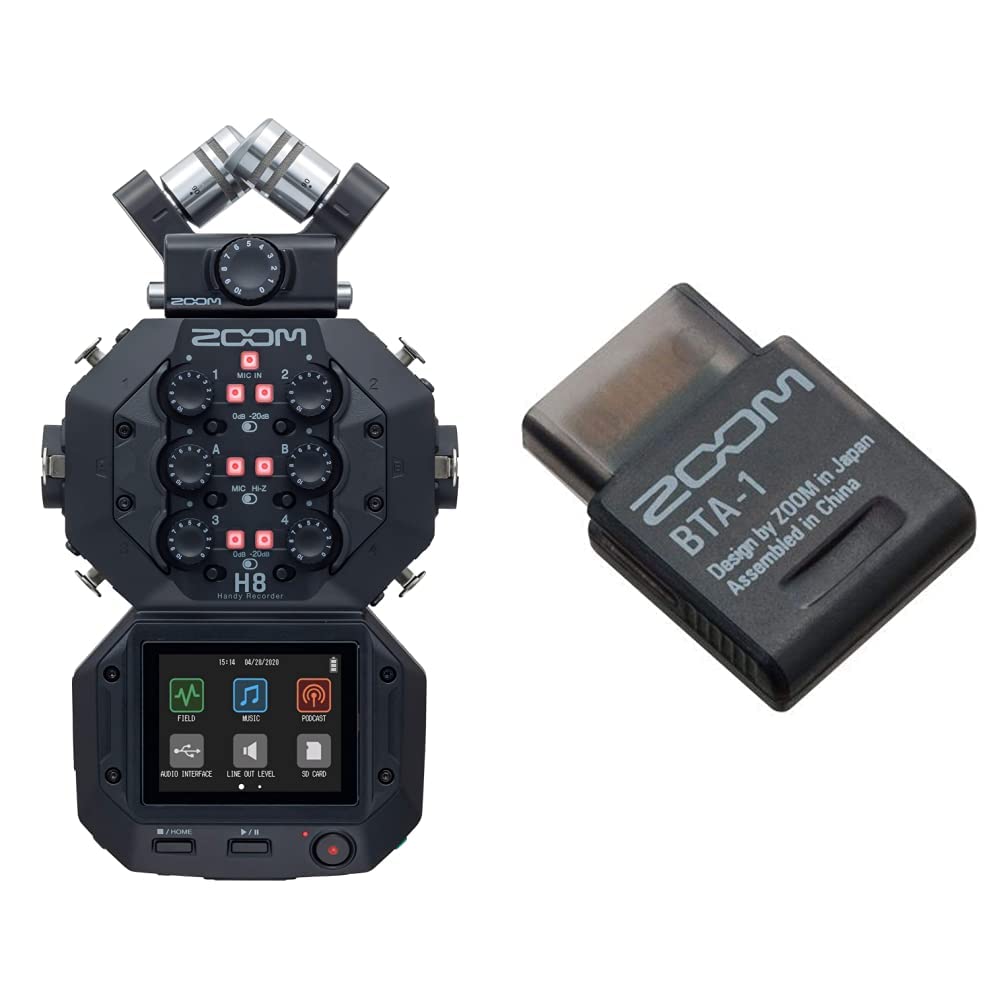
Image: Front view of the Zoom H8, showcasing the attached XYH-6 X/Y microphone capsule. This demonstrates the modular design for various recording needs.
Video: This video demonstrates the Capsule System 3.0, showing how different microphone capsules can be attached and detached from a Zoom Handy Recorder, highlighting the modularity and versatility of the system.
3. Installing BTA-1 Bluetooth Adapter
To enable wireless control, insert the BTA-1 Bluetooth adapter into the dedicated slot on the Zoom H8. Ensure it is securely seated.

Image: A close-up of the Zoom BTA-1 Bluetooth Adapter, a compact black rectangular device with 'ZOOM BTA-1' branding. This adapter enables wireless functionality for compatible Zoom recorders.
4. Connecting to a Computer or Mobile Device
The Zoom H8 can function as a USB audio interface. Connect the H8 to your computer (Windows, macOS) or mobile device (iOS) using a USB cable. This allows for direct recording into your preferred digital audio workstation (DAW) or for live streaming.
Video: This video illustrates how to connect the Zoom H8 to a computer and use it in Audio Interface Mode, demonstrating its capability as a multi-channel audio interface for recording and streaming.
Operating the Zoom H8
1. Recording Modes
The H8 features a large color LCD touchscreen display with customized applications for different recording scenarios: Podcasting, Music, and Field Recording. Select the appropriate app from the home screen for optimized settings.
2. Inputs and Outputs
The H8 offers 4 mic inputs and 2 XLR/TRS combo connectors, allowing for versatile microphone and instrument connections. It also includes a line out and headphone jack for monitoring and outputting audio.

Image: Side view of the Zoom H8, highlighting the XLR/TRS combo inputs and the SD card slot. This shows the connectivity options for external microphones and storage.
3. 32-bit Float Recording
The H8 supports 32-bit float recording, which provides an extremely wide dynamic range. This feature virtually eliminates the risk of audio clipping, allowing for pristine recordings even in unpredictable sound environments without needing to constantly adjust gain levels.
4. Multi-track Recording
The device is capable of 12-track simultaneous recording, making it suitable for complex audio projects where multiple sources need to be captured independently.
5. Monitoring
Monitor your audio in real-time using the headphone output. The touchscreen display also provides visual feedback on audio levels and waveforms.
6. Wireless Control (with BTA-1)
With the BTA-1 adapter installed, you can remotely control the H8 using the H3 Control app on your iOS device. This allows you to start/stop recording, adjust levels, and manage other settings from a distance.

Image: A graphic detailing the features of the Zoom BTA-1 Bluetooth Adapter, including wireless capability for H3VR, ARQ Aero Rhythm AR-48 controller, and LiveTrak L-20 digital console, with an effective range of 33' unobstructed.
Maintenance
- Keep the device clean by wiping it with a soft, dry cloth.
- Avoid exposing the H8 to extreme temperatures, humidity, or direct sunlight.
- Remove batteries if the device will not be used for an extended period to prevent leakage.
- Store in a cool, dry place.
Troubleshooting
- No Power: Check battery installation and charge level. Ensure USB power source is active if using.
- No Audio Input: Verify microphone connections, phantom power settings (if required), and input gain levels.
- No Recording: Ensure an SD card is inserted and has sufficient free space. Check that tracks are armed for recording.
- Wireless Control Issues: Ensure BTA-1 is correctly installed and the H3 Control app is updated and connected via Bluetooth.
Specifications
| Feature | Detail |
|---|---|
| Compatible Devices | MIDI Controller, Personal Computer, Smartphone, Tablet |
| Supported Software | Ableton Live, Pro Tools, Logic Pro |
| Connectivity Technology | USB, XLR/TRS |
| Number of Channels | 12 |
| Operating System | Windows, iOS, macOS |
| Audio Input | XLR, Auxiliary |
| Maximum Sample Rate | 192 KHz |
Warranty and Support
This product comes with a standard manufacturer's warranty. For detailed warranty information, technical support, or service inquiries, please refer to the official Zoom website or contact their customer service directly. Keep your purchase receipt for warranty claims.


