
1. Introduction
Thank you for purchasing the AIPOI 600ml Ultrasonic Cleaner, Model 890. This device utilizes ultrasonic waves to provide thorough and gentle cleaning for a variety of items, including glasses, jewelry, watches, and dentures. Please read this manual carefully before operating the device to ensure safe and efficient use. Keep this manual for future reference.
2. Safety Instructions
- Always place the cleaner on a stable, flat, and dry surface.
- Do not immerse the main unit in water or any other liquid.
- Ensure the power cord is not damaged and is properly connected to a grounded outlet.
- Do not operate the cleaner without liquid in the tank.
- Keep out of reach of children.
- Unplug the device from the power outlet before filling or emptying the tank, or when not in use.
- Do not disassemble or attempt to repair the unit yourself. Contact qualified service personnel.
- Avoid using flammable or corrosive cleaning solutions. Use only water or specialized ultrasonic cleaning solutions.
- Do not touch the water or items in the tank during operation.
3. Product Overview
The AIPOI 600ml Ultrasonic Cleaner is designed for effective cleaning with user-friendly features.
Key Features:
- 600ml Capacity: Suitable for various small to medium-sized items.
- 40KHz Ultrasonic Frequency: Provides powerful yet gentle cleaning.
- Digital Touch Control: Easy selection of cleaning cycles.
- Degas Function: Helps prevent oxidation and chemical reactions during cleaning by removing dissolved gases from the water.

Image 3.1: The AIPOI Ultrasonic Cleaner featuring its upgraded Degas function. This function operates in a cycle of 9 seconds work and 6 seconds stop, designed to protect items from oxidation or other chemical reactions with air during the cleaning process.

Image 3.2: Illustration of the AIPOI Ultrasonic Cleaner's multipurpose cleaning capabilities. It efficiently cleans various household items such as rings, glasses, watch bands, electric shavers, cutlery, and dentures.

Image 3.3: Close-up of the AIPOI Ultrasonic Cleaner's digital touch control panel. It offers 18 different cleaning cycles, allowing for precise control over cleaning time based on specific requirements.
4. Setup
- Unpack: Carefully remove the ultrasonic cleaner and all accessories from the packaging.
- Placement: Place the unit on a firm, level, and dry surface near a power outlet. Ensure there is adequate ventilation around the unit.
- Fill Tank: Open the lid and fill the stainless steel tank with tap water. Do not exceed the maximum fill line. For enhanced cleaning, a small amount of mild dish soap or specialized ultrasonic cleaning solution can be added.
- Connect Power: Plug the power cord into a grounded electrical outlet. The display will illuminate.

Image 4.1: The AIPOI Ultrasonic Cleaner positioned on a kitchen countertop, demonstrating a typical setup location. Ensure the unit is placed on a stable, dry surface away from water splashes.
5. Operating Instructions
- Prepare Items: Place the items to be cleaned into the cleaning basket. Ensure items are fully submerged in the water but do not overcrowd the tank.
- Close Lid: Close the lid securely.
- Power On: Press the "ON/OFF" button to turn on the device.
- Select Cleaning Cycle: Use the "TIME" button to cycle through the available cleaning durations (e.g., 90s, 120s, 150s, up to 30 min). Refer to Image 3.3 for available cycles.
- Activate Degas Function (Optional): If desired, press the "DEGAS" button. The degas function will run in a 9-second work, 6-second stop cycle to remove dissolved gases from the water, which can improve cleaning efficiency and prevent oxidation.
- Start Cleaning: Once the desired time is selected, the cleaning process will start automatically after a few seconds, or you may press the "ON/OFF" button again to initiate.
- End of Cycle: The unit will automatically shut off when the selected cleaning cycle is complete.
- Remove Items: Open the lid, carefully remove the cleaning basket, and rinse the cleaned items under running water. Dry them thoroughly.
- Power Off: Press the "ON/OFF" button to turn off the device and unplug it from the power outlet.
6. Maintenance
- Empty Tank: After each use, unplug the unit and carefully empty the water from the tank.
- Clean Tank: Wipe the inside of the stainless steel tank with a soft cloth. Do not use abrasive cleaners or scouring pads.
- Clean Exterior: Wipe the exterior of the unit with a soft, damp cloth.
- Storage: Store the cleaner in a cool, dry place when not in use.
- Avoid Water Damage: Ensure no water enters the control panel or electrical components.
7. Troubleshooting
- Unit does not turn on:
- Check if the power cord is securely plugged into a working outlet.
- Ensure the "ON/OFF" button has been pressed.
- Cleaning results are poor:
- Ensure items are fully submerged and not overcrowded.
- Use appropriate cleaning solution or a small amount of mild detergent.
- Increase the cleaning cycle duration.
- Consider using the Degas function.
- Unit stops during operation:
- The cleaning cycle may have completed.
- Check for overheating (unplug and let cool down).
8. Specifications
| Model Number | 890 |
| Manufacturer | AIPOI |
| Tank Capacity | 600 ml |
| Ultrasonic Frequency | 40 KHz |
| Power | 35 W |
| Net Weight | 0.98 kg |
| ASIN | B09NVHRV2M |
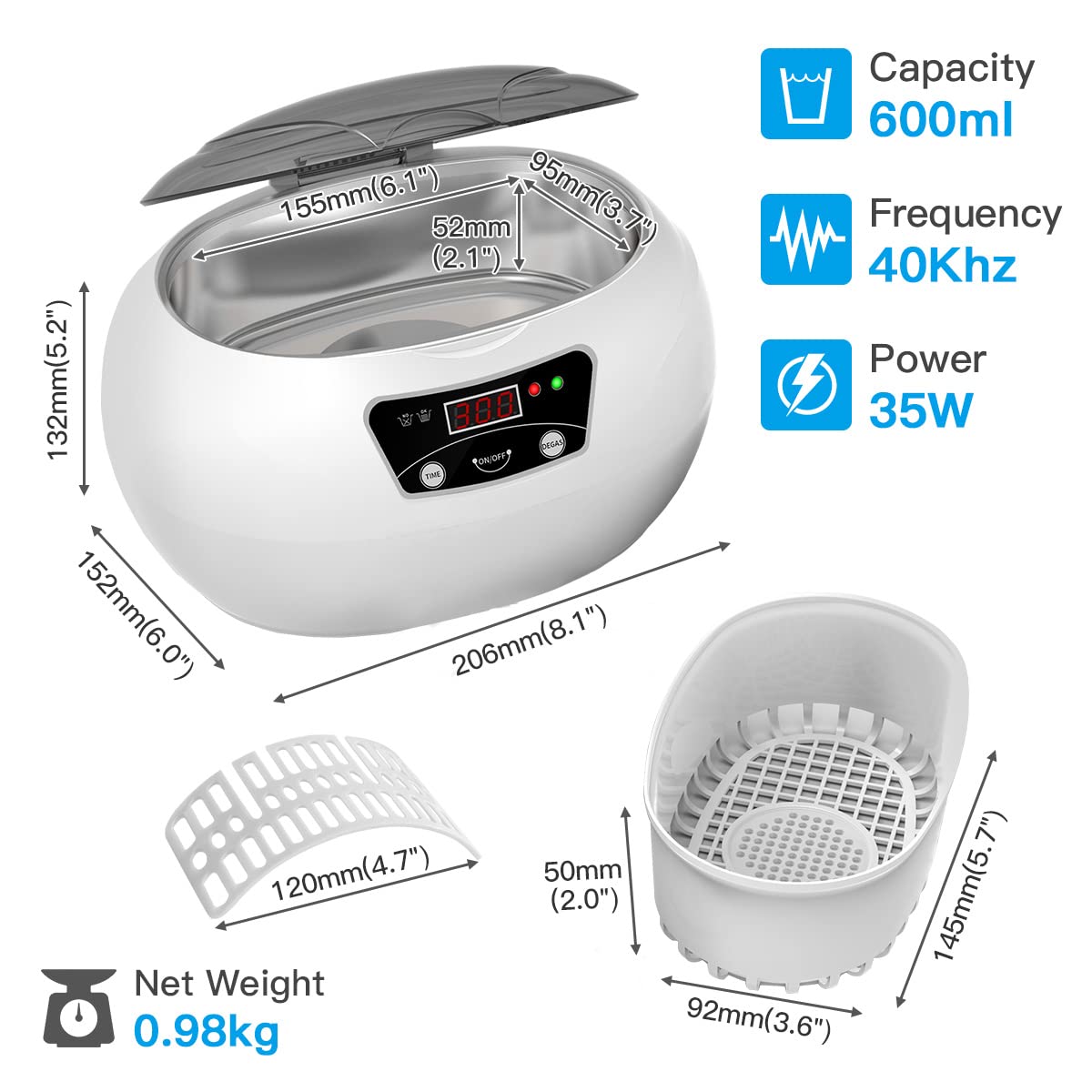
Image 8.1: Detailed diagram showing the dimensions and key specifications of the AIPOI Ultrasonic Cleaner. It highlights the 600ml capacity, 40KHz frequency, 35W power, and 0.98kg net weight, along with physical measurements in millimeters and inches.
9. Warranty and Support
For warranty information and customer support, please refer to the documentation provided with your purchase or contact your retailer. Keep your proof of purchase for any warranty claims.