
Product Overview
The BLACK+DECKER BEPW2000 is an electric cold water pressure washer designed for various outdoor cleaning tasks. It features a compact design with a telescoping handle and integrated storage for accessories, offering ease of use and convenient storage.

Image: Front view of the BLACK+DECKER BEPW2000 Electric Pressure Washer, showcasing its compact design and integrated handle.
Safety Information
Always read and understand all safety warnings and instructions before operating this pressure washer. Failure to follow the warnings and instructions may result in electric shock, fire, and/or serious injury.
- Electrical Safety: Ensure the power cord and plug are in good condition. Do not operate the pressure washer in wet conditions or near standing water. Always use a ground fault circuit interrupter (GFCI) protected outlet.
- Water Connection: Connect the pressure washer to a cold water supply only. Do not use hot water. Ensure all connections are tight to prevent leaks.
- Personal Protective Equipment: Always wear appropriate eye protection (safety glasses or goggles) and protective clothing when operating the pressure washer.
- Operating Environment: Keep the area clear of all persons, especially children and pets. Do not direct the spray at people, animals, or electrical devices.
- Chemical Use: Use only detergents specifically designed for pressure washers. Follow the detergent manufacturer's instructions for proper use and dilution.
- Storage: Disconnect the power supply and water supply before storing. Store the pressure washer in a dry, protected area where temperatures will not fall below freezing.
Package Contents
Verify that all items listed below are included in your package. If any parts are missing or damaged, do not operate the pressure washer. Contact customer service for assistance.
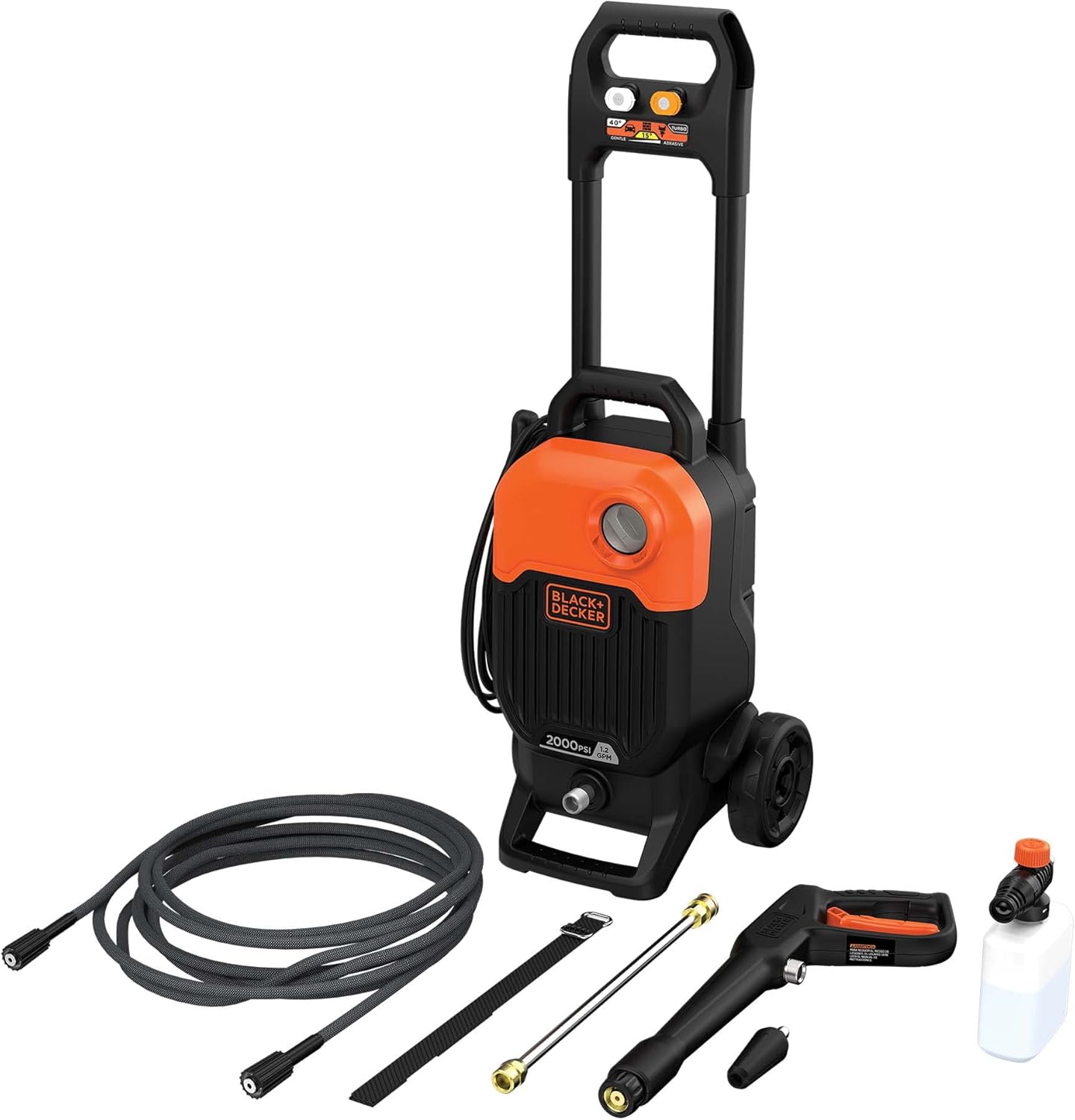
Image: All components of the BLACK+DECKER BEPW2000 Electric Pressure Washer laid out, including the main unit, spray gun, hose, nozzles, and soap bottle.
- BLACK+DECKER BEPW2000 Electric Pressure Washer Unit
- High-Pressure Hose (25 ft.)
- Spray Gun
- Wand Extension
- Turbo Nozzle
- 15° Nozzle
- 40° Nozzle
- Soap Bottle
- Power Cord (35 ft.)
- Instruction Manual
Setup
- Unpack and Inspect: Remove all components from the packaging. Inspect for any damage.
- Attach High-Pressure Hose: Connect one end of the high-pressure hose to the outlet on the front of the pressure washer unit. Ensure it is securely tightened.
- Connect Spray Gun: Attach the other end of the high-pressure hose to the inlet on the spray gun.
- Assemble Wand: Insert the wand extension into the spray gun. Then, attach the desired nozzle (e.g., 40° nozzle for general cleaning) to the end of the wand. Ensure all connections are firm.
- Connect Water Supply: Connect a standard garden hose (not included) to the water inlet on the pressure washer unit. Ensure the garden hose is free of kinks and has a minimum diameter of 5/8 inch. Turn on the water supply fully.
- Purge Air from System: Before plugging in the unit, squeeze the trigger on the spray gun to allow water to flow through the system and purge any trapped air. Continue until a steady stream of water emerges from the nozzle.
- Connect Power: Plug the pressure washer's power cord into a grounded 120V AC outlet protected by a GFCI.

Image: Front view of the pressure washer with the high-pressure hose and spray gun connected, ready for operation.
Operating Instructions
Starting the Pressure Washer
- Ensure the water supply is fully open and the power cord is plugged into a GFCI-protected outlet.
- Turn the ON/OFF switch on the pressure washer to the "ON" position. The motor will start briefly and then shut off. This is normal, as the unit builds pressure.
- Squeeze the trigger on the spray gun to begin spraying. The motor will run continuously while the trigger is depressed.
- To stop spraying, release the trigger. The motor will shut off automatically.
Using Nozzles
The BEPW2000 comes with multiple nozzles for different cleaning tasks:
- 40° Nozzle (White): Provides a wide, gentle spray for general cleaning of delicate surfaces like vehicles, boats, and patio furniture.
- 15° Nozzle (Yellow): Delivers a concentrated, powerful spray for intense cleaning of stubborn dirt on hard surfaces like concrete, brick, and siding.
- Turbo Nozzle (Black): Creates a rotating jet of water for maximum cleaning power on heavily soiled areas. Not recommended for delicate surfaces.
To change nozzles, ensure the pressure washer is off and the trigger is released. Pull back the collar on the wand, insert the desired nozzle, and release the collar to lock it in place. Pull on the nozzle to ensure it is secure before operating.
Applying Detergent
- Fill the included soap bottle with pressure washer-safe detergent.
- Attach the soap bottle to the spray gun.
- Ensure a low-pressure nozzle (e.g., 40° nozzle) is attached to the wand for optimal detergent application.
- Turn on the pressure washer and squeeze the trigger to apply detergent.
- After applying detergent, remove the soap bottle and reattach a high-pressure nozzle for rinsing.

Image: A person using the pressure washer to apply soap to a car, demonstrating the detergent application feature.

Image: A person using the pressure washer to clean a dirty wall, illustrating its effectiveness on hard surfaces.
Maintenance
Regular maintenance ensures optimal performance and extends the life of your pressure washer.
- After Each Use:
- Turn off the pressure washer and disconnect the power cord.
- Turn off the water supply.
- Squeeze the spray gun trigger to release any remaining pressure in the system.
- Disconnect the garden hose and high-pressure hose.
- Drain all water from the pump by tilting the unit and allowing water to flow out.
- Clean the exterior of the unit with a damp cloth.
- Nozzle Cleaning: If a nozzle becomes clogged, use the included nozzle cleaning tool (or a small paper clip) to clear any debris from the nozzle opening.
- Inlet Filter Cleaning: Periodically check and clean the water inlet filter to prevent debris from entering the pump. Remove the filter, rinse it under running water, and reinsert.
- Winter Storage (Freezing Temperatures): If storing in an area where temperatures may drop below freezing, it is crucial to winterize the unit to prevent damage. Use a pump protector or non-toxic antifreeze solution specifically designed for pressure washers. Follow the product's instructions for application.
Troubleshooting
| Problem | Possible Cause | Solution |
|---|---|---|
| Motor does not start. | No power supply; GFCI tripped; ON/OFF switch is off. | Check power connection; Reset GFCI; Turn ON/OFF switch to "ON". |
| Low pressure. | Insufficient water supply; Clogged nozzle; Air in pump; Kinked hose. | Ensure water supply is fully open; Clean nozzle; Purge air from system; Straighten hose. |
| Motor cycles on and off when trigger is not pressed. | Air in pump; Water leak in hose or connections. | Purge air from system; Check all connections for leaks and tighten. |
| Water leaks from connections. | Loose connections; Damaged O-rings. | Tighten connections; Replace damaged O-rings. |
Specifications
- Model: BEPW2000
- Power Source: Electric
- Maximum Pressure: 2,000 MAX PSI*
- Maximum Flow Rate: 1.2 GPM**
- Hose Length: 25 Feet
- Power Cord Length: 35 Feet
- Item Weight: 22.7 Pounds
- Product Dimensions: 11 x 10 x 24 inches
- Manufacturer: BLACK+DECKER
*Maximum psi when used with 15° nozzle.
**gpm when used with 15° nozzle.
Warranty and Support
BLACK+DECKER provides a limited warranty for this product. For specific warranty details, registration, or technical support, please refer to the warranty card included with your purchase or visit the official BLACK+DECKER website. Keep your proof of purchase for warranty claims.
For further assistance, you may contact BLACK+DECKER customer service through their official channels.