
1. Product Overview
This manual provides instructions for the Skechers Men's Digital Watch, model SR1130. This timepiece features a digital display, chronograph function, and is designed for everyday use with a focus on durability and water resistance.

Image 1.1: Front view of the Skechers Men's Digital Watch SR1130, displaying the digital time and various indicators.
Key Features:
- Case Size: 51mm
- Band Size: 20mm
- Movement: Digital with negative display
- Functions: Time, Date, Chronograph, Alarm, Light
- Case Material: Lightweight polyurethane
- Band Material: Black silicone
- Water Resistance: Up to 100m (330ft) / 10 ATM. Suitable for bathing, swimming, snorkeling, and shallow diving.
2. Setup
Before initial use, ensure the watch is powered on. If the display is blank, check for a plastic battery tab that may need to be removed. Follow these steps to set the time and date.
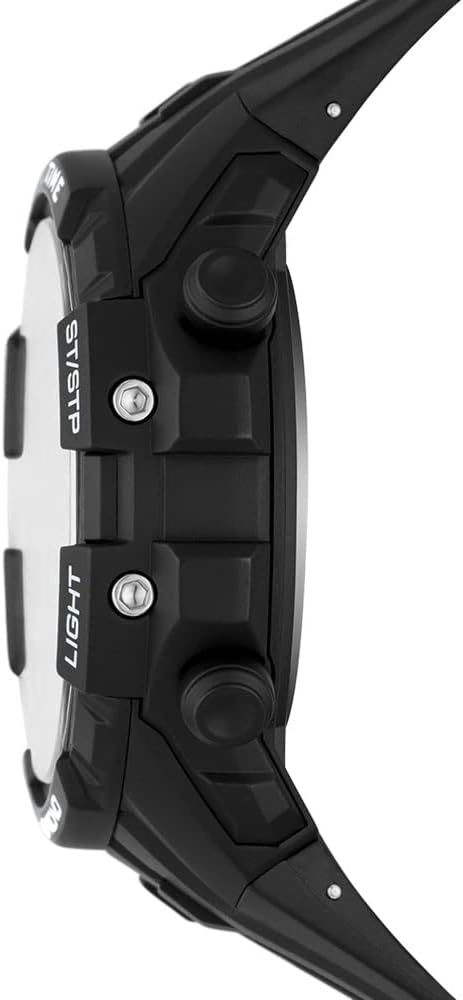
Image 2.1: Side view of the watch, illustrating the placement of the control buttons.
Setting Time and Date:
- Press the MODE button (typically bottom-left) repeatedly until the time setting mode is displayed (usually indicated by flashing digits).
- Use the RESET button (typically top-left) to cycle through the settings (seconds, hour, minute, year, month, day).
- Use the ST/STP button (typically top-right) to adjust the flashing value.
- Once all settings are correct, press the MODE button again to exit the setting mode.
3. Operating Instructions
The Skechers Digital Watch SR1130 offers several functions accessible via its control buttons.

Image 3.1: Angled view of the watch, showing the digital display and button labels.
Button Functions:
- MODE Button: Cycles through different modes (Time, Alarm, Stopwatch, Timer).
- RESET Button: Used to reset values in setting modes or split/reset the stopwatch.
- ST/STP Button: Starts/stops functions like the stopwatch or adjusts values in setting modes.
- LIGHT Button: Activates the backlight for visibility in low-light conditions.
Using the Chronograph (Stopwatch):
- Press the MODE button until the stopwatch mode is displayed (usually indicated by '00:00:00').
- Press the ST/STP button to start the stopwatch.
- Press the ST/STP button again to stop the stopwatch.
- Press the RESET button to clear the stopwatch to zero.
Setting and Using the Alarm:
- Press the MODE button until the alarm mode is displayed.
- Use the RESET button to select the hour or minute to set.
- Use the ST/STP button to adjust the flashing value.
- Press the MODE button to confirm and exit alarm setting.
- To turn the alarm on/off, typically press the ST/STP button while in alarm mode. An alarm icon will appear/disappear.
4. Maintenance
Proper care will ensure the longevity and performance of your Skechers Digital Watch SR1130.

Image 4.1: Back view of the watch, showing the stainless steel case back.
Water Resistance:
This watch is water resistant up to 100 meters (330 feet) or 10 ATM. This means it is suitable for bathing, swimming, snorkeling, and shallow diving. However, it is not recommended for scuba diving. Avoid operating buttons underwater to prevent water ingress.
Cleaning:
Clean the watch regularly with a soft, damp cloth. For the silicone band, mild soap and water can be used. Avoid harsh chemicals or abrasive materials that could damage the watch's finish.
Battery Replacement:
The watch requires 1 Lithium Ion battery (included). When the display dims or functions become erratic, it may be time to replace the battery. Battery replacement should ideally be performed by a qualified watch technician to ensure proper sealing and maintain water resistance.
5. Troubleshooting
If you encounter issues with your Skechers Digital Watch SR1130, refer to the following common problems and solutions.
Display is Dim or Blank:
- Battery: The battery may be low or depleted. Replace the battery.
- Backlight: Ensure you are pressing the LIGHT button correctly. If the display is generally dim even with a new battery, the negative display might be difficult to read in certain lighting conditions.
Buttons are Unresponsive:
- Reset: Try performing a soft reset by pressing all four buttons simultaneously for a few seconds, if applicable to your model. Otherwise, removing and reinserting the battery can act as a hard reset.
- Debris: Check if any debris is lodged around the buttons, preventing them from being pressed fully.
Time is Inaccurate:
- Battery: A low battery can affect timekeeping accuracy. Replace the battery.
- Reset: Reset the time and date as per the 'Setting Time and Date' section.
If problems persist after attempting these solutions, contact customer support for further assistance.
6. Specifications
Detailed technical specifications for the Skechers Men's Digital Watch SR1130.

Image 6.1: The Skechers watch packaging box.
| Feature | Detail |
|---|---|
| Item Model Number | SR1130 |
| Manufacturer | Skechers |
| Batteries | 1 Lithium Ion battery (included) |
| Parcel Dimensions | 10.2 x 7.7 x 7.5 cm |
| Item Weight | 165 g |
| Water Resistance | 100m (330ft) / 10 ATM |
| Display Type | Digital |
7. Warranty Information
Skechers watches are manufactured to high-quality standards. This product is covered by a limited warranty against defects in materials and workmanship from the date of purchase. Please retain your proof of purchase for any warranty claims. The warranty does not cover normal wear and tear, battery life, accidental damage, or damage resulting from improper use or unauthorized repairs.
For specific warranty terms and conditions, please refer to the warranty card included with your product or visit the official Skechers website.
8. Support
For further assistance, technical support, or inquiries regarding your Skechers Digital Watch SR1130, please contact Skechers customer service.
You can find contact information on the official Skechers website or through the retailer where the product was purchased.


