
Introduction
This manual provides detailed instructions for the safe and efficient operation of your BetterSub Tumbler Mug Heat Press Machine. This versatile machine is designed for heat transfer sublimation onto various drinkware, including skinny tumblers, ceramic mugs, glass cups, metal cups, glass beer mugs, and aluminum bottles. It supports multiple sizes from 6oz to 30oz with compatible attachments.
Safety Precautions
- Always ensure the machine is plugged into a grounded 110V outlet.
- Do not operate the heating element without a cup for extended periods, as this may cause deformation.
- Always wear heat-resistant gloves when handling hot drinkware or machine parts.
- Ensure adequate ventilation in your workspace to dissipate any odors during operation.
- Keep the machine out of reach of children and pets.
- Do not touch the heating plate when the machine is hot.
Setup
Unboxing and Initial Inspection
Carefully remove all components from the packaging. Inspect the machine for any signs of damage. Ensure all accessories, such as heat-resistant gloves and the power cord, are present.

Figure 1: BetterSub Tumbler Heat Press Machine and included accessories.
Connecting Power
Connect the power cord to the machine's inlet and then to a standard 110V power outlet. Ensure the power switch is in the OFF position before plugging in.

Figure 2: Power switch and power cord inlet on the machine.
Powering On
Flip the power switch to the ON position. The digital control panel will illuminate, displaying the current temperature and time settings.
Operating Instructions
Setting Temperature and Time
Use the control panel to set the desired temperature (0-482°F / 0-250°C) and time (0-999 seconds) according to your sublimation blank's requirements. Refer to the included user manual or material guidelines for specific settings. The LCD panel provides clear parameter information.

Figure 3: LCD Digital Control Panel for precise temperature and time settings.
Video 1: Demonstrates how to set the temperature and time on the BetterSub Tumbler Press.
Adjusting Pressure
The machine features double pressure knobs for manual adjustment. Turn the knobs to achieve even pressure suitable for your drinkware. This ensures optimal heat transfer and consistent results.
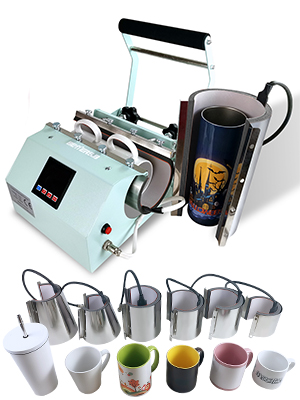
Figure 4: Double stainless steel pressure knobs for manual adjustment.
Video 2: Shows how to adjust the mug press for large-diameter cups.
Sublimation Process
- Prepare your sublimation blank (tumbler, mug, etc.) by cleaning it and securely wrapping your printed sublimation design with heat-resistant tape.
- Wearing heat-resistant gloves, carefully insert the prepared drinkware into the heating element.
- Press the 'Enter' button to start the heating cycle. The machine will automatically apply pressure and begin the countdown.
- Once the timer completes, the machine will automatically release pressure.
- Wearing heat-resistant gloves, carefully remove the hot drinkware. Allow it to cool completely before removing the sublimation paper.

Figure 5: Inserting a tumbler into the heat press for sublimation.
Video 3: Overview of the BetterSub Tumbler Mug Heat Press Machine in operation.

Figure 6: A finished sublimated tumbler after being removed from the heat press.
Changing Heating Elements
The heating element can be replaced to accommodate different drinkware sizes. Disconnect the power and allow the machine to cool completely before attempting to replace any parts. The updated thumb screw design allows for easy heater replacement.

Figure 7: Updated thumb screw design for convenient heater replacement.

Figure 8: High-quality silicone pads and Teflon coated heating element.
Figure 9: The heat press is compatible with various sizes of mug heat press attachments.
Maintenance
Cleaning
Ensure the machine is unplugged and completely cool before cleaning. Wipe down the exterior with a soft, damp cloth. Do not use abrasive cleaners or solvents that could damage the finish or internal components.
Storage
Store the heat press in a dry, dust-free environment when not in use. Keep it away from direct sunlight and extreme temperatures.
Troubleshooting
Common Issues
- Uneven Heating/Transfer: Check pressure adjustment. Ensure sublimation paper is tightly secured and covers the entire design area. Rotate the tumbler during the process if necessary, following specific blank instructions.
- Temperature Drop: It is normal for the temperature to temporarily decrease when a cold tumbler is placed into the machine. The machine is designed to quickly recover to the set temperature.
- Heating Element Deformation: Avoid heating the mug attachments without a cup for prolonged periods. This can cause the silicone pad to deform.
- Machine Not Powering On: Check the power cord connection and ensure the power switch is in the ON position. Verify the power outlet is functional.
Specifications
| Wattage: | 500W |
| Voltage: | 110V |
| Temperature Range: | 0-482°F / 0-250°C |
| Time Range: | 0-999 s |
| Material: | High-quality aluminum and silica gel |
| Product Dimensions: | 15.75 x 11.81 x 11.81 inches |
| Item Weight: | 16.72 pounds |
| Model Number: | BYBS-Tumbler Press |
| Manufacturer: | BetterSub |
Warranty
Please refer to the manufacturer's warranty information provided with your purchase for details on coverage and duration. Keep your proof of purchase for any warranty claims.
Support
For product inquiries, technical assistance, or warranty claims, please contact BetterSub customer support. Refer to your product packaging or the official BetterSub website for current contact information.
Video 4: An introductory video to the BetterSub Tumbler Heat Press.