
BLACK DIAMOND BD620677
Black Diamond Cosmo 350-R Headlamp
User Manual
Introduction
The Black Diamond Cosmo 350-R is a versatile and powerful rechargeable headlamp designed for outdoor enthusiasts. With its integrated battery, robust construction, and multiple lighting modes, it provides reliable illumination for a wide range of activities, from camping and hiking to climbing and general outdoor use. This manual provides essential information for the proper setup, operation, maintenance, and troubleshooting of your Cosmo 350-R headlamp.

Figure 1: Black Diamond Cosmo 350-R Headlamp (Octane)
Key Features:
- 350 Lumen Max Output: Provides powerful illumination for various conditions.
- Rechargeable: Integrated 1500 mAh Li-ion battery with micro-USB charge port for convenient recharging.
- Multiple Settings: Includes dimming, strobe, red LED night-vision, and lock mode.
- IP67 Waterproof: Tested to operate at least 1.0 meters underwater for 30 minutes, ensuring durability in wet conditions.
- Red Night Vision: Features dimming and strobe modes, activating without cycling through white light.
- Integrated Battery Meter: Displays the percentage of power remaining.
- Comfortable Headband: Recycled elastic headband with Repreve fiber construction for next-to-skin comfort.
Setup
1. Charging the Headlamp:
Before first use, fully charge the Cosmo 350-R headlamp. Locate the micro-USB charge port on the side of the headlamp unit. Connect the provided micro-USB cable to the port and the other end to a compatible USB power source (e.g., wall adapter, computer USB port, power bank).
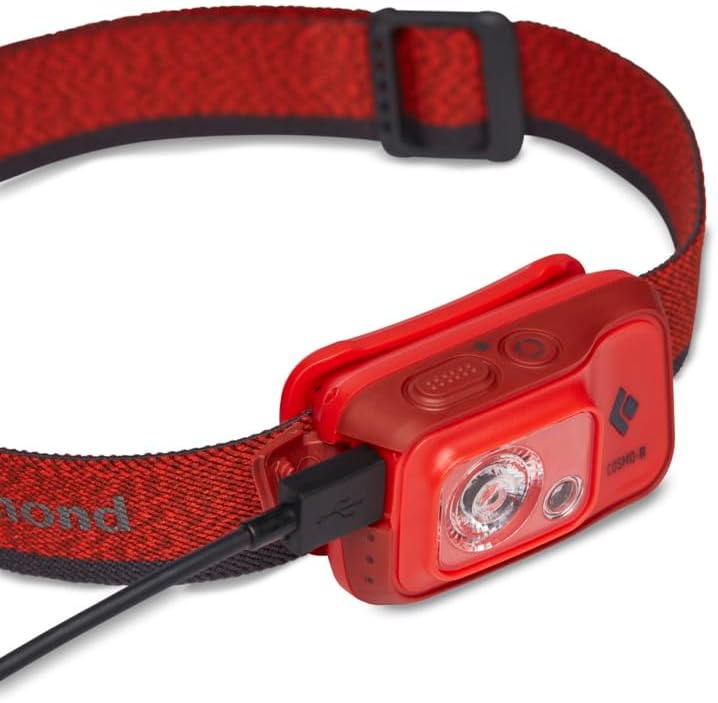
Figure 2: Charging the Cosmo 350-R Headlamp
- The battery meter will indicate charging progress.
- A full charge typically takes several hours.
2. Adjusting the Headband:
The elastic headband is adjustable to ensure a secure and comfortable fit. Slide the buckle on the headband to tighten or loosen it around your head or helmet. Ensure the headlamp is centered on your forehead.
Operating Instructions

Figure 3: Headlamp Control Buttons
1. Power On/Off:
- To turn on the headlamp, press the large power/mode button once.
- To turn off the headlamp, press and hold the power/mode button until the light extinguishes.
2. Mode Selection:
The Cosmo 350-R features multiple lighting modes:
- White Light: Press the power/mode button repeatedly to cycle through different white light settings (e.g., high, medium, low).
- Red Night Vision: From the off position, press and hold the power/mode button for 2 seconds to activate red night vision. This mode is ideal for preserving night adaptation.
- Strobe Mode: From any white or red light setting, quickly double-press the power/mode button to activate strobe mode. Double-press again to return to the previous mode.
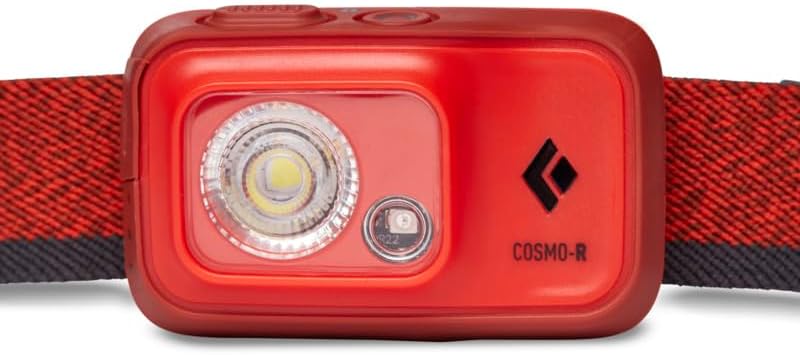
Figure 4: Front View with LEDs
3. Dimming (Brightness Adjustment):
While the headlamp is on in any white or red light mode, press and hold the power/mode button. The light will gradually dim or brighten. Release the button when the desired brightness is reached.
4. Lock Mode:
Lock mode prevents accidental activation of the headlamp, saving battery life during transport or storage.
- Activate Lock Mode: Press and hold the small lock button for 3 seconds until the light flashes.
- Deactivate Lock Mode: Press and hold the lock button for 3 seconds until the light flashes again and turns on.
5. Battery Meter:
The integrated battery meter displays the remaining power. When the headlamp is turned on, a small indicator light will show the battery level for a few seconds. Refer to the user guide for specific indicator meanings (e.g., green for full, yellow for medium, red for low).
Maintenance
1. Cleaning:
Wipe the headlamp body and lens with a soft, damp cloth. Do not use abrasive cleaners or solvents, as they may damage the unit. Ensure the charging port cover is securely closed before cleaning or exposing to water.
2. Storage:
Store the headlamp in a cool, dry place away from direct sunlight and extreme temperatures. For long-term storage, ensure the battery is partially charged (around 50%) and activate lock mode to prevent accidental discharge.
3. Battery Care:
- Avoid fully discharging the battery frequently, as this can reduce its lifespan.
- Recharge the battery regularly, even if not in use, to maintain optimal performance.
- Use only the provided or a certified micro-USB cable for charging.
4. Waterproofing (IP67):
The Cosmo 350-R is rated IP67, meaning it is protected from dust and can withstand immersion in water up to 1 meter for 30 minutes. While it is highly water-resistant, it is not designed for prolonged underwater use. Always ensure the charging port cover is sealed before exposing the headlamp to water.
Troubleshooting
If you encounter issues with your Black Diamond Cosmo 350-R headlamp, refer to the table below for common problems and their solutions.
| Problem | Possible Cause | Solution |
|---|---|---|
| Headlamp does not turn on. | Battery is depleted; Headlamp is in lock mode. | Charge the battery; Deactivate lock mode (press and hold lock button for 3 seconds). |
| Light is dim or flickers. | Low battery; Incorrect brightness setting. | Recharge the battery; Adjust brightness by pressing and holding the power/mode button. |
| Headlamp does not charge. | Faulty USB cable/power source; Dirty charging port. | Try a different USB cable and power source; Gently clean the charging port. |
| Red night vision does not activate. | Incorrect activation method. | Ensure headlamp is off, then press and hold the power/mode button for 2 seconds. |
If the problem persists after attempting these solutions, please contact Black Diamond customer support.
Specifications
| Feature | Specification |
|---|---|
| Max Output | 350 Lumens |
| Power Source | Integrated 1500 mAh Li-ion Rechargeable Battery |
| Water Resistance | IP67 (Waterproof: 1m for 30 min) |
| Weight | 83 Grams (2.93 ounces) |
| Product Dimensions (HxWxD) | 1.75" x 2" x 0.8" |
| Material | Polycarbonate |
| Color | Octane |
| Model Number | BD620677 |
| UPC | 793661520047 |
Warranty and Support
Black Diamond headlamps, including the Cosmo 350-R, come with a Three-Year Warranty from the date of purchase. This warranty covers manufacturing defects in materials and workmanship.
For warranty claims, technical support, or any other inquiries regarding your Black Diamond Cosmo 350-R headlamp, please contact Black Diamond Equipment directly. You can find more information and contact details on their official website or through their Amazon store:
Visit the BLACK DIAMOND Store on Amazon
Please have your product model number (BD620677) and proof of purchase ready when contacting support.
Related documentsBD620677


Ask a question about this manual
Ask about setup, troubleshooting, compatibility, parts, safety, or missing instructions. Manuals+ will review the question and use this page’s manual context to help answer it.