
Introduction
Thank you for choosing the HKS 12-Piece Mini Crimping Tool Set. This comprehensive kit is designed for a wide range of electrical wiring tasks, offering precision and versatility. It includes a high-quality ratchet crimper, an auto-adjusting wire stripper, and 9 sets of interchangeable jaws to accommodate various terminal types. This manual provides essential information for safe and effective use, setup, operation, and maintenance of your new tool set.
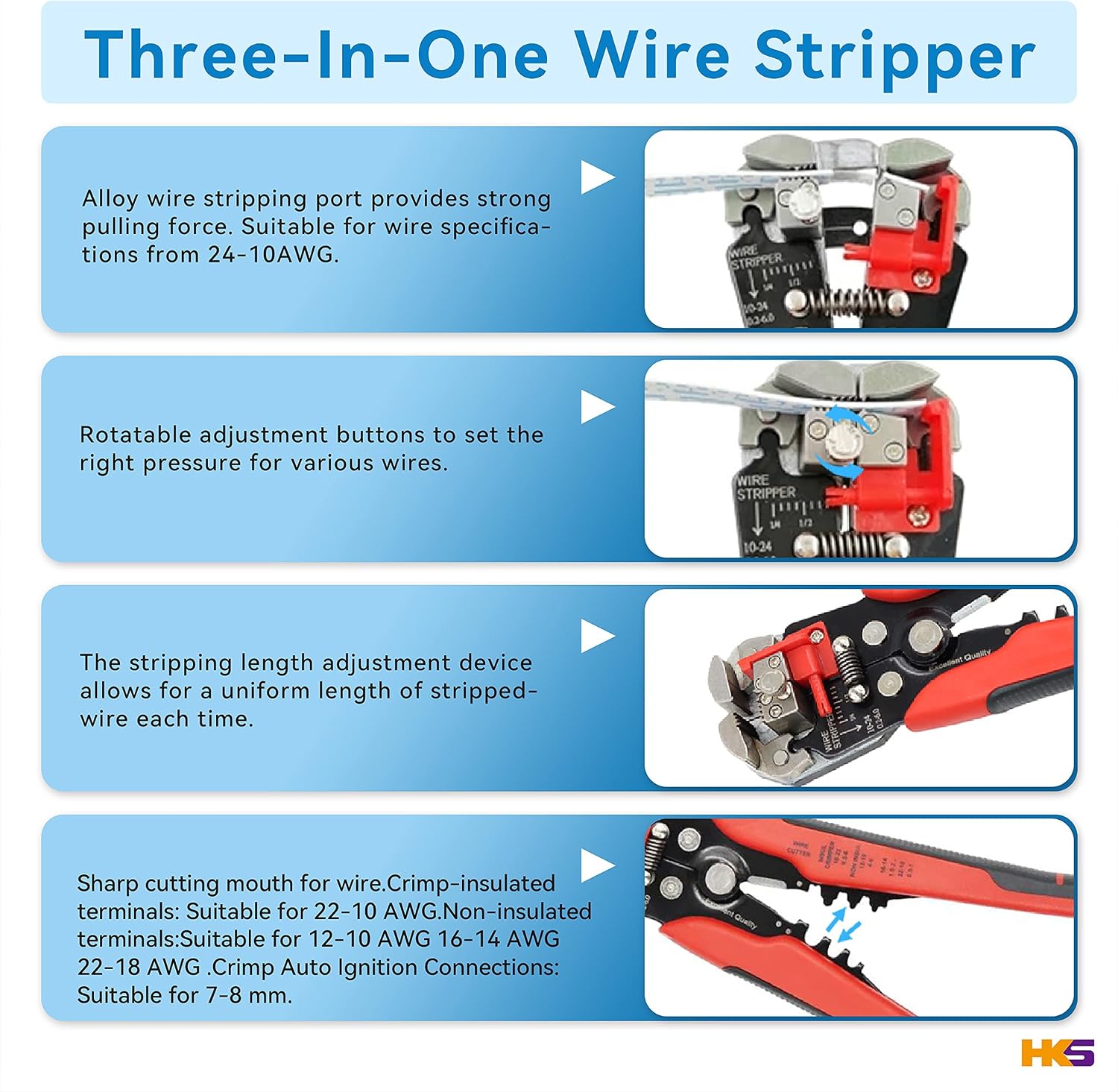
Image: The HKS 12-Piece Mini Crimping Tool Set, showcasing the main crimping tool, wire stripper, and the array of interchangeable jaws included in the kit.
Package Contents
Verify that all items listed below are present in your package:
- 1 x Ratchet Crimping Tool (HKS-XC)
- 1 x Multifunctional Wire Stripper (HKS-S1R)
- 9 x Pairs of Interchangeable Crimping Jaws (A58B, 02WF2C, 2546B, 06WF, 16WF, 02C, 03H, 06, 0325)
- 1 x Hexagonal Wrench (for jaw replacement)
- 1 x Durable Tool Bag
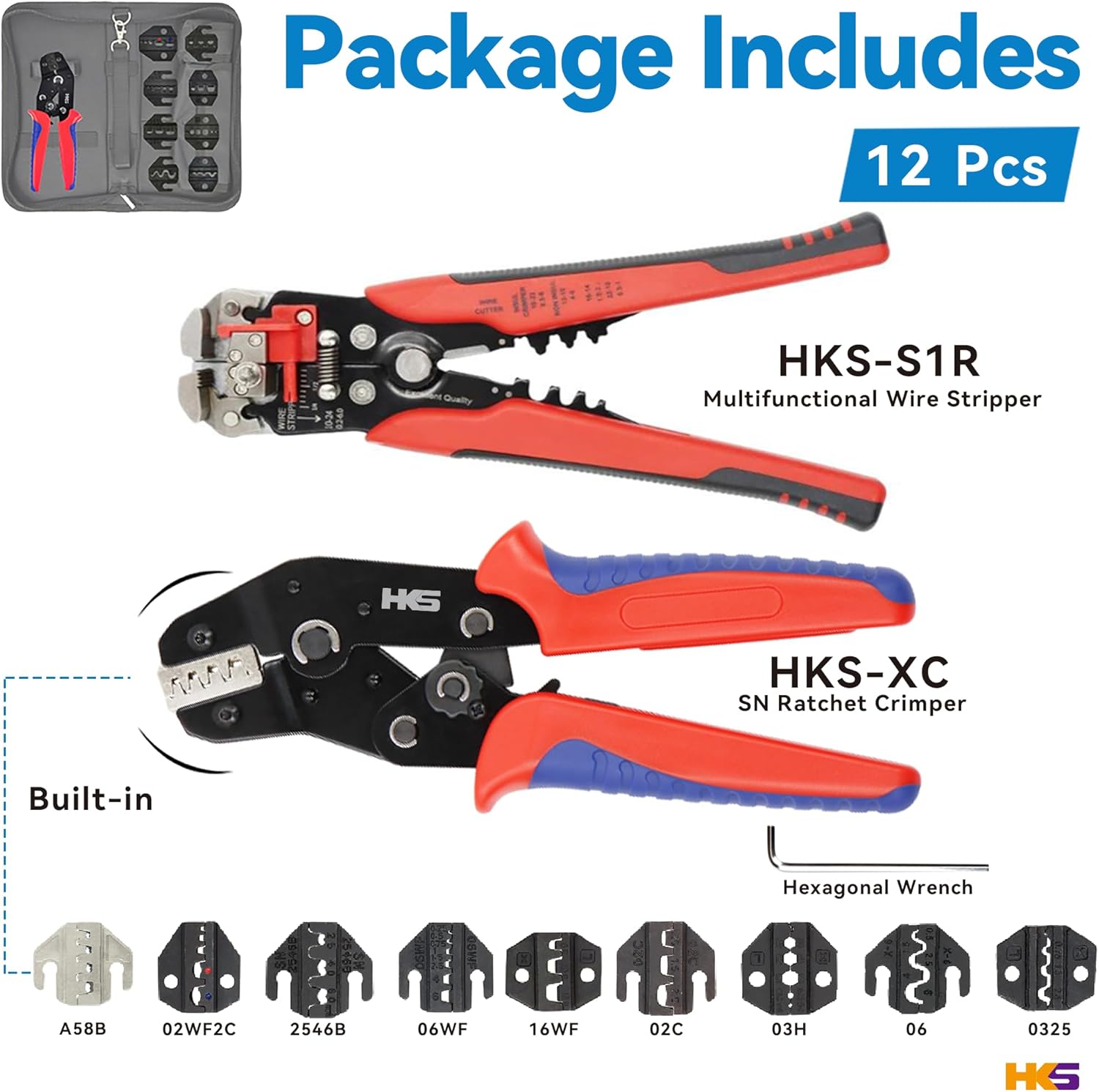
Image: A visual representation of the complete HKS 12-Piece Mini Crimping Tool Set, detailing the main tools and the various interchangeable crimping jaws.
Safety Information
Always observe the following safety precautions when using this tool set:
- Wear appropriate personal protective equipment, including safety glasses, to protect against flying debris.
- Ensure the power is disconnected from any electrical circuits before working on wires or terminals.
- Do not use tools for purposes other than their intended design.
- Keep tools clean and free from oil or grease to maintain a secure grip.
- Store tools in a dry, secure place, out of reach of children.
- Inspect tools for damage before each use. Do not use damaged tools.
Product Overview
Ratchet Crimping Tool (HKS-XC)
The HKS-XC ratchet crimper features a precision-polished jaw mechanism and a ratchet design for consistent, high-quality crimps. The tool includes an automatic release mechanism for ease of use and an adjustable crimping force.

Image: Detailed view of the crimping tool, illustrating its wire-cut electrical discharge machined jaws for accuracy, adjustable crimp force dial, thickened gears for labor-saving operation, and ergonomic TPR handle.
Multifunctional Wire Stripper (HKS-S1R)
The HKS-S1R is an auto-adjusting 3-in-1 tool capable of cutting, stripping, and crimping. It features an alloy wire stripping port for strong pulling force, rotatable adjustment buttons for various wire gauges, and a stripping length adjustment device for uniform results.

Image: Detailed features of the HKS multifunctional wire stripper, including its alloy stripping port, rotatable adjustment buttons for wire gauge, stripping length adjustment, and sharp cutting mouth for various terminals.
Setup
Changing Crimping Jaws
The HKS crimping tool allows for quick and easy replacement of jaws to suit different terminal types.
- Remove the Screws: Use the provided hexagonal wrench to loosen and remove the two screws securing the current jaws on the crimping tool.
- Replace the Jaw: Carefully remove the existing jaws. Insert the desired new pair of jaws, ensuring they are correctly aligned with the tool's mechanism.
- Secure the New Jaws: Reinsert and tighten the screws firmly with the hexagonal wrench. Ensure the jaws are securely fastened before use.

Image: A visual guide demonstrating the two simple steps for changing the crimping jaws: first, removing the screws, and second, replacing the jaw with a different type.
Operating Instructions
Using the Ratchet Crimper
Select the appropriate jaw set for your terminal type and wire gauge. Refer to the 'Jaw Application' image for guidance.
Image: A comprehensive chart illustrating the application of each interchangeable jaw, showing compatible terminal types and corresponding wire gauge ranges (AWG and mm²).
- Prepare the Wire: Strip the insulation from the end of the wire to the appropriate length for your terminal.
- Insert Terminal: Place the terminal into the correct crimping slot on the selected jaws.
- Insert Wire: Insert the stripped wire into the terminal.
- Crimp: Squeeze the handles of the crimping tool firmly until the ratchet mechanism releases. This ensures a complete and secure crimp.
- Inspect: Visually inspect the crimp to ensure it is tight and secure.
Using the Wire Stripper
- Adjust Stripping Length: Use the adjustable stopper to set the desired stripping length.
- Select Wire Gauge: Rotate the adjustment buttons to match the wire gauge you are working with (24-10 AWG / 0.5-6 mm²).
- Insert Wire: Place the wire into the stripping jaws.
- Strip: Squeeze the handles together. The tool will automatically grip, cut, and remove the insulation.
- Cutting Function: Use the sharp cutting mouth for clean wire cuts.
- Crimping Function (Stripper): The stripper also has integrated crimping sections for insulated terminals (22-10 AWG / 0.5-6 mm²), non-insulated terminals (12-10 AWG / 4-6 mm², 16-14 AWG / 1.5-2.5 mm², 22-18 AWG / 0.5-1 mm²), and auto ignition connections (7-8 mm).
Maintenance
- Cleaning: After each use, wipe down the tools with a clean, dry cloth to remove any dirt, dust, or debris.
- Lubrication: Periodically apply a light coat of machine oil to the moving parts and pivot points of the crimping tool and wire stripper to ensure smooth operation and prevent rust.
- Storage: Store the tool set in its durable tool bag in a dry environment to protect it from moisture and corrosion.
- Jaw Inspection: Regularly inspect the crimping jaws for wear or damage. Replace worn jaws to maintain crimping accuracy.
Troubleshooting
| Problem | Possible Cause | Solution |
|---|---|---|
| Poor crimp quality (loose or deformed) | Incorrect jaw selection; improper wire stripping length; insufficient crimping force. | Ensure correct jaws for terminal/wire. Adjust wire stripping length. Increase crimping force on the ratchet tool if applicable. |
| Wire stripper not cutting/stripping effectively | Incorrect wire gauge setting; dull blade; debris in jaws. | Adjust wire gauge setting. Clean jaws. If blade is dull, consider replacement or professional sharpening if possible. |
| Crimping tool handles stuck or difficult to operate | Lack of lubrication; debris in mechanism. | Clean the tool and apply a light lubricant to moving parts. |
| Jaws are loose after replacement | Screws not tightened sufficiently. | Ensure screws are fully tightened with the hexagonal wrench. |
Specifications
| Feature | Specification |
|---|---|
| Product Name | HKS 12-Piece Mini Crimping Tool Set |
| Model Number | 12 PCS Mini Crimping Tool Set |
| Crimping Tool Length | 18 cm (approx.) |
| Crimping Tool Weight | 320 g (approx.) |
| Handle Material | Thermoplastic Elastomer (TPE) |
| Wire Stripping Range | 24-10 AWG / 0.5-6 mm² |
| Crimping Range (Insulated Terminals) | 22-10 AWG / 0.5-6 mm² |
| Crimping Range (Non-Insulated Terminals) | 12-10 AWG / 4-6 mm², 16-14 AWG / 1.5-2.5 mm², 22-18 AWG / 0.5-1 mm² |
| Crimping Range (Auto Ignition Connections) | 7-8 mm |
| Jaw Material (A58B) | Sintered Alloy |
| Package Dimensions | 29.9 x 15.5 x 5.9 cm |
| Package Weight | 317.51 grams |
Warranty and Support
For warranty information, technical support, or any questions regarding your HKS 12-Piece Mini Crimping Tool Set, please refer to the contact information provided at the point of purchase or visit the official HKS website. Keep your purchase receipt as proof of purchase for any warranty claims.