
1. Introduction
This instruction manual provides detailed information on the operation, features, and maintenance of your Godox TT685II-F flash unit. Designed for Fujifilm cameras, this speedlite offers advanced functionalities including a 2.4G Wireless X System, TCM instant conversion, High-Speed Sync (HSS), and a flexible bounce head. Please read this manual thoroughly before using the product to ensure correct and safe operation.
2. Product Overview
2.1 Included Components
- 1x Godox TT685II-F Fuji Flash
- 1x Protective Bag
- 1x Mini Stand (H-Bracket)
- 1x LETWING Cleaning Cloth

Image 2.1: The Godox TT685II-F flash unit shown with its standard accessories, including a protective pouch, a small stand for off-camera use, and a cleaning cloth.
2.2 Key Features
- 2.4G Wireless X System: Integrated system for seamless connectivity with compatible Godox flashes or triggers, offering a range of up to 100 meters.
- TCM Instant Conversion: Allows for quick conversion from TTL mode to manual mode, locking in the correct exposure value.
- Wider Bounce Angle: Flash head tilts from -7° to 120° and rotates 330° for flexible light direction.
- Multiple Flash Modes: Supports TTL, Manual, and Multi-flash modes, including HSS (up to 1/8000s), FEC, FEB, and second curtain sync.
- Wide Light Coverage: Guide number of 197' (at ISO100) and a zoom range of 20-200mm.
- Quick Release Lock: Ensures secure and fast mounting to the camera hot shoe.
3. Setup
3.1 Battery Installation
- Open the battery compartment cover located on the side of the flash unit.
- Insert four (4) AA batteries according to the polarity indicators inside the compartment.
- Close the battery compartment cover securely.
The TT685II-F can also be connected to an optional external Godox power pack, such as the PB960, for extended shooting sessions and faster recycle times. This external power pack is sold separately.

Image 3.1: The flash unit's battery compartment for four AA batteries and an illustration of an optional external power pack (PB960) for enhanced performance.
3.2 Mounting on Camera
- Slide the flash unit onto your Fujifilm camera's hot shoe.
- Push the quick-release lock lever forward until it clicks into place, securing the flash firmly to the camera.
- To remove, push the quick-release lock lever backward and slide the flash off the hot shoe.

Image 3.2: Detail of the quick-release lock, designed for fast and secure attachment to a camera's hot shoe.
4. Operating Instructions
4.1 Power On/Off
Press and hold the power button (usually marked with an 'ON/OFF' symbol) for a few seconds to turn the flash unit on or off. The LCD screen will illuminate upon power-on.
4.2 Flash Modes
The TT685II-F supports various flash modes to suit different photographic needs:
- TTL (Through-The-Lens) Mode: The flash automatically adjusts its output for correct exposure based on the camera's metering system. Features include HSS (High-Speed Sync up to 1/8000s), FEC (Flash Exposure Compensation), FEB (Flash Exposure Bracketing), and second curtain sync.
- Manual (M) Mode: Allows you to manually set the flash power output from 1/1 (full power) to 1/128 in 22 adjustable steps.
- Multi (Stroboscopic) Mode: Fires a series of rapid flashes during a single exposure to capture multiple movements of a subject.

Image 4.1: Visual examples of the flash's full TTL capabilities, including High-Speed Sync, capturing fast-moving subjects with clarity.
4.3 TCM Instant Conversion
The TCM (TTL Converted to Manual) function allows for immediate conversion of a TTL exposure value into a manual power setting. This feature helps to lock in a desired exposure, providing consistent light output when switching from automatic to manual control.

Image 4.2: The flash's control panel highlighting the TCM button, which facilitates instant conversion from TTL to manual mode.
4.4 2.4G Wireless X System
The integrated Godox 2.4G Wireless X System enables the TT685II-F to function as both a master and slave unit. This allows for wireless control of other compatible Godox flashes or triggers within a range of up to 100 meters, providing flexibility for multi-light setups.
- Master Unit: When set as a master, the TT685II-F can control other slave flashes.
- Slave Unit: When set as a slave, the TT685II-F can be triggered by a master flash or a dedicated Godox X-series trigger.

Image 4.3: An overview of the 2.4G Wireless X System, showing the TT685II-F's capability to integrate with other Godox lighting equipment as both a transmitter and receiver.
4.5 Broader Bounce Angle
The flash head offers enhanced flexibility for bouncing light. It can be tilted vertically from -7° to 120° and rotated horizontally 330°. This wide range of motion allows for precise control over light direction, whether bouncing off ceilings, walls, or using off-camera modifiers.

Image 4.4: Illustration of the flash head's extensive vertical and horizontal movement, enabling versatile light bouncing options.
4.6 Wide Light Coverage
The TT685II-F provides broad and even light distribution with a guide number of 197' (60m) at ISO100 and a zoom range of 20-200mm. This allows the flash to adapt to various lens focal lengths, ensuring optimal illumination for different shooting scenarios.

Image 4.5: The flash head designed to provide wide and even light coverage across its zoom range.
5. Maintenance
- Keep the flash unit dry. Do not handle with wet hands or immerse in water.
- Clean the flash head and body with a soft, dry cloth. For stubborn dirt, use a slightly damp cloth and then dry thoroughly.
- Avoid strong impacts, as the flash contains delicate electronic components.
- Remove batteries when the flash is not in use for extended periods to prevent leakage.
- Store the unit in a cool, dry place, away from direct sunlight and extreme temperatures.
- The flash features a USB-C port for firmware updates. Visit the official Godox website for the latest firmware and update instructions.
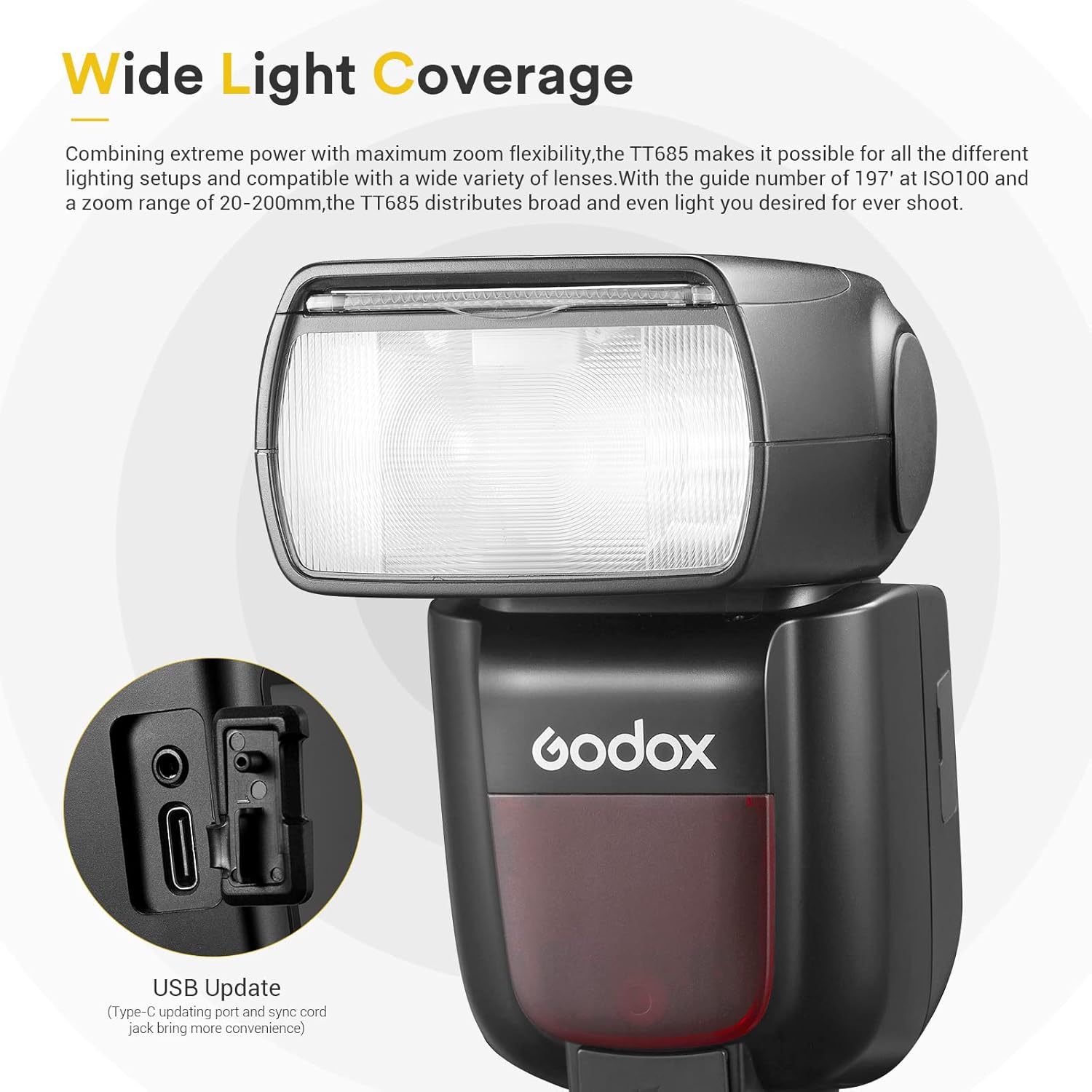
Image 5.1: The USB-C port for firmware updates and a sync cord jack, providing connectivity options.
6. Troubleshooting
| Problem | Possible Cause | Solution |
|---|---|---|
| Flash does not fire. | Low battery, incorrect mode, flash not securely mounted, camera settings. | Check battery level and replace if necessary. Ensure flash is in an appropriate mode (TTL/M). Re-mount flash securely on hot shoe. Verify camera flash settings. |
| Flash output is too bright/dark. | Incorrect FEC, manual power setting, or ambient light conditions. | Adjust FEC in TTL mode. Adjust manual power output in M mode. Consider ambient light and camera ISO/aperture settings. |
| Wireless trigger not working. | Incorrect channel/group, distance, interference, master/slave setting. | Ensure master and slave units are on the same channel and group. Check distance and line of sight. Verify correct master/slave mode is selected. |
| Slow recycle time. | Low battery, high power output. | Replace batteries. Reduce flash power output. Consider using an external power pack (e.g., PB960). |
7. Specifications
| Feature | Detail |
|---|---|
| Model Number | TT685II-F |
| Guide Number (GN) | 60 (m ISO 100, @200mm) |
| Flash Coverage | 20 to 200mm (Auto/Manual Zoom) |
| Vertical Rotation Angle | -7° to 120° |
| Horizontal Rotation Angle | 0° to 330° |
| Flash Duration | 1/300 to 1/20000 seconds |
| Exposure Control System | TTL Autoflash, Manual Flash, Multi Flash |
| High-Speed Sync (HSS) | Up to 1/8000 seconds |
| Wireless Flash Function | Master, Slave, Off |
| Wireless Transmission Range | Approx. 100 meters |
| Channels | 32 (1-32) |
| Groups | 5 (A, B, C, D, E) |
| Power Source | 4x AA batteries (Ni-MH or Alkaline) |
| Recycle Time | Approx. 0.1-2.6 seconds (Ni-MH batteries) |
| Dimensions (W x H x D) | Approx. 8.07 x 3.62 x 3.31 inches |
| Weight (without batteries) | Approx. 1.3 pounds |
8. Warranty and Support
For warranty information, technical support, and service inquiries, please refer to the official GODOX website or contact your authorized GODOX dealer. Keep your purchase receipt as proof of purchase for warranty claims. Firmware updates and additional resources may also be available on the manufacturer's website.