
1. Introduction
Thank you for purchasing the Battletron Dual Charging Dock for PlayStation 4 Controllers. This charging station is designed to provide a convenient and efficient way to charge two PlayStation 4 controllers simultaneously, ensuring you're always ready for your next gaming session. Its compact design and integrated lighting make it a practical addition to your gaming setup.
2. Package Contents
- 1 x Battletron Dual Charging Dock
- 1 x USB Charging Cable

Figure 2.1: The retail packaging for the Battletron Dual Charging Dock, featuring an image of the dock with two PlayStation 4 controllers.
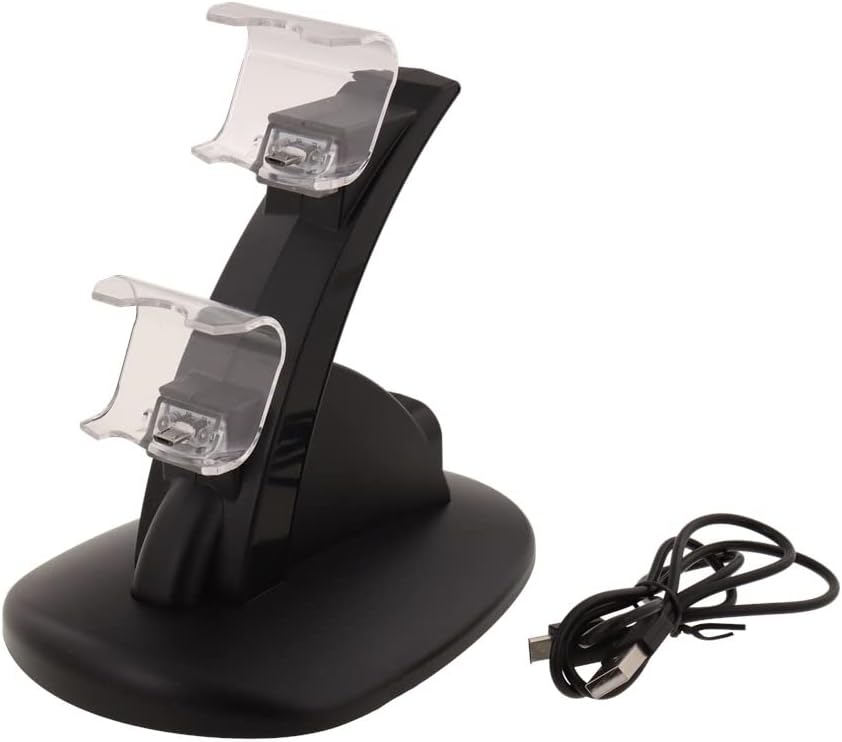
Figure 2.2: The Battletron Dual Charging Dock itself, shown with its included USB charging cable. The dock features two clear plastic cradles for controllers.
3. Setup
- Unpack the Charging Dock: Carefully remove the charging dock and USB cable from the packaging.
- Connect Power: Insert the small end of the included USB charging cable into the USB port on the back of the Battletron Dual Charging Dock.
- Connect to Power Source: Plug the larger end of the USB cable into an available USB port on your PlayStation 4 console, a USB wall adapter (not included), or any standard USB power source.
- Placement: Place the charging dock on a stable, flat surface near your gaming setup.
4. Operating Instructions
4.1 Charging Controllers
- Insert Controllers: Gently align the charging port of your PlayStation 4 controller with one of the charging connectors on the dock. Push the controller down until it securely seats into the cradle.
- Charging Indicator: The charging dock features integrated lighting. When a controller is properly connected and charging, the light will illuminate, indicating the charging status.
- Simultaneous Charging: You can charge one or two controllers at the same time. Repeat step 1 for the second controller if desired.
- Charging Completion: Once the controller is fully charged, the indicator light on the dock may change color or turn off, depending on the specific model's design. Refer to your PlayStation 4 controller's manual for its own charging indicator behavior.
4.2 Disconnecting Controllers
To remove a controller, simply lift it straight up from the charging cradle. Avoid twisting or pulling at an angle to prevent damage to the controller's charging port or the dock's connectors.
5. Maintenance
- Cleaning: Use a soft, dry cloth to wipe down the charging dock. Do not use liquid cleaners or abrasive materials, as they may damage the surface or internal components.
- Storage: When not in use, store the charging dock in a cool, dry place away from direct sunlight and extreme temperatures.
- Handling: Handle the dock with care. Avoid dropping it or subjecting it to strong impacts.
6. Troubleshooting
| Problem | Possible Cause | Solution |
|---|---|---|
| Controller not charging. |
|
|
| Indicator light not working. |
|
|
7. Specifications
| Brand: | Battletron (Manufacturer: BTTN) |
| Model: | Dual Charging Dock for PS4 Controllers (ASIN: B09NP3XS62) |
| Hardware Platform: | PlayStation 4 |
| Special Features: | Compatible with PS4 controller and Switch controller (Note: Primarily designed for PS4), simultaneous charging, integrated lighting. |
| Power Source: | Corded Electric (USB) |
| Connector Type: | USB |
| Product Dimensions: | 8 x 17 x 20 cm (3.15 x 6.69 x 7.87 inches) |
| Item Weight: | 700 g (1.54 lbs) |
| First Available Date: | December 23, 2021 |
8. Warranty and Support
For warranty information and customer support, please refer to the retailer or manufacturer's website where you purchased this product. Keep your proof of purchase for any warranty claims.
For further assistance or inquiries, please contact Battletron customer service through their official channels.