
Hetingprotool LB55135
Instruction Manual for Hetingprotool LED Backlight Strips
Model: LB55135 for Insignia TV NS-55DF710NA19
1. Introduction
This manual provides essential information for the installation and proper handling of Hetingprotool LED backlight strips, specifically designed as replacement parts for the Insignia TV model NS-55DF710NA19. These strips are crucial components of your television's display system, providing the necessary illumination for the screen.
It is critical to verify compatibility before installation. Many TV models, even within the same brand, may use different sets of LED strips. Always match the part numbers and physical appearance of these strips to the original ones in your TV. This product is not compatible with the NS-50DF710NA19 model.
2. Safety Information
Please read and understand all safety precautions before attempting installation. Improper installation can lead to electric shock, damage to the television, or personal injury.
- Disconnect Power: Always unplug the television from the power outlet before beginning any disassembly or installation work.
- Static Electricity: Discharge any static electricity from your body before handling electronic components. Use an anti-static wrist strap if available.
- Fragile Components: The TV screen and internal components are extremely fragile. Handle them with extreme care to prevent cracking or damage.
- Professional Assistance: If you are not comfortable with electronic repairs, seek assistance from a qualified technician.
- Ventilation: Ensure adequate ventilation during and after installation.
3. Product Overview
The Hetingprotool LED backlight strip kit includes 10 pieces: 5 right-side strips and 5 left-side strips. These strips are constructed from aluminum, which aids in efficient heat dissipation, contributing to the longevity of the LEDs.

Figure 3.1: Complete set of 10 LED backlight strips (5 right, 5 left).
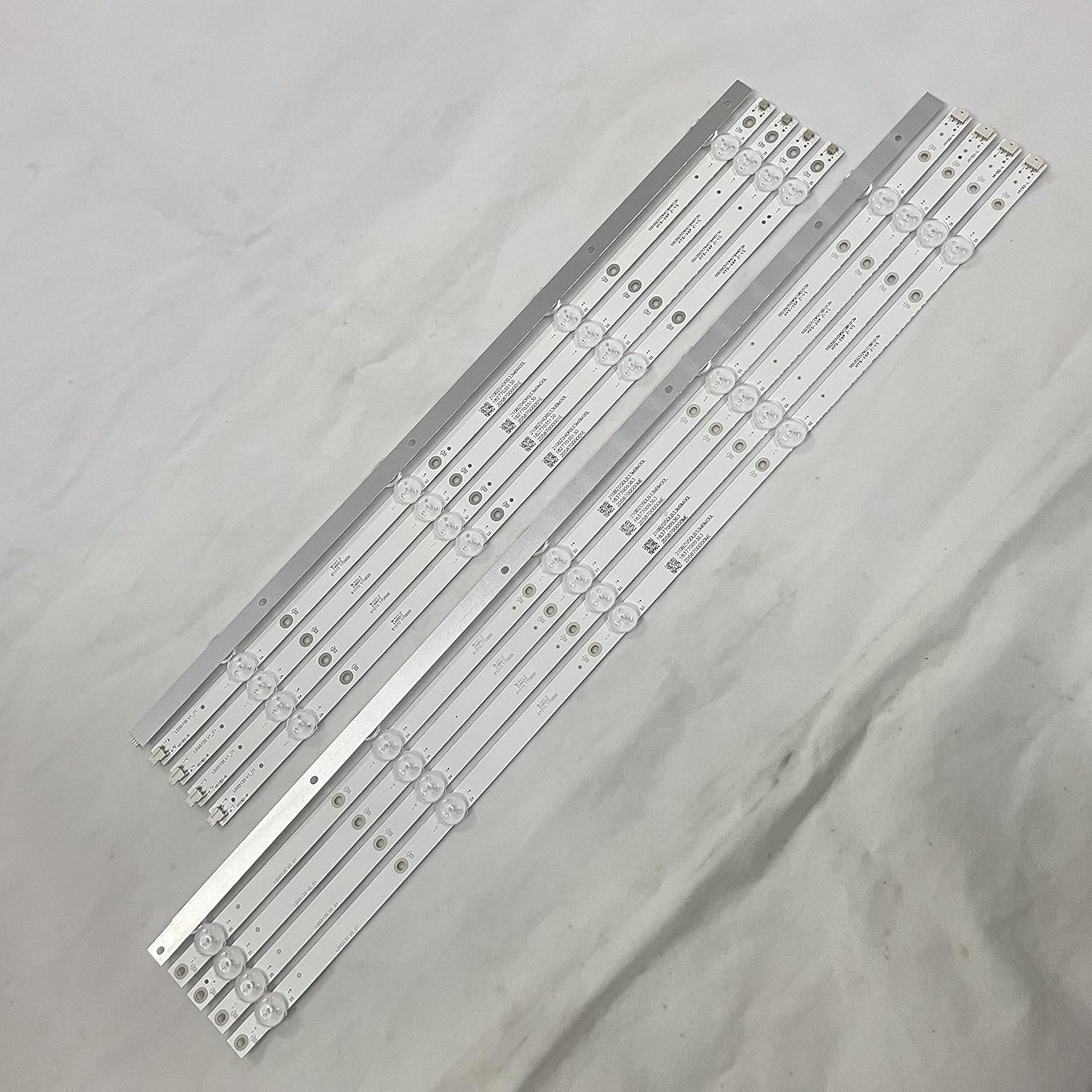
Figure 3.2: Angled view showcasing the aluminum construction of the LED strips.
4. Setup and Installation
Replacing LED backlight strips requires careful disassembly and reassembly of the television. Follow these general steps, but always refer to specific disassembly guides for your TV model (NS-55DF710NA19) if available.
- Preparation: Lay the TV face down on a soft, clean, and flat surface to prevent screen damage. Ensure you have the necessary tools (screwdrivers, pry tools, anti-static mat).
- Disassembly: Carefully remove the back cover of the TV. Disconnect all cables and ribbons that obstruct access to the display panel.
- Panel Removal: This is the most critical step. Gently remove the outer bezel, then carefully lift and set aside the LCD panel and diffuser layers. These components are extremely fragile and prone to cracking.
- Old Strip Removal: Locate the existing LED backlight strips. They are typically secured with screws or adhesive. Carefully remove them, noting their orientation.
- Compatibility Check: Before installing new strips, compare them directly with the old ones. Ensure the part numbers (e.g., LB55135 V1_01, LB55135 V0_01), length, number of LEDs, and connector types match exactly. Do not proceed if there is any discrepancy, especially if your original strips do not have "LB55135" printed on them.
- New Strip Installation: Install the new Hetingprotool LED strips in the correct positions. Secure them as the original strips were.
- Reassembly: Carefully reassemble the TV in reverse order. Pay utmost attention when placing the LCD panel and diffuser layers back into position. Ensure all cables and ribbons are reconnected properly.
- Testing: Before fully securing the back cover, connect the TV to power and test the backlight functionality. If successful, proceed to fully secure the TV.
Important Compatibility Note: This product is specifically designed for Insignia TV model NS-55DF710NA19 (including REV A and REV C) and compatible panel types like TPT550U2-D072. It is NOT compatible with NS-50DF710NA19 or other 50-inch models.

Figure 4.1: Verify the presence of "LB55135" and version numbers on your original strips for compatibility.

Figure 4.2: Detail of the connector ends and specific markings like H1192-L.

Figure 4.3: Additional markings such as 55D3503V2W4C1B49012M and HYS-20P for further identification.
5. Operating
Once correctly installed, the LED backlight strips operate automatically as an integral part of your television's display system. They are controlled by the TV's internal power supply and main board, illuminating the screen when the television is powered on. There are no user-adjustable settings or separate operational controls for these strips.
6. Maintenance
The LED backlight strips themselves require no routine maintenance. Their aluminum construction is designed for efficient heat dissipation, contributing to their lifespan. To ensure the longevity of your TV and its components, follow general television maintenance guidelines:
- Keep the TV in a well-ventilated area to prevent overheating.
- Clean the TV screen and exterior with a soft, dry, lint-free cloth. Avoid harsh chemicals.
- Protect the TV from dust and moisture.
7. Troubleshooting
If you encounter issues after installing the LED backlight strips, consider the following:
- No Backlight / Dim Screen:
- Ensure all connectors are securely seated.
- Verify that the correct LED strips (matching part numbers) were installed.
- Check for any visible damage to the new strips or their connections.
- Confirm the TV's power supply board is functioning correctly.
- Screen Cracked During Repair:
- Unfortunately, TV screens are extremely delicate. Cracking during disassembly or reassembly is a common risk of this type of repair, not a defect of the LED strips.
- Uneven Lighting:
- Ensure all diffuser layers and the LCD panel are correctly aligned and seated without gaps or pressure points.
If problems persist, it is recommended to consult a professional television repair technician.
8. Specifications
| Feature | Detail |
|---|---|
| Product Type | LED Backlight Strips |
| Brand | Hetingprotool |
| Model Number | LB55135 |
| Compatible TV Model | Insignia NS-55DF710NA19 (REV A, REV C) |
| Incompatible TV Model | Insignia NS-50DF710NA19 |
| Compatible Panel Types | TPT550U2-D072 |
| Package Contents | 10 pieces (5*R + 5*L) |
| Material | Aluminum (for fast heat dissipation) |
| Length (R+L combined) | 1096mm |
| Number of LED Beads | 9 LEDs (per R+L strip) |
| Voltage | 12 Volts (DC) |
| Wattage | 2 watts |
| Item Weight | 1 pound |
| UPC | 601263772033 |
9. Warranty and Support
For specific warranty information regarding your Hetingprotool LED backlight strips, please refer to the terms and conditions provided by your original point of purchase or contact the seller directly. Keep your proof of purchase for any warranty claims.
For technical support or inquiries not covered in this manual, please reach out to the Hetingprotool customer service or the retailer from whom you purchased the product.
Ask a question about this manual
Ask about setup, troubleshooting, compatibility, parts, safety, or missing instructions. Manuals+ will review the question and use this page’s manual context to help answer it.