
1. Introduction
This user manual provides detailed instructions for the installation, operation, and maintenance of the HIKROBOT MV-CH120-10UC Machine Vision FA Camera. Please read this manual thoroughly before using the product to ensure proper and safe operation. Keep this manual for future reference.
2. Safety Information
Always observe the following safety precautions to prevent injury and damage to the camera:
- Do not expose the camera to extreme temperatures, humidity, or direct sunlight.
- Avoid strong impacts or vibrations.
- Do not attempt to disassemble or modify the camera. Refer all servicing to qualified personnel.
- Ensure proper power supply (DC12V or USB3.0) as specified to prevent electrical damage.
- Handle the lens and sensor area with care to avoid dust and scratches.
- Ensure proper grounding if applicable to your setup.
3. Package Contents
Verify that all items are present in the package:
- HIKROBOT MV-CH120-10UC Camera Unit
- USB 3.0 Cable
- Quick Start Guide (if included)
- Software CD or link for MVS client software/drivers
If any items are missing or damaged, please contact your supplier immediately.
4. Product Overview
The HIKROBOT MV-CH120-10UC is a high-performance 12MP machine vision camera designed for industrial applications. It features a Sony IMX304 CMOS sensor with global shutter, providing high-resolution images at up to 23.1 frames per second via a USB 3.0 interface.

Figure 4.1: Front view of the HIKROBOT MV-CH120-10UC camera, highlighting the C-mount lens interface. The camera body is orange and black.
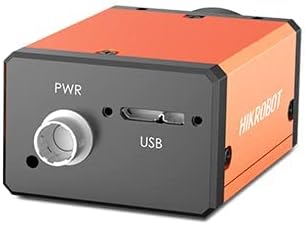
Figure 4.2: Rear view of the HIKROBOT MV-CH120-10UC camera, displaying the PWR (power) input and USB 3.0 port for data and optional power. The camera body is orange and black.

Figure 4.3: Technical drawing illustrating the dimensions of the HIKROBOT MV-CH120-10UC camera in millimeters. Key dimensions include 44mm width, 29mm height, and 59mm length, along with mounting hole details.
5. Setup
Follow these steps for initial setup of your camera:
- Software Installation: Download and install the MVS client software or a compatible third-party software (e.g., supporting USB 3.0 Vision Protocol) from the HIKROBOT official website. Ensure your operating system (Windows XP/7/10 or Linux 32/64bit) is supported.
- Lens Attachment: Carefully attach a compatible C-mount lens to the camera. Ensure it is securely fastened.
- Power Connection: Connect the camera to a DC12V power supply or connect the USB 3.0 cable to a powered USB 3.0 port on your computer. The camera supports power supply via USB 3.0.
- Data Connection: Connect the USB 3.0 cable from the camera to a USB 3.0 port on your computer.
- Driver Installation: The necessary drivers should be installed automatically with the MVS software. Verify that the camera is recognized by your operating system and the installed software.
6. Operating
Once the camera is set up and recognized by the software, you can begin operation:
- Launch Software: Open the MVS client software or your chosen third-party application.
- Camera Selection: Select the MV-CH120-10UC camera from the list of detected devices within the software.
- Parameter Configuration: Adjust camera parameters such as resolution (4096 × 3000), frame rate (up to 23.1fps), exposure time (1µs to 10s), gain (0dB to 20dB), and pixel format (e.g., Mono 8/10/12, BayerGB, YUV422Packed, RGB 8, BGR 8) as required for your application.
- Image Acquisition: Initiate image acquisition in continuous mode or single-frame mode.
- Digital I/O: Utilize the 6-pin Hirose connector for external triggering or synchronization via the opto-isolated input (Line0), opto-isolated output (Line1), or bidirectional non-isolated I/O (Line2).
- Image Processing: Use the software's tools for image display, saving, and basic processing.
7. Maintenance
Proper maintenance ensures the longevity and optimal performance of your camera:
- Cleaning: Use a soft, lint-free cloth to clean the camera body. For the lens and sensor, use specialized optical cleaning solutions and tools. Avoid abrasive materials.
- Storage: When not in use, store the camera in a dry, dust-free environment within the specified storage temperature range (-30°C to 70°C) and humidity (20% to 80% RH, non-condensing).
- Firmware Updates: Periodically check the HIKROBOT website for firmware updates to ensure your camera has the latest features and bug fixes.
8. Troubleshooting
If you encounter issues, refer to the following common problems and solutions:
- Camera Not Detected:
- Ensure the USB 3.0 cable is securely connected to both the camera and the computer.
- Verify that the camera is receiving power (either via USB 3.0 or external DC12V).
- Check if the camera drivers are correctly installed. Reinstall the MVS software if necessary.
- Try connecting to a different USB 3.0 port or computer.
- No Image/Black Screen:
- Check lens cap removal.
- Verify exposure time and gain settings in the software. They might be too low for the lighting conditions.
- Ensure the correct pixel format is selected.
- Image Quality Issues (Noise, Blurriness):
- Adjust focus on the lens.
- Check for dust or smudges on the lens or sensor.
- Optimize exposure time and gain settings to reduce noise.
- Ensure proper lighting conditions for your application.
- Software Crashes/Freezes:
- Ensure your operating system meets the minimum requirements.
- Update your graphics card drivers.
- Reinstall the MVS client software.
For persistent issues, please contact HIKROBOT technical support.
9. Specifications
| Category | Parameter | Value |
|---|---|---|
| Camera Specifications | Model | MV-CH120-10UC |
| Type | 12 MP 1.1 CMOS USB3.0 | |
| Sensor Type | CMOS, Global Shutter | |
| Sensor | IMX304 | |
| Pixel Size | 3.45µm × 3.45µm | |
| Sensor Size | 1.1 inch | |
| Resolution | 4096 × 3000 | |
| Max Frame Rate | 23.1fps | |
| Dynamic Range | 72.2 dB | |
| SNR | 40.2 dB | |
| Gain | 0dB to 20dB | |
| Exposure Time | Ultra-short: 1µs to 14µs, Standard: 15µs to 10s | |
| Electrical Characteristics | Data Interface | USB3.0 |
| Power Supply | DC12V, USB3.0 power supply compatible | |
| Power Consumption | Typ. 3.5 W@5 VDC (from USB3.0) | |
| Mechanical Characteristics | Lens Mount | C-mount |
| Dimensions | 44 mm × 29 mm × 59 mm | |
| Weight | Approx. 100g | |
| Protection Class | IP30 (with proper lens installation and wiring) | |
| Operating Temperature | 0°C to 50°C | |
| General | Client Software | MVS or USB 3.0 Vision Protocol compatible 3rd-party software |
| Operating System | 32/64bit Windows XP/7/10, 32/64bit Linux | |
| Compatibility | USB 3.0 Vision, GenlCam | |
| Certifications | CE, FCC, RoHS, KC |
10. Warranty Information
HIKROBOT products are typically covered by a limited warranty against defects in materials and workmanship. The specific terms and duration of the warranty may vary by region and product. Please refer to the warranty card included with your product or visit the official HIKROBOT website for detailed warranty information.
Note: Damage caused by improper use, unauthorized modification, or failure to follow the instructions in this manual may void the warranty.
11. Support and Contact
For technical support, product inquiries, or service requests, please contact HIKROBOT through the following channels:
- Official Website: Visit the HIKROBOT official website for the latest drivers, software, FAQs, and support resources.
- Customer Service: Refer to the contact information provided on the HIKROBOT website for your region.
- Authorized Distributors: Contact your local authorized HIKROBOT distributor or reseller for assistance.