
1. Introduction
This manual provides essential instructions for the safe and effective operation of your SUHU 4-Amp 6V/12V Automatic Smart Battery Charger/Maintainer. This device is designed to charge and maintain various lead-acid batteries, including STD, AGM, GEL, and LiFePO4 batteries, for vehicles such as cars, motorcycles, trucks, boats, and lawn mowers. Please read this manual thoroughly before use and retain it for future reference.
2. Safety Information
Always prioritize safety when operating electrical equipment. Failure to follow these safety guidelines may result in injury or damage to the product or property.
- Ensure the battery charger is connected to a 110V-60Hz power supply.
- Do not attempt to charge batteries with different operating voltages than specified (6V or 12V).
- Connect the battery charger to the battery with correct polarity: red clamp to positive (+), black clamp to negative (-).
- Disconnect the charger from the power supply before disconnecting from the battery. Always remove the negative (-) clamp first, then the positive (+) clamp.
- The charger features built-in circuit protection against reverse polarity, sparks, overcharging, over-current, open circuit, short circuit, and overheating. However, always exercise caution.
- Do not attempt to activate severely damaged or completely dead batteries, as the pulse repair function may not restore them to 100% new condition.
- Operate the charger within the specified temperature range: -20°C to 40°C (-4°F to 140°F).
3. Product Features
The SUHU 4-Amp Smart Battery Charger/Maintainer offers several advanced features for efficient and safe battery care:
- Versatile Charging: Works with 6V and 12V lead-acid batteries, including STD, AGM, GEL, and 12V LiFePO4 batteries. (Note: Lithium batteries other than 12V LiFePO4 are not supported).
- Pulse Repair Function: An 8-stage charging program analyzes and addresses battery sulfation, helping to repair and extend the life of slightly damaged batteries. This function cannot restore severely damaged or completely dead batteries.
- Multi-Protection System: Equipped with circuit protection to prevent reverse polarity, sparks, overcharging, over-current, open circuit, short circuit, and overheating.
- LCD Display: Provides real-time information on charging voltage, charging mode, battery charging progress, and battery levels for clear monitoring.
- Automatic Operation: Features a 10-stage microprocessor-controlled charging process for precision and safety. Automatically adjusts amperage rate and returns to the last charge mode when reconnected.
- Temperature Compensation: An integrated thermal sensor detects ambient temperature and adjusts the charging process to prevent over-charging in hot conditions and under-charging in cold conditions.
- Dual Connector Types: Includes both ring terminals and alligator clamps for flexible connection options.

Image: The SUHU battery charger highlighting its 8 smart protection features, including over-charge, anti-reverse, over-voltage, low-voltage, over-current, over-power, over-temperature, and short-circuit protection.

Image: The SUHU 6V/12V 4AMP car battery charger emphasizing its pulse repair, multi-protection, and intelligent detection capabilities, shown in an engine bay setting.
4. Package Contents
Upon opening the package, verify that all components are present and undamaged:
- SUHU 4-Amp 6V/12V Smart Battery Charger/Maintainer Unit
- Alligator Clamps (Red for positive, Black for negative)
- Ring Terminals (for permanent connection)
- User Manual

Image: A visual representation of the SUHU battery charger, including the main unit, alligator clamps, ring terminals, and the user manual.
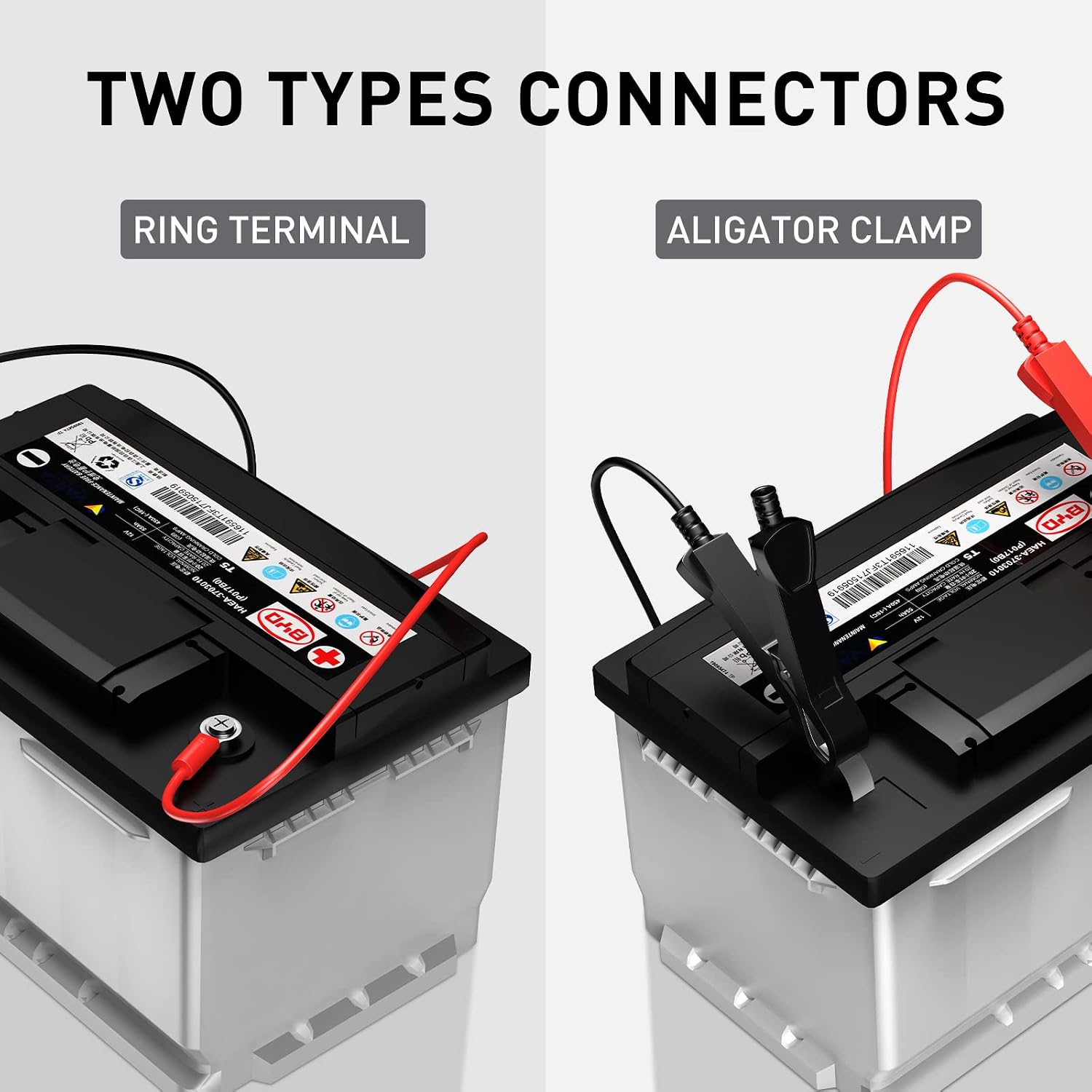
Image: Close-up view of the two types of connectors provided with the SUHU battery charger: ring terminals and alligator clamps, demonstrating their use on a battery.
5. Setup and Connection
Follow these steps to properly set up and connect your SUHU battery charger:
- Verify Battery Voltage: Ensure your battery is either a 6V or 12V battery. Do not attempt to charge batteries with different operating voltages.
- Connect SAE and Alligator Clips (or Ring Terminals): If using alligator clips, connect the SAE quick connector from the charger to the alligator clip cable. If using ring terminals, connect the SAE quick connector from the charger to the ring terminal cable.
- Connect to Battery:
- Connect the RED (+) alligator clip or ring terminal to the positive (+) battery terminal.
- Connect the BLACK (-) alligator clip or ring terminal to the negative (-) battery terminal.
- Ensure connections are secure.
- Connect to Power Supply: Plug the battery charger into a standard 110V-60Hz AC power outlet.

Image: A four-step visual guide demonstrating how to connect the SUHU battery charger: connecting SAE and alligator clips, plugging into a power socket, connecting to the battery terminals, and pressing the mode button.
6. Operating Instructions
Once connected, the charger will automatically begin its charging process. Use the "Mode" button to select the appropriate battery type.
- Automatic Detection: The charger will automatically detect the battery voltage (6V or 12V).
- Select Charging Mode: Press the "Mode" button to cycle through the available charging modes for different battery types. The LCD display will indicate the selected mode.
- 12V STD: For standard 12V lead-acid batteries.
- 12V AGM/C: For 12V AGM batteries.
- 12V LFP: For 12V Lithium Iron Phosphate (LiFePO4) batteries.
- 12V GEL: For 12V GEL batteries.
- 6V STD: For standard 6V lead-acid batteries.
- Monitor Charging: The LCD display will show the charging voltage, current charging mode, and a battery charging bar indicating progress.
- Charging Complete: When the battery is fully charged, the display will show "FUL" and the charger will automatically switch to maintenance mode to prevent overcharging.
- Disconnecting: After charging is complete, first disconnect the charger from the power supply. Then, remove the negative (-) clamp from the battery, followed by the positive (+) clamp.

Image: The SUHU battery charger's LCD display showing various battery type selections: 12V STD, 12V AGM/C, 12V LFP, 12V GEL, and 6V STD, along with their respective charging voltages.

Image: The SUHU battery charger's LCD display showing "FUL" and a full battery icon, indicating that the battery charging process is complete.
7. Maintenance
Proper maintenance ensures the longevity of your battery and charger:
- Regular Cleaning: Keep the charger unit and connectors clean and free from dirt or corrosion. Use a dry cloth for cleaning.
- Storage: Store the charger in a cool, dry place when not in use.
- Battery Maintenance: For vehicles stored for extended periods, connect the charger in maintenance mode to keep the battery optimally charged. The charger's automatic memory function will recall the last used mode.
- Temperature Compensation: The charger automatically adjusts for ambient temperature, optimizing charging in both hot and cold climates. This feature helps prevent over-charging or under-charging, contributing to battery health.

Image: The SUHU battery charger connected to a car battery, illustrating its thermal compensation feature which optimizes charging for both hot (104°F) and cold (-4°F) weather conditions.
8. Troubleshooting
If you encounter issues with your SUHU battery charger, refer to the following common problems and solutions:
| Problem | Possible Cause | Solution |
|---|---|---|
| Charger does not turn on. | No power supply; faulty outlet; loose connection. | Check power outlet and connections. Ensure charger is properly plugged in. |
| Charger displays an error or does not charge. | Incorrect polarity; battery voltage mismatch; severely damaged battery. | Verify positive and negative connections. Ensure battery voltage matches selected mode. The charger cannot repair severely damaged batteries. |
| Charging is slow or incomplete. | Battery sulfation; incorrect mode selected; extreme temperatures. | Ensure correct mode is selected. The pulse repair function may take time for sulfated batteries. Allow temperature compensation to adjust. |
| LCD display is not legible. | Potential display malfunction. | Contact customer support for assistance. |
For further troubleshooting or issues not listed here, please refer to the last page of the physical instruction manual or contact SUHU customer support.
9. Specifications
| Feature | Detail |
|---|---|
| Brand | SUHU |
| Model Number | BD02-Z4.0A-P1 |
| Input Voltage | 120 Volts |
| Current Rating | 4 Amps |
| Battery Compatibility | 6V and 12V Lead-Acid (STD, AGM, GEL), 12V LiFePO4 |
| Operating Temperature | -20°C to 40°C (-4°F to 140°F) |
| Charging Time (approx.) | 120 minutes (for a typical charge, varies by battery state) |
| Protection Features | Reverse polarity, sparks, overcharging, over-current, open circuit, short circuit, overheating |
10. Warranty and Support
Your SUHU 4-Amp 6V/12V Smart Battery Charger/Maintainer is covered by a 2-year warranty from the date of purchase.
For warranty claims, technical support, or any questions regarding the product, please contact SUHU customer service. Refer to the contact information provided with your purchase or on the official SUHU website.


