
Introduction
The HUEMIHUI Battery Powered Rhythm Light Bar is designed to enhance your environment with dynamic, sound-activated lighting. Featuring 32 SMD 5050 LED lamp beads, a built-in high-sensitivity microphone, and an IC chip, these light bars offer 21 dynamic patterns and 8 pickup rhythm patterns. They synchronize with ambient sound and music, providing an immersive visual experience for gaming, movies, music, or simply creating an atmosphere. Control is available via three physical buttons or through the dedicated "duoCo StripX" mobile application, offering extensive customization with 16 million static colors and 213 dynamic modes. The light bars are USB rechargeable and include a built-in battery for portable use.
What's in the Box
Please verify that all components are present in your package:
- 2 x 32-Bit RGB Music Rhythm Lights
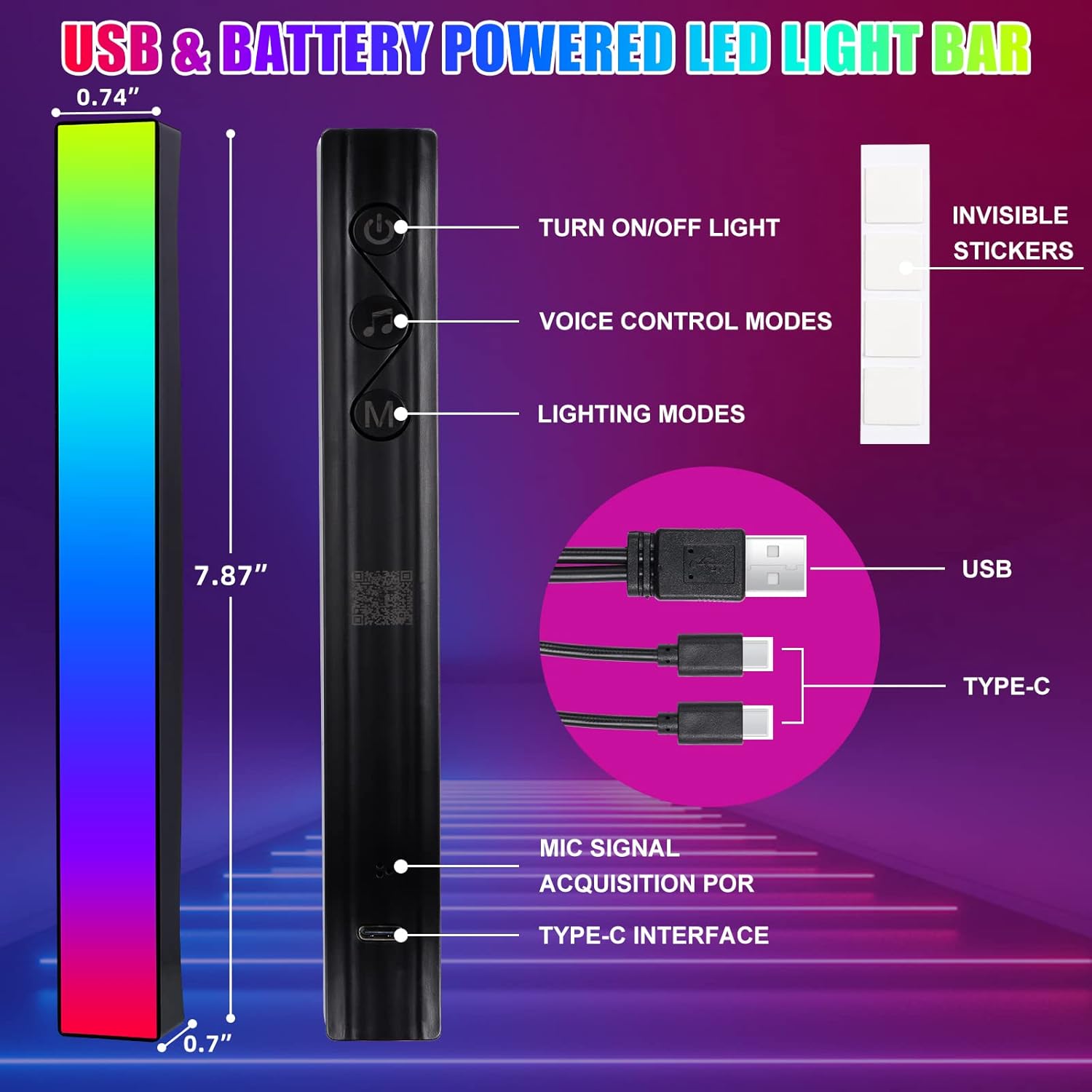
- 1 x USB Cable with 2 Type-C Ports
- 8 x Invisible Stickers (Acrylic Double-Sided Tapes)

Setup
Powering the Device
The rhythm light bars can be powered in two ways:
- USB Power: Connect the provided USB cable to a 5V DC power source (e.g., a USB wall adapter, computer USB port) and the Type-C ends to the light bars. The 5V LED light generates very little heat, ensuring safety.
- Battery Power: Each light bar has a built-in battery. When fully charged, the battery life is approximately 3 hours. Charge the device using the USB cable.
Connecting to the APP
To utilize the full range of features, connect your light bars to the "duoCo StripX" application:
- Download the "duoCo StripX" app from Google Play Store or Apple App Store. You can also scan the QR code provided in the manual.
- Ensure Bluetooth is enabled on your smartphone.
- Power on the LED light bars.
- The LED strip lights should automatically connect to the APP. If not, open the app and follow the on-screen prompts to pair.
Operating Instructions
Physical Button Control
The light bars feature three control buttons on the back:
- Power Button: Turns the light bar on or off.
- Voice Control Modes Button: Cycles through various voice-activated rhythm patterns.
- Lighting Modes Button: Cycles through different dynamic lighting patterns.
APP Control ("duoCo StripX")
The "duoCo StripX" app provides comprehensive control over your light bars:
- Color Adjustment: Choose from 16 million static colors.
- Dynamic Modes: Select from 213 dynamic lighting patterns.
- DIY Mode: Create and customize your own unique lighting patterns.
- Music Mode: Synchronize lights with music playing on your phone.
- Mic Mode: Lights react to ambient sounds picked up by the light bar's microphone.
- Timing Settings: Schedule automatic turn on/off times.
- Brightness Adjustment: Adjust the light intensity from 1% to 100%.

Music Synchronization
The built-in high-sensitivity microphone allows the lights to react to sound:
- Place the light bars near your phone, speaker, or music player.
- The lights will automatically detect ambient sound/music and display synchronized spectrum effects.
- For local music playback via the app:
- Android Users: Download music to your phone. The app will automatically sync your downloaded music.
- iOS Users: Import your favorite music into your phone's local music library via iTunes on a computer. The app will then sync the imported music.

Placement Options
The light bars offer flexible placement to suit various scenarios:
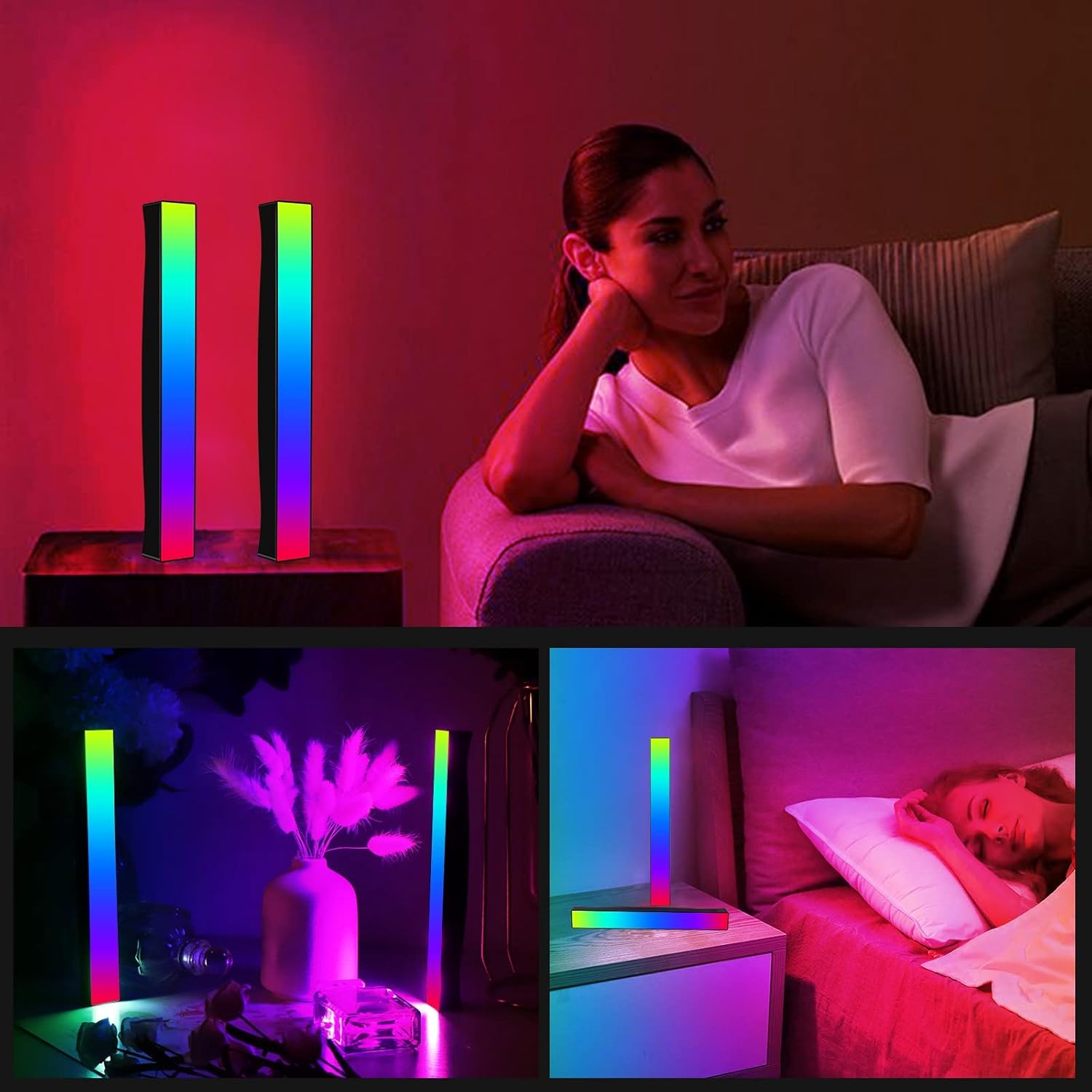
- Vertical Placement: Position them upright next to a TV or computer monitor for an immersive entertainment experience.
- Horizontal Placement: Lay them flat on a shelf or desk as ambient decorative lighting.
- Portable Use: Due to their built-in battery, they can be held or placed in various locations for gatherings, concerts, or other events.

Maintenance
Proper care ensures the longevity and optimal performance of your light bars:
- Cleaning: Do not wipe the screen with any solvent or non-alcohol liquid. Use a soft, dry cloth for cleaning.
- Storage: Store in a cool, dry place when not in use.
Troubleshooting
- Light bar does not respond after power failure or timer shutdown: If the light bar loses power or is turned off via the timer function, it cannot be restarted through the APP. Please restart the light bar manually using the physical switch on the light bar itself.
- Poor sound pickup/rhythm synchronization: Ensure the light bar is placed in a relatively quiet environment to optimize the automatic noise reduction effect.
- Connection issues with APP: Verify that Bluetooth is enabled on your phone and the light bars are powered on. Try restarting both the app and the light bars.
Specifications
| Feature | Detail |
|---|---|
| Brand | HUEMIHUI |
| Model Number | 6647b5ce-b512-403e-9097-06c57c49f818 |
| Product Dimensions | 10.63 x 2.76 x 1.18 inches |
| Item Weight | 3.17 ounces (per bar) |
| Light Source Type | LED (32 SMD 5050 lamp beads) |
| Color | Multicolor (RGB) |
| Control Method | App, Physical Buttons |
| Power Source | Battery Powered, USB Powered (5V) |
| Wattage | 10 watts |
| Material | Acrylic, Vinyl, Metal, Polycarbonate |
| Mounting Type | Tabletop (with included stickers) |
| Water Resistance Level | Not Waterproof (Indoor Use Only) |
| Special Features | Energy Efficient, Low Voltage, App Control, Color Changing, Sound & Music Sync, Dimmable, Battery & USB Powered |
Important Safety Information
- Do not connect a power supply higher than 5V to avoid damage to the motherboard. Please use a power source from a relevant agency.
- Do not immerse in water or use in conditions of over 90% humidity. This product is not waterproof.
- Do not wipe the screen with any solvent or non-alcohol liquid.
- Do not disassemble the product by yourself to avoid damage and make it unusable.
- Do not allow children 6 years and younger to use this product unsupervised.
- Due to manual measurement, please allow 0.5~1cm measurement deviation.
- Due to different display and lighting effects, the actual color may be slightly different from the color shown in the picture.
Warranty & Support
For any product inquiries, technical support, or warranty information, please refer to the official HUEMIHUI brand store or contact customer service through your purchase platform. Keep your proof of purchase for warranty claims.
Visit the HUEMIHUI Store for more information.