
1. Introduction
This user manual provides comprehensive instructions for the installation, operation, and maintenance of your Mustpoint AC1200 High Power USB AC Wireless WiFi 5 Adapter. This device is designed to upgrade your PC or Mac to the latest 802.11ac Wi-Fi technology, offering enhanced wireless speeds and connectivity. Please read this manual thoroughly before using the product to ensure proper setup and optimal performance.

Image 1.1: The Mustpoint AC1200 USB WiFi Adapter, featuring a compact black body with two adjustable external antennas and a blue LED indicator. The USB 3.0 connector is visible at one end.
2. Package Contents
Verify that your package contains the following items:
- Mustpoint AC1200 USB WiFi Adapter
- Driver CD (for initial driver installation)
- User Manual (this document)

Image 2.1: The retail packaging for the Mustpoint AC1200 USB WiFi Adapter, showing the adapter itself and key features like Dual Band, USB 3.0, and 1200Mbps speed.
3. Product Features
The Mustpoint AC1200 USB WiFi Adapter offers the following key features:
- Upgrades PC or Mac to the Latest 802.11ac Wi-Fi Technology with 5GHz Support.
- Easy to Install and Configure with the Setup CD and Utility.
- USB 3.0 Interface, Backward Compatible with USB 2.0.
- Dual Band Connections, Supports up to 867Mbps on 5GHz Network and 300Mbps on 2.4GHz.
- Equipped with two 5dBi high-gain dual antennas for extended range and stable connection.
- Antennas feature 360° rotation and 90° folding for optimal signal reception and portability.
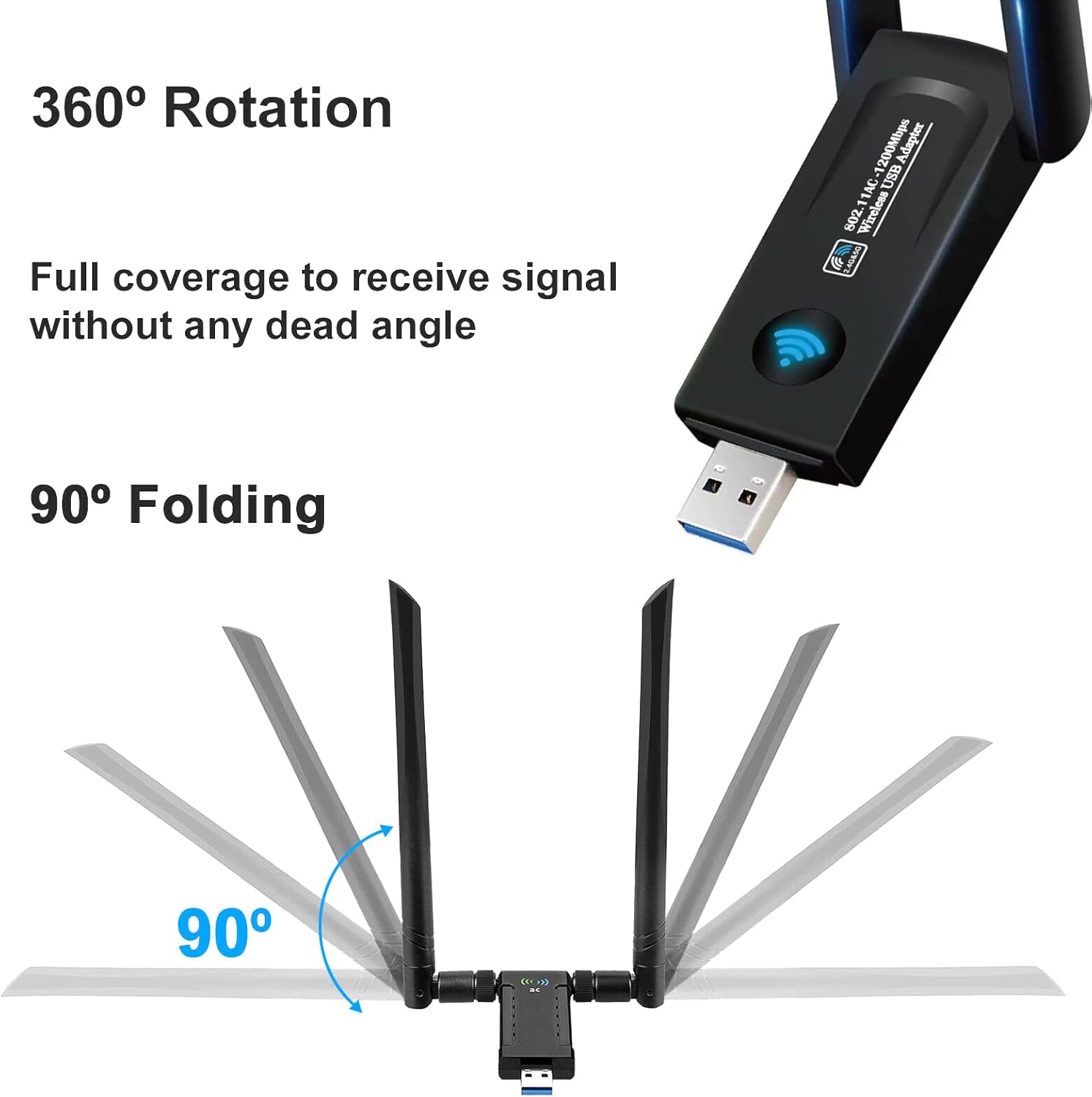
Image 3.1: Illustration of the adapter's antennas, demonstrating their 360-degree rotation and 90-degree folding capabilities, which allow for flexible positioning to optimize signal reception.
4. System Requirements
Before installing the adapter, ensure your system meets the following requirements:
- Operating System: Windows (Vista, 7, 8, 10), Mac OS X (10.6-10.14), Ubuntu Linux.
- Hardware Interface: Available USB 2.0 or USB 3.0 port. USB 3.0 is recommended for optimal performance.
- Compatible Devices: Desktop PC, Laptop.
- Optical Drive: CD-ROM drive (for driver installation from included CD) or internet access to download drivers.

Image 4.1: This image illustrates the adapter's compatibility with multiple operating systems including Mac OS X, Windows Vista, Windows 10/8/7/XP/2000, and Ubuntu Linux. It also highlights USB 3.0 connectivity and dual-band capabilities.
5. Setup and Installation
Follow these steps to install your Mustpoint AC1200 USB WiFi Adapter:
5.1. Driver Installation
- Do not plug in the adapter yet. Insert the included Driver CD into your computer's CD-ROM drive.
- Navigate to the CD drive and locate the setup file (e.g., "setup.exe" for Windows or a specific installer for Mac/Linux).
- Run the setup file and follow the on-screen instructions to install the drivers. If you do not have a CD-ROM drive, please download the latest drivers from the Mustpoint support website (refer to the support section for details).
- Restart your computer after the driver installation is complete, if prompted.
5.2. Connecting the Adapter
- After the drivers are installed and your computer has restarted (if necessary), plug the Mustpoint AC1200 USB WiFi Adapter into an available USB port on your computer. For optimal performance, use a USB 3.0 port.
- The operating system should automatically detect the adapter and complete the installation. The blue LED indicator on the adapter will illuminate, indicating it is powered on.
- Adjust the dual antennas to an upright position or angle them for best signal reception. The antennas can rotate 360 degrees and fold 90 degrees.

Image 5.1: The Mustpoint AC1200 USB WiFi Adapter plugged into the side of a laptop, with its dual antennas extended upwards, indicating active wireless signal transmission.
6. Operating Instructions
6.1. Connecting to a Wi-Fi Network
- Once the adapter is installed, open your computer's wireless network settings.
- Windows: Click the Wi-Fi icon in the system tray (bottom-right corner).
- Mac: Click the Wi-Fi icon in the menu bar (top-right corner).
- Linux: Access network settings through your desktop environment's system menu.
- A list of available wireless networks will appear. Select your desired network (SSID).
- If the network is secured, enter the Wi-Fi password (security key) when prompted.
- Click "Connect" or "Join" to establish the wireless connection.
6.2. Dual Band Operation (2.4GHz and 5GHz)
The AC1200 adapter supports both 2.4GHz and 5GHz Wi-Fi bands.
- 2.4GHz Band: Offers wider coverage and better penetration through walls, suitable for general internet browsing, email, and file downloads (up to 300Mbps).
- 5GHz Band: Provides faster speeds and less interference, ideal for online gaming, HD video streaming, and large file transfers (up to 867Mbps). This band typically has a shorter range.
Your router may broadcast separate SSIDs for each band (e.g., "MyWiFi_2.4G" and "MyWiFi_5G"). Choose the appropriate network based on your activity and proximity to the router.

Image 6.1: A visual representation of the dual-band functionality. The 2.4GHz band (300Mbps) is shown for activities like web surfing, email, and file downloads, while the 5.8GHz band (866Mbps) is depicted for online gaming, music streaming, and HD movie playback.
7. Maintenance
- Keep Drivers Updated: Periodically check the Mustpoint support website for the latest driver updates to ensure optimal performance and compatibility.
- Cleanliness: Keep the adapter clean and free from dust. Use a soft, dry cloth to wipe the surface. Avoid using liquid cleaners.
- Storage: When not in use, store the adapter in a cool, dry place away from direct sunlight and extreme temperatures.
- Antenna Position: Ensure antennas are positioned correctly for best signal. Avoid excessive force when adjusting them.
8. Troubleshooting
| Problem | Possible Solution |
|---|---|
| Adapter not detected / No Wi-Fi networks found. |
|
| Slow connection speed. |
|
| Frequent disconnections. |
|
| Cannot connect to a specific network. |
|
9. Specifications
| Feature | Detail |
|---|---|
| Model | AC1200 USB WiFi Adapter |
| Brand | Mustpoint |
| Wireless Standard | IEEE 802.11ac (backward compatible with 802.11a/b/g/n) |
| Interface | USB 3.0 (backward compatible with USB 2.0) |
| Frequency Bands | 2.4GHz and 5GHz (Dual Band) |
| Data Transfer Rate |
|
| Antenna Type | Dual 5dBi High Gain Antennas |
| Security Features | WFA, WPA, WPA2, WPS2.0, WAPI |
| Compatible OS | Windows (Vista/7/8/10), Mac OS X (10.6-10.14), Ubuntu Linux |
| Dimensions | 5.12 x 3.43 x 0.87 inches (approximate package dimensions) |
| Item Weight | 1.44 ounces / 0.04 Kilograms |
10. Warranty and Support
Mustpoint products are designed for reliability and performance. For specific warranty information, please refer to the warranty card included with your product or visit the official Mustpoint website.
For technical support, driver downloads, or frequently asked questions, please visit the Mustpoint support page. Contact information for customer service can typically be found on the product packaging or the official website.