
1. Safety Instructions
Please read all safety warnings carefully before using the battery.
- Do not disassemble, modify, or subject the battery to severe impact.
- Do not short-circuit the battery terminals with metal objects. This may cause fire, heat, or explosion.
- Do not expose the battery to high temperatures, heat, or immerse it in water or fire.
- Charge and use the battery only with specified chargers and methods.
- Discard used batteries according to manufacturer's instructions and local laws.
- Always read the instruction manual before use.
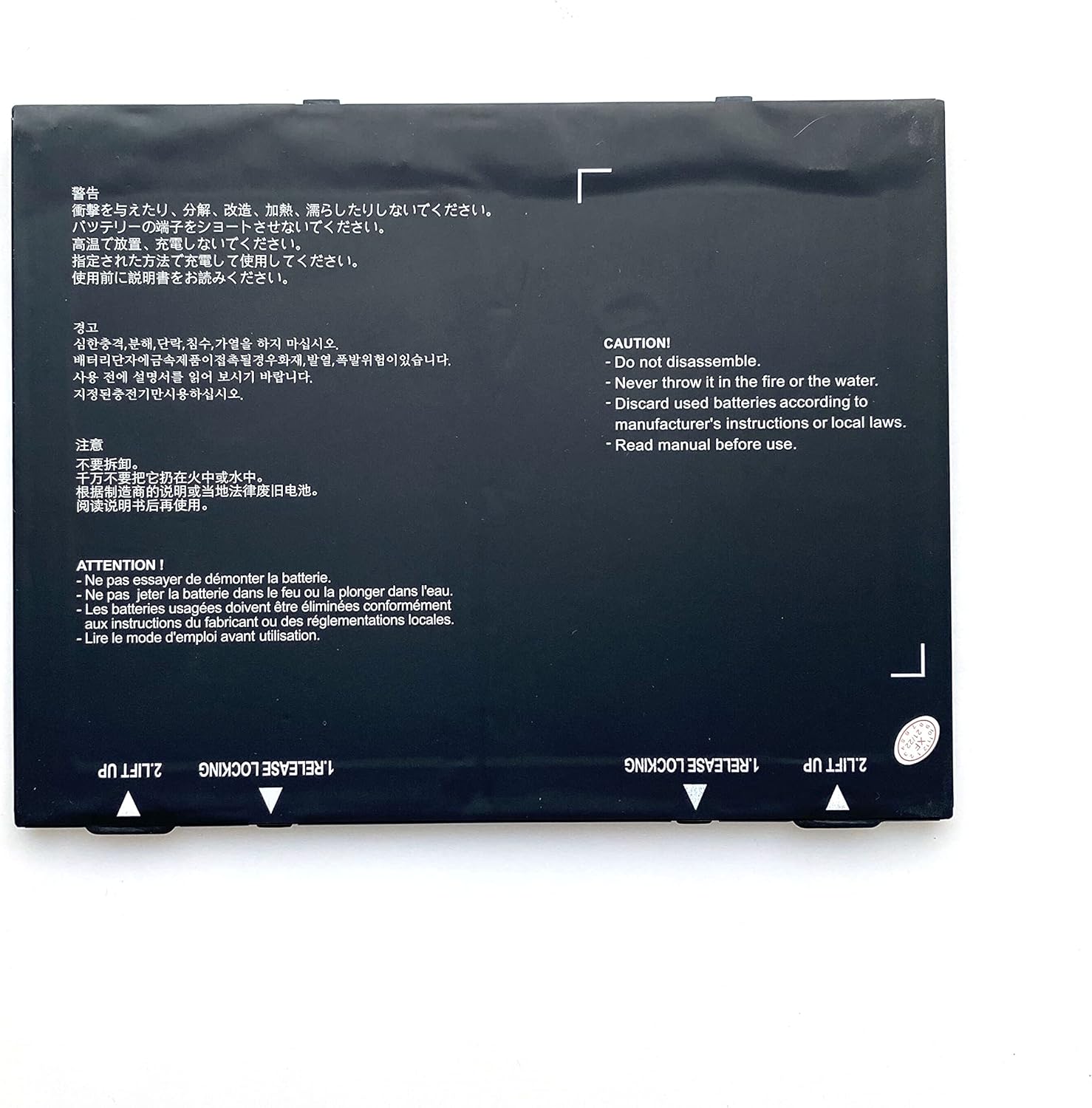
Image 1.1: CQCBD AMME2415 AMME3203 Battery showing safety warnings and installation indicators. This image displays the battery's physical appearance and critical safety information printed on its surface.
2. Product Overview
2.1 Key Features
- High Capacity: 3.8V Li-polymer battery delivering 33.06Wh/8700mAh for extended device operation.
- Device Compatibility: Specifically engineered for Zebra ET50 and ET55 tablets, ensuring perfect fit and optimal performance.
- Quality Cells: Constructed with Grade A cells for superior performance and consistent power delivery.
- Safety Certified: Meets rigorous FCC, CE, and RoHS certification standards for safe and reliable operation.
- Enhanced Longevity: Features multiple charging cycles capability for extended battery lifespan and sustained performance.
2.2 Package Contents
- 1 x CQCBD AMME2415 AMME3203 Battery
3. Setup and Installation
Follow these steps to properly install the CQCBD AMME2415 AMME3203 battery into your Zebra ET50 or ET55 tablet.
- Power Off Device: Ensure your Zebra tablet is completely powered off before beginning installation.
- Locate Battery Compartment: Identify the battery compartment on your Zebra ET50 or ET55 tablet. Refer to your tablet's user manual if needed.
- Remove Old Battery (if applicable): If replacing an existing battery, carefully release any locking mechanisms (often labeled as "1. RELEASE LOCKING" or similar) and lift the old battery out (often labeled as "2. LIFT UP").
- Insert New Battery: Align the new CQCBD battery with the compartment. Ensure the connectors match correctly.
- Secure Battery: Gently press the battery into place until it is fully seated. Engage any locking mechanisms to secure the battery.
- Close Compartment: Replace the battery compartment cover, if applicable, and secure it.
Image 3.1: Detail of the battery showing release and lift points for installation/removal. These labels guide the user on how to properly handle the battery during insertion or extraction from the tablet.
4. Operation
4.1 Initial Charging
Before first use, fully charge the battery. Connect your Zebra ET50/ET55 tablet to its original or a compatible charger. The charging indicator on your tablet will show the charging status.
4.2 Normal Use
The battery is designed for daily use in your Zebra ET50/ET55 tablet. For optimal performance, avoid completely draining the battery frequently. It is recommended to recharge the battery before it reaches critically low levels.
4.3 Charging Cycles
This Li-polymer battery supports multiple charging cycles. To maximize battery lifespan, avoid overcharging for extended periods once the battery is full. Disconnect the charger when the battery is fully charged.
5. Maintenance
- Storage: If storing the battery for an extended period, ensure it is charged to approximately 50-60% capacity. Store in a cool, dry place away from direct sunlight and extreme temperatures.
- Cleaning: Keep the battery contacts clean. Use a dry, soft cloth to wipe away any dust or debris. Do not use liquids or abrasive cleaners.
- Temperature: Avoid exposing the battery to extreme hot or cold temperatures, as this can degrade performance and shorten lifespan.
- Physical Damage: Protect the battery from physical damage, punctures, or crushing.
6. Troubleshooting
| Problem | Possible Cause | Solution |
|---|---|---|
| Battery not charging or not holding charge. | Incorrect installation, faulty charger, damaged battery, or software issue. | 1. Re-install the battery ensuring proper connection. 2. Try a different charger or charging cable. 3. Check tablet's charging port for debris. 4. Restart the tablet. 5. If issues persist, the battery may be faulty. |
| Tablet shuts off unexpectedly. | Low battery charge, faulty battery, or tablet software issue. | 1. Ensure the battery is adequately charged. 2. Perform a tablet software update or factory reset (backup data first). 3. If the problem continues, the battery may need replacement. |
| Battery drains quickly. | High background app usage, screen brightness too high, or battery degradation. | 1. Close unnecessary background applications. 2. Reduce screen brightness. 3. Disable Wi-Fi/Bluetooth when not in use. 4. Check battery health via tablet settings. |
7. Specifications
| Feature | Detail |
|---|---|
| Battery Type | Li-polymer |
| Voltage | 3.8V |
| Capacity | 33.06Wh / 8700mAh |
| Compatible Models | Zebra ET50, Zebra ET55 |
| Compatible Part Numbers | AMME2415, AMME3203, 1ICP4/77/110-2 |
| Dimensions (L x W x H) | 9.17 x 5.59 x 1.06 inches |
| Item Weight | 8.1 ounces |
| Certifications | FCC, CE, RoHS |
| Manufacturer | Foshan Eurasia Energy Technology Co., Ltd. |
8. Warranty and Support
This CQCBD battery is manufactured to high-quality standards. For information regarding warranty coverage, please refer to the product listing or contact your retailer directly.
For technical support or inquiries, please contact CQCQ customer service through the retailer's platform or the official CQCQ brand store.
Online Support: Visit the CQCQ Store on Amazon