1. Introduction
This manual provides detailed instructions for the proper setup, operation, and maintenance of your SMARTTECH Techno UD-900FX USB Condenser Microphone. Please read this manual thoroughly before using the product to ensure optimal performance and longevity.

Image 1.1: The SMARTTECH Techno UD-900FX USB Condenser Microphone with its included tripod stand and USB cable.
2. Package Contents
Please verify that all items listed below are included in your package:
- 1x USB Condenser Microphone
- 1x Portable Microphone Stand
- 1x Table Mounting Clamp
- 1x USB Cable (1.5 m / 4.92 ft)
- 1x User Manual
3. Product Overview
3.1 Key Features
- Cardioid Directivity: Designed to capture sound from the front, reducing unwanted background noise.
- High Sensitivity: Ensures clear and pure audio capture.
- Plug & Play: No drivers required for most operating systems.
- Multi-Platform Compatibility: Works with Windows, macOS, and PS4.
- Integrated Controls: Mute key, Volume control, and Echo adjustment.
- 3.5mm Headphone Jack: For real-time audio monitoring.
- Durable Construction: Full metal body for enhanced durability.
3.2 Microphone Controls and Ports
The UD-900FX microphone features intuitive controls for easy audio management.
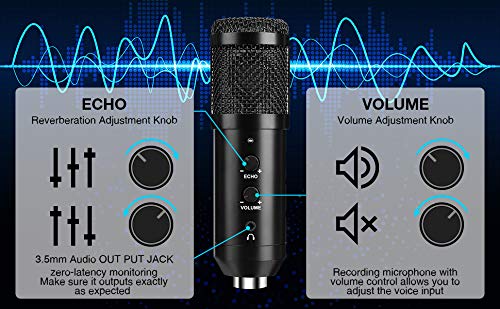
Image 3.1: Detailed view of the microphone's Echo, Volume, and 3.5mm Audio Out controls.
- Echo Control: Adjusts the reverberation effect.
- Volume Control: Adjusts the microphone's input volume.
- 3.5mm Audio Out Jack: Connect headphones for direct monitoring of your audio.
- Mute Button: Quickly mute or unmute the microphone.

Image 3.2: Features including the metal protection mesh, stable USB port, and adjustable controls.

Image 3.3: Illustration of the cardioid polar pattern, which helps reduce background noise.
4. Setup
4.1 Assembling the Microphone Stand
Follow these steps to assemble the portable tripod stand:

Image 4.1: Visual guide for assembling the microphone stand and connecting the microphone.
- Insert the middle pole into the tripod base from the bottom.
- Tighten the thread to secure the middle rod.
- Install the condenser microphone base onto the rod.
- Install the microphone body onto the base.
- Insert the USB cable into the microphone's USB port.
4.2 Connecting to Your Device
The UD-900FX is a Plug & Play device, requiring no additional drivers for most systems.
- Connect the USB cable from the microphone directly to an available USB 2.0 port on your PC, laptop, desktop, or PS4.
- Your operating system should automatically detect and configure the microphone.
- For optimal positioning, adjust the angle of the microphone on its stand.

Image 4.2: The adjustable tripod stand allows for 180-degree angle adjustments.
5. Operating Instructions
Once connected, the microphone is ready for use. You can adjust settings directly on the microphone or through your device's sound settings.
- Volume Adjustment: Use the 'VOL' knob on the microphone to increase or decrease the input sensitivity.
- Echo Adjustment: Use the 'ECHO' knob to add or remove a reverberation effect to your voice.
- Mute Function: Press the 'MUTE' button to instantly silence the microphone. Press again to unmute.
- Real-time Monitoring: Plug headphones into the 3.5mm jack on the microphone to hear your audio input without latency.
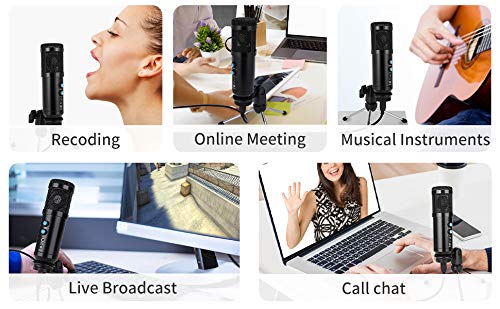
Image 5.1: The microphone is suitable for diverse applications such as recording, online meetings, and live streaming.
6. Compatibility
The SMARTTECH Techno UD-900FX USB Condenser Microphone offers broad compatibility:
- Operating Systems: Compatible with Windows, macOS, and Android/iOS (via appropriate adapters, not included).
- Gaming Consoles: Supports PS4 and PS5.
- Hardware: Works with laptops, desktop PCs, and other devices with a compatible USB 2.0 port.
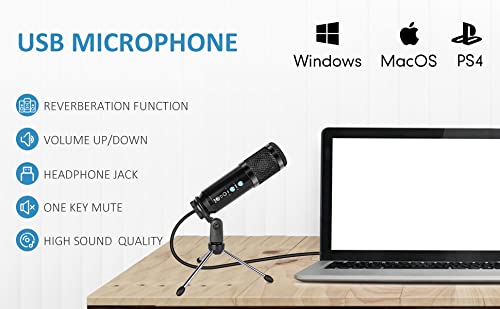
Image 6.1: The microphone is compatible with major operating systems and gaming platforms.
7. Maintenance
To ensure the longevity and optimal performance of your microphone, follow these maintenance guidelines:
- Cleaning: Use a soft, dry cloth to wipe the microphone body. Avoid using harsh chemicals or abrasive materials.
- Storage: When not in use, store the microphone in a clean, dry place away from extreme temperatures and humidity.
- Handling: Handle the microphone with care. Avoid dropping it or subjecting it to strong impacts, as this can damage internal components.
- Cable Care: Do not bend or crimp the USB cable excessively. Always grasp the plug, not the cable, when disconnecting.
8. Troubleshooting
If you encounter issues with your microphone, refer to the following common solutions:
| Problem | Possible Solution |
|---|---|
| No sound output from microphone |
|
| Distorted or unclear sound |
|
| Microphone not recognized by device |
|
9. Specifications
Detailed technical specifications for the SMARTTECH Techno UD-900FX USB Condenser Microphone:
- Model: UD-900FX
- Directivity: Cardioid
- Frequency Response: 20Hz - 20KHz
- Sensitivity: -34dB ±2dB
- Equivalent Noise Level: 16dB A
- Signal-to-Noise Ratio: 78dB
- USB Interface: USB 2.0
- Power Supply: USB DC5V
- Sampling Rate: 44.1KHz/48bit
- Impedance: 2200 Ohm
- Material: Metal
- Hardware Platform: PC, Laptop
- Number of Channels: 1
- Connector Type: USB (for data/power), 3.5mm Jack (for monitoring)

Image 9.1: Dimensions of the UD-900FX microphone and its portable stand.
10. Warranty and Support
This product comes with a standard manufacturer's warranty. For specific warranty terms and conditions, please refer to the documentation provided with your purchase or contact SMARTTECH customer support.
For technical assistance, troubleshooting beyond this manual, or warranty claims, please contact SMARTTECH customer support through their official website or the contact information provided at the point of purchase.