
1. Product Overview
The ZdalaMit RC-834M is a replacement remote control designed for specific Onkyo AV Receiver models. It provides full functionality without requiring any programming.
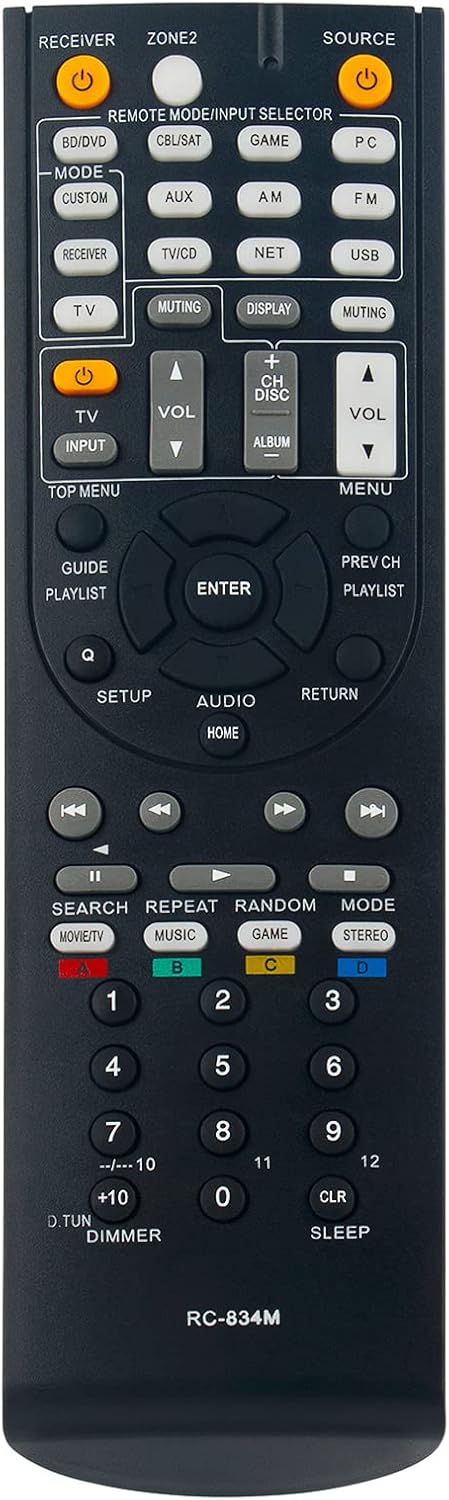
Image 1.1: Front view of the RC-834M remote control. This image displays the layout of all buttons, including power, input selectors, volume controls, navigation, and numeric keys.
2. Setup and Initial Use
2.1 Battery Installation
This remote control requires two (2) AA size alkaline batteries. Batteries are not included with the product.
- Locate the battery compartment cover on the back of the remote control.
- Slide the cover downwards or press the latch to open the compartment.
- Insert two AA alkaline batteries, ensuring the positive (+) and negative (-) terminals align correctly with the indicators inside the compartment.
- Slide the battery compartment cover back into place until it clicks securely.

Image 2.1: Angled view of the RC-834M remote control. This perspective highlights the ergonomic design and the location of the battery compartment on the underside.
2.2 First-Time Operation
The ZdalaMit RC-834M remote control is pre-programmed for compatible Onkyo AV Receivers. No additional programming or setup is required. Once batteries are correctly installed, the remote is ready for immediate use.
Note: This remote control cannot be programmed to operate a television or other non-Onkyo AV Receiver devices.
3. Operating Instructions
The RC-834M remote control functions identically to the original remote for the specified Onkyo AV Receiver models. Point the remote directly at your AV receiver and press the desired function button.
3.1 Compatible Onkyo AV Receiver Models
This remote control is compatible with the following Onkyo AV Receiver models:
- TX-NR515
- TX-NR414
- HT-S6500
- HT-S7500
- HT-R791
- HT-RC460
- HT-R758
It also supports models with similar numbering conventions such as TXNR515, TXNR414, HTRC440, HTS6500, HTS7500, HTR791, HTRC460, and HTR758.
4. Maintenance
4.1 Battery Replacement
Replace the batteries when the remote control becomes unresponsive or its range decreases significantly. Always replace both batteries simultaneously with new AA alkaline batteries.
4.2 Cleaning
To clean the remote control, use a soft, dry cloth. Do not use liquid cleaners, abrasive pads, or chemical solvents, as these may damage the remote's surface or internal components.
5. Troubleshooting
- Remote is not responding:
- Ensure the batteries are inserted correctly with the proper polarity.
- Replace old batteries with new AA alkaline batteries.
- Check for any obstructions between the remote control and the AV receiver.
- Ensure you are within the effective operating range of the AV receiver.
- Some buttons are not working:
- This often indicates low battery power. Replace both batteries.
- Ensure the remote is clean and there is no debris obstructing the buttons.
If issues persist after following these steps, please refer to the 'Warranty & Support' section for further assistance.
6. Specifications
| Feature | Detail |
|---|---|
| Model | RC-834M |
| Brand | ZdalaMit |
| Product Dimensions | 6 x 2 x 0.5 inches |
| Item Weight | 2 ounces |
| Batteries Required | 2 x AA (Alkaline, not included) |
| Compatible Devices | Onkyo AV Receivers (Specific models listed in Section 3.1) |
| Special Feature | Ergonomic design |
7. Warranty & Support
For any questions, concerns, or technical support regarding your ZdalaMit RC-834M replacement remote control, please contact the seller directly through your purchase platform. They will be able to provide assistance and information regarding product warranty, if applicable.


