
1. Introduction
This manual provides essential information for the proper installation, operation, and maintenance of your Freewing 3 Axis Flight Controller FPV Stabilizer E51 Gyro. Designed for RC airplanes, this stabilizer enhances flight stability, making your flying experience more controlled and enjoyable. Please read this manual thoroughly before use to ensure optimal performance and safety.

Figure 1: The Freewing E51 3 Axis Flight Controller, a compact device designed to stabilize RC aircraft.
2. Product Overview and Features
The Freewing E51 is a sophisticated 3-axis flight stabilizer engineered to provide superior stability for various RC airplane configurations. Its compact design and universal compatibility make it an ideal upgrade for many models.
Key Features:
- 3-Axis Flight Stabilization: Provides enhanced stability across roll, pitch, and yaw axes for smoother flight.
- Versatile Compatibility: Supports normal fixed-wing aircraft, V-tail, and triangle-tail configurations.
- Independent Sensitivity Adjustment: Allows for fine-tuning of gyro sensitivity for each axis (rudder, elevator, aileron) to match specific aircraft characteristics and pilot preferences.
- Visual Indicators: Equipped with Red/Blue LED indicators for clear operational status feedback.
- Compact and Lightweight: Designed for minimal impact on aircraft weight and balance.
- Standard Connectivity: Utilizes standard servo connections for easy integration.
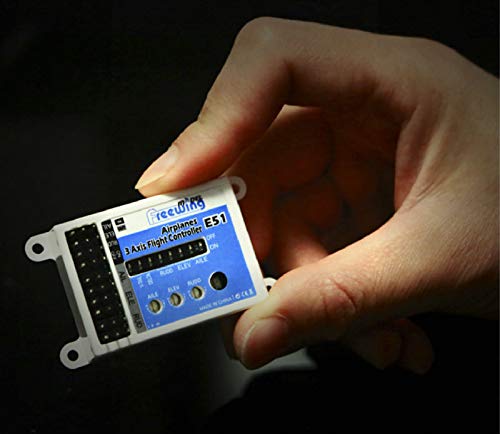
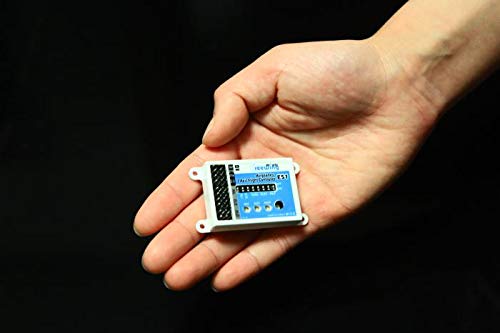
Figure 2: The compact size of the E51 flight controller, easily held in one hand, demonstrating its suitability for various RC aircraft without adding significant bulk.
3. Package Contents
Upon opening the package, please verify that all the following items are included:
- Freewing E51 Gyro (1 pc)
- Servo Extension Wires (4 pcs) - male to male
- Mounting Screws (4 pcs)
- Small Screwdriver (1 pc) - for sensor trim/adjustment
- User Manual (1 pc) - this document
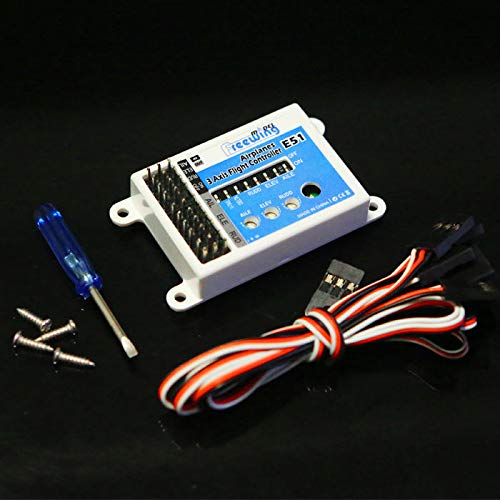
Figure 3: Contents of the Freewing E51 package, including the flight controller, servo wires, mounting screws, and a screwdriver for adjustments.
4. Setup and Installation
Proper installation is crucial for the optimal performance of the E51 flight controller. Follow these general steps for setup:
- Mounting: Securely mount the E51 gyro to a flat, stable surface within your RC airplane. Ensure it is oriented correctly as per the markings on the unit (usually indicating forward direction). Use the provided mounting screws.
- Receiver Connection: Connect the E51 flight controller to your RC receiver using the provided male-to-male servo extension wires. Refer to your receiver's manual for specific port assignments (e.g., Aileron, Elevator, Rudder, Throttle, Gear). The E51 has clearly labeled input ports for AIL (Aileron), ELE (Elevator), and RUD (Rudder).
- Servo Connections: Connect your aircraft's servos (aileron, elevator, rudder) to the corresponding output ports on the E51 flight controller.
- Power Supply: Ensure the E51 receives power from your receiver or a dedicated power source within the specified voltage range of 3.5V to 7.2V.
- Aircraft Type Selection: The E51 supports different aircraft types. Verify the correct switch settings on the unit for your specific aircraft configuration (normal fixed-wing, V-tail, or triangle-tail).
- Initial Calibration: After power-up, allow the gyro to initialize and self-calibrate. Keep the aircraft still during this process. The LED indicators will provide feedback on its status.
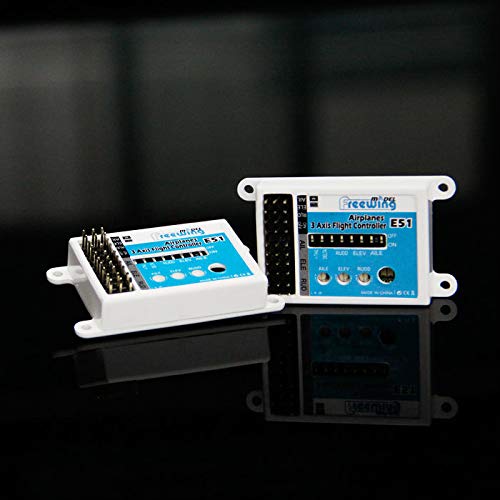
Figure 4: Multiple views of the E51 flight controller, illustrating its various ports and switches for proper connection and configuration.
5. Operating Instructions
Once installed and powered, the E51 flight controller will actively stabilize your RC airplane.
Sensitivity Adjustment:
The E51 features independent sensitivity adjustment for Aileron (AILE), Elevator (ELEV), and Rudder (RUDD). Use the provided small screwdriver to carefully turn the adjustment potentiometers on the unit.
- Turn clockwise to increase sensitivity.
- Turn counter-clockwise to decrease sensitivity.
Recommendation: Start with lower sensitivity settings and gradually increase them during test flights until the desired level of stability and responsiveness is achieved. Overly high sensitivity can lead to oscillations.
LED Indicators:
The Red/Blue LED indicators provide visual feedback on the gyro's operational status. Consult the specific LED patterns in the detailed product documentation (if available) for precise interpretations. Generally, a steady light indicates proper operation.
6. Maintenance
The Freewing E51 flight controller is designed for durability and requires minimal maintenance.
- Cleaning: Keep the unit free from dust, dirt, and moisture. Use a soft, dry cloth for cleaning. Avoid using solvents or harsh chemicals.
- Connections: Periodically check all wire connections to ensure they are secure and free from damage. Loose connections can lead to intermittent performance.
- Environmental Conditions: Store and operate the unit within its specified temperature range (-40°C to +80°C) and avoid excessive humidity.
- Physical Inspection: Regularly inspect the unit for any signs of physical damage, such as cracks in the casing or bent pins.
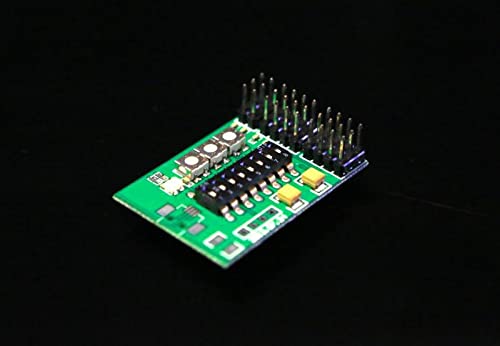
Figure 5: The internal circuit board of the E51, highlighting the precision components that require protection from environmental factors.
7. Troubleshooting
If you encounter issues with your E51 flight controller, consider the following common troubleshooting steps:
| Problem | Possible Cause | Solution |
|---|---|---|
| No power/LEDs off | Incorrect voltage, loose power connection, faulty receiver power. | Verify power supply voltage (3.5-7.2V). Check all power connections from receiver to gyro. Test receiver power independently. |
| Unstable flight/Oscillations | Gyro sensitivity too high, incorrect mounting, vibration. | Reduce gyro sensitivity using the adjustment potentiometers. Ensure the gyro is securely mounted and isolated from excessive vibrations. |
| Controls unresponsive/Incorrect direction | Incorrect servo connections, reversed channels on transmitter, incorrect aircraft type setting. | Double-check all servo connections to the E51. Verify channel directions on your RC transmitter. Ensure the correct aircraft type (fixed-wing, V-tail, triangle-tail) is selected on the E51. |
| Gyro not functioning with Spektrum telemetry receiver | Incompatibility issue. | Note: This gyro is not compatible with any Spektrum telemetry receivers. Use a non-telemetry Spektrum receiver or a receiver from another compatible brand. |
8. Specifications
| Parameter | Value |
|---|---|
| Model | E51 |
| Input Voltage | 3.5 - 7.2V |
| Current Consumption | Max. 50mA |
| Gyro Rate | 2000 degrees/second |
| Input Signal | 50HZ PWM |
| Output Signal | 50HZ PWM |
| Operating Temperature | -40°C to +80°C |
| Weight | 12g |
| Manufacturer | GalaxyElec |
| ASIN | B09NCCV7RH |
| Date First Available | December 9, 2021 |
9. Warranty and Support
For information regarding warranty coverage, technical support, or service inquiries, please refer to the documentation included with your product at the time of purchase or visit the official GalaxyElec website.
Please retain your proof of purchase for any warranty claims.