
Introduction
This manual provides essential instructions for the safe operation, installation, maintenance, and troubleshooting of your DuraComfort DH50PWM Dehumidifier. Please read this manual thoroughly before using the appliance and retain it for future reference.
Important Safety Information
Always follow basic safety precautions when using electrical appliances to reduce the risk of fire, electric shock, and injury.
- Ensure the power supply matches the rating label on the unit.
- Do not operate the unit with a damaged power cord or plug.
- Do not block air inlets or outlets to ensure proper ventilation.
- Keep the unit upright during operation and transport.
- Unplug the appliance before cleaning or performing any servicing.
- Do not use the dehumidifier in wet areas where water may splash directly onto the unit.
- Keep children away from the appliance during operation.
Product Overview
The DuraComfort DH50PWM is an ENERGY STAR certified dehumidifier designed for large rooms up to 4500 sq.ft. It features a 70-pint (2012 DOE) per day dehumidification capacity, Wi-Fi control, and multiple drainage options.
Key Features
- ENERGY STAR Most Efficient 2024 Certified: Recognized for outstanding dehumidification efficiency and energy savings.
- Wi-Fi Function for Remote Control: Control settings via the DuraComfort app on your smartphone.
- Three Drainage Options: Includes pump drainage, continuous gravity drainage, and manual water tank collection.
- Suitable for Large Areas: Effectively dehumidifies spaces up to 4500 Sq.Ft.
- Portable Design: Equipped with 360° easy-rolling wheels and ergonomic recessed handles for easy movement.
- 1.6 Gallon Water Tank: Features an auto shut-off function and a "Tank Full" indicator to prevent overflow.
- Additional Functions: Auto Defrost, Timer, Overflow Protection, and Child Lock.
Components
The product package includes the Dehumidifier unit, a Removable Water Tank, this User Manual, and a 16.4 Ft Pump Hose.

This image shows the DuraComfort DH50PWM dehumidifier from the front-left, highlighting its compact design, the included drain hose, and a smartphone displaying the Wi-Fi control app.
Setup and Installation
Unpacking
Carefully remove the dehumidifier from its packaging. Inspect the unit for any signs of shipping damage. It is recommended to retain the original packaging for future storage or transport.
Placement
- Place the unit on a level, stable surface to ensure proper operation and prevent vibrations.
- Ensure at least 8 inches (20 cm) of clear space around the air inlet and outlet grilles for optimal airflow and efficiency.
- Do not place the dehumidifier near heat sources such as radiators, heaters, or in direct sunlight.
- Avoid placing the unit in areas where it might be exposed to freezing temperatures, as this can damage the internal components.

This image illustrates the versatility of the DuraComfort DH50PWM dehumidifier, showing it placed in different large room environments such as an office, basement, garage, warehouse, and living room, indicating its suitability for various applications.
Power Connection
Plug the power cord securely into a grounded electrical outlet that meets the specifications listed on the unit's rating label.
Drainage Options
The DH50PWM offers three convenient methods for water removal:
- Manual Drainage (Water Tank): Water collects in the 1.6-gallon internal tank. The unit will automatically shut off when the tank is full, and the "Tank Full" indicator will illuminate. Empty the tank by carefully pulling it out and discarding the collected water.
- Continuous Drainage (Gravity): Connect a standard garden hose (not included, with an inner diameter of 1.0625 inches) to the continuous drain port located on the back of the unit. Ensure the hose is sloped downwards to a floor drain or suitable receptacle for gravity drainage.
- Pump Drainage: For vertical or longer distance drainage, connect the included 16.4 ft (5m) pump hose to the pump drain port. The internal pump will automatically activate to discharge water when the water level in the internal reservoir reaches a certain point.

This diagram visually explains the three drainage options for the dehumidifier: pump drainage using the included 16.4 ft hose, continuous gravity drainage with a shorter hose, and manual drainage by emptying the 1.6-gallon water tank. It also shows where a garden hose can be connected for continuous drainage.
Operating Instructions
Control Panel
The unit features a simple smart control panel for easy operation.

This image provides a detailed view of the dehumidifier's control panel, showing the digital display indicating 48% relative humidity, and various buttons and indicator lights for functions like Pump, Timer, Lock, Mode selection (Dry, Wi-Fi, Turbo, Comfort, Continuous), and Power.
- Power Button: Press to turn the unit ON or OFF.
- Mode Button: Press to cycle through available operating modes: Dry, Turbo, Comfort, and Continuous.
- Humidity Adjustment Buttons (Up/Down): Use these buttons to set your desired humidity level, ranging from 35%RH to 80%RH.
- Timer Button: Press to set the auto-on or auto-off timer, up to 24 hours. Hold this button for 3 seconds to reset the filter alarm.
- Pump Button: Press to activate or deactivate the internal pump for drainage, if using the pump drainage option.
- Lock Button: Hold for 3 seconds to activate or deactivate the child lock function, preventing accidental changes to settings.
- Display: The LED display shows the current room humidity, your set humidity level, or timer settings.
Wi-Fi Control
To utilize the remote control features, download the DuraComfort app on your smartphone. Follow the in-app instructions to connect your dehumidifier to your home Wi-Fi network. Once connected, you can remotely control humidity settings, fan speed, and timer functions from your device.
Maintenance
Regular maintenance ensures optimal performance and extends the lifespan of your dehumidifier. Always unplug the unit from the power outlet before performing any maintenance procedures.
Cleaning the Air Filter
The air filter should be cleaned approximately every two weeks, or more frequently depending on usage and the air quality in your environment.
- Turn off and unplug the dehumidifier.
- Remove the filter from its slot, typically located on the back or side of the unit.
- Wash the filter gently with warm, soapy water.
- Rinse the filter thoroughly under running water and allow it to air dry completely before reinstallation.
- Reinstall the dry filter into its slot. If the "Filter" indicator light is on, press and hold the "Timer" button for 3 seconds to reset the filter alarm.

This image displays the washable air filter of the DuraComfort DH50PWM dehumidifier, emphasizing its reusability and ease of maintenance.
Cleaning the Water Tank
Clean the water tank regularly to prevent the growth of mold, mildew, and bacteria.
- Remove the water tank from the unit.
- Wash the tank with a mild detergent and water.
- Rinse thoroughly and ensure it is completely dry before placing it back into the unit.
Storing the Dehumidifier
If you plan to store the unit for an extended period, follow these steps:
- Unplug the unit and ensure the water tank is completely empty and dry.
- Clean the air filter and the water tank as described above.
- Wrap the power cord neatly and secure it to prevent damage.
- Cover the unit with a plastic bag or cloth to protect it from dust accumulation.
- Store the dehumidifier in an upright position in a cool, dry place.
Troubleshooting
Refer to this section for common issues and their potential solutions. If the problem persists after attempting these steps, please contact customer service.
| Problem | Possible Cause | Solution |
|---|---|---|
| Unit does not turn on | No power supply; Power cord loose; Water tank full or improperly seated. | Check the power outlet and circuit breaker; Ensure the power cord is securely plugged in; Empty the water tank and ensure it is correctly reinserted. |
| No dehumidification or insufficient performance | Air filter clogged; Room temperature too low; Desired humidity setting too high; Doors/windows open. | Clean the air filter; Ensure the room temperature is above 41°F (5°C); Lower the desired humidity setting; Close all doors and windows in the area. |
| Unit is noisy | Unit not placed on a level surface; Air filter clogged. | Place the unit on a firm, level surface; Clean the air filter. |
| Water leakage | Water tank not properly seated; Drain hose loose, kinked, or clogged (for continuous/pump drainage). | Reinsert the water tank correctly; Check the drain hose connection, ensure it is not kinked, and clear any blockages. |
| E1 Error Code | Temperature/humidity sensor error. | Unplug the unit for 10 minutes, then plug it back in. If the error persists, contact customer service. |
| E5 Error Code | Pump malfunction (if applicable). | Check the pump hose for kinks or blockages. Ensure the pump function is activated if using pump drainage. If the error persists, contact customer service. |
If troubleshooting steps do not resolve the issue, please contact DuraComfort customer support.
Specifications
| Feature | Detail |
|---|---|
| Model Name | DH50PWM |
| Brand | DuraComfort |
| Dehumidification Capacity | 70 Pints/day (2012 DOE Rating) |
| Coverage Area | Up to 4500 Sq.Ft |
| Water Tank Volume | 1.6 Gallons |
| Product Dimensions (D x W x H) | 15"D x 12"W x 22"H |
| Item Weight | 42.5 Pounds |
| Wattage | 500 watts |
| Humidity Setting Range | 35%RH - 80%RH |
| Special Features | ENERGY STAR Certified, Auto Defrost, Auto Shut Off, Timer, Overflow Protection, Built-in handle, Built-in pump, Wi-Fi Control |
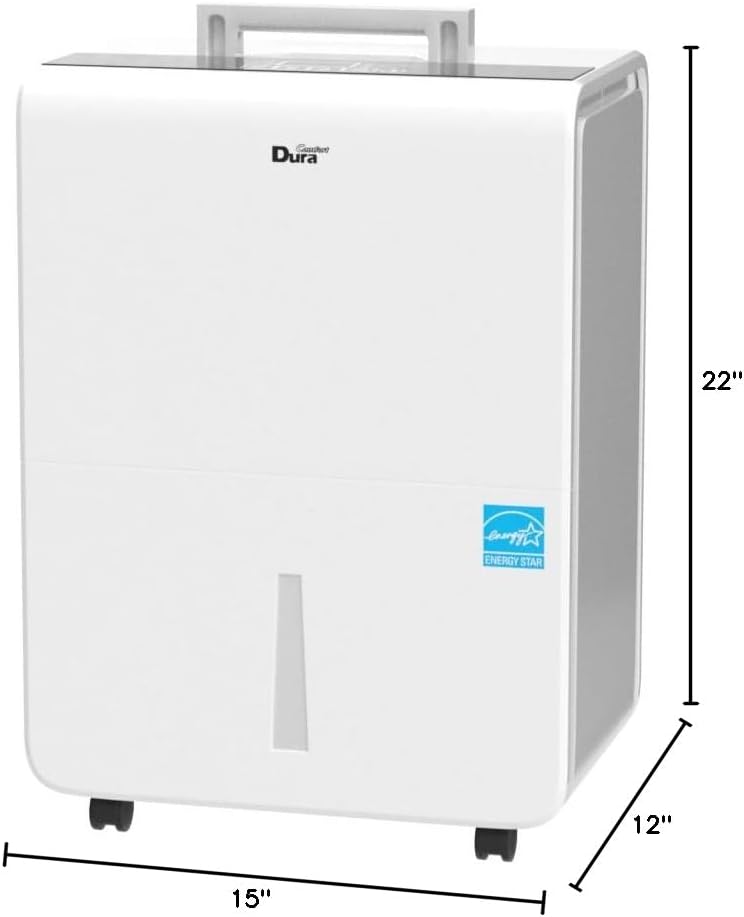
This image provides a dimensional drawing of the DuraComfort DH50PWM dehumidifier, clearly indicating its height of 22 inches, width of 12 inches, and depth of 15 inches.
Warranty and Customer Support
For detailed warranty information or technical assistance, please contact DuraComfort customer service. Specific warranty terms and conditions may vary.
Refer to the official DuraComfort website or the contact information provided in your product packaging for the most up-to-date support details.
When contacting support, please have your model number (DH50PWM) and purchase information readily available to expedite the service process.


