
1. Introduction and Overview
The Lock Connection CL-01 Electronic Cabinet Lock is a hidden DIY RFID locking system designed for wooden cabinets, drawers, lockers, and cupboards. This system provides enhanced security and privacy for personal items, and can also help improve child safety by preventing unauthorized access to drawers or cabinets.
Key features include:
- Hidden/Invisible Design: The lock mechanism is concealed within the furniture.
- Pre-programmed System: All locks are pre-programmed at the factory, requiring only battery installation for immediate use.
- RFID Technology: Utilizes 13.56MHz RFID cards and fobs for secure access.
- Low Power Alarm & Auto-Unlock: Alerts users when batteries are low and automatically unlocks when power is critically low to prevent being locked out.
- Versatile Application: Suitable for various wooden furniture types, including cabinets, drawers, lockers, medical carts, data racks, and gun boxes.
Note: This RFID lock system is designed for wooden applications and will not function through metal doors.
2. Package Contents
Upon opening your Lock Connection CL-01 Electronic Cabinet Lock kit, you should find the following components:
- 1 x Lock Body
- 1 x Latch/Striker
- 1 Set of Mounting Screws
- 1 x Manager RFID Card (for programming and management)
- 1 x User RFID Card (for daily unlocking)
- 2 x User RFID Fobs (keychain style, for daily unlocking)
- 1 x RFID Tag/Indication Sticker (optional use to mark scan area)
- User Instructions (this manual)

Figure 2.1: Complete contents of the CL-01 Electronic Cabinet Lock kit.
3. Specifications
| Feature | Detail |
|---|---|
| Brand | Lock Connection |
| Model Number | CL-01 |
| Special Feature | RFID Lock |
| Dimensions (L x W x H) | 5 x 4 x 3 inches (approx. 12.7 x 10.16 x 7.62 cm) |
| Item Weight | 7.4 ounces (approx. 210 grams) |
| Material | Metal |
| Power Source | Battery Powered (4 AAA batteries required, not included) |
| RFID Frequency | 13.56MHz |
| Max Wood Thickness (Cards) | Up to 1.5 inches (approx. 3.8 cm) |
| Max Wood Thickness (Fobs) | Up to 1 inch (approx. 2.54 cm) |

Figure 3.1: Dimensions of the CL-01 Lock components.
4. Installation
The CL-01 lock is designed for easy DIY installation. Ensure the cabinet or drawer material is wood and does not exceed the maximum reading distance for RFID cards (1.5 inches) or fobs (1 inch).
4.1. Preparing for Installation
- Identify Mounting Location: Choose an internal surface of your cabinet, drawer, or cupboard where the lock body can be securely mounted.
- Determine Striker Orientation: The latch/striker can be mounted either vertically or horizontally to align with the lock body's mechanism.
- Mark Scan Position: It is recommended to mark the exact position on the exterior of the furniture where the RFID cards or fobs will be scanned. The included RFID tag sticker can be used for this purpose.
- Install Batteries: Insert 4 AAA batteries into the lock body. Ensure correct polarity.
4.2. Mounting the Lock
Use the provided screws to securely attach the lock body and the latch/striker to the desired internal surfaces of your furniture. Ensure proper alignment for smooth operation.
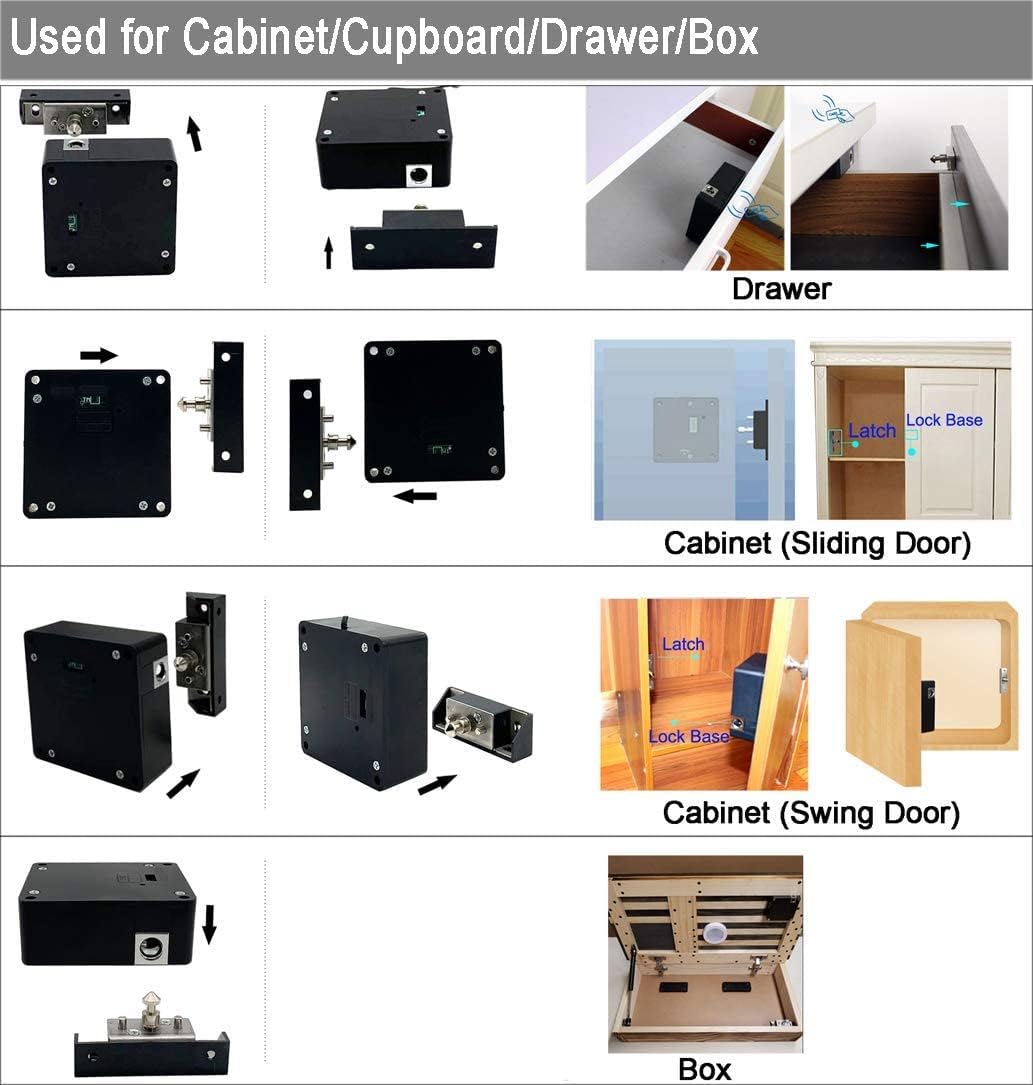
Figure 4.1: Examples of installation for different furniture types.
Video 4.1: An overview of the Lock Connection CL-01 RFID Lock kit components and a demonstration of its functionality through wood.
5. Operation
The CL-01 lock is designed for straightforward operation with its pre-programmed RFID cards and fobs.
5.1. Unlocking the Lock
To unlock the cabinet or drawer, simply scan a pre-programmed User Card or User Fob over the marked scan area on the exterior of the furniture. The lock will disengage, allowing the furniture to be opened.
5.2. Lock Modes
The lock supports multiple unlock modes:
- User Card Unlock: A single User Card or User Fob is sufficient to unlock the mechanism.
- User Card + Management Card Unlock: This mode requires both a User Card/Fob and the Management Card to be scanned in sequence to unlock. Refer to the included user instructions for details on setting up this mode if desired.
5.3. Programming (Advanced)
While the lock comes pre-programmed, you can reprogram it or add/remove additional user cards/fobs using the Manager Card. Detailed instructions for reprogramming are provided in the separate user manual included in your package. All programming is performed at the lock level.
6. Maintenance
The Lock Connection CL-01 lock requires minimal maintenance, primarily focusing on battery management.
6.1. Battery Installation and Replacement
The lock requires 4 AAA batteries (not included). To install or replace batteries, open the battery compartment on the lock body and insert new batteries, ensuring correct polarity. It is recommended to use high-quality alkaline batteries for optimal performance and lifespan.
6.2. Low Power Alarm and Auto-Unlock
The lock is equipped with a low power alarm system. When the battery level is low, the lock will emit a rapid series of 10 beeps immediately after being opened. After this initial alarm, the lock can still be used approximately 30 more times before the batteries become too weak to operate.
In the event that the batteries become critically weak, the lock will automatically release the striker. This auto-unlock feature prevents users from being permanently locked out due to dead batteries. Once the striker is released, the batteries must be replaced before the lock can be used again.
7. Troubleshooting
If you encounter issues with your Lock Connection CL-01 Electronic Cabinet Lock, consider the following common troubleshooting steps:
- Lock Not Responding to RFID Card/Fob:
- Ensure batteries are installed correctly and are not depleted. Replace batteries if the low power alarm has sounded or if the lock is unresponsive.
- Verify that you are scanning the RFID card/fob directly over the lock body's sensor. The optional RFID tag sticker can help pinpoint the exact location.
- Check the thickness of the wooden material. RFID cards work through up to 1.5 inches of wood, while fobs work through approximately 1 inch. Exceeding these limits may prevent proper reading.
- Confirm that the furniture is made of wood. This RFID lock will not function through metal doors or surfaces.
- If the lock was recently reprogrammed, ensure the cards/fobs you are using are correctly programmed to the lock.
- Lock Does Not Engage/Disengage Properly:
- Check the alignment of the lock body and the latch/striker. Misalignment can prevent the lock from engaging or releasing smoothly.
- Ensure there is no physical obstruction preventing the striker from moving freely.
- If the lock is installed on a drop-down shelf or similar application, ensure no pressure is applied to the lock mechanism when attempting to operate it, as this can prevent release.
- Low Battery Alarm Sounds Frequently:
- Replace all 4 AAA batteries with new, high-quality alkaline batteries.
8. Support
Lock Connection is a USA-based hardware supplier located in Lancaster, PA. For any questions, technical assistance, or support regarding your CL-01 Electronic Cabinet Lock, please refer to the contact information provided on the Lock Connection website or the original product packaging.
While specific warranty details are not provided in this manual, please consult the manufacturer's official website or contact their customer service for information regarding product warranty and return policies.