
FreedConn TMAX PRO (tcs-tmpro)
FreedConn TMAX PRO Motorcycle Helmet Bluetooth Headset
Model: TMAX PRO (tcs-tmpro)
Brand: FreedConn
Product Overview
The FreedConn TMAX PRO Motorcycle Helmet Bluetooth Headset is an advanced communication system designed for motorcyclists. It features CVC Noise Cancellation for clear audio, stereo music playback, and supports intercom communication for up to 6 riders over a distance of 0.75 miles (1200 meters). With dual device connection capabilities and IP65 water resistance, it offers reliable performance in various riding conditions.
Key Features
- Advanced Chipset Stability: Engineered with Qualcomm's CSR chip, maintaining crystal-clear Bluetooth 5.1 connections even at 75mph speeds, delivering uninterrupted music streaming through helmet-mounted speakers.
- 6-Rider Conference Mode: Delivers 1200m-range intercom. Share Spotify playlists between 2 headsets while coordinating with 6 additional riders via group channel. One click to pair with others for seamless connectivity.
- Glove-Friendly Controls: Oversized tactile buttons enable easy operation with riding gloves. Manage calls/music/GPS through multi-function button (Siri/S Voice) with 17h talk time & 15h music time.
- Dual-Device Smart Switching: Intelligently manages 2 connected smartphones - prioritizes GPS navigation alerts during cornering while allowing incoming call interruption with speed-adjusted volume.
- Helmet-Specific Audio: Interchangeable pro-grade mics: Boom mic (noise-dampening for full-face helmets), Clip mic (360° adjustable for modular helmets), IP65 weatherproof certification ensures reliability in heavy rain.
Package Contents
Your FreedConn TMAX PRO package includes the following items:
- FreedConn TMAX PRO Motorcycle Helmet Bluetooth Headset unit
- 2-in-1 Soft & Hard Mic Earphone set
- Hook Clip and Velcro Clip for mounting
- Screwdriver
- USB Cable for charging
- Headphone Velcro pads
- User Manual
- Gift Box
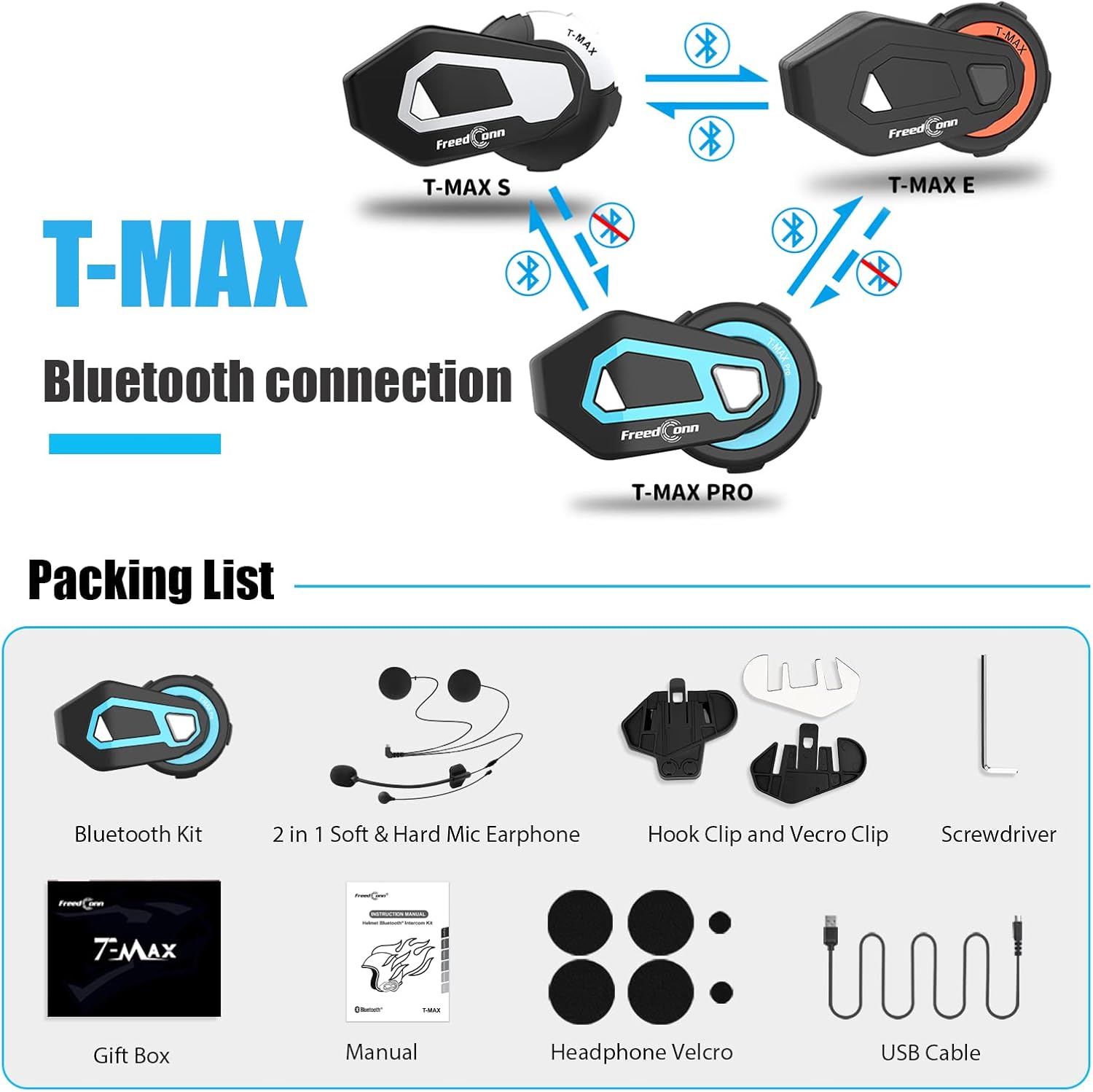
Image: Contents of the FreedConn TMAX PRO package, including the headset, microphones, mounting clips, and accessories.
Setup and Installation
Mounting the Headset
Choose a suitable location on the side of your helmet for mounting the TMAX PRO unit. Use either the hook clip for secure attachment to the helmet edge or the adhesive velcro clip for flat surfaces. Ensure the unit is firmly attached and does not obstruct your vision or helmet functionality.

Image: The FreedConn TMAX PRO headset attached to the side of a motorcycle helmet.
Microphone and Speaker Installation
Install the speakers inside the helmet's ear pockets, ensuring they are positioned directly over your ears for optimal sound. Connect the appropriate microphone (boom mic for open-face/modular helmets, soft mic for full-face helmets) to the headset unit. Route the cables neatly within the helmet padding.

Image: Diagram showing the dimensions and components of the microphone and stereo ear speakers for installation.
Charging the Device
Before first use, fully charge the TMAX PRO. Connect the provided USB cable to the charging port on the unit and to a standard USB power adapter. The LED indicator will show charging status. A full charge provides up to 17 hours of talk time and 15 hours of music time, with over a week of standby time.
Operating Instructions
Power On/Off
- Power On: Press and hold the Power button for approximately 3 seconds until the LED indicator lights up.
- Power Off: Press and hold the Power button for approximately 3 seconds until the LED indicator turns off.
Bluetooth Pairing
To pair with your mobile phone or other Bluetooth devices:
- Ensure the TMAX PRO is off.
- Press and hold the Power button for about 5-7 seconds until the LED flashes red and blue alternately, indicating pairing mode.
- On your mobile phone, enable Bluetooth and search for "FreedConn TMAX PRO".
- Select the device to pair. Once connected, the LED will flash blue slowly.
Image: Diagram illustrating the Bluetooth connection process between FreedConn TMAX series devices.
Intercom Functionality
The TMAX PRO supports group intercom for up to 6 riders with a maximum communication distance of 1200 meters. The maximum communication distance between two riders is approximately 500 meters.

Image: Visual representation of 6 riders communicating via the TMAX PRO intercom system on a road.
For detailed pairing and group intercom setup, please refer to the specific instructions in the included user manual.
Video: An official product video demonstrating the features and functionality of the FreedConn TMAX PRO, including its Bluetooth 5.0 chip, DSP/CVC noise reduction, large spin knob design, IP65 waterproof technology, battery life, and group intercom capabilities.
Music Playback and Sharing
Once paired with your phone, you can stream music directly to your headset. The TMAX PRO also supports music sharing between two connected headsets.

Image: Two riders on ATVs with one phone displaying a music player, indicating remote music sharing functionality.
Call Management
Manage incoming and outgoing calls with ease using the headset's controls. The large, glove-friendly buttons allow for simple operation while riding.

Image: Close-up of the TMAX PRO unit on a helmet, highlighting the multi-function button for one-key operation of calls, music, and other features.
Voice Control
The TMAX PRO supports voice control functions (Siri/S Voice) when paired with a compatible smartphone, allowing for hands-free command execution.
Maintenance
Water Resistance (IP65)
The TMAX PRO features IP65 waterproof technology, making it resistant to rain and dust. While it can handle heavy rain, avoid submerging the device in water.

Image: A rider in the rain, showcasing the IP65 rainproof and dustproof capabilities of the TMAX PRO headset.
Cleaning and Storage
Clean the unit with a soft, damp cloth. Do not use harsh chemicals or abrasive cleaners. Store the headset in a cool, dry place when not in use, away from direct sunlight and extreme temperatures.
Troubleshooting
| Problem | Possible Cause | Solution |
|---|---|---|
| Cannot power on | Low battery | Charge the device fully. |
| Cannot pair with phone | Device not in pairing mode / Bluetooth off on phone | Ensure headset is in pairing mode (flashing red/blue). Turn on Bluetooth on your phone and search again. |
| Poor audio quality / Noise | Microphone/speaker placement / Environmental noise | Adjust speaker position. Ensure microphone is correctly installed and facing your mouth. CVC noise cancellation should reduce environmental noise. |
| Intercom not connecting | Out of range / Incorrect pairing sequence | Ensure riders are within range. Re-initiate intercom pairing sequence as per manual. |
If you encounter persistent issues, please refer to the complete troubleshooting section in your user manual or contact customer support.
Specifications
| Feature | Detail |
|---|---|
| Model Name | TMAX PRO |
| Connectivity Technology | Wireless (Bluetooth 5.1) |
| Noise Control | Active Noise Cancellation (CVC) |
| Intercom Range (Group) | Up to 1200 meters (0.75 miles) |
| Intercom Range (2 Riders) | Approx. 500 meters |
| Battery Life (Talk Time) | Up to 17 hours |
| Battery Life (Music Time) | Up to 15 hours |
| Water Resistance Level | IP65 (Rainproof & Dustproof) |
| Included Components | Headset, Boom Mic, Soft Mic, Speakers, Mounting Kits, USB Cable |
| Product Dimensions | 4.53 x 2.56 x 5.91 inches |
| Item Weight | 11.8 ounces |
Warranty and Support
FreedConn products are designed for durability and performance. For warranty information and customer support, please refer to the warranty card included in your product packaging or visit the official FreedConn website. For any technical assistance or inquiries, please contact FreedConn customer service directly.
You can also visit the FreedConn Store on Amazon for more information and product updates: FreedConn Amazon Store
Ask a question about this manual
Ask about setup, troubleshooting, compatibility, parts, safety, or missing instructions. Manuals+ will review the question and use this page’s manual context to help answer it.