
1. Introduction
This manual provides essential information for the proper installation, operation, and maintenance of your DASA0820B2U 80x20mm 12V 4-Wire CPU Chassis Fan. This fan is designed to provide efficient air cooling for desktop computer chassis and CPU cooling applications, ensuring optimal thermal performance for your system components. Please read this manual thoroughly before installation and use.
2. Safety Information
- Always disconnect power from the computer before installing or removing the fan.
- Handle the fan by its frame; avoid touching the fan blades directly to prevent damage or injury.
- Ensure proper orientation of the fan for desired airflow.
- Do not operate the fan if the blades are damaged or obstructed.
- Keep fingers and loose objects away from rotating fan blades.
- This product is designed for 12V DC operation. Connecting it to an incorrect voltage may cause damage.
3. Package Contents
Verify that your package contains the following item:
- 1x DASA0820B2U 80x20mm 12V 4-Wire CPU Chassis Fan
4. Setup and Installation
This fan is compatible with desktop computer systems requiring an 80x80x20mm cooling fan with a 4-pin PWM connector.
- Prepare your system: Power off your computer and disconnect it from the power source. Open the computer case to access the fan mounting location.
- Determine airflow: Identify the desired airflow direction. Most fans have an arrow on the side indicating airflow direction. Ensure the fan is oriented to push or pull air as needed for your system's cooling strategy.
- Mount the fan: Align the fan with the mounting holes in your chassis or CPU cooler. Secure the fan using appropriate fan screws (not included, typically provided with chassis or cooler). Do not overtighten screws.
- Connect the power cable: Locate an available 4-pin fan header on your motherboard. Carefully plug the fan's 4-pin connector into the motherboard header. Ensure the connector is fully seated. The 4-pin connector allows for Pulse Width Modulation (PWM) control, enabling the motherboard to adjust fan speed based on temperature.
- Close and power on: Close your computer case, reconnect the power, and power on your system. Verify that the fan is spinning and operating correctly.
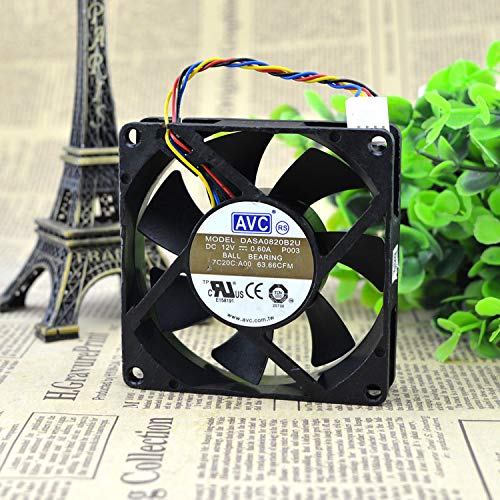
Image 1: DASA0820B2U 80x20mm 4-Wire CPU Chassis Fan. This image shows the fan's front view, including its black frame, seven blades, and the attached 4-wire cable with a white 4-pin connector.
5. Operating Instructions
Once installed and connected, the DASA0820B2U fan will operate automatically. The 4-pin PWM connector allows your motherboard to control the fan speed dynamically based on system temperature, providing efficient cooling when needed and quieter operation during lighter loads. No manual adjustment is typically required for standard operation.
6. Maintenance
Regular maintenance helps ensure optimal performance and longevity of your fan.
- Cleaning: Periodically (e.g., every 3-6 months), power off your computer and disconnect it from the power source. Use compressed air to gently blow dust off the fan blades and frame. Hold the fan blades to prevent them from spinning rapidly during cleaning, which can damage the bearings.
- Inspection: Check for any obstructions, loose wires, or signs of wear on the fan blades or frame.
7. Troubleshooting
| Problem | Possible Cause | Solution |
|---|---|---|
| Fan not spinning |
|
|
| Fan making unusual noise |
|
|
| Low airflow |
|
|
8. Specifications
| Model Number | DASA0820B2U |
| Dimensions | 80mm x 80mm x 20mm (approx. 3.15 x 3.15 x 0.79 inches) |
| Voltage | 12 Volts DC |
| Current | 0.60A |
| Power Connector Type | 4-Pin (PWM) |
| Maximum Rotational Speed | 2500 RPM |
| Cooling Method | Air |
| Compatible Devices | Desktop |
| Material | Copper (internal motor components) |
| Manufacturer | DASA0820B2U |
9. Warranty and Support
For warranty information or technical support, please refer to the retailer or manufacturer's official website where the product was purchased. Keep your proof of purchase for any warranty claims.