
1. Introduction
The TTArtisan 40mm F2.8 Macro Lens is a manual focus prime lens designed for APS-C E-mount cameras. It offers a 1:1 magnification ratio, making it suitable for capturing detailed close-up images. Its F2.8 large aperture allows for creative depth of field control and performance in various lighting conditions.

Figure 1: The TTArtisan 40mm F2.8 Macro Lens.
2. Product Contents
Verify that all items are present in the packaging:
- 40mm F2.8 Camera lens x 1
- Front Lens Cap x 1
- Rear Lens Cap x 1
- User Manual (this document)
- Warranty Card

Figure 2: Contents of the TTArtisan 40mm F2.8 Macro Lens package.
3. Setup
3.1 Mounting the Lens
- Ensure your camera is turned off.
- Remove the rear lens cap from the TTArtisan 40mm F2.8 Macro Lens and the body cap from your camera.
- Align the red dot on the lens barrel with the corresponding red dot on your camera's lens mount.
- Insert the lens into the camera mount and rotate it clockwise until it clicks into place.
- Remove the front lens cap.
Important Note: Since this is a manual lens without electronic contacts, you may need to enable the "Release shutter without lens" or "Shoot without lens" setting in your camera's menu. Refer to your camera's instruction manual for specific details on this setting.
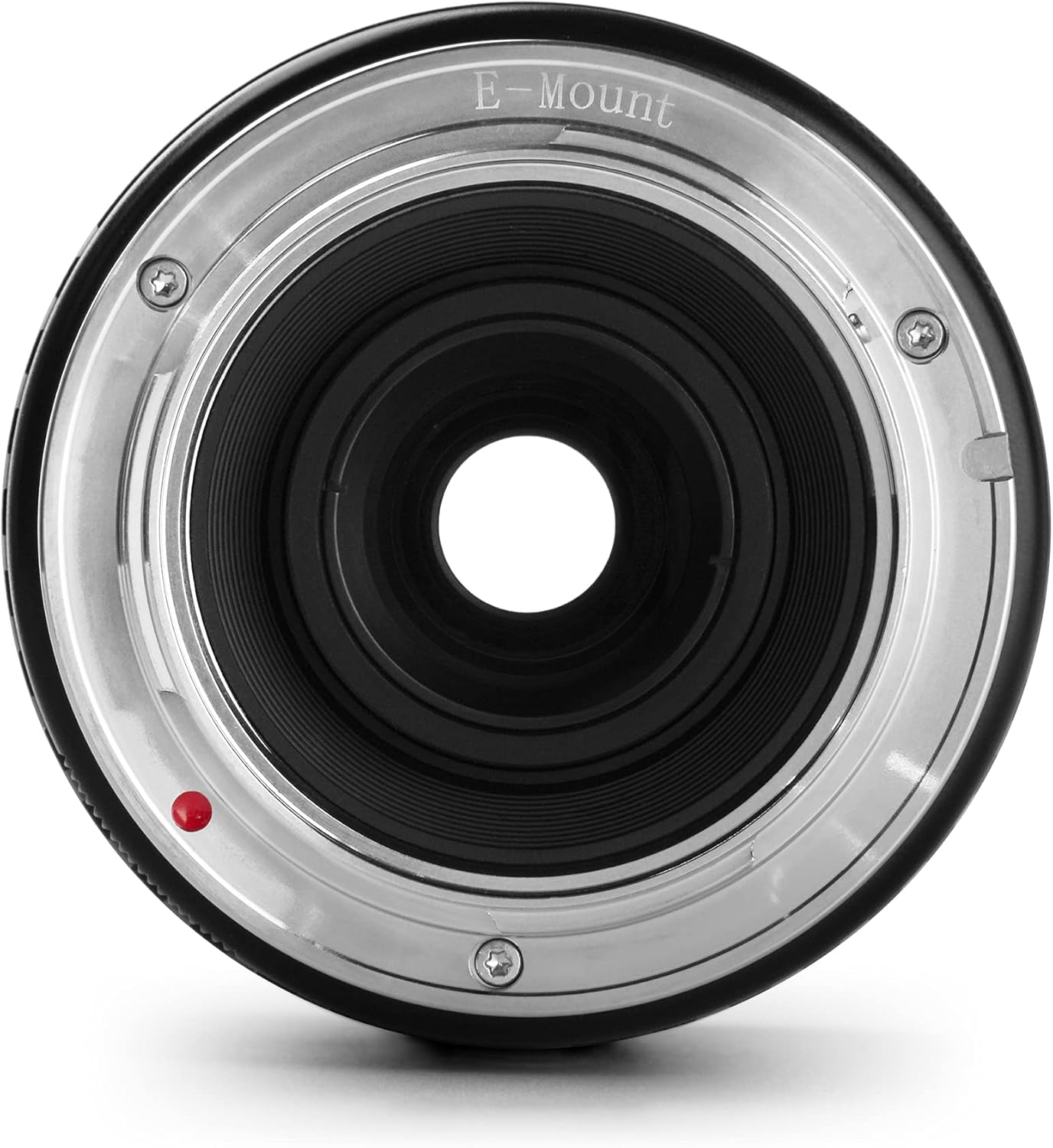
Figure 3: Rear view of the lens, highlighting the E-mount connection.
4. Operating the Lens
4.1 Manual Focus
The lens features a manual focus ring. Rotate this ring to achieve sharp focus on your subject. For precise macro photography, utilize your camera's focus peaking or magnification assist functions, which are typically found in your camera's shooting settings.
4.2 Aperture Control
The lens has a manual aperture ring. Rotate this ring to select your desired aperture from F2.8 to F16. A wider aperture (e.g., F2.8) allows more light and creates a shallower depth of field, resulting in blurred backgrounds (bokeh). A narrower aperture (e.g., F16) increases depth of field, keeping more of the scene in focus.
4.3 1:1 Macro Magnification
This lens offers a 1:1 magnification ratio, allowing you to capture subjects at life-size on your camera's sensor. The closest focusing distance is 0.17 meters (0.56 feet). When shooting at high magnifications, even slight camera movement can cause blur. Using a tripod is highly recommended for stable and sharp macro images.

Figure 4: The lens barrel extends for close-up macro focusing.

Figure 5: Example of macro photography captured with the lens.

Figure 6: Example demonstrating the shallow depth of field achievable at F2.8.
5. Compatibility
This lens is compatible with various Sony APS-C E-mount camera models, including but not limited to:
- Sony A5000, A5100, A6000, A6100, A6300, A6400, A6500, A6600
6. Maintenance
6.1 Lens Care and Cleaning
- Always use a clean, soft microfiber cloth specifically designed for optical surfaces to clean the lens elements.
- For stubborn smudges, use a small amount of lens cleaning fluid applied to the cloth, not directly to the lens.
- Use a blower brush to remove dust particles before wiping the lens.
- Avoid touching the glass elements with your fingers.
6.2 Storage
- When not in use, always attach the front and rear lens caps to protect the lens elements.
- Store the lens in a dry, cool place, away from direct sunlight and extreme temperatures.
- Consider using a dehumidifying cabinet or silica gel packets in your camera bag to prevent mold growth, especially in humid environments.
7. Troubleshooting
7.1 Camera Not Recognizing Lens
If your camera displays an error message or does not recognize the lens, ensure that the "Release shutter without lens" or "Shoot without lens" setting is enabled in your camera's menu. Consult your camera's manual for specific instructions on this setting.
7.2 Images Appear Blurry
- Focus: Verify that the lens is properly focused. This is a manual focus lens, so precise adjustment of the focus ring is essential. Utilize your camera's focus aids.
- Camera Shake: For macro photography, camera shake is a common cause of blur. Use a tripod and a remote shutter release or timer to minimize movement.
- Shutter Speed: Ensure your shutter speed is fast enough to freeze motion and reduce blur, especially in handheld shooting.
- Lens Cleanliness: Ensure the lens elements are clean and free from dust or smudges.
8. Specifications
| Feature | Detail |
|---|---|
| Brand | TTArtisan |
| Model Number | FV-40mm F2.8 E-mount-1205 |
| Focal Length | 40mm |
| Maximum Aperture | F2.8 |
| Minimum Aperture | F16 |
| Lens Type | Macro, Prime, Manual Focus |
| Compatible Mountings | Sony E-mount (APS-C) |
| Magnification | 1:1 |
| Closest Focusing Distance | 0.17m (0.56 feet) |
| Filter Size | 52mm |
| Lens Construction | 8 elements in 7 groups (includes two Extra low-dispersion glasses) |
| Number of Diaphragm Blades | 11 |
| Item Weight | 1.18 pounds (approx. 535g) |
| Product Dimensions | 3 x 2.5 x 2.5 inches |

Figure 7: Optical design diagram of the lens, showing LD and high index elements.

Figure 8: Modulation Transfer Function (MTF) chart illustrating lens performance.
9. Warranty and Support
9.1 Warranty Information
Warranty terms and conditions are typically provided with your product packaging. Please refer to the included warranty card for detailed information regarding coverage, duration, and claims procedures. Keep your proof of purchase for warranty validation.
9.2 Customer Support
For technical assistance, service, or any inquiries not covered in this manual, please contact TTArtisan customer support through their official website or the retailer from whom you purchased the product.


