
DOUXURY The 2024 Latest Version
DOUXURY RV Backup Camera System User Manual
Model: The 2024 Latest Version
Introduction
This manual provides comprehensive instructions for the installation, operation, and maintenance of your DOUXURY RV Backup Camera System. This system features a 10.36-inch 4K monitor and four 1080P HD cameras, designed to enhance driving safety by providing clear, comprehensive views around your vehicle, effectively eliminating blind spots for RVs, trucks, buses, and trailers.

Figure 1: DOUXURY RV Backup Camera System
This image displays the complete DOUXURY RV Backup Camera System, including the 10.36-inch 4K monitor with a touch interface and four high-definition cameras designed for comprehensive vehicle surveillance.
Package Contents
Please verify that all items listed below are included in your package:
- 1 x 4K 10.36 Inch LED Touch Screen Monitor
- 2 x 1080p side view camera
- 2 x 1080p front view rear view camera
- 1 x 50ft power cord
- 3 x 16ft power cord
- 1 x Power cord
- 1 set x Other accessories (e.g., mounting hardware, user manual, 32GB TF card)

Figure 2: Complete Package Contents
This image displays the 10.36-inch 4K LCD monitor, two rear view cameras, two side view cameras, a 50ft AV cable, three 16ft AV cables, a power cable, a user manual, and a 32GB TF card, illustrating all items included in the product package.
Setup and Installation
The DOUXURY RV Backup Camera System is designed for a wired installation to ensure stable signal transmission. Follow these general steps for proper setup:
- Mount the Monitor: Securely mount the 10.36-inch monitor in a suitable location within your vehicle's cabin, ensuring it does not obstruct your view or interfere with driving controls.
- Mount the Cameras: Install the four 1080P HD cameras in desired locations (rear, side, front) to cover all blind spots. Ensure cameras are positioned for optimal viewing angles.
- Connect Wiring: Connect the cameras to the monitor using the provided 4-pin extension cables. The system is wired, eliminating wireless signal interference.
- Power Supply: Provide power to the monitor. The system operates on a 12-24V DC power supply. The cameras receive power directly through their connection to the monitor.
- Trigger Wires (Optional): For advanced functionality, connect the trigger wires (Grey for CH4, Blue for CH3, Green for CH2) to your vehicle's turn signals and reverse light. This allows automatic camera view switching.
For detailed wiring instructions, refer to the diagram below. Depending on your vehicle's size, longer cables may be required for optimal routing; these can often be obtained from the manufacturer.

Figure 3: Installation Wiring Diagram
This diagram illustrates how to connect the 10.36-inch monitor to the four cameras (V1, V2, V3, V4) using 4-pin cables. It also shows the power supply connections (Red Wire: DC 12-24V Power Supply, Yellow Wire: DC 12-24V Power Supply, Black Wire: Ground) and optional trigger wires for CH2, CH3, and CH4 (Green, Blue, Grey wires respectively).
Operating Instructions
Monitor Features
- 10.36-inch 4K Touch Screen: The large, high-resolution touch screen provides clear visuals and intuitive control.
- 4-Split Screen Display: View feeds from all four cameras simultaneously, providing a comprehensive 360-degree view without blind spots. Double-tap a channel to view it in full screen.
- DVR Recording Function: The built-in DVR supports loop recording from all four cameras concurrently. You can set recording intervals to 1, 5, or 10 minutes, with easy video retrieval from the monitor.
- Bluetooth Connectivity: Connect your smartphone via Bluetooth to the monitor for hands-free calling and music playback.
- Adjustable Parking Assist Line: Customize the width and height of the parking guide lines on the screen to suit your specific vehicle and preferences.
- Mirror & Flip Image: The monitor supports mirroring and flipping images from the cameras, allowing for flexible installation and correct orientation.
- Portable Hard Drive/TF Card Support: Use a TF card or USB disk to play music and watch videos directly on the monitor.

Figure 4: Monitor Features Overview
This image highlights the key features of the 10.36-inch 4K monitor, including its stunning ultra-high quality 4K resolution, DVR recording function, MP5 video playback capability, Bluetooth for telephone and music, and adjustable parking assist lines.

Figure 5: 4-Channel 360° Coverage
This image illustrates how the four cameras provide 360-degree coverage around a large vehicle, effectively eliminating blind spots. It also shows the monitor's ability to display a 4-split screen view and the option to double-click a channel to make it full screen.

Figure 6: Bluetooth Connectivity
This image shows the Bluetooth feature, allowing users to connect their phone for hands-free calls and music streaming directly through the monitor.

Figure 7: Portable Hard Drive/TF Card Support
This image highlights the monitor's capability to play video and music files from a TF card or USB disk, offering additional entertainment options.
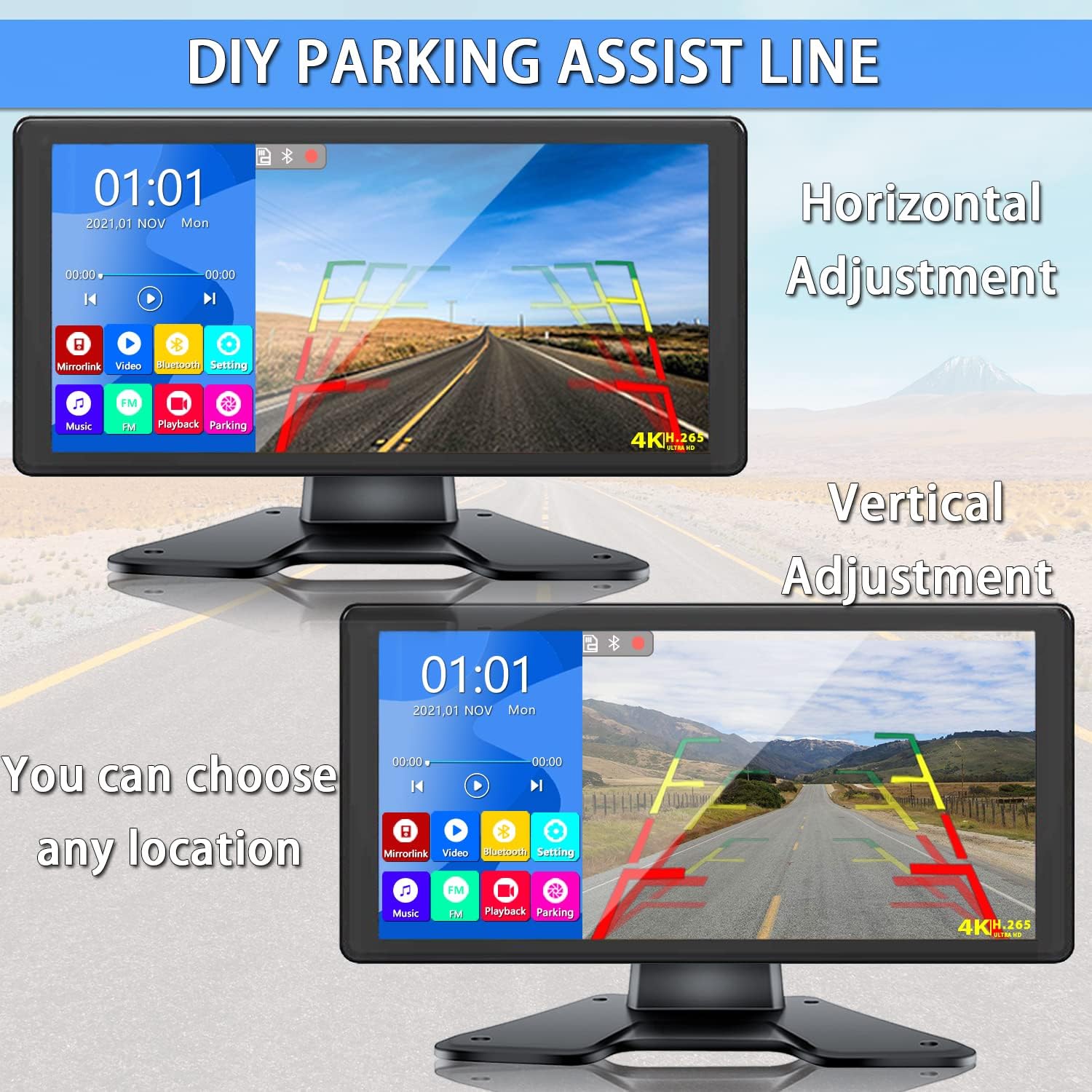
Figure 8: DIY Parking Assist Line Adjustment
This image demonstrates the adjustable parking assist lines feature, allowing users to customize both the horizontal and vertical positioning of the guide lines on the monitor screen to match their specific vehicle and parking needs.

Figure 9: DVR Recording and Playback
This image illustrates the DVR recording function and playback capability of the monitor, showing a video feed and a timeline of recorded footage, indicating the system's ability to capture and review driving events.
Camera Features
- 1080P HD Resolution: Provides clear and detailed images for enhanced visibility.
- Great Night Vision: Equipped with 18 infrared LED lights, the cameras deliver clear images even in low-light conditions or at night.
- IP69 Waterproof: Designed with multiple glue sealing technology, the cameras are highly waterproof and can withstand various extreme weather conditions, operating effectively from -59°F to 176°F.
- Wide View Angle: The cameras offer a wide viewing angle to minimize blind spots.

Figure 10: IP69 Waterproof and Infrared Night Vision
This image highlights the IP69 waterproof rating of the cameras, showing one camera partially submerged in water. It also demonstrates the infrared night vision capability by comparing a clear daytime view with a black-and-white, illuminated nighttime view provided by the camera's IR LEDs.
Maintenance
To ensure the longevity and optimal performance of your DOUXURY RV Backup Camera System, follow these maintenance guidelines:
- Cleaning: Regularly clean the monitor screen with a soft, lint-free cloth. For stubborn smudges, use a screen-safe cleaning solution. Clean camera lenses gently to ensure clear vision.
- Waterproofing: While cameras are IP69 waterproof, avoid directing high-pressure water jets directly at them during cleaning. Ensure all cable connections are secure to maintain water resistance.
- Cable Inspection: Periodically inspect all cables for any signs of wear, fraying, or damage. Replace damaged cables immediately to prevent signal loss or electrical issues.
- Temperature Range: The system is designed to operate in temperatures from -59°F to 176°F. Avoid prolonged exposure to temperatures outside this range.
Troubleshooting
If you encounter issues with your RV Backup Camera System, refer to the following common troubleshooting steps:
| Problem | Possible Cause | Solution |
|---|---|---|
| No image on monitor |
|
|
| Poor image quality (daytime) |
|
|
| Poor night vision |
|
|
| Water inside camera lens |
|
|
| Bluetooth connection issues |
|
|
If these steps do not resolve the issue, please contact DOUXURY customer support for further assistance.
Specifications
| Feature | Detail |
|---|---|
| Brand | DOUXURY |
| Model Number | The 2024 Latest Version |
| Screen Size | 10.36 Inches |
| Product Dimensions | 13.78 x 7.87 x 3.94 inches (Monitor) |
| Item Weight | 4 pounds (Total) |
| Display Technology | LED |
| Video Capture Resolution | 1080p (Cameras) |
| Voltage | 12-24 Volts DC |
| Optical Sensor Technology | CMOS |
| Lens Type | Wide Angle |
| Waterproof Rating | IP69 (Cameras) |
| Operating Temperature | -59°F to 176°F |
| DVR Function | Supports loop recording (1, 5, 10 min intervals) |
| Connectivity | Wired system, Bluetooth for phone connection |
Warranty and Support
DOUXURY is committed to providing high-quality products and customer satisfaction. While specific warranty details are not provided in this manual, please retain your proof of purchase for any warranty claims.
For product support, technical assistance, or warranty inquiries, please contact DOUXURY customer service through the retailer where you purchased the product or visit the official DOUXURY website for contact information.
Ask a question about this manual
Ask about setup, troubleshooting, compatibility, parts, safety, or missing instructions. Manuals+ will review the question and use this page’s manual context to help answer it.