
1. Introduction
This manual provides essential information for the safe and efficient use of your Hyuduo NFLIXIN 1PH VFD 220V 1.5KW Frequency Converter. Please read this manual thoroughly before installation, operation, or maintenance to ensure proper functionality and to prevent potential hazards. Keep this manual for future reference.
2. Safety Information
WARNING: Improper installation or operation can lead to serious injury or equipment damage. Always adhere to the following safety guidelines:
- Read the user's manual completely before installing or operating the device.
- Do not open the cover of the frequency converter while it is connected to the power supply.
- After disconnecting the power supply, wait at least 10 minutes before opening the cover or touching any internal components. Residual voltage may be present.
- Ensure all wiring is performed by qualified personnel and complies with local electrical codes.
- Verify that the power supply voltage matches the converter's specifications.
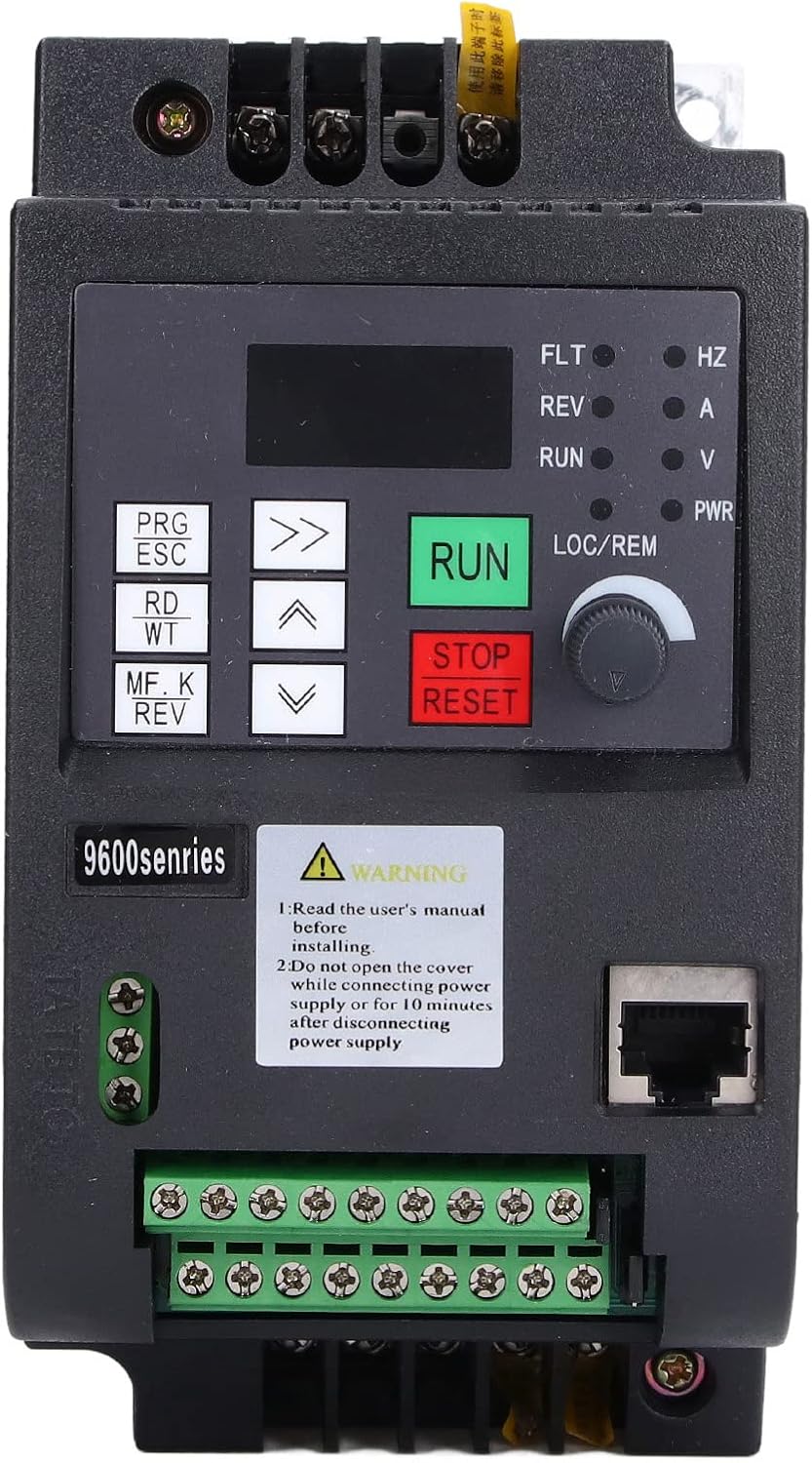
Image: A close-up of the frequency converter's front panel, showing a yellow warning label with text in English and French, advising users to read the manual and not open the cover while powered or within 10 minutes of disconnection.
3. Product Overview
The Hyuduo NFLIXIN 1PH VFD 220V 1.5KW Frequency Converter is designed for precise control of both asynchronous and synchronous motors. It utilizes high-performance current vector control technology to deliver stable and efficient motor operation. Key features include:
- Advanced Motor Control: Capable of controlling asynchronous and synchronous motors with high-performance current vector control.
- Automatic Current and Voltage Limiting: Automatically limits current and voltage during operation to prevent frequent tripping due to overvoltage or overcurrent.
- Constant Output Voltage: Maintains a constant output voltage even with fluctuations in the power supply voltage, facilitating closed-loop process control.
- Voltage Drop Compensation: Utilizes feedback energy to compensate for voltage drops, allowing the VFD to continue operating during short power interruptions and preventing frequent overcurrent errors.
- Flexible Speed Control: Supports up to 16 speeds through simple API functions or combinations of terminal states.
- Communication support for RTU, PROFIBUS-DP, CANLINK, and CANopen.

Image: A front-angled view of the Hyuduo NFLIXIN 1PH VFD. The device is black with a silver heat sink, featuring a digital display, control buttons (PRG/ESC, RD/WT, MF.K/REV, RUN, STOP/RESET), and a rotary knob. Wiring terminals are visible at the bottom.
4. Specifications
| Parameter | Value |
|---|---|
| Brand | Hyuduo |
| Model Number | 9600D-1T-00150M |
| Input Voltage Range | Single-phase 220V ± 15% |
| Input Frequency Range | 50 ~ 60 Hz |
| Output Voltage Range | Single-phase 0 ~ 220V ± 15% |
| Output Frequency Range | 0 ~ 650 Hz |
| Rated Power | 1.5 KW (1500 Watts) |
| Total Current Outlets | 3 |
| Compliant Specifications | CE |
| Power Source | Mains Powered |
5. Setup and Wiring
Careful wiring is crucial for the safe and correct operation of the frequency converter. Refer to the diagram below and the instructions for proper connections.
5.1. Wiring Connections
- Input Power: Connect the single-phase 220V power supply to the S and T terminals of the frequency converter.
- Motor Output: The U, V, and W terminals are the output terminals of the frequency converter. These should be connected to a three-phase asynchronous motor. If connecting a single-phase motor, consult the motor's specific wiring diagram for VFD compatibility and connection points, as direct U, V, W connection may not be suitable for all single-phase motors.

Image: A side-angled view of the frequency converter, highlighting the green terminal blocks at the bottom for input and output wiring connections.
5.2. Type Selection Notes
- Always choose the converter type based on the required function and power to avoid damage from incorrect wiring or undersizing.
- For single-phase motors, it is recommended to select a frequency converter with a higher power rating. For example, for a 0.75 KW single-phase motor, choose a 1.5 KW inverter.
- For three-phase motors with six or more stages requiring speed regulation, select a converter with a power rating higher than that of the motor.
6. Operating Instructions
The frequency converter offers various control methods for precise motor operation.
6.1. Basic Operation
- Power On: After ensuring all connections are secure and correct, apply power to the converter. The digital display will illuminate.
- Start/Stop: Use the RUN button to start the motor and the STOP/RESET button to stop it.
- Frequency Adjustment: The rotary knob (LOC/REM) allows for manual adjustment of the output frequency, thereby controlling motor speed.
- Parameter Setting: Use the PRG/ESC, RD/WT, and arrow buttons (up/down) to navigate through menus and adjust operational parameters. Refer to the detailed programming guide in the full manual for specific parameter settings.

Image: A detailed view of the control panel of the frequency converter, showing the digital display, indicator lights (FLT, REV, RUN, A, V, PWR, HZ), and all control buttons and the rotary knob.
6.2. Advanced Control
The converter supports advanced control functionalities:
- Multi-Speed Operation: Achieve up to 16 distinct speeds using the simple API function or by configuring combinations of the X terminal states.
- Communication Interfaces: The device supports various communication protocols including RTU, PROFIBUS-DP, CANLINK, and CANopen for integration into industrial control systems.
7. Maintenance
Regular maintenance ensures the longevity and reliable performance of your frequency converter.
- Cleaning: Periodically clean the exterior of the unit with a soft, dry cloth. Ensure ventilation openings are free from dust and debris to prevent overheating. Do not use liquid cleaners.
- Inspection: Regularly inspect all wiring connections for tightness and signs of wear or damage. Check for any unusual noises or smells during operation.
- Environment: Ensure the operating environment is within the specified temperature and humidity ranges, and free from excessive dust, corrosive gases, or direct sunlight.
- Power Disconnection: Always disconnect power and wait for 10 minutes before performing any inspection or maintenance inside the unit.
8. Troubleshooting
This section provides solutions for common issues. For problems not listed here, or if issues persist, contact technical support.
- No Power/Display Off: Check the input power supply and ensure connections to S and T terminals are secure. Verify the circuit breaker or fuse.
- Motor Not Running: Ensure the RUN command is active. Check motor wiring (U, V, W) and ensure the motor is not overloaded. Verify frequency settings.
- Overcurrent/Overvoltage Fault: The converter has automatic limiting features. If a fault occurs, check for motor overload, sudden changes in load, or unstable input power. Allow the unit to cool if it's an overload issue.
- Unusual Noise/Vibration: Inspect motor and load for mechanical issues. Check VFD parameters related to motor tuning.
- Error Codes: If an error code appears on the display, consult the full product manual for a list of error codes and their corresponding troubleshooting steps.
9. Warranty and Support
For warranty information, technical support, or detailed product documentation, please refer to the documentation included with your purchase or contact your seller/manufacturer directly. Ensure you have your product model number (9600D-1T-00150M) and purchase details available when seeking support.