
1. Introduction
Thank you for choosing the LeaderPro Silent Pedestal Fan FS02. This fan is designed to provide powerful yet quiet airflow, featuring a DC motor, adjustable height, remote control, and multiple speed and oscillation settings. This manual provides essential information for safe operation, assembly, maintenance, and troubleshooting to ensure optimal performance and longevity of your device.
2. Important Safety Instructions
- Always unplug the fan from the power outlet before cleaning, servicing, or when not in use for extended periods.
- Do not operate the fan with a damaged cord or plug. If the cord or plug is damaged, contact customer support for assistance.
- Keep fingers and other objects away from the fan blades and grille during operation. The grille spacing is 7mm for safety, but caution is still advised, especially with children.
- Do not use the fan in wet or damp locations, such as bathrooms or laundry areas.
- Place the fan on a stable, level surface to prevent it from tipping over.
- Ensure proper ventilation around the fan. Do not block air inlets or outlets.
- This appliance is not intended for use by persons (including children) with reduced physical, sensory or mental capabilities, or lack of experience and knowledge, unless they have been given supervision or instruction concerning use of the appliance by a person responsible for their safety.
- Children should be supervised to ensure that they do not play with the appliance.
- When the fan is not in use, it is recommended to disconnect the power adapter from the wall outlet.
3. Package Contents
Carefully unpack all components and check against the list below. If any items are missing or damaged, please contact customer support.
- 1 x LeaderPro Pedestal Fan Unit
- 1 x Remote Control
- 1 x Multilingual Manual (French, German, Italian, Spanish, English)
- 1 x Set of Long Screws for Base Fixing
- 1 x L-shaped Screwdriver
- 1 x Small Screw for Front Mesh Locking
- 1 x Power Adapter
- 2 x Scented Tablets (optional use)

Image: All components included in the LeaderPro FS02 fan package, laid out for inspection.
4. Assembly and Setup
The LeaderPro FS02 fan offers a 2-in-1 design, allowing it to be used as a pedestal fan or a table fan. Follow these steps for assembly:
- Base Assembly: Attach the main fan body to the base. Ensure the connection is secure. Some users have noted that significant force may be required to fully screw in the base plate to the extension rod or top part to ensure proper electrical contact.
- Height Adjustment (2-in-1 Design): The fan can be configured for two heights: approximately 950 mm as a pedestal fan or 615 mm as a table fan. Adjust the central pole section as needed and secure it firmly.
- Grille and Blade Assembly: If the fan blades and grilles are not pre-assembled, follow the diagrams provided. Ensure the rear grille is in place, then attach the fan blades, securing them with the blade nut. Finally, attach the front grille and secure it with the small locking screw provided, typically located at the bottom of the grille.
- Power Connection: Connect the power adapter to the fan's power input and then plug it into a standard electrical outlet.

Image: Visual guide illustrating the step-by-step assembly process for the LeaderPro FS02 fan.

Image: The LeaderPro FS02 fan shown in both its 950mm pedestal configuration and 615mm table fan configuration, highlighting its adjustable height feature.
5. Operating Instructions
The LeaderPro FS02 fan can be controlled via the integrated buttons on the unit or the included remote control.
5.1 Power On/Off
Press the power button on the fan unit or remote control to turn the fan on or off.
5.2 Speed Settings
The fan features 8 adjustable speed settings. Use the speed control buttons on the unit or remote to increase or decrease the airflow intensity. The current speed level will be displayed on the LED screen.
5.3 Oscillation Control
The fan offers wide-angle oscillation for optimal air distribution:
- Horizontal Oscillation: Adjustable from 30°, 60°, 90°, to 120°. Press the oscillation button to cycle through the available angles or to stop oscillation.
- Vertical Tilt: Manually adjust the fan head vertically from -10° to 90° to direct airflow precisely where needed.

Image: The LeaderPro FS02 fan demonstrating its wide-angle oscillation and vertical tilt capabilities, showing multi-directional airflow.
5.4 Timer Function
Set the fan to automatically turn off after a specified period using the timer function. The timer can be set for up to 8 hours. Use the timer button on the remote or unit to select the desired duration.
5.5 Remote Control and LED Display
The remote control allows convenient operation from a distance. The LED display on the fan unit provides clear visual feedback on the current settings, including speed, oscillation angle, and timer status. The memory function automatically restores previous settings when the fan is turned back on from standby mode.

Image: Close-up view of the remote control and the LED display on the fan unit, showing various control options and indicators.
6. Maintenance
Regular cleaning and proper storage will help maintain the performance and appearance of your fan.
6.1 Cleaning
- Always unplug the fan before cleaning.
- Use a soft, damp cloth to wipe the exterior surfaces of the fan. Do not use abrasive cleaners or solvents.
- To clean the fan blades, carefully remove the front grille (refer to assembly instructions for removal). Wipe the blades with a soft cloth. Ensure all parts are dry before reassembling.
- Do not immerse the fan in water or allow water to drip into the motor housing.
6.2 Storage
When not in use, store the fan in a cool, dry place, preferably in its original packaging, to protect it from dust and damage.
7. Troubleshooting
If you encounter issues with your LeaderPro FS02 fan, refer to the following common problems and solutions:
| Problem | Possible Cause | Solution |
|---|---|---|
| Fan does not turn on | No power supply; Loose connection; Power button not pressed. | Check if the power adapter is securely plugged into the fan and the wall outlet. Ensure the power button is pressed. Verify the base and pole connections are tight. |
| Unusual noise or vibration | Loose parts; Fan head tilted too far down; Obstruction. | Ensure all assembly screws are tightened. Avoid tilting the fan head excessively downwards, as this may cause vibrations. Check for any foreign objects obstructing the blades. |
| Remote control not working | Dead batteries; Obstruction; Signal interference. | Replace remote control batteries. Ensure there are no obstructions between the remote and the fan's receiver. If other devices (e.g., TV remote, set-top box) are interfering, try operating the fan from a different angle or distance. |
| Weak airflow | Low speed setting; Dirty blades/grille. | Increase the fan speed. Clean the fan blades and grilles as described in the Maintenance section. |
8. Specifications
| Feature | Specification |
|---|---|
| Brand | LeaderPro |
| Model Number | FS02 |
| Color | White |
| Electric Fan Design | Floor Fan (Pedestal Fan) |
| Power Source | Corded Electric |
| Motor Type | DC Motor |
| Number of Speeds | 8 |
| Noise Level | From 12.8 Decibels (minimum) |
| Power Consumption | 25 Watts (maximum), down to 1.6 Watts (minimum) |
| Airflow | Up to 1980 m³/h (33 Cubic Meters per Minute) |
| Air Speed | Up to 6.2 meters per second |
| Voltage | 24 Volts (DC) |
| Number of Blades | 7 (Dual Blades) |
| Oscillation | Horizontal: 30°, 60°, 90°, 120°; Vertical: -10° to 90° (manual) |
| Timer | Up to 8 hours |
| Adjustable Height | Yes (Pedestal: 950mm, Table: 615mm) |
| Product Dimensions (D x W x H) | 19.5 x 21 x 30.6 cm (base dimensions, height varies) |
| Item Weight | 1.8 Kilograms |
| Material | Polypropylene, Metal (blade material) |
| Control Type | Button Control & Remote Control |
| Recommended Use | Air Circulation (Indoor) |
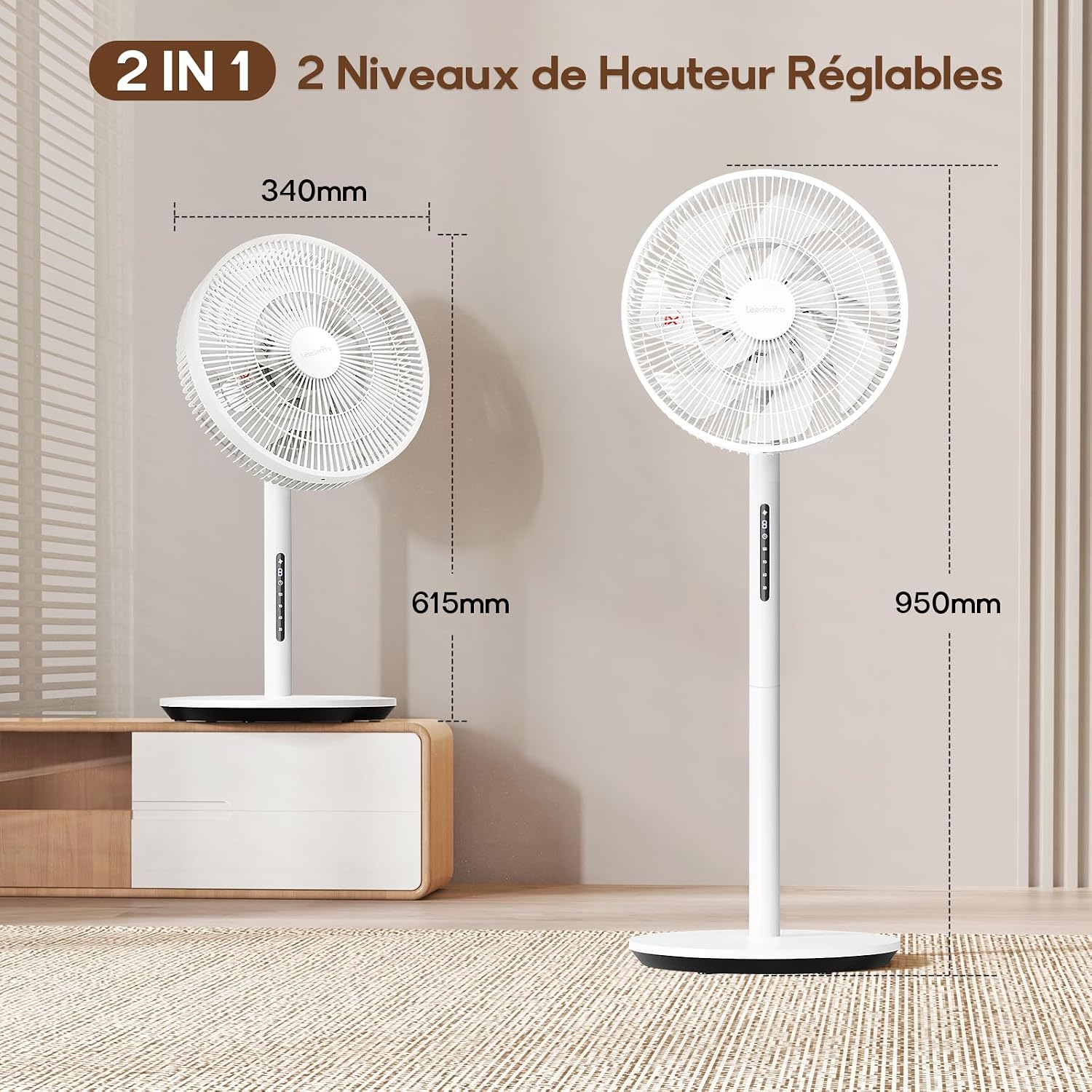
Image: The LeaderPro FS02 fan displayed in both its full-height (950mm) and table-top (615mm) configurations, with dimensions indicated.

Image: Illustration of the LeaderPro FS02 fan's ultra-quiet operation, showing a noise level as low as 12.8 dB, suitable for a peaceful sleeping environment.
9. Warranty and Support
The LeaderPro FS02 Silent Pedestal Fan is covered by a 2-year warranty from the date of purchase. This warranty covers manufacturing defects and ensures reliable operation under normal use conditions.
For any questions, technical support, or warranty claims, please contact LeaderPro customer service. Have your purchase receipt and product model number (FS02) ready when contacting support.
Customer Service Contact: Please refer to the contact information provided on the LeaderPro official website or your purchase documentation.