
1. Introduction
The DPS MY-PS-25 Digital Phase Converter is designed to operate 3-phase motors from a single-phase power supply. This unit is suitable for motors with a capacity of 20HP (15kW) and 60A, requiring an input/output voltage of 200-240V. It is UL Listed, ensuring compliance with safety standards. This manual provides essential information for the safe and effective installation, operation, and maintenance of your DPS MY-PS-25 converter.
2. Important Safety Information
Always observe the following safety precautions to prevent injury or damage to the equipment:
- Electrical Hazard: Installation and maintenance should only be performed by qualified personnel. Ensure power is disconnected before any wiring or service.
- Correct Model Selection: Use only the DPS model appropriate for your motor's specifications. Using an incorrect size may lead to overheating, abnormal noise, or motor damage. Refer to the model selection table in Section 4.
- One DPS Per Motor: Each DPS unit is designed for use with only one motor. Do not connect multiple motors to a single DPS unit.
- Voltage Compatibility: Verify that your motor's nameplate voltage supports 200-240V and that your wiring system is compatible with 200-240V input/output.
- Magnetic Contactor: If your machine uses a magnetic contactor, ensure it is rated for 220V. The control wires of the magnetic contactor must be connected to the DPS output terminals 'U' and 'W'.
3. Product Overview
The DPS MY-PS-25 is a digital phase converter designed for efficiency and reliability. It converts single-phase power to stable 3-phase power for industrial and commercial motor applications.
Key Features:
- Converts single-phase power to 3-phase power for motors.
- Easy to connect and use.
- Compact size and lightweight design.
- Maintains 3-phase power supply even after motor startup.
- UL Listed (UL-US-2328605-1, UL-CA-2324527-1).
- Digital type phase converter with excellent start-up torque.
- Low failure rate and non-flammable design.
- Sealed type construction protects against dust, moisture, and heat.
- Operates without high-frequency noise and offers lower power consumption.
- High efficiency compared to other phase converters.

Figure 3.1: DPS MY-PS-25 Digital Phase Converter connected to a 3-phase motor, illustrating single-phase input and 3-phase output.
4. Specifications
| Specification | Value |
|---|---|
| Model Number | MY-PS-25 |
| Applicable Motor Capacity | 20HP (15kW) |
| Input/Output Voltage | 200-240V |
| Amperage | 60A |
| Frequency | 50/60Hz |
| Product Dimensions (L x W x H) | 9 x 5.7 x 5 inches (230 x 145 x 125 mm) |
| Item Weight | 5.5 pounds (2.5 kg) |
| Color | Grey |
| Certifications | UL Listed (UL-US-2328605-1, UL-CA-2324527-1) |

Figure 4.1: Dimensions of the DPS MY-PS-25 Digital Phase Converter.
DPS Model Selection Table:
It is crucial to select the correct DPS model for your motor. Refer to the table below to match your motor's rated HP/kW and current (AMP) with the appropriate DPS model. Using a DPS model that is too high or too low for your motor's specifications can lead to operational issues or damage.

Figure 4.2: DPS Model Selection Table. Locate your motor's HP/kW and rated current to find the corresponding DPS model.
For the MY-PS-25 model, the table indicates compatibility with 20 HP / 15 kW motors requiring 60 AMPs.
5. Setup & Installation
Proper installation is critical for the safe and efficient operation of the DPS MY-PS-25. Always ensure power is off before beginning installation.
5.1 Checking Motor Nameplate Specifications
Before purchasing and installing, verify the rated specifications on your motor's nameplate. Confirm that the motor nameplate voltage supports 200-240V and check the rated HP, kW, and Amps. Ensure your wiring supports 200-240V.

Figure 5.1: A technician checking the motor nameplate for voltage, HP, kW, and Amps to ensure compatibility with the DPS unit.
5.2 Wiring Connection
Connect the single-phase input (200-240V) to the R and S terminals of the DPS unit. Connect the 3-phase output (200-240V) from the U, V, and W terminals of the DPS to your motor. Ensure all connections are secure and properly insulated.

Figure 5.2: Detailed wiring diagram showing single-phase input to the DPS and 3-phase output to a 20HP motor.
5.3 Magnetic Contactor Installation (If Applicable)
If your machine incorporates a magnetic contactor, follow these steps:
- Verify if a magnetic contactor is installed inside your machine (common in air compressors).
- Only a 220V-rated magnetic contactor can be used.
- The control wires of the magnetic contactor must be connected to the DPS output terminals 'U' and 'W'.
- If you cannot verify the control wiring, power off first, then swap the control wires and test again. Repeat as needed until the motor operates correctly.
- If wiring the magnetic contactor proves difficult, disconnect it and connect the DPS directly to the motor first to verify proper operation.

Figure 5.3: Wiring illustration for connecting the DPS with a magnetic contactor to a motor.
6. Operating Instructions
Once properly installed, the DPS MY-PS-25 operates automatically to provide 3-phase power to your motor. Ensure the motor is connected correctly before applying power.
6.1 Initial Startup
After completing all wiring, turn on the single-phase power supply to the DPS. The DPS will then provide 3-phase power to the connected motor. The motor should start and run smoothly.
6.2 Motor Rotation Direction
If the motor does not start or runs in reverse, you may need to swap the output wires. Turn off the power, then swap any two of the U, V, W output wires connected to the motor. Reapply power and test the motor's rotation. Repeat if necessary until the correct rotation is achieved.
Video 6.1: Demonstrates how to swap motor wires (U, V, W) if the motor does not start or runs in reverse after connecting the DPS.
7. Maintenance
The DPS MY-PS-25 is designed for low maintenance due to its sealed construction, which protects internal components from dust, moisture, and heat.
- Regular Inspection: Periodically check all wiring connections for tightness and signs of wear or damage.
- Cleaning: Keep the exterior of the unit clean and free from obstructions to ensure proper ventilation. Do not open the sealed unit.
- Environmental Conditions: Ensure the operating environment remains within the recommended temperature and humidity ranges to prolong the life of the unit.
8. Troubleshooting
This section addresses common issues you might encounter with your DPS MY-PS-25.
8.1 Motor Not Working
If the motor does not work after connecting the DPS, try swapping the position of any two wires connected to the 'U-V-W' output terminals of the DPS. This may need to be done multiple times to find the correct phase sequence for your motor.
Video 8.1: Guide on troubleshooting a non-starting motor by swapping output wires (U, V, W) from the DPS.
8.2 No Voltage on One Phase from DPS Output (V-W)
The DPS generates a 3-phase output by driving the motor. Therefore, the full 3-phase output can only be measured when the motor is running. If the motor is not running, no voltage will be present between V and W. This is normal operation.
8.3 Imbalance in Input Current and Voltage
When there is little load on the motor, current and voltage imbalance may occur. However, when the motor is loaded more than 50% of its capacity, the current and voltage typically become balanced. Some voltage and current imbalance is inherent and unavoidable due to the single-phase to three-phase conversion process.
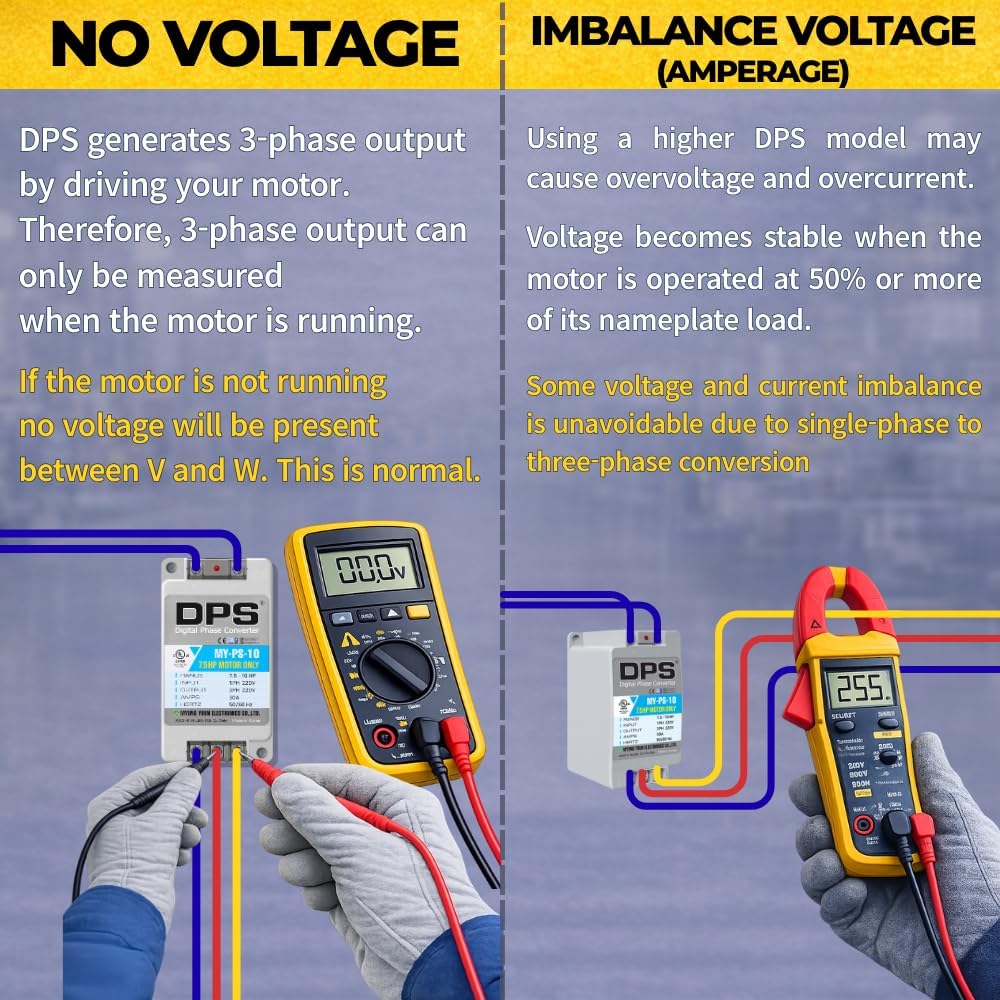
Figure 8.1: Comparison of voltage readings when the motor is not running (showing no voltage on V-W) versus when it is running (showing balanced 3-phase output).
Video 8.2: Explains why voltage may not be detected on all three phases (V-W) when the motor is not running, and how it normalizes during operation.
8.4 Motor Generates Heat and Noise
Ensure that the DPS model matches the specifications of your motor. Using a DPS model that is too high compared to the motor's specifications may cause the motor to become hot and noisy. Refer to the model selection guide in Section 4.

Figure 8.2: Illustrates that using a higher DPS model does not increase power and can lead to issues if not matched correctly to the motor's HP range.

Figure 8.3: Clarification on DPS HP ratings, explaining that the stated HP is maximum support, while optimal efficiency is achieved with a slightly lower HP motor.
9. Warranty & Support
For warranty information or technical support, please contact Myung Youn Electronics, the manufacturer. Always refer to your purchase documentation for specific warranty terms and conditions.
If you are unsure about selecting a DPS model or have any installation questions, it is recommended to contact the seller or manufacturer for assistance.