1. Introduction and Overview
The MKS SERVO42C is a closed-loop stepper motor driver designed to enhance precision and reliability in applications such as 3D printers and CNC machines. This system utilizes motor rotation angle feedback to the drive circuit, ensuring that every intended step is executed. If a step is missed or an error occurs, the motor automatically corrects its position based on feedback, indicated by a blue LED on the closed-loop module.
Key Features:
- Closed-Loop Control: Position, speed, and torque closed-loop operation prevents step loss, even at high speeds.
- High Performance: Achieves maximum speeds of 1000 RPM with low noise, low vibration, and minimal heat generation due to Field-Oriented Control.
- Flexible Subdivision: Supports 1 to 256 subdivisions, including odd subdivisions, and is compatible with 0.9-degree or 1.8-degree motors.
- Advanced Driver: Features a 4 half-bridge driver with 8 MOSFETs for high operating efficiency.
- High-Resolution Encoder: Equipped with a 14-bit magnetic encoder for precise angle resolution.
- USART Interface: Allows connection to a computer via serial port for parameter adjustment and query.
- Broad Compatibility: Compatible with mainboards like Gen L, SGen L, SKR 2 / V1.4 Turbo, and BTT Octopus V1.1, provided they use separate, non-soldered drivers.
2. Setup and Installation
2.1 Package Contents
Verify that all components are present in your package:
- 1 x MKS SERVO42C (includes motor and integrated driver)
- 1 x Adapter board (MKS APT)
- 1 x 60cm 6-pin Data Cable

Figure 2.1: MKS SERVO42C package contents, showing the stepper motor with integrated driver, the MKS APT adapter board, and the connecting data cable.
2.2 Physical Installation
Mount the MKS SERVO42C motor securely to your equipment (e.g., 3D printer frame, CNC machine axis) using appropriate fasteners. Ensure the motor is aligned correctly with the axis it will drive.

Figure 2.2: Side view of the MKS SERVO42C, illustrating the compact design of the motor with the driver board mounted directly.
2.3 Wiring
Connect the MKS SERVO42C to your mainboard using the provided data cable and adapter board. Pay close attention to the pin assignments for V+, GND, EN (Enable), STP (Step), and DIR (Direction) to ensure correct functionality and prevent damage.

Figure 2.3: Detailed view of the MKS SERVO42C driver board, highlighting the V+, GND, Com, En, Stp, and Dir connection pins, along with the USART interface.

Figure 2.4: Front and back views of the MKS SERVO42C driver board, showing the component layout and the encoder connection on the reverse side.
2.4 Compatibility
The MKS SERVO42C is designed for compatibility with various 3D printer and CNC mainboards that utilize separate, pluggable stepper motor drivers. This includes popular boards such as Gen L, SGen L, SKR 2 / V1.4 Turbo, and BTT Octopus V1.1. Ensure your mainboard's driver slots are compatible with the MKS APT adapter board.
3. Operation
3.1 Subdivision Settings
The MKS SERVO42C supports a wide range of subdivision settings from 1 to 256. This allows for fine control over motor movement and can be adjusted to suit the precision requirements of your application. The driver is compatible with both 0.9-degree and 1.8-degree stepper motors. Subdivision settings can be configured via the USART interface.
3.2 Software Interface (MKS SERVO42C Control)
The MKS SERVO42C features a USART interface, enabling connection to a computer for advanced parameter adjustment and monitoring. This allows users to fine-tune settings such as subdivision, motor speed, and other operational parameters using dedicated control software.

Figure 3.1: Screenshot of the MKS SERVO42C Control V1.0 software, illustrating options for reading parameters, controlling motor rotation, setting subdivision, and adjusting motor position.
3.3 Closed-Loop Functionality
The core advantage of the MKS SERVO42C is its closed-loop control system. This system continuously monitors the motor's position and adjusts it in real-time to prevent step loss. This results in:
- High-Speed Operation: The motor can run at speeds up to 1000 RPM without losing steps, improving overall machine throughput.
- Reduced Noise and Vibration: Field-Oriented Control (FOC) minimizes operational noise and vibration, contributing to smoother and quieter machine performance.
- Lower Calorific Value: Efficient operation leads to less heat generation, enhancing component longevity.
4. Maintenance
To ensure the longevity and optimal performance of your MKS SERVO42C, consider the following maintenance guidelines:
- Keep Clean: Periodically clean the motor and driver to prevent dust and debris accumulation, which can affect cooling and component lifespan.
- Check Connections: Regularly inspect all wiring connections to ensure they are secure and free from corrosion or damage. Loose connections can lead to intermittent operation or component failure.
- Environmental Conditions: Operate the device within its specified temperature and humidity ranges to prevent premature wear.
5. Troubleshooting
This section addresses common issues you might encounter with the MKS SERVO42C.
- Motor Losing Steps: If the motor appears to be losing steps, check the blue LED on the closed-loop module. If it lights up, the system has detected and attempted to correct a step loss. Ensure the motor is not overloaded and that power supply is stable. Verify that the subdivision settings are appropriate for your application.
- Communication Issues via USART: If you experience difficulty connecting to the software interface or adjusting parameters, ensure the data cable is securely connected and the correct COM port and baud rate are selected in the software. Check for any driver conflicts on your computer.
- Motor Not Moving or Erratic Movement: Verify all wiring connections (V+, GND, EN, STP, DIR) are correct and secure. Ensure the power supply voltage is within the specified range (7V-28V). Check for any mechanical obstructions preventing motor movement.
- Excessive Noise or Vibration: While the MKS SERVO42C is designed for low noise, excessive noise or vibration could indicate an issue. Check motor mounting for looseness, ensure proper current settings, and verify that the motor is not operating under excessive load.
6. Technical Specifications
Detailed specifications for the MKS SERVO42C:
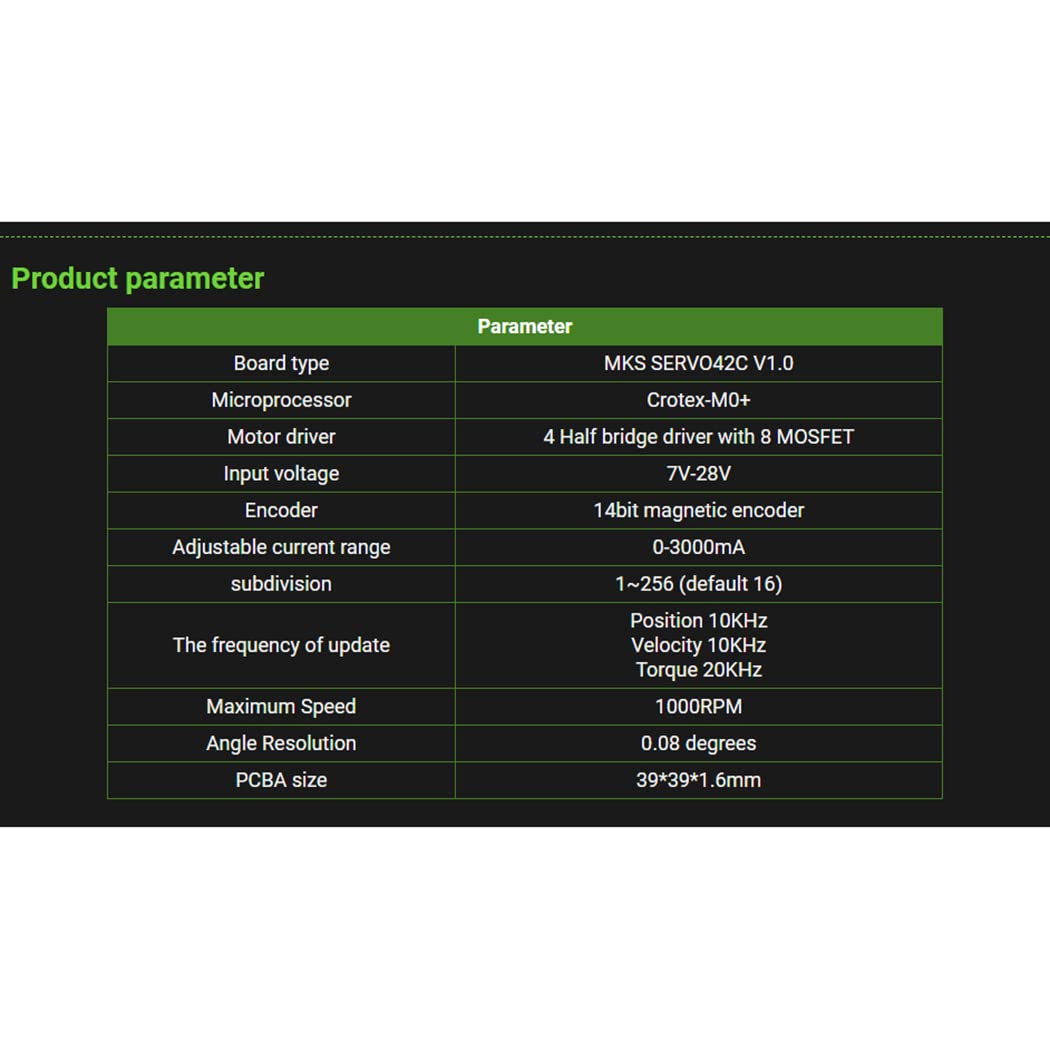
Figure 6.1: MKS SERVO42C V1.0 Product Parameters, detailing board type, microprocessor, motor driver, input voltage, encoder, current range, subdivision, update frequency, maximum speed, angle resolution, and PCBA size.

Figure 6.2: Parameter comparison between MKS SERVO42C, SERVO42B, and SERVO42A, highlighting differences in update frequency, PID control mode, driver, OLED, operating voltage, current range, USART, Field-Oriented Control, subdivision, angle resolution, maximum speed, motor vibration, noise, and temperature.
6.1 General Specifications
- Board Type: MKS SERVO42C V1.0
- Microprocessor: Crotex-M0+
- Motor Driver: 4 Half bridge driver with 8 MOSFET
- Input Voltage: 7V-28V
- Encoder: 14bit magnetic encoder
- Adjustable Current Range: 0-3000mA
- Subdivision: 1-256 (default 16)
- Frequency of Update: Position 10KHz, Velocity 10KHz, Torque 20KHz
- Maximum Speed: 1000RPM
- Angle Resolution: 0.08 degrees
- PCBA Size: 39*39*1.6mm
- Material: Metal
6.2 Dimensions

Figure 6.3: Dimensional drawing of the MKS SERVO42C, showing key measurements for installation and integration.
7. Warranty and Support
HOCENWAY products are manufactured to high-quality standards. For specific warranty information, please refer to the product packaging or contact your retailer. For technical support, troubleshooting assistance, or further inquiries, please reach out to HOCENWAY customer service through their official channels or the platform where the product was purchased.


