Introduction
This manual provides instructions for the VINABTY RC902V1 Voice Remote Control. This remote is designed to operate various Smart TV models, offering convenient control and voice command capabilities. Please read this manual thoroughly before using the remote control.
Compatible TV Models: 65X925, 75X925, 75C835, 65C835, 55C835, 43P735, 65C935, 75C935, 65P735, 85P735, 75P735, 65C831, 55C831, 55C631, 43P737, 50P737, 55P737, 65P737, 75P737, 55C735, 65C735, 65C825, 55C735K, 65C735K, 75C735K, 85C735K, 98C735K, 65C935K, 75C935K, 75QLED860, 65QLED860, 55QLED860, 32S5400A, 32S5403A, 32S5403AF, and other similar models.

Image: The VINABTY RC902V1 remote control in use, demonstrating its application in a home entertainment setting.
Setup
1. Battery Installation
The remote control requires two AAA batteries (not included). Follow these steps to install them:
- Locate the battery compartment cover on the back of the remote control.
- Slide the cover downwards or press the latch to open it.
- Insert two AAA batteries, ensuring the positive (+) and negative (-) terminals align correctly with the markings inside the compartment.
- Replace the battery compartment cover by sliding it back into place until it clicks securely.

Image: Rear view of the remote control, illustrating the location of the battery compartment.
2. Initial Pairing with Your TV
For voice control functionality, the remote must be paired with your Smart TV via Bluetooth. The pairing process may vary slightly depending on your TV model. Refer to your TV's user manual for specific instructions. General steps are as follows:
- Ensure your TV is powered on.
- Navigate to your TV's Settings menu.
- Look for options such as Remotes & Accessories, Bluetooth Settings, or System.
- Select Add Device or Pair Remote.
- On the VINABTY RC902V1 remote, press and hold the OK button (center of the navigation pad) and the Home button simultaneously for a few seconds until an indicator light on the remote flashes, or a pairing message appears on your TV screen.
- Once the remote appears in the list of discoverable devices on your TV, select it to complete the pairing process.
- A confirmation message should appear on your TV screen upon successful pairing.
If pairing fails, ensure the remote is close to the TV and repeat the steps. Check battery levels if issues persist.
Operating Instructions
The VINABTY RC902V1 remote control features a standard layout for easy navigation and dedicated buttons for quick access to popular functions and applications.
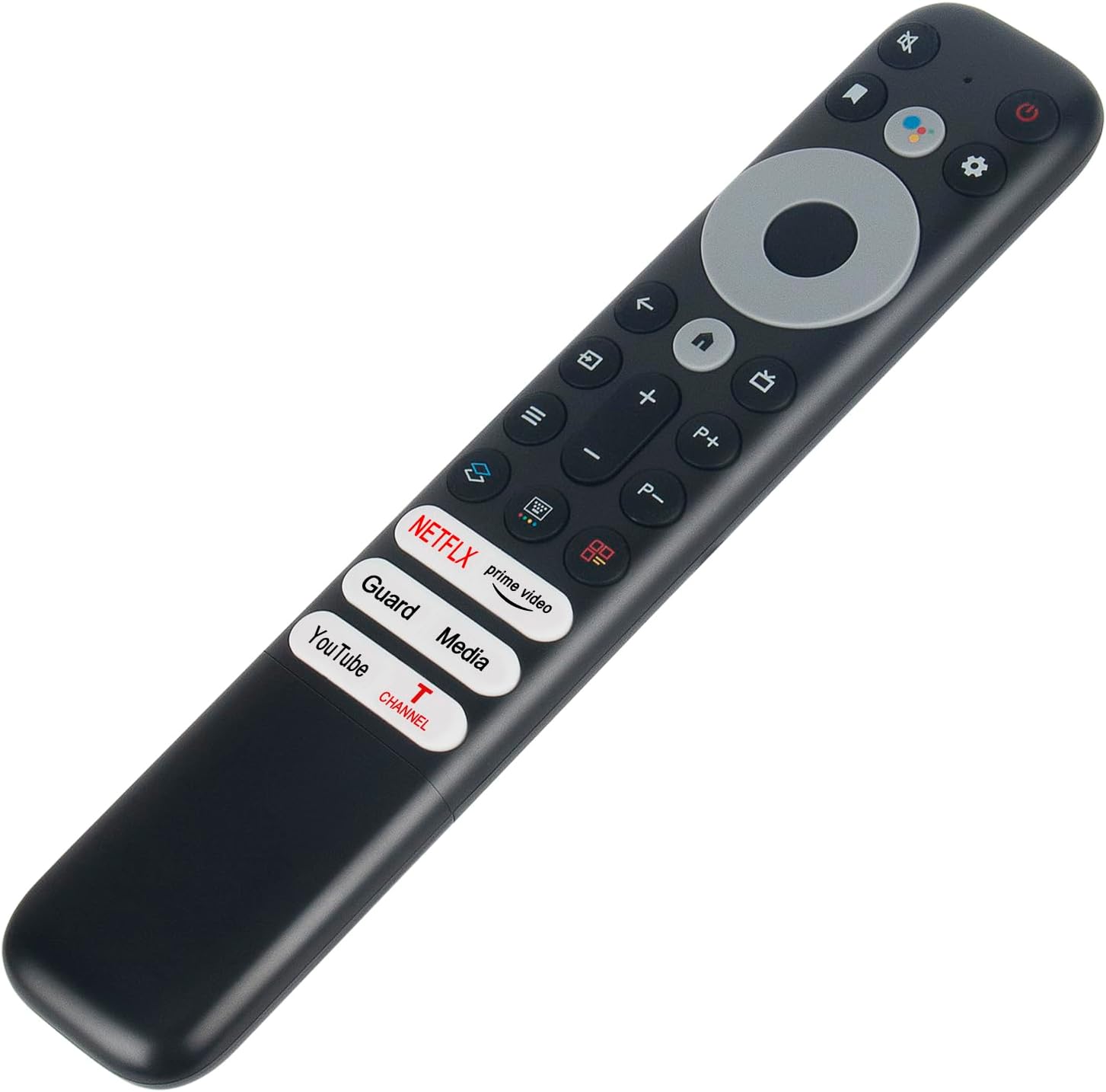
Image: Front view of the VINABTY RC902V1 remote control, displaying its full button layout.
Button Functions:
- Power Button (⏻): Turns the TV on or off.
- Voice Assistant Button (🎤): Activates the TV's voice assistant for commands and search.
- Settings Button (⚙️): Accesses the TV's settings menu.
- Navigation Pad (Up, Down, Left, Right, OK): Used to navigate menus and confirm selections.
- Back Button (↩): Returns to the previous screen or menu.
- Home Button (🏠): Returns to the TV's home screen.
- Volume Up/Down (V+/V-): Adjusts the TV volume.
- Channel Up/Down (P+/P-): Changes TV channels.
- Mute Button (🔇): Mutes or unmutes the TV audio.
- App Shortcut Buttons: Dedicated buttons for quick access to applications like Netflix, Prime Video, YouTube, etc.
Using Voice Control:
After successful pairing, you can use the voice control feature:
- Press and hold the Voice Assistant Button (usually marked with a microphone icon).
- Speak clearly into the remote control's microphone.
- Release the button when you have finished speaking.
- The TV will process your command or search query.

Image: The remote control with a visual indicator highlighting the voice assistant button and its function.
Maintenance
Cleaning:
To clean the remote control, use a soft, dry cloth. For stubborn dirt, slightly dampen the cloth with water or a mild, non-abrasive cleaner. Avoid using harsh chemicals, solvents, or abrasive materials, as these can damage the remote's surface or internal components.
Battery Care:
- Replace batteries when the remote's performance degrades or if it stops responding.
- Do not mix old and new batteries, or different types of batteries.
- Remove batteries if the remote will not be used for an extended period to prevent leakage.
- Dispose of used batteries according to local regulations.
Storage:
Store the remote control in a cool, dry place away from direct sunlight, extreme temperatures, and high humidity. Avoid dropping the remote or exposing it to liquids.
Troubleshooting
| Problem | Possible Cause | Solution |
|---|---|---|
| Remote not responding | Low or dead batteries; Remote not paired; Obstruction between remote and TV. | Replace batteries; Re-pair the remote (see Setup section); Ensure clear line of sight to TV's IR receiver (if applicable). |
| Voice control not working | Remote not paired via Bluetooth; Microphone blocked; TV's voice assistant disabled. | Ensure remote is Bluetooth paired; Check for obstructions over the microphone; Verify TV's voice assistant settings. |
| Buttons are sticky or unresponsive | Dirt or debris under buttons. | Clean the remote surface (see Maintenance section). |
| Short battery life | Using low-quality batteries; Frequent use of voice control. | Use high-quality alkaline batteries; Reduce frequency of voice commands if not necessary. |
Specifications
- Model Number: RC902V1
- Brand: VINABTY
- Product Dimensions: 7.6 x 2 x 0.7 inches
- Item Weight: 2.39 ounces
- Special Feature: Voice Search
- Color: Black
- Max Number of Supported Devices: 1
- Compatible Devices: Television
- Manufacturer: Xinhao
- Date First Available: December 1, 2021
Warranty and Support
Specific warranty information for the VINABTY RC902V1 remote control is not provided within this manual. For details regarding warranty coverage, technical support, or service inquiries, please refer to the product packaging, the retailer's return policy, or contact the manufacturer directly through their official website or customer service channels.
