
Piroir PP009AW
Piroir IPL Hair Removal Device User Manual
Model: PP009AW
Introduction
Welcome to the Piroir IPL Hair Removal Device user manual. This device is designed for safe and effective hair removal in the comfort of your home. Utilizing advanced IPL (Intense Pulsed Light) technology with a cooling function, it offers a convenient solution for long-term hair reduction. Please read this manual thoroughly before first use to ensure proper operation and maximize results.
Important Safety Information
Always adhere to the following safety guidelines to prevent injury or damage to the device.
- Do not use on damaged or irritated skin.
- Avoid direct eye exposure to the light flash. Always wear protective eyewear during use.
- Keep out of reach of children.
- Do not use if pregnant or breastfeeding.
- Consult a doctor before use if you have any pre-existing skin conditions or are taking photosensitive medication.
- Ensure the device is clean and dry before each use.
- Do not immerse the device in water or any other liquid.
- Unplug the device when not in use and before cleaning.
Product Overview
The Piroir IPL Hair Removal Device features a sleek, ergonomic design for comfortable handling. Key components include the flash window, control panel, and power button.

Image: The Piroir IPL Hair Removal Device, white with rose gold accents, featuring a digital display and a cooling function indicated by blue light and snowflakes emanating from the flash window.
Device Components
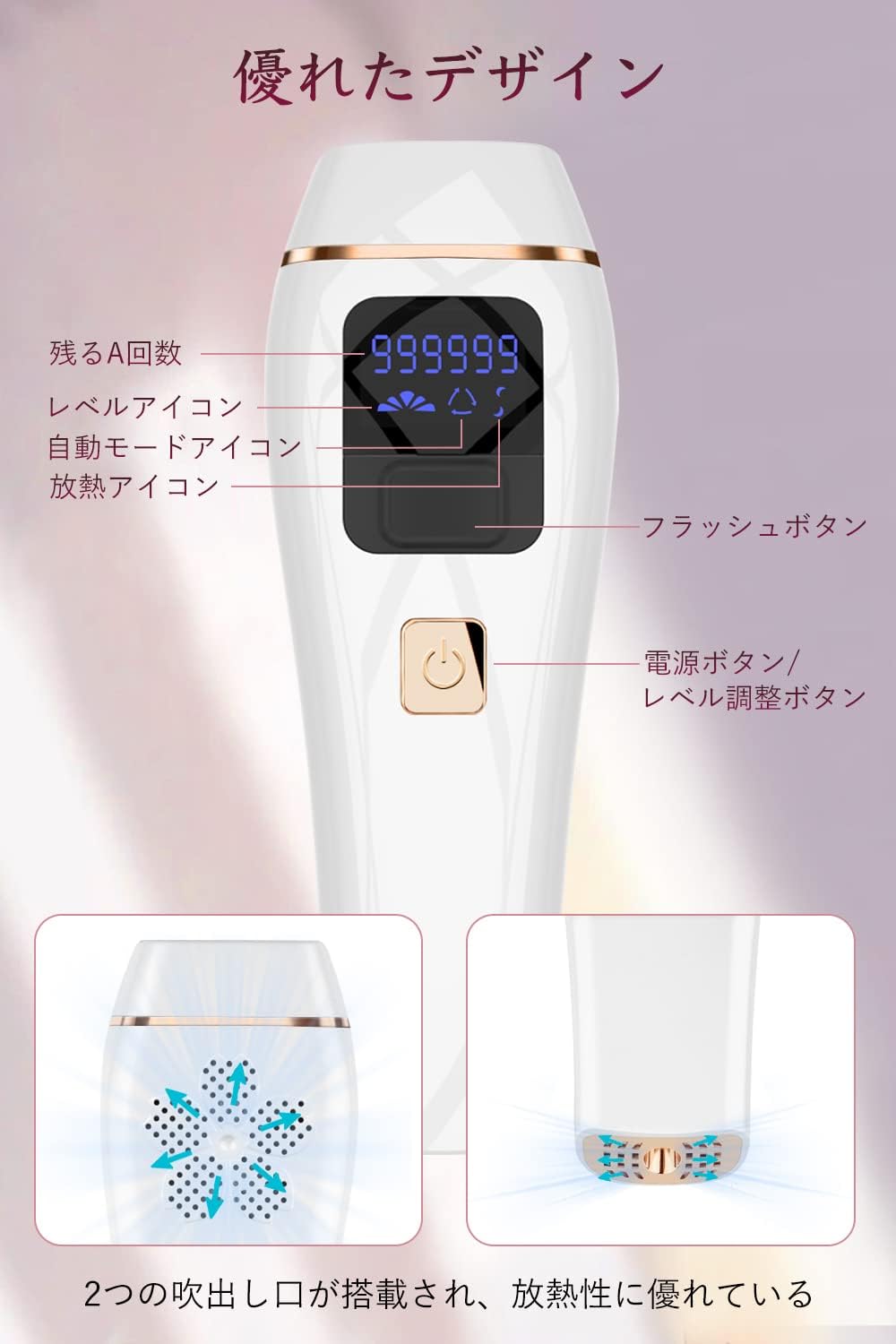
Image: A detailed diagram of the Piroir IPL Hair Removal Device, highlighting its features: remaining flashes display, level icon, automatic mode icon, heat dissipation icon, flash button, and power/level adjustment button. The bottom shows two air outlets for heat dissipation.
- Flash Window: Emits the IPL light.
- Digital Display: Shows remaining flashes, intensity level, and mode.
- Power Button: Turns the device on/off and adjusts intensity levels.
- Flash Button: Triggers a single flash in manual mode.
- Cooling Vents: Located on the sides for heat dissipation.
Package Contents

Image: The complete package contents of the Piroir IPL Hair Removal Device, including the device itself, power adapter, protective eyewear, a razor, and the user manual.
- Piroir IPL Hair Removal Device
- Power Adapter
- Protective Eyewear
- Razor
- User Manual
Setup
Before your first use, ensure the device is fully charged or connected to power.
- Prepare the Skin: Shave the area to be treated. Ensure the skin is clean, dry, and free of any lotions or creams.
- Connect Power: Plug the power adapter into the device and then into a power outlet.
- Wear Protective Eyewear: Always wear the provided protective eyewear to shield your eyes from the intense light.

Image: A four-panel image illustrating the usage steps: 1) Shaving hair with a razor, 2) Plugging in the power and selecting mode/level, 3) Wearing protective glasses, and 4) Placing the flash window perpendicularly on the skin to begin hair removal.
Operating Instructions
Power On/Off and Level Adjustment
- Press and hold the Power Button for 2 seconds to turn the device on. The digital display will light up.
- Short press the Power Button to cycle through the 5 intensity levels. Start with Level 1 for your first treatment and gradually increase as your skin tolerates it.
- To turn off the device, press and hold the Power Button for 2 seconds.
Modes of Operation
The device offers two modes: Manual Flash and Automatic Flash.
Manual Flash Mode
- This mode is suitable for small or sensitive areas like the face, armpits, or bikini line.
- Place the flash window firmly against your skin.
- Press the Flash Button to emit a single flash.
- Move the device to the next area and repeat.
Automatic Flash Mode
- This mode is ideal for larger areas such as legs, arms, or back.
- To activate automatic mode, press and hold the Flash Button for 2 seconds until the automatic mode icon appears on the display.
- Place the flash window firmly against your skin and glide the device slowly over the treatment area. The device will automatically emit flashes at regular intervals.
- To exit automatic mode, short press the Flash Button again.
Treatment Schedule
For optimal results, follow a consistent treatment schedule:

Image: A visual guide showing the expected hair reduction over an 8-week period. It illustrates the progression from dense hair to significantly reduced hair, with recommended treatment frequencies for each phase: 1-2 weeks (3 times/week), 3-4 weeks (2 times/week), 5-8 weeks (1 time/week), and after 8 weeks (1 time/month).
- Weeks 1-2: 3 treatments per week. Hair follicles begin to shrink.
- Weeks 3-4: 2 treatments per week. Hair becomes softer and melanin content decreases.
- Weeks 5-8: 1 treatment per week. Hair becomes finer, and skin feels smoother.
- After 8 Weeks: 1 treatment per month for maintenance. Continued use helps achieve permanent hair reduction.
Note: Individual results may vary based on hair type, skin tone, and consistency of use. The data provided is based on laboratory tests.
Applicable Body Areas
The Piroir IPL Hair Removal Device is suitable for use on various body parts:
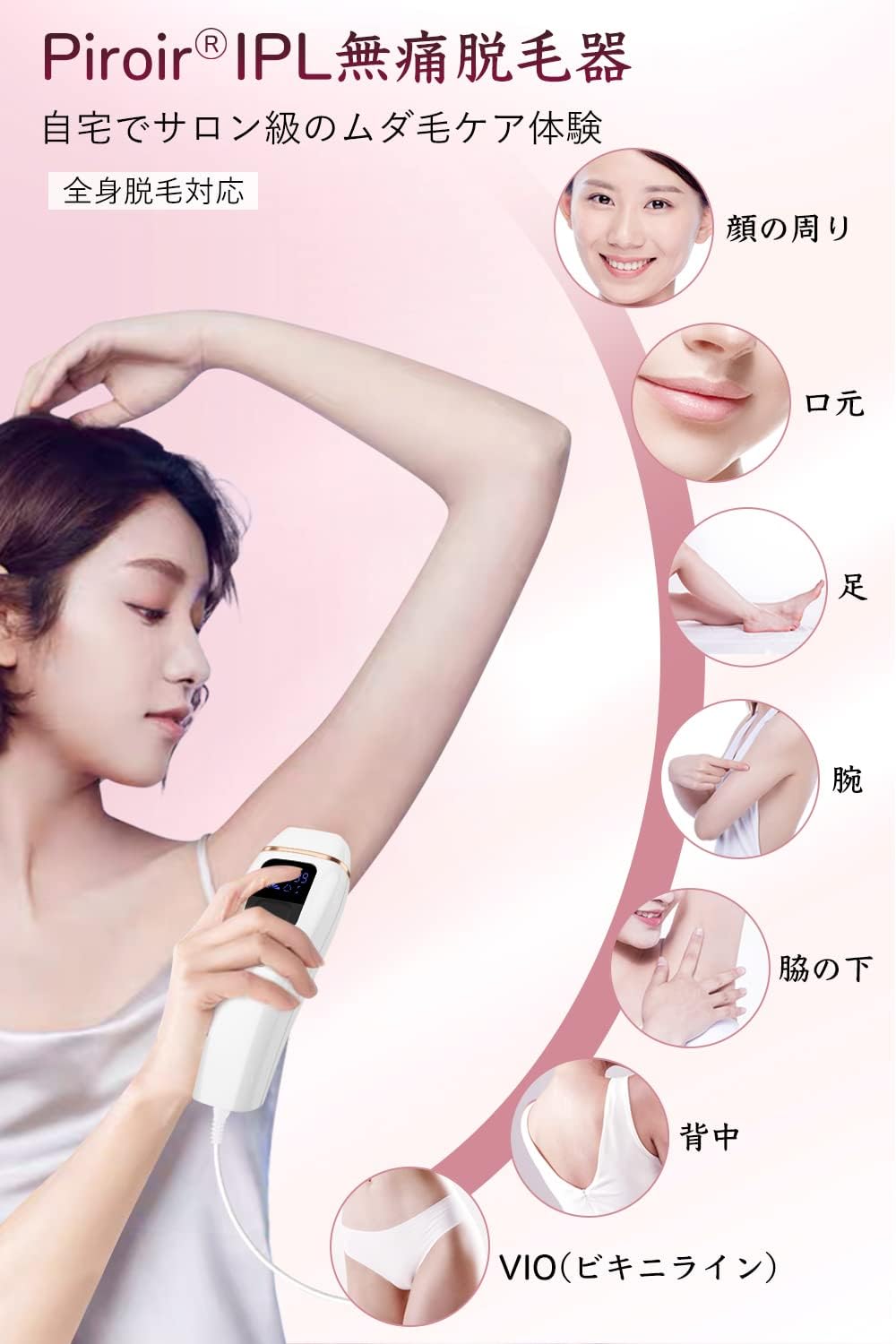
Image: An illustration showing the various body areas where the Piroir IPL Hair Removal Device can be used, including around the face, mouth, legs, arms, underarms, back, and bikini line (VIO).
- Face (avoiding eyes and lips)
- Arms
- Underarms
- Legs
- Back
- Bikini Line (VIO)
IPL Hair Removal Principle
The device utilizes Intense Pulsed Light (IPL) technology, which is widely adopted in professional beauty salons. IPL works by emitting broad-spectrum light that targets the melanin pigment in hair follicles. This light energy is converted into heat, which damages the hair follicle and inhibits future hair growth, without harming the surrounding skin.

Image: A diagram illustrating the IPL hair removal process: 1) Light irradiation of the hair follicle, 2) Destruction of the hair follicle by high-energy laser light, and 3) Cessation of hair growth, leading to permanent hair reduction with repeated treatments.
Maintenance
Proper maintenance ensures the longevity and performance of your device.
- Cleaning: After each use, unplug the device and wipe the flash window with a soft, dry cloth. Do not use abrasive cleaners or alcohol.
- Storage: Store the device in a cool, dry place, away from direct sunlight and moisture. Keep it in its original packaging or a protective case when not in use.
- Inspection: Regularly inspect the device and power cord for any signs of damage. Do not use if damaged.
Troubleshooting
If you encounter any issues, refer to the following common problems and solutions:
| Problem | Possible Cause | Solution |
|---|---|---|
| Device does not turn on. | Not plugged in correctly; Power outlet issue; Device malfunction. | Ensure power adapter is securely connected to both the device and a working power outlet. Try a different outlet. If problem persists, contact customer support. |
| No flash emitted. | Flash window not fully in contact with skin; Device in standby mode; Remaining flashes depleted. | Ensure the flash window is pressed firmly and flat against the skin. Press the power button to wake the device. Check the digital display for remaining flashes. |
| Skin feels too hot. | Intensity level too high for your skin type; Device overheating. | Reduce the intensity level. Take a short break to allow the device to cool down. Ensure cooling vents are not blocked. |
| Display shows an error code. | Internal malfunction. | Turn off the device, unplug it, wait a few minutes, then plug it back in and restart. If the error persists, contact customer support. |
Specifications
| Feature | Detail |
|---|---|
| Model Number | PP009AW |
| Technology | IPL (Intense Pulsed Light) |
| Flashes | 990,000 (approx.) |
| Intensity Levels | 5 Levels |
| Modes | Manual / Automatic |
| Cooling Function | Yes |
| Flash Area | 3 cm² |
| Power Consumption | 100-240V |
| Dimensions | 22.7 x 17.2 x 5.7 cm |
| Weight | 650 g |
Warranty and Support
The Piroir IPL Hair Removal Device comes with a one-year warranty from the date of purchase, covering manufacturing defects. Please retain your proof of purchase for warranty claims.
For technical support, troubleshooting assistance, or warranty inquiries, please contact Piroir customer service through the retailer's platform or the contact information provided in your product packaging.
Online Resources: For additional tips and FAQs, visit the official Piroir product page or support section on the retailer's website.
Ask a question about this manual
Ask about setup, troubleshooting, compatibility, parts, safety, or missing instructions. Manuals+ will review the question and use this page’s manual context to help answer it.