
1. Introduction
The VIGELA STC-3028 is an all-purpose temperature and humidity controller designed for precise environmental management. This device features dual displays for simultaneous temperature and humidity readings, along with dual relay outputs for controlling both heating/cooling and humidifying/dehumidifying equipment. It is suitable for a wide range of applications requiring accurate environmental control.
This manual provides detailed instructions for the installation, operation, and maintenance of your STC-3028 controller to ensure safe and effective use.

Figure 1.1: VIGELA STC-3028 Temperature and Humidity Controller with included sensors.
2. Product Features
- Integrated Design: Embedded installation without the need for an external socket.
- Dual Sensors: Ships with two high-performance integrated sensors (one as backup) with a 1.5m (59in) extension cable.
- Durable Construction: Features an ABS flame retardant plastic shell for enhanced safety.
- Wide Voltage Input: Operates on AC110~230V (±10%) power supply.
- Dual Relay Outputs: Maximum loaded current of 11A, enabling simultaneous temperature and humidity control.
- Temperature Range: -40°C to +110°C (-40°F to +230°F).
- Humidity Range: 00% RH to +100% RH.
- High Accuracy: Temperature accuracy of ±0.3°C and humidity accuracy of ±3% RH.
- Correction Function: Supports temperature and humidity correction for precise calibration.
3. Package Contents
Upon opening the package, please verify that all components are present and undamaged:
- 1 x VIGELA STC-3028 Temperature and Humidity Controller
- 2 x High-performance Integrated Sensors (one black, one grey, with 1.5m extension cables)

Figure 3.1: Contents of the STC-3028 kit, including the controller and two sensors.
4. Specifications
| Parameter | Value |
|---|---|
| Model Number | STC-3028 |
| Input Voltage | AC110~230V (±10%) |
| Relay Output Current | Max 11A |
| Temperature Range | -40°C to +110°C (-40°F to +230°F) |
| Humidity Range | 00% RH to +100% RH |
| Temperature Accuracy | ±0.3°C |
| Humidity Accuracy | ±3% RH |
| Display Type | LCD Dual Display |
| Material | Acrylonitrile Butadiene Styrene (ABS) |
| Product Dimensions | 3.35"L x 2.95"W x 1.34"H (85mm x 75mm x 34mm) |
| Item Weight | 6.7 ounces (190g) |
| Color | Black or Grey |

Figure 4.1: Physical dimensions of the STC-3028 controller and its sensor.
5. Setup and Installation
5.1 Physical Installation
The STC-3028 is designed for embedded installation. It should be mounted into a panel or enclosure. Ensure adequate ventilation around the unit.
5.2 Wiring Instructions
WARNING: All wiring should be performed by a qualified electrician or technician. Ensure the power supply is disconnected before making any electrical connections to prevent electric shock or damage to the device. Strictly distinguish interfaces of relay, sensor, and power. Sensor down-lead and power wire should be kept a proper distance.
The controller has terminals for power input, sensor connection, and relay outputs for humidifying and heating/cooling. Refer to the wiring diagrams below for correct connections.

Figure 5.1: General Wiring Diagram. The red display shows temperature, and the blue display shows humidity. Connections are made to the power supply, sensor, and output devices (heater/humidifier).
Connection 1: Load Independent Power Supply
This configuration uses a separate power supply for the load devices (heater/humidifier) from the controller's power supply.

Figure 5.2: Wiring for independent load power supply. Connect L (Live) and N (Neutral) of the 110-220VAC power supply to the controller's power input terminals. Connect the sensor to its designated terminals. For heating and humidifying outputs, connect the load devices to their respective relay terminals, powered by a separate 110VAC/220VAC or 12VDC/24VDC supply.
Connection 2: Parallel Connection with Load Power Supply
This configuration uses the same power supply for both the controller and the load devices.

Figure 5.3: Wiring for parallel connection. Connect L (Live) and N (Neutral) of the 110-220VAC power supply to the controller's power input terminals. The same L and N lines are then branched to power the heating and humidifying loads through their respective relay terminals.
5.3 Sensor Connection
The sensors are designed for direct plug-in connection to the controller. Ensure the sensor is securely plugged into the designated sensor terminals. The sensor is not sealed and should not be immersed in water.

Figure 5.4: Sensor connection detail. Sensors plug into the designated terminals. Note that the sensor is not sealed and should be kept dry.
6. Operating Instructions
6.1 Display Overview
The STC-3028 features dual LCD displays. The left display (red) shows the current temperature, and the right display (blue) shows the current humidity. Adjacent to each display are up and down arrow buttons for setting parameters.
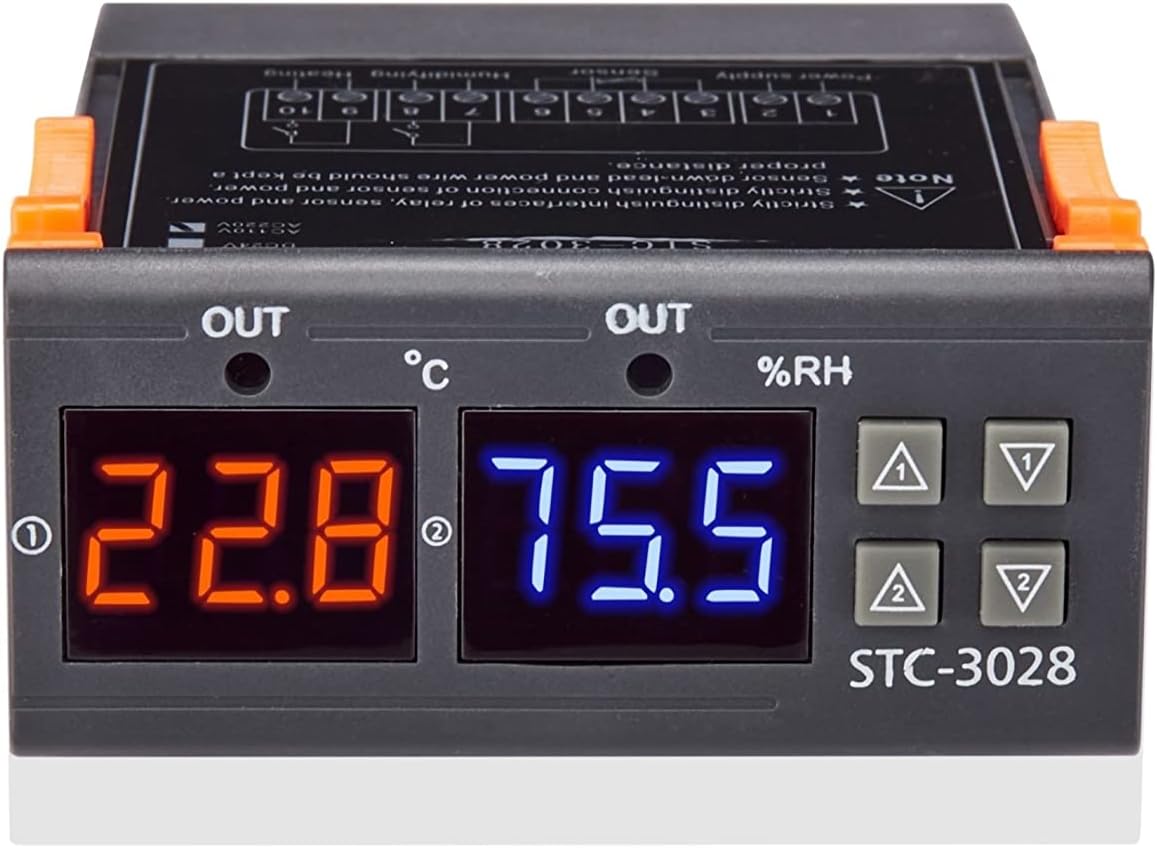
Figure 6.1: Front view of the STC-3028 controller, highlighting the temperature (red) and humidity (blue) displays, and control buttons.
6.2 Setting Temperature and Humidity
To set the desired temperature or humidity, typically you will press and hold one of the setting buttons (often the 'Set' or 'Mode' button, or one of the arrow buttons) until the display flashes, indicating it's in setting mode. Then, use the corresponding up/down arrow buttons to adjust the value. Press the 'Set' or 'Mode' button again, or wait a few seconds, to confirm the setting and exit setting mode.
The controller will then activate or deactivate the connected heating/cooling and humidifying/dehumidifying devices based on the set parameters and the current readings from the sensors.
6.3 Temperature and Humidity Correction
The STC-3028 supports calibration for both temperature and humidity readings. This feature allows you to adjust the displayed values to match a known accurate reference. The specific procedure for entering calibration mode and applying corrections will be detailed in the full product manual provided with the device. Typically, this involves a combination of button presses to access a hidden menu or a specific setting parameter.
7. Applications
The VIGELA STC-3028 is a versatile device suitable for a wide range of applications requiring precise temperature and humidity control. Its capabilities make it ideal for:
- Environmental Control Boxes: Maintaining specific conditions in various sensor control boxes.
- Home Appliances: Integration with water heaters, refrigerators, and fans for automated control.
- Scientific Research: Ensuring stable test conditions in laboratories.
- Agriculture: Optimizing environments for planting, such as greenhouses, and aquaculture.
- Incubators: Providing stable temperature and humidity for hatching eggs.
- Terrariums/Vivaria: Creating ideal climates for reptiles and other exotic pets.

Figure 7.1: Examples of STC-3028 applications, including humidity control in greenhouses, temperature and humidity management in mushroom cultivation, use in various control boxes, and maintaining precise test conditions.
8. Maintenance
To ensure the longevity and accurate performance of your VIGELA STC-3028 controller, follow these maintenance guidelines:
- Keep Dry: Do not soak the controller or sensors in water. Avoid exposure to excessive moisture or condensation.
- Clean Regularly: Gently wipe the display and casing with a soft, dry cloth. Do not use abrasive cleaners or solvents.
- Sensor Care: Keep the sensor clean and free from dust or debris, which can affect accuracy.
- Inspect Wiring: Periodically check all wiring connections to ensure they are secure and free from damage.
- Storage: If storing the device for an extended period, keep it in a cool, dry place away from direct sunlight and extreme temperatures.
9. Troubleshooting
If you encounter issues with your STC-3028 controller, refer to the following common troubleshooting steps:
- No Power/Display Off:
- Check the power supply connection to the controller.
- Ensure the input voltage is within the specified AC110~230V range.
- Verify that the power source is active.
- Inaccurate Readings:
- Ensure the sensor is clean and free from obstructions.
- Check the sensor cable for any damage or loose connections.
- Consider using the temperature and humidity correction feature if you have a known accurate reference.
- If readings are wildly off, the sensor might be faulty; use the spare sensor provided.
- Output Devices Not Activating:
- Verify that the wiring to the heating/cooling or humidifying/dehumidifying device is correct and secure.
- Check the set temperature/humidity parameters to ensure they are configured to trigger the output.
- Ensure the load device itself is functional and powered.
- Confirm the relay output current (max 11A) is not exceeded by the connected load.
- Controller Not Responding to Button Presses:
- Power cycle the device (turn off and on again).
- Ensure no foreign objects are lodged in the buttons.
If the problem persists after attempting these steps, please contact VIGELA customer support for further assistance.
10. Safety Precautions
Please read and adhere to the following safety precautions to prevent injury or damage to the device:
- Electrical Safety: Always disconnect power before performing any wiring or maintenance. Improper wiring can lead to electric shock or fire.
- Environmental Conditions: Do not expose the controller to water, rain, or excessive humidity. The device is not waterproof.
- Installation: Ensure the controller is installed in a stable and secure location, away from direct heat sources or flammable materials.
- Ventilation: Provide adequate ventilation around the unit to prevent overheating.
- Load Capacity: Do not exceed the maximum relay output current of 11A. Overloading can damage the controller and connected devices.
- Children and Pets: Keep the device out of reach of children and pets.
- Intended Use: Use the controller only for its intended purpose as a temperature and humidity control device.
11. Warranty and Support
For warranty information and customer support, please refer to the documentation included with your purchase or contact the seller directly. The standard return policy for this product is 30 days from the date of purchase for refund or replacement.
For technical assistance or inquiries, please reach out to VIGELA customer service through the retailer's platform or the official VIGELA website.