
1. Introduction
This manual provides detailed instructions for the RATTMMOTOR 4 Axis CNC Controller Kit. This kit is designed for CNC applications, offering precise control over stepper motors. It includes Nema23 stepper motors, TB6600 stepper motor drivers, a USB Mach3 motion control card, and a 350W switching power supply.
The kit is suitable for various CNC projects requiring reliable motion control and high torque output.

2. Kit Components Overview
The RATTMMOTOR 4 Axis CNC Controller Kit includes the following main components:
- Nema23 Stepper Motors (Model 23HS8430): High-torque, 2-phase stepper motors.
- TB6600 Stepper Motor Drivers: Upgraded 4.5A drivers with multiple protection features.
- USB Mach3 Motion Control Card: 4-axis linkage control card with a 400KHz pulse frequency.
- 350W Switching Power Supply: Provides stable 24V DC output with protection features.


3. Setup and Wiring
Proper wiring is crucial for the correct operation of the CNC kit. Follow the instructions below carefully.
3.1. Stepper Motor and TB6600 Driver Wiring
- Stepper motor's RED wire connects to driver's A+ port.
- Stepper motor's GREEN wire connects to driver's A- port.
- Stepper motor's YELLOW wire connects to driver's B+ port.
- Stepper motor's BLUE wire connects to driver's B- port.
3.2. Control Card and TB6600 Driver Wiring (X-axis example)
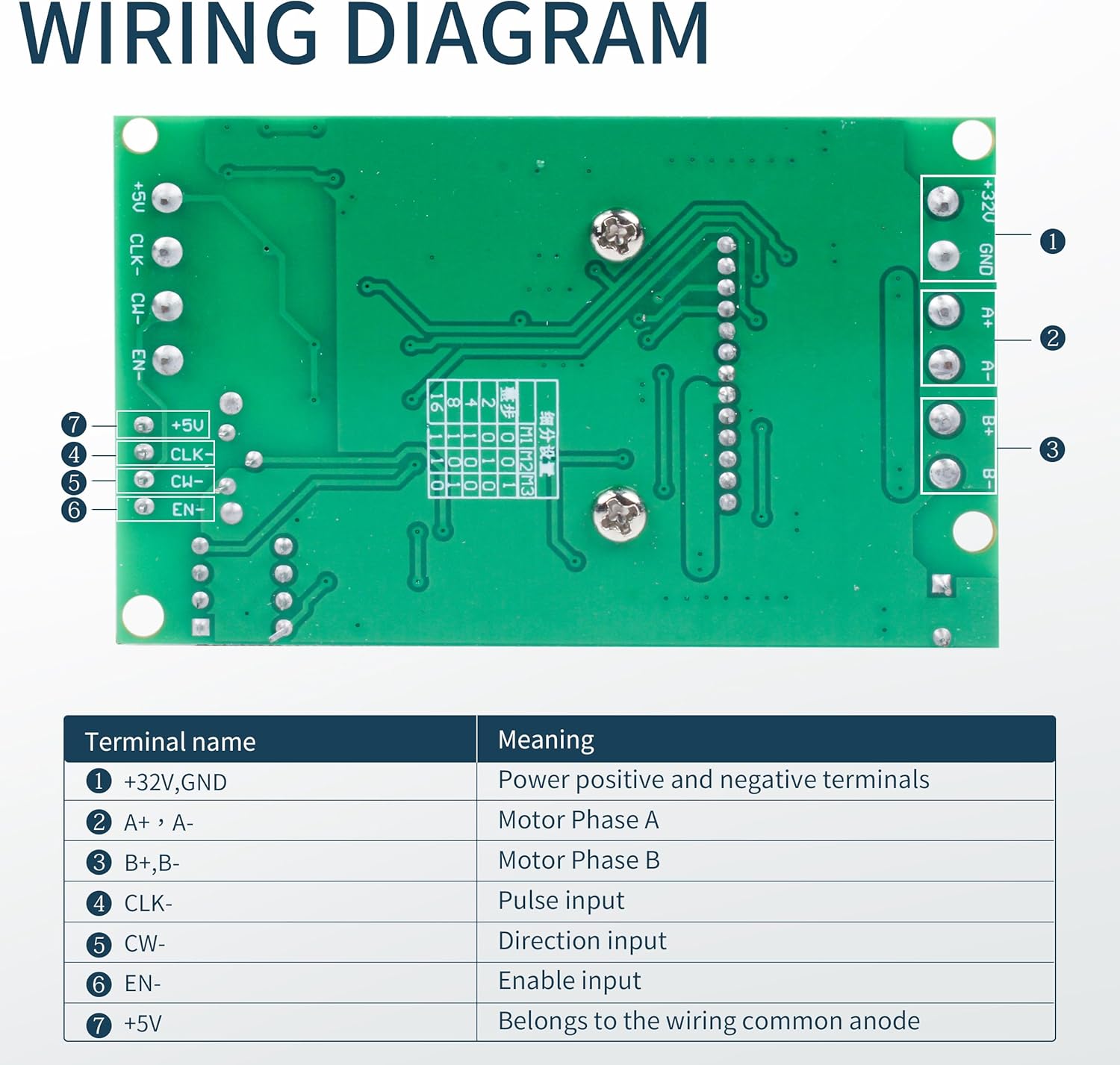
- Driver's "CLK-" connects to control card's XP pin.
- Driver's "CW-" connects to control card's XD pin.
- Driver's "5V" connects to control card's 5V pin.
- Note: The USB Mach3 control card does not support connection to EN- and EN+.

3.3. General Wiring Diagram

3.4. Mach3 Controller Board Details


3.5. Power Supply Wiring

4. Operating Instructions
The RATTMMOTOR CNC Controller Kit operates with Mach3 software. Ensure Mach3 is installed and configured correctly on your PC.
4.1. USB Mach3 Control Card Features
- Drive-free Design: Connects to PC via USB without requiring driver installation.
- 4-Axis Linkage Control: Supports up to 4 axes, with the 4th axis configurable as a slave axis.
- High Pulse Frequency: Output pulse frequency of 400KHz for high processing accuracy.
- Multi-functionality: Supports automatic home return, automatic tool setting, emergency stop input, limit switch access, spindle control (PWM and Him electrical modes), and handwheel interface.
- Inputs/Outputs: Provides up to 12-way digital signal input, 4-way optocoupler digital signal input, and isolated relay output for strong anti-interference and high reliability.
4.2. TB6600 Stepper Motor Driver Configuration
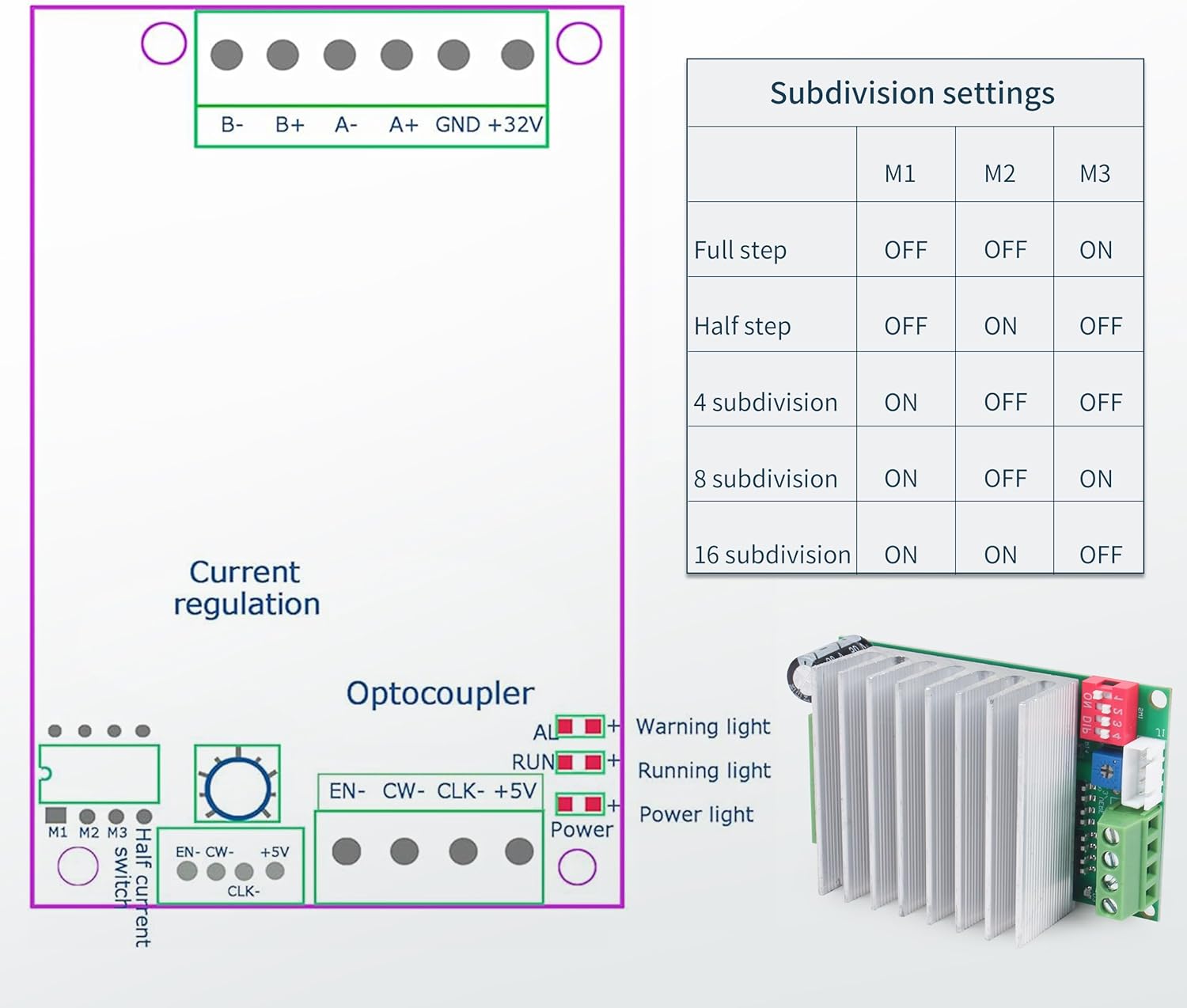
The TB6600 driver supports various subdivision settings. Refer to the table below for configuration.
| Subdivision | M1 | M2 | M3 |
|---|---|---|---|
| Full step | OFF | OFF | ON |
| Half step | OFF | ON | OFF |
| 4 subdivision | ON | OFF | OFF |
| 8 subdivision | ON | OFF | ON |
| 16 subdivision | ON | ON | OFF |
5. Maintenance
To ensure the longevity and optimal performance of your RATTMMOTOR CNC Controller Kit, observe the following maintenance guidelines:
- Heat Dissipation: The 350W power supply features a heat dissipation fan and a hollow shell design for efficient cooling. Ensure adequate airflow around the power supply and drivers to prevent overheating.
- Cleanliness: Keep all components free from dust and debris. Dust accumulation can impede heat dissipation and affect electronic components.
- Connection Integrity: Periodically check all wiring connections to ensure they are secure and free from corrosion. Loose connections can lead to intermittent operation or damage.
- Environmental Conditions: Operate the kit in a dry, well-ventilated environment, away from excessive moisture, extreme temperatures, and corrosive substances.

6. Troubleshooting
If you encounter issues with your CNC Controller Kit, consider the following troubleshooting steps:
- No Power: Verify the 350W power supply is receiving input power and its output terminals are correctly connected. Check for any tripped circuit breakers or blown fuses.
- Motor Not Moving: Ensure all motor wiring (A+, A-, B+, B-) is correct and secure. Check the TB6600 driver's power and signal connections from the Mach3 card. Confirm the Mach3 software is sending commands.
- Erratic Motor Movement: This can be caused by incorrect subdivision settings on the TB6600 driver or electrical noise. Review the subdivision table in Section 4.2 and ensure proper grounding.
- Communication Issues (USB Mach3 Card): Ensure the USB cable is securely connected to both the PC and the control card. Since it's a drive-free design, check Mach3 software settings for proper port selection.
- Overheating Components: Ensure adequate ventilation. Check if the power supply fan is operating. Reduce motor current if possible, or ensure drivers are not overloaded.
7. Specifications
7.1. Nema23 Stepper Motor (23HS8430)

| Parameter | Value |
|---|---|
| Model | 23HS8430 |
| Shaft | Single shaft, diameter 8mm, length 21mm |
| Step angle | 1.8° ±5% |
| Motor Size | 57*57*76mm |
| Voltage | 4.8V |
| Rated current | 3A/Phase |
| Resistance | 1.6Ω ±10%/ Phase |
| Inductance | 6.8mH ±20%/ Phase |
| Holding torque | 1.8Nm (270oz-in) |
| Detent torque | 6N.cm Max |
| Rotor inertia | 440g.cm² |
| Insulation class | B |
| Phase | 2 Phase |
7.2. TB6600 Stepper Motor Driver
| Parameter | Value |
|---|---|
| Working Voltage | DC 10-45V (DC32V recommended) |
| Rated Maximum Output | ±4.5A |
| Compatible Motors | 42/57/86 two-phase/four-phase/four-wire/six-wire stepper motors within 4.2A |
| Subdivision Options | Whole step, half step, 1/4, 1/8, 1/16 step (maximum 16 subdivision) |
| Protection Features | Low-voltage shutdown, thermal over-stop, over-current circuit protection, short-circuit protection |
| Optical Isolation | Uses 6N137 high-speed optical lotus for high speed without losing steps |
| Functionality | Automatic half-flow function |
7.3. 350W Switching Power Supply
| Parameter | Value |
|---|---|
| Output Voltage | 24V DC |
| Power Output | 350W |
| Efficiency | Up to 90% electrical energy conversion rate |
| Protection Features | Over-current, over-voltage, and overload protection |
| Cooling | Heat dissipation fan design, shell hollow design |
7.4. General Product Specifications
| Specification | Value |
|---|---|
| Brand | RATTMMOTOR |
| Model Number | 4ARED-CKIT |
| UPC | 754193834828 |
| Material | Aluminum |
| Color | Silver |
| Item Weight | 6.22 Kilograms (13.68 pounds) |
| Package Dimensions | 10.24 x 10.2 x 6.26 inches |
| Batteries Required | No |
8. Product Video
9. Warranty and Support
For warranty information and technical support, please refer to the documentation included with your purchase or contact RATTMMOTOR customer service directly. Specific warranty terms and support channels may vary.


