
1. Introduction
Thank you for choosing the Recci REP-W16 Wireless Sports Headset. This manual provides essential information for the proper setup, operation, and maintenance of your device. Please read this manual thoroughly before using the headset to ensure optimal performance and longevity.
2. Product Overview
The Recci REP-W16 is a lightweight, neckband-style wireless earphone designed for sports and daily use. It features a magnetic design for convenient storage and is equipped with Bluetooth V5.0 for stable connectivity.

Figure 2.1: Front view of the Recci REP-W16 Wireless Sports Headset, showcasing its neckband design and earbuds.
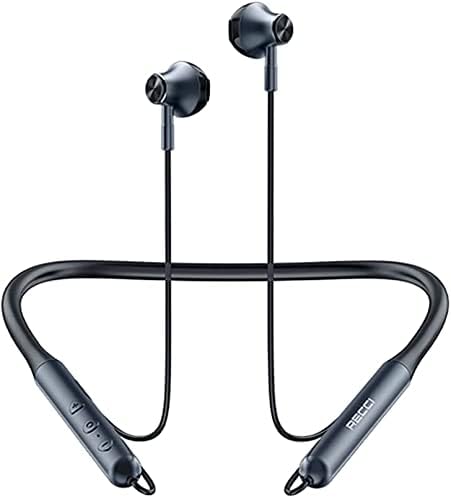
Figure 2.2: Top-down view of the headset, highlighting the flexible neckband and earbud placement.

Figure 2.3: Detailed view of the earbuds, showing their ergonomic design and magnetic tips for secure storage.

Figure 2.4: Close-up of the inline control panel on the neckband, featuring volume, multi-function, and power buttons.

Figure 2.5: Diagram illustrating the functions of the control buttons, including volume adjustment, track skipping, and call management.
Key Features:
- Wireless Bluetooth V5.0 connectivity
- Magnetic earbuds for tangle-free storage
- Lightweight neckband design
- Integrated controls for music and calls
- Type-C charging port
- Durable ABS+metal construction
3. Setup
3.1 Initial Charging
Before first use, fully charge your Recci REP-W16 headset.
- Locate the Type-C charging port on the neckband.
- Connect the provided Type-C charging cable to the headset and the other end to a USB power source (e.g., wall adapter, computer USB port).
- The LED indicator will show the charging status. Once fully charged, the indicator light will change or turn off (refer to LED indicator section for details).
- A full charge typically takes approximately 1.5 to 2 hours.
3.2 First-Time Bluetooth Pairing
To connect your headset to a Bluetooth-enabled device (smartphone, tablet, etc.):
- Ensure the headset is fully charged and turned off.
- Press and hold the Multi-function Button (usually the center button) for approximately 3-5 seconds until the LED indicator flashes red and blue alternately. This indicates pairing mode.
- On your device, go to Bluetooth settings and ensure Bluetooth is enabled.
- Scan for available devices. You should see "REP-W16" in the list.
- Select "REP-W16" to connect. Once successfully paired, the LED indicator on the headset will flash blue slowly or turn off, and you will hear an audible confirmation.
- If prompted for a password, enter "0000".
The headset will automatically attempt to reconnect to the last paired device when powered on.
4. Operating Instructions
4.1 Power On/Off
- Power On: Press and hold the Multi-function Button for about 3 seconds until the blue LED flashes and you hear a power-on prompt.
- Power Off: Press and hold the Multi-function Button for about 5 seconds until the red LED flashes and you hear a power-off prompt.
4.2 Music Playback
- Play/Pause: Press the Multi-function Button once.
- Volume Up: Press the "+" button.
- Volume Down: Press the "-" button.
- Next Track: Press and hold the "+" button for 2 seconds.
- Previous Track: Press and hold the "-" button for 2 seconds.
4.3 Call Management
- Answer Call: Press the Multi-function Button once.
- End Call: Press the Multi-function Button once during a call.
- Reject Call: Press and hold the Multi-function Button for 2 seconds during an incoming call.
- Redial Last Number: Double-press the Multi-function Button.
4.4 Charging
When the battery is low, you will hear an audible "Battery Low" prompt. Connect the headset to a power source using the Type-C cable as described in Section 3.1.

Figure 4.1: The headset offers long-lasting standby and playtime, suitable for extended use.
5. Maintenance
- Cleaning: Use a soft, dry cloth to clean the headset. Do not use abrasive cleaners or solvents.
- Storage: When not in use, store the headset in a cool, dry place, away from direct sunlight and extreme temperatures. The magnetic earbuds help prevent tangling.
- Battery Care: To prolong battery life, avoid fully discharging the battery frequently. Charge the headset regularly, even if not in use for extended periods.
- Water Resistance: The headset features multi-process waterproof material (high-quality silicone & skin-friendly). While it offers some protection against splashes and sweat, do not submerge it in water.

Figure 5.1: The headset is made with multi-process waterproof material, offering protection against sweat and light splashes.
6. Troubleshooting
| Problem | Possible Cause | Solution |
|---|---|---|
| Cannot power on | Low battery | Charge the headset fully. |
| Cannot pair with device | Headset not in pairing mode; Bluetooth off on device; too far from device. | Ensure headset is in pairing mode (flashing red/blue). Turn on Bluetooth on your device. Move headset closer to device (within 8 meters). |
| No sound | Volume too low; not connected; incorrect audio output selected on device. | Increase volume on headset and device. Re-pair the headset. Check device's audio output settings. |
| Intermittent connection | Interference; too far from device; low battery. | Move away from sources of interference (Wi-Fi routers, other Bluetooth devices). Stay within 8 meters of your device. Charge the headset. |
7. Specifications
| Feature | Detail |
|---|---|
| Model Name | REP-W16 |
| Manufacturer | Recci |
| Connectivity Technology | Bluetooth |
| Wireless Communication Technology | Bluetooth |
| Bluetooth Version | V5.0 |
| Headphone Form Factor | In Ear (Neckband) |
| Material | ABS + Metal |
| Color | Black |
| Charging Port | Type-C |
| Battery Capacity | 100mAh |
| Playtime | Up to 6 hours |
| Transmission Distance | Up to 8 meters |
| Net Weight | 30g |
| Included Components | Ear Cushions |

Figure 7.1: Product packaging displaying key specifications and features of the REP-W16 headset.
8. Warranty and Support
For warranty information and technical support, please refer to the documentation provided with your purchase or contact the retailer/manufacturer directly. Keep your proof of purchase for warranty claims.
Manufacturer: Recci