
1. Introduction
The XISEDO D2B Fiber Optic Decoder is designed to integrate aftermarket audio systems with the factory Bose sound system in specific Mercedes Benz SL R230 models. This decoder converts RCA audio output from an aftermarket head unit into a fiber optic signal, allowing it to interface with the vehicle's existing D2B Bose amplifier. This manual provides essential information for proper installation, operation, and troubleshooting.
2. Safety Information
- Always disconnect the vehicle's battery before beginning any electrical installation to prevent short circuits or damage.
- Professional installation is highly recommended due to the complexity of vehicle electrical and fiber optic systems.
- Ensure all connections are secure and properly insulated to prevent electrical hazards.
- Do not modify the product or its components. Unauthorized modifications may void the warranty and pose safety risks.
- Keep the product away from moisture, extreme temperatures, and direct sunlight.
3. Package Contents
Verify that all items are present in your package:
- XISEDO D2B Fiber Optic Decoder Unit
- Power and RCA Input Harness
- Four D2B Fiber Optic Bypass Loops
- Installation Instructions (refer to QR code video for detailed guidance)
4. Compatibility
This D2B Fiber Optic Decoder is specifically designed for:
- Mercedes Benz SL R230 models: SL500, SL55 AMG, SL600
- Model Years: 2001-2004
- Sound System: Factory Bose Sound System (D2B fiber optic system)
Note: This decoder is not compatible with MOST sound systems, which are typically found in cars produced after 2004.
5. Setup & Installation
Installation of this D2B Fiber Optic Decoder requires familiarity with automotive electrical and audio systems. Professional installation is strongly recommended.
5.1 Pre-Installation Steps
- Disconnect Battery: Before starting, disconnect the negative terminal of your vehicle's battery.
- Access Head Unit: Carefully remove the factory head unit to access the wiring harness and fiber optic connections.
- Identify Components: Locate the factory D2B fiber optic ring components, such as the audio module (under the armrest case) and the CD Changer (under the rear left seat).
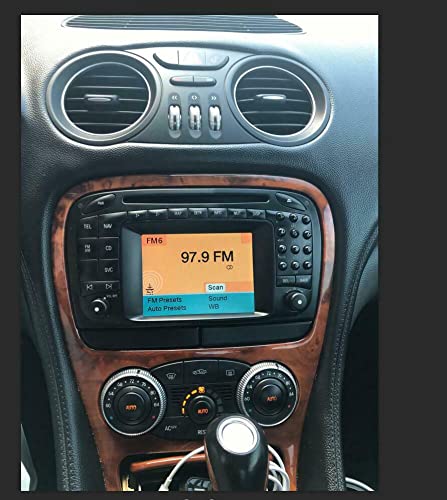
Figure 1: Mercedes-Benz SL R230 dashboard showing the factory radio unit.
5.2 Decoder Connection
- Connect Power and RCA: Connect the power and RCA input harness from the D2B decoder to your aftermarket head unit's corresponding outputs. Ensure correct polarity for power connections (usually red for accessory, yellow for constant, black for ground).
- Integrate into D2B Ring: The D2B decoder needs to be integrated into the vehicle's D2B fiber optic ring. This typically involves connecting the decoder's fiber optic output to the input of the factory Bose amplifier.

Figure 2: The XISEDO D2B Fiber Optic Decoder unit, shown with a fiber optic bypass loop.
5.3 Fiber Optic Bypass Loops
If your car has multiple fiber optic devices (e.g., CD changer, telephone module) that will no longer be used after installing the aftermarket head unit, these devices must be bypassed using the provided fiber optic bypass loops. Failure to bypass unused or non-functional D2B components will disrupt the fiber optic ring, resulting in no sound or intermittent sound.
- Identify Unused Devices: Locate any D2B fiber optic devices that are no longer functional or required.
- Bypass Connection: Disconnect the fiber optic cables from the unused device. Connect a fiber optic bypass loop to the vehicle's fiber optic cable that was previously connected to the device, effectively completing the D2B ring.

Figure 3: Example of a fiber optic bypass loop being connected within the vehicle's wiring harness.

Figure 4: An electrical connector with a 10A fuse, illustrating a typical power connection point.
5.4 Video Guide
For a visual guide to the installation process, please refer to the QR code video provided in your package. This video offers detailed, step-by-step instructions.
Video 1: Official XISEDO Fiber Optic Decoder installation overview. This video demonstrates key aspects of the installation process for the D2B decoder.
6. Operating Instructions
Once correctly installed, the XISEDO D2B Fiber Optic Decoder operates automatically. It receives analog audio signals (RCA OUT) from your aftermarket head unit and converts them into a digital D2B fiber optic signal. This digital signal is then transmitted to the factory Bose amplifier, which processes and outputs the audio through the vehicle's speakers. Ensure your aftermarket head unit's RCA outputs are properly configured for optimal sound quality.
7. Maintenance
The D2B Fiber Optic Decoder is designed for maintenance-free operation. To ensure longevity:
- Ensure the unit is installed in a dry, secure location away from excessive heat or vibration.
- Avoid exposing fiber optic cables to sharp bends or excessive force, as this can damage the optical fibers.
- Periodically check all electrical connections for tightness and corrosion.
8. Troubleshooting
If you encounter issues after installation, refer to the following troubleshooting tips:
- No Sound:
- Verify all power connections to the decoder and aftermarket head unit are secure and receiving power.
- Check all RCA audio connections from the head unit to the decoder.
- Ensure the D2B fiber optic ring is complete. All unused factory D2B devices (e.g., CD changer, telephone module) must be bypassed using the provided fiber optic loops. A broken fiber optic ring will result in no sound.
- Confirm the decoder is correctly integrated into the D2B ring, connecting its output to the Bose amplifier input.
- Intermittent Sound or Sound Cuts Out After 10 Minutes:
- This often indicates an issue with the D2B fiber optic ring. Re-check all bypass connections and ensure no factory D2B components are causing interference or are improperly connected.
- Ensure the fiber optic cables are not damaged or kinked.
- Poor Sound Quality:
- Check RCA connections for proper seating and shielding.
- Ensure the aftermarket head unit's audio settings (e.g., volume, balance, fader) are correctly configured.
If problems persist, consult with a professional car audio installer.
9. Specifications
| Feature | Specification |
|---|---|
| Brand | XISEDO |
| Model Name | D2B SL-UK (CS-JP01) |
| Connector Type | TOSLINK (Fiber Optic) |
| Cable Type | Fiber Optic |
| Compatible Devices | Amplifier (Mercedes Benz SL R230 Bose Sound System) |
| Special Feature | Fiber Optic Audio Conversion |
| Color | Black |
| Connector Gender | Male-to-Male |
| Number of Pins | 16 (on electrical connector) |
| Maximum Voltage | 5 Volts (DC) |
| Outer Material | Plastic/Protective Jacket |
| Item Weight | 3.52 ounces |
| Package Dimensions | 6.93 x 5.67 x 1.57 inches |
| Indoor/Outdoor Usage | Indoor, Outdoor |
10. Warranty Information
This product is covered by the standard manufacturer's warranty. Please refer to the product packaging or the seller's terms and conditions for specific warranty duration and details. Keep your proof of purchase for any warranty claims.
11. Customer Support
For technical assistance, installation queries, or troubleshooting not covered in this manual, please contact your product retailer or the manufacturer's customer support. Have your product model number (D2B SL-UK) and purchase information ready when contacting support.