
Battery Hawk MC1P-487BH
CXL6VBXT Battery User Manual
Brand: Battery Hawk | Model: MC1P-487BH
1. Introduction
This manual provides essential information for the safe and effective use of your Battery Hawk MC1P-487BH Ni-CD battery. This rechargeable nickel cadmium battery is specifically designed as a replacement for Emergency and Exit Lights, ensuring reliable power for critical safety systems.
Please read this manual thoroughly before installation and operation to ensure proper handling and longevity of the battery.
2. Safety Information
WARNING: Failure to follow these safety instructions may result in fire, electric shock, injury, or damage to the battery or connected equipment.
- Do not disassemble: Do not attempt to open, modify, or disassemble the battery pack. There are no user-serviceable parts inside.
- Avoid short circuits: Do not short-circuit the battery terminals. This can cause severe heat, fire, and damage to the battery.
- Proper charging: Use only chargers designed for Ni-CD batteries with the correct voltage and current specifications. Overcharging can damage the battery.
- Temperature: Do not expose the battery to extreme temperatures (above 60°C / 140°F or below -20°C / -4°F). Store in a cool, dry place.
- Water exposure: Keep the battery away from water, moisture, and other liquids.
- Damage: If the battery appears damaged, swollen, or leaking, discontinue use immediately and dispose of it properly.
- Children: Keep batteries out of reach of children.

Image 2.1: The Battery Hawk MC1P-487BH Ni-CD battery, clearly showing its voltage, capacity, and important recycling symbols. The label indicates "BATTERY MUST BE RECYCLED OR DISPOSED OF PROPERLY."
3. Setup and Installation
This battery is designed for direct replacement in compatible Emergency and Exit Light fixtures. Always ensure the power to the fixture is OFF before beginning installation.
- Power Disconnection: Locate the emergency or exit light fixture. Turn off the main power supply to the fixture at the circuit breaker to prevent electric shock.
- Access Battery Compartment: Carefully open the fixture's housing to access the existing battery compartment. Refer to your fixture's specific manual for instructions on opening.
- Remove Old Battery: Disconnect the old battery from its connector. Note the orientation of the connector (red wire to positive, black wire to negative). Carefully remove the old battery.
- Install New Battery: Connect the new Battery Hawk MC1P-487BH battery to the fixture's connector, ensuring the correct polarity (red to red, black to black). The battery features a 2-pin white connector for easy and secure attachment.
- Secure Battery: Place the new battery securely within the battery compartment. Ensure it does not obstruct any moving parts or ventilation.
- Close Fixture: Carefully close and secure the fixture's housing.
- Restore Power: Turn the main power supply back on at the circuit breaker. The emergency light should now begin charging the new battery.
- Initial Charge: Allow the battery to charge for at least 24 hours before its first discharge test to ensure full capacity.

Image 3.1: The Battery Hawk MC1P-487BH battery, highlighting its 2-pin white connector, which ensures a proper and secure connection within compatible emergency and exit light fixtures.
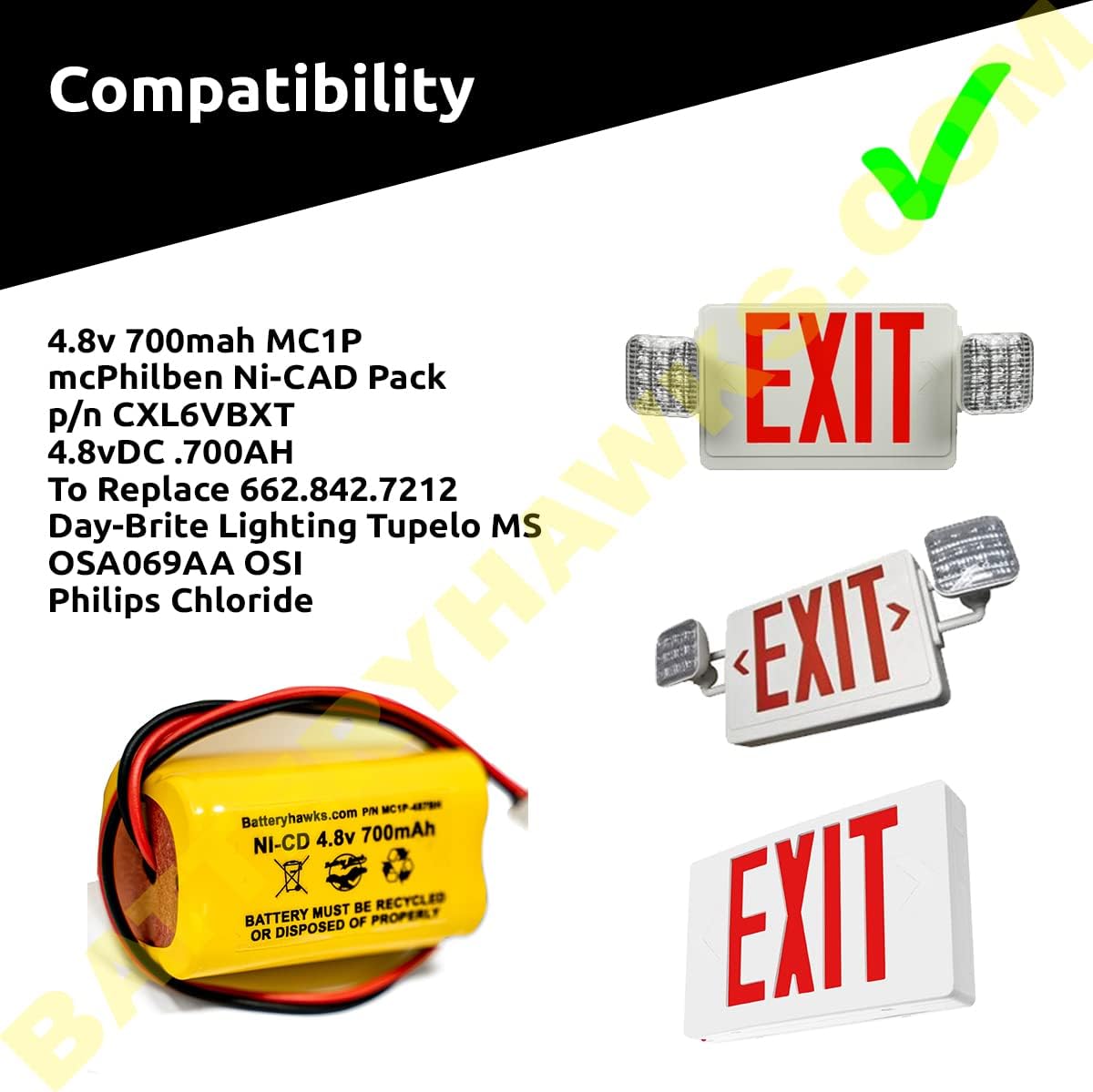
Image 3.2: This image illustrates the compatibility of the Battery Hawk MC1P-487BH with various emergency and exit light models, including those from mcPhilben, Day-Brite Lighting, and Philips Chloride, confirming its suitability as a replacement battery.
4. Operating Principles
The Battery Hawk MC1P-487BH is a Nickel-Cadmium (Ni-CD) rechargeable battery designed to provide backup power for emergency and exit lighting systems. When AC power is present, the lighting fixture's internal charger will charge and maintain the battery. In the event of a power outage, the battery automatically supplies power to illuminate the emergency lights.
- Charging: The battery charges automatically when connected to a compatible emergency light fixture with AC power. An initial charge of 24 hours is recommended for optimal performance.
- Discharge: Upon loss of AC power, the battery will discharge to power the connected emergency lights. The duration of discharge depends on the load and the battery's charge level.
- Cycle Life: Ni-CD batteries are known for their robust cycle life, capable of enduring many charge/discharge cycles.
5. Maintenance
Proper maintenance ensures the longevity and reliability of your battery. Regular testing of emergency lighting systems is crucial for safety compliance.
- Regular Testing: Perform monthly functional tests of your emergency lighting system by simulating a power outage (e.g., using the test button on the fixture). Ensure the lights remain illuminated for the required duration (typically 30-90 minutes).
- Annual Discharge Test: Conduct an annual full discharge test. Allow the battery to discharge completely until the lights dim or turn off, then allow it to recharge for 24 hours. This helps to prevent "memory effect" in Ni-CD batteries and ensures full capacity.
- Cleaning: Keep the battery and its terminals clean and free from dust or corrosion. Use a dry cloth for cleaning.
- Storage: If storing the battery for an extended period, store it in a cool, dry place at room temperature (20-25°C / 68-77°F) and ensure it is partially charged. Avoid storing fully discharged or fully charged for very long periods.
6. Troubleshooting
If you encounter issues with your battery or emergency lighting system, refer to the following common problems and solutions:
| Problem | Possible Cause | Solution |
|---|---|---|
| Emergency lights do not turn on during power outage. | Battery not charged; Battery faulty; Loose connection. | Ensure AC power is restored and battery has charged for 24 hours. Check battery connections. If problem persists, battery may need replacement. |
| Emergency lights dim quickly or do not last long. | Insufficient charge; Battery capacity degradation (memory effect); Battery nearing end of life. | Perform a full discharge/recharge cycle. Ensure continuous AC power for charging. If battery is old, consider replacement. |
| Battery appears swollen or leaking. | Overcharging; Internal cell damage; End of life. | Immediately disconnect and safely dispose of the battery. Do NOT attempt to charge or use. Replace with a new battery. |
| Battery connector does not fit. | Incorrect battery model; Connector mismatch. | Verify the battery model (MC1P-487BH) and connector type (2-pin white) against your fixture's requirements. Ensure correct orientation. |
If troubleshooting steps do not resolve the issue, contact Battery Hawk customer support or a qualified electrician.
7. Specifications
| Feature | Detail |
|---|---|
| Model Number | MC1P-487BH |
| Battery Chemistry | Nickel Cadmium (Ni-CD) |
| Voltage | 4.8 Volts DC |
| Capacity | 700 mAh (Milliampere Hour) |
| Cell Size | AA Cell |
| Connector Type | 2-Pin White Connector |
| Dimensions (L x W x H) | 1.98" x 1.12" x 1.12" (approx. 5.03 cm x 2.84 cm x 2.84 cm) |
| Weight | 2.7 oz (approx. 76.5 grams) |
| Manufacturer | Battery Hawk |
| Compatible Models | MC1P-487BH, MC1P487BH, mcPhilben Ni-CAD Pack, CXL6VBXT, 4.8vDC .700AH, 662.842.7212, Day-Brite Lighting Tupelo MS, OSA069AA, Philips Chloride |

Image 7.1: A visual representation of the battery's key specifications, including Voltage (4.8V), Capacity (700mAh), Cell Size (AA), Chemistry (Ni-CD), Connector Type (White 2 Pin), Weight (76.5g/2.7oz), and Size (1.98 x 1.12 x 1.12 inches).
8. Battery Disposal and Recycling
IMPORTANT: Ni-CD batteries contain cadmium, a toxic heavy metal. They must be recycled or disposed of properly and should not be discarded with household waste.
- Recycle: Look for battery recycling programs in your area. Many electronics stores, hardware stores, and municipal waste facilities offer collection points for rechargeable batteries.
- Call2Recycle: In North America, Call2Recycle is a common program for finding recycling locations. Visit their website or call their hotline for more information.
- Local Regulations: Always comply with local regulations for battery disposal.
9. Warranty and Support
For warranty information or technical support regarding your Battery Hawk MC1P-487BH battery, please contact Battery Hawk directly. Refer to the product packaging or the Battery Hawk official website for the most current contact details and warranty terms.
Battery Hawk Customer Support:
- Website: www.batteryhawk.com
- Email: Refer to website
- Phone: Refer to website
When contacting support, please have your product model number (MC1P-487BH) and purchase information ready.
Ask a question about this manual
Ask about setup, troubleshooting, compatibility, parts, safety, or missing instructions. Manuals+ will review the question and use this page’s manual context to help answer it.