
Introduction
Welcome to the user manual for your Behringer MonoPoly 4-voice Analog Synthesizer. This manual provides essential information for setting up, operating, maintaining, and troubleshooting your instrument.
The MonoPoly is a powerful analog synthesizer featuring four Voltage Controlled Oscillators (VCOs), a Voltage Controlled Filter (VCF), and two Envelope Generators (EGs), offering a rich palette of sounds from classic analog warmth to complex textures.
Important Safety Instructions
- Read these instructions.
- Keep these instructions.
- Heed all warnings.
- Follow all instructions.
- Do not use this apparatus near water.
- Clean only with dry cloth.
- Do not block any ventilation openings. Install in accordance with the manufacturer's instructions.
- Do not install near any heat sources such as radiators, heat registers, stoves, or other apparatus (including amplifiers) that produce heat.
- Do not defeat the safety purpose of the polarized or grounding-type plug.
- Protect the power cord from being walked on or pinched.
- Only use attachments/accessories specified by the manufacturer.
- Unplug this apparatus during lightning storms or when unused for long periods of time.
- Refer all servicing to qualified service personnel.
Setup
Unpacking
Carefully unpack your MonoPoly synthesizer and ensure all components are present. Retain the original packaging for future transport or storage.
Power Connection
Connect the provided power adapter to the DC input on the rear panel of the MonoPoly. Plug the adapter into a suitable power outlet.
Audio Connections
Use a standard 1/4" TS cable to connect the MonoPoly's main audio output to your mixer, audio interface, or amplifier.
MIDI Connections
The MonoPoly supports MIDI In, Out, and Thru for integration with other MIDI devices or a computer. Connect MIDI cables as required for your setup.
Initial Placement
Place the synthesizer on a stable, flat surface, ensuring adequate ventilation around the unit.
Operating the MonoPoly
The Behringer MonoPoly features a comprehensive control panel for sound design and performance.
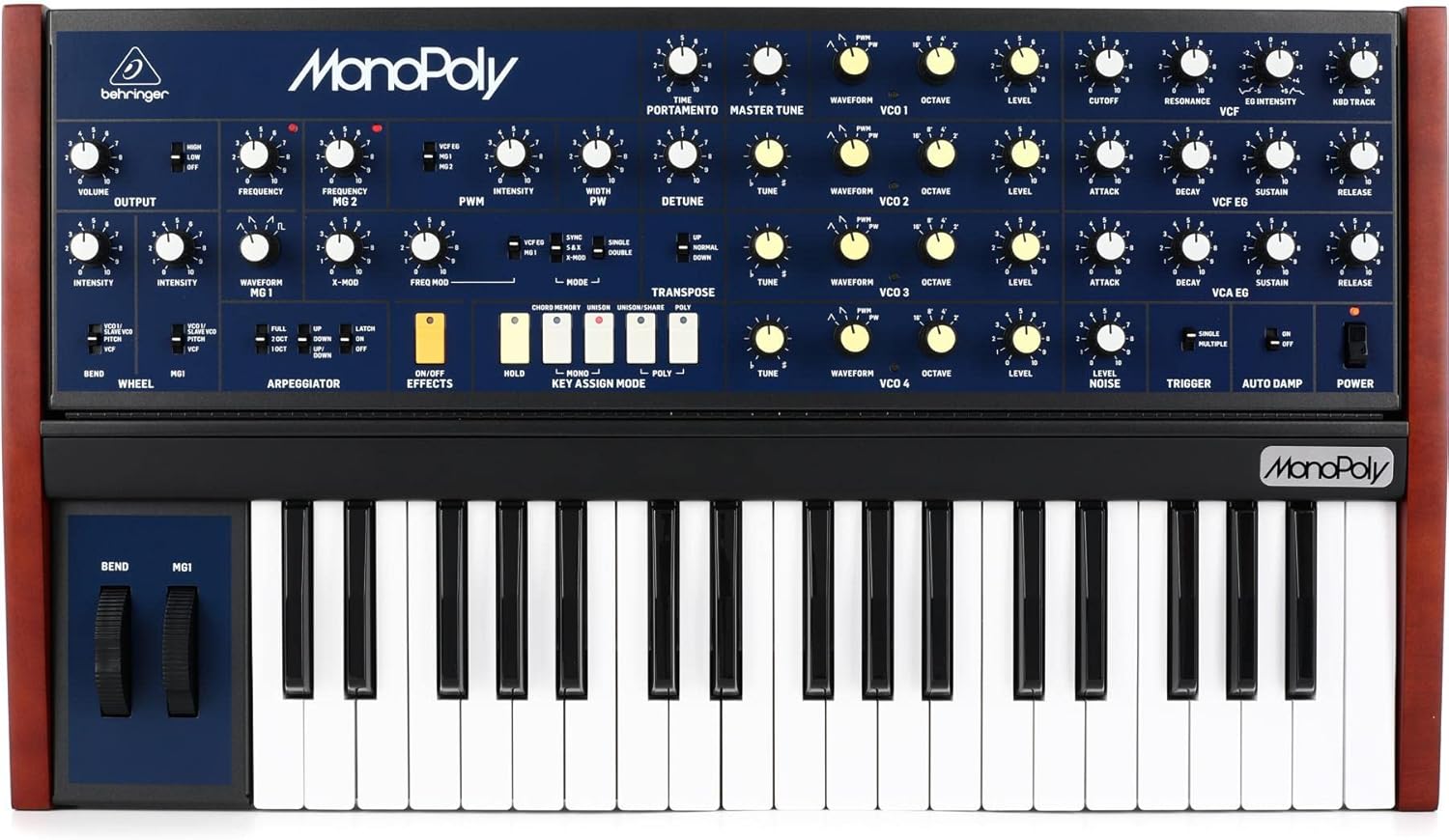
This image displays the full front panel of the Behringer MonoPoly synthesizer, showing the keyboard, pitch bend and modulation wheels, and the extensive array of knobs and switches for controlling the oscillators, filter, envelopes, and other parameters.
Power On/Off
Locate the POWER switch on the far right of the control panel. Flip the switch to the ON position to power on the unit.
Oscillators (VCOs)
The MonoPoly features four Voltage Controlled Oscillators (VCOs), each with controls for:
- TUNE: Adjusts the pitch of the oscillator.
- WAVEFORM: Selects the oscillator waveform (e.g., sawtooth, pulse, triangle).
- OCTAVE: Sets the octave range for the oscillator.
- LEVEL: Controls the output level of the oscillator.
Voltage Controlled Filter (VCF)
The VCF section shapes the timbre of the sound. Key controls include:
- CUTOFF: Determines the filter's cutoff frequency.
- RESONANCE: Adds emphasis at the cutoff frequency.
- EG INTENSITY: Controls the amount of envelope modulation applied to the VCF.
- KBD TRACK: Adjusts how much the filter cutoff tracks the keyboard pitch.
Envelope Generators (EGs)
The MonoPoly has two Envelope Generators: VCF EG and VCA EG. Each features standard ADSR (Attack, Decay, Sustain, Release) controls to shape the filter and amplifier contours.
- ATTACK: Time for the sound to reach its peak level.
- DECAY: Time for the sound to fall from peak to sustain level.
- SUSTAIN: Level at which the sound holds while a key is pressed.
- RELEASE: Time for the sound to fade out after the key is released.
Arpeggiator
The arpeggiator creates rhythmic patterns from held notes. Controls include:
- FULL/2 OCT/1 OCT: Sets the arpeggio range.
- UP/DOWN/UP-DOWN: Selects the arpeggio direction.
- LATCH ON/OFF: Toggles latching behavior.
Key Assign Mode
The MonoPoly offers various key assignment modes:
- MONO: Monophonic operation.
- UNISON: All four VCOs play the same note for a thick sound.
- UNISON/SHARE: Distributes VCOs across multiple notes.
- POLY: Polyphonic operation, allowing up to four notes simultaneously.
Maintenance
Cleaning
To clean the unit, use a soft, dry cloth. Do not use abrasive cleaners, solvents, or waxes.
Storage
When not in use for extended periods, store the MonoPoly in a cool, dry place, ideally in its original packaging or a protective case.
Firmware Updates
Check the Behringer website periodically for firmware updates that may enhance functionality or address issues. Follow the instructions provided with the update carefully.
Troubleshooting
| Problem | Possible Cause | Solution |
|---|---|---|
| No Sound | Power not connected/on, Volume low, Cables incorrect | Check power connection and switch. Increase volume. Verify audio cable connections. |
| Distorted Sound | Input/Output levels too high, Faulty cable | Reduce levels. Try a different audio cable. |
| MIDI Not Responding | Incorrect MIDI settings, Cable issues | Check MIDI In/Out connections. Verify MIDI channel settings on both devices. |
| Arpeggiator not working | Arpeggiator not enabled, No notes held | Ensure arpeggiator is active. Hold down keys on the keyboard. |
Specifications
| Feature | Detail |
|---|---|
| Model | MonoPoly |
| Type | 4-voice Analog Synthesizer |
| Oscillators | 4 x VCO (Voltage Controlled Oscillator) |
| Keyboard | 37-key |
| Dimensions (L x W x H) | 31.25 x 19.5 x 6.5 inches |
| Weight | 22 pounds |
| Connectors | 1/4" Audio Out, MIDI In/Out/Thru, DC In |
| Power | External Power Adapter |
| Body Material | Plastic |
| UPC | 644216642205 |
Warranty and Support
For warranty information and technical support, please visit the official Behringer website or contact your local distributor. Keep your proof of purchase for warranty claims.
Online resources and FAQs may also be available on the Behringer support page: www.behringer.com/support


