
1. Safety Instructions
Read all instructions carefully before installation and operation. Failure to follow these instructions may result in serious injury or property damage. Keep this manual for future reference.
- Professional Installation: Installation and electrical connections must be performed by qualified personnel in accordance with local electrical codes and regulations.
- Moving Parts: Keep hands, feet, and clothing clear of the gate and its moving parts during operation.
- Children and Pets: Do not allow children or pets to play near the gate or operate the remote controls.
- Obstructions: Ensure the gate path is clear of any obstructions before and during operation.
- Emergency Stop: Familiarize yourself with the manual release mechanism for emergency situations or power outages.
- Maintenance: Regularly inspect the gate opener for signs of wear, damage, or misalignment. Perform maintenance as described in this manual.
- Power Supply: Disconnect power to the unit before performing any maintenance or repairs.
2. Product Overview
The Einfeben 280W Sliding Gate Opener Kit is designed to automate sliding gates weighing up to 600kg. It provides convenient and secure access control for residential and commercial properties. The kit includes the main motor unit, remote controls, and essential installation accessories.
2.1. Kit Components
The following components are typically included in your Einfeben Sliding Gate Opener Kit:

Image: Overview of the Einfeben Sliding Gate Opener Kit components, including the main motor unit, two remote controls, photocells, a warning light, mounting brackets, keys, and sections of gear rack.
- Main Motor Unit (280W)
- Remote Controls (x2)
- Infrared Photocells (Safety Sensors)
- Warning Light
- Mounting Hardware and Brackets
- Manual Release Keys
- Gear Rack Sections (8 x 50cm)
2.2. Main Unit Dimensions
Refer to the diagram below for the main motor unit and gear rack dimensions, which are crucial for planning the installation space.

Image: Diagram showing the dimensions of the main motor unit (approximately 26cm height, 22cm width, 24cm depth) and the gear rack sections (8 pieces, each 50cm long).
3. Specifications
Key technical specifications for the Einfeben Sliding Gate Opener Kit:
| Feature | Specification |
|---|---|
| Manufacturer | Einfeben |
| Model Number | WH-5630 |
| Power | 280W |
| Maximum Gate Weight | 600 kg |
| Item Weight | 17 kg |
| Package Dimensions | 52 x 34 x 26.5 cm |
4. Setup and Installation
This section provides a general guide for the installation process. It is highly recommended to consult a qualified electrician and a professional installer to ensure proper and safe installation according to local regulations.
4.1. Site Preparation
- Ensure the gate slides smoothly and freely without any obstructions.
- Prepare a stable, level concrete base for mounting the motor unit.
- Plan the routing for electrical wiring, ensuring it is protected and meets safety standards.
4.2. Mounting the Motor Unit
Securely fasten the motor unit to the prepared concrete base using the provided mounting hardware. Ensure the motor's output gear aligns correctly with the intended position of the gate's gear rack.
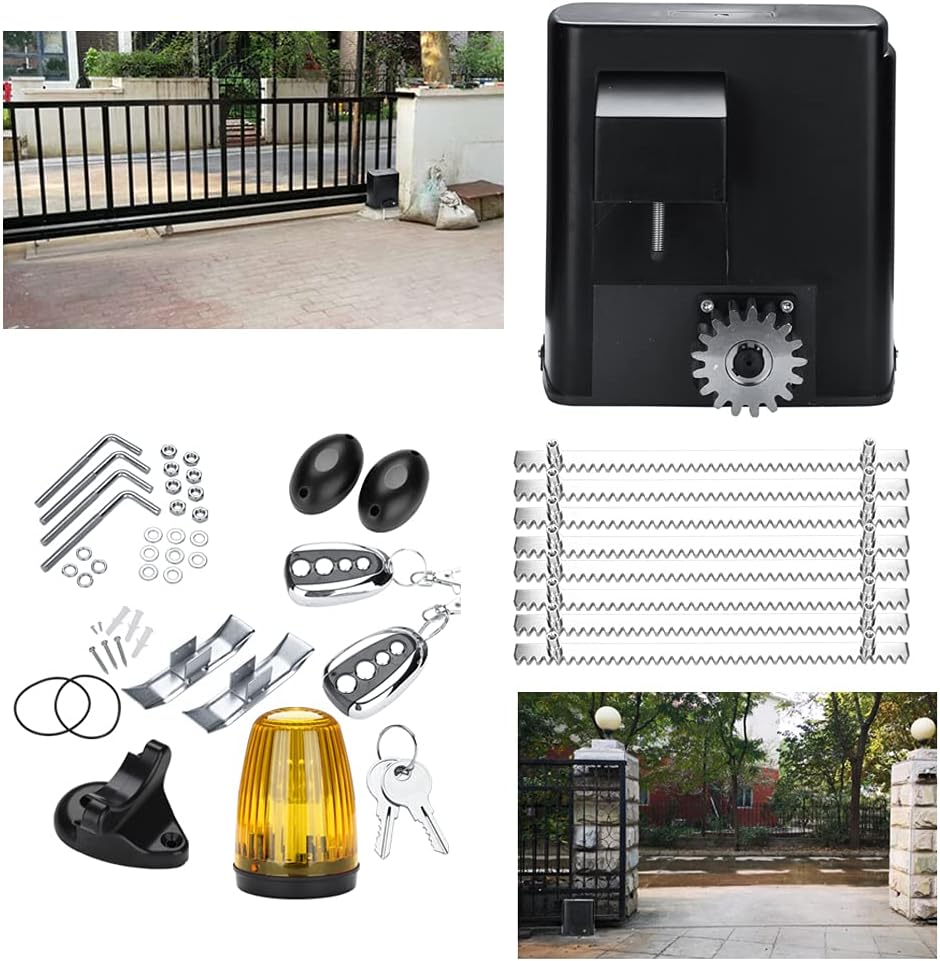
Image: An installed Einfeben sliding gate opener unit positioned next to a black metal sliding gate, demonstrating a typical outdoor setup.
4.3. Installing the Gear Rack
Attach the gear rack sections along the bottom edge of the sliding gate. Ensure the rack is level and maintains proper engagement with the motor's output gear throughout the gate's full travel range. Leave a small gap (approx. 1-2mm) between the gear rack and the motor gear to prevent binding.
4.4. Electrical Connections
Connect the power supply, safety photocells, warning light, and any other accessories to the control board inside the motor unit. Follow the wiring diagram provided in the detailed installation manual (not included in this overview). Ensure all connections are secure and properly insulated.
4.5. Programming Remote Controls
Refer to the specific instructions for programming the remote controls to the motor unit. This typically involves pressing a programming button on the control board and then a button on the remote control.

Image: A close-up view of the two chrome and black remote controls, each featuring multiple buttons for gate operation.
5. Operating Instructions
5.1. Using the Remote Control
- Press the designated button on the remote control to open the gate.
- Press the same button again to stop the gate during movement.
- Press the button once more to close the gate.
- Ensure a clear line of sight to the gate and that no obstructions are present before operating.

Image: The main motor unit with a hand holding a remote control, indicating wireless operation. A close-up of the motor's gear is also visible.
5.2. Manual Release
In case of a power outage or malfunction, the gate can be operated manually. Locate the manual release keyhole on the side of the motor unit. Insert the provided key and turn it to disengage the motor, allowing the gate to be pushed open or closed by hand.

Image: A close-up of the Einfeben sliding gate opener's main unit, highlighting the keyhole for manual release on its side panel.
6. Maintenance
Regular maintenance ensures the longevity and safe operation of your gate opener. Perform these checks periodically:
- Cleanliness: Keep the motor unit and gear rack free from dirt, debris, leaves, and ice. Clean the photocell lenses regularly.
- Obstructions: Periodically check the gate's path for any new obstructions that could impede its movement.
- Lubrication: Inspect the gear rack and motor gear for wear. Apply appropriate lubricant to the gear rack if recommended by the manufacturer (refer to the full product manual).
- Fasteners: Check all mounting bolts and screws for tightness. Tighten if necessary.
- Electrical Connections: Ensure all electrical connections are secure and free from corrosion. (Only perform if power is disconnected by a qualified person).
- Safety Features: Test the safety photocells regularly by breaking the beam while the gate is closing to ensure it reverses or stops.
7. Troubleshooting
This section addresses common issues you might encounter. For complex problems, contact technical support.
| Problem | Possible Cause | Solution |
|---|---|---|
| Gate does not move | No power supply Remote control battery flat Safety sensors obstructed | Check power connection and circuit breaker Replace remote control batteries Clear obstruction from safety sensors |
| Gate stops unexpectedly | Obstruction in gate path Safety sensors triggered | Remove obstruction Check and clean safety sensors |
| Remote control not working | Flat battery Out of range Not programmed correctly | Replace battery Move closer to the gate Re-program remote control (refer to programming instructions) |
| Motor makes unusual noise | Lack of lubrication Gear rack misalignment Internal mechanical issue | Lubricate gear rack Check gear rack alignment Contact technical support |
8. Warranty and Support
8.1. Warranty Information
For specific warranty terms and conditions, please refer to the documentation provided at the time of purchase or contact your retailer. Warranty coverage typically includes defects in materials and workmanship under normal use.
8.2. Technical Support
If you encounter issues that cannot be resolved using the troubleshooting guide, or require further assistance with installation or operation, please contact Einfeben customer support or your authorized dealer. Provide your product model number (WH-5630) and a detailed description of the issue for efficient service.


