
Introduction
Thank you for choosing the MMAXZ F30070M HD Astronomical Telescope. This instrument is designed for both beginners and experienced enthusiasts to explore celestial objects and terrestrial views. With its 70mm aperture and 300mm focal length, it gathers ample light for clear observations. This manual provides detailed instructions for assembly, operation, and maintenance to ensure optimal performance and enjoyment of your telescope.

Image: The MMAXZ F30070M HD Astronomical Telescope fully assembled on its tripod, ready for observation.
Package Contents
Before beginning assembly, please verify that all components listed below are present in your package:
- Telescope Tube
- 90° Diagonal Mirror
- 6mm Eyepiece
- 20mm Eyepiece
- 3X Barlow Lens
- 1.5X Erecting Eyepiece
- 5X24 Finderscope with Mounting Bracket
- Phone Adapter
- Star Target Planisphere
- Aluminum Tripod
- Aiming Control and Lock Handle
- Moon Filter
- User Manual
- Warranty Card

Image: A visual representation of all components included in the MMAXZ F30070M telescope package, including the tripod, telescope tube, various lenses, finderscope, phone adapter, and documentation.
Setup Instructions
The MMAXZ F30070M telescope is designed for quick and easy assembly without the need for additional tools. Follow these steps to set up your telescope:
- Set up the Tripod: Extend the legs of the aluminum tripod to a stable position. Adjust the height as desired.
- Attach the Telescope Tube: Securely mount the telescope tube (1) onto the tripod's aiming control and lock handle (6). Ensure it is firmly attached.
- Install the Finderscope: Attach the 5X24 finderscope (8) to its designated mounting bracket on the telescope tube.
- Insert the Diagonal Mirror: Place the 90° diagonal mirror into the focuser at the end of the telescope tube.
- Insert an Eyepiece: Choose an eyepiece (e.g., 20mm for lower magnification) and insert it into the diagonal mirror. Secure it with the small screw.
- Attach Phone Adapter (Optional): If using, attach the phone adapter to the eyepiece.

Image: A detailed diagram illustrating the main structural components of the telescope, including the telescope tube, objective lens, eyepiece, focusing knob, locking knob, aiming control, tripod, finderscope, and diagonal lens.
Operating Instructions
1. Using the Finderscope
The 5X24 finderscope is a small, low-power telescope mounted parallel to the main telescope tube. It provides a wider field of view, making it easier to locate objects before observing them with the higher magnification of the main telescope.
- Align the finderscope with the main telescope during daylight hours by pointing the main telescope at a distant, easily identifiable object (e.g., a distant tree or building).
- Adjust the finderscope's alignment screws until the same object is centered in both the finderscope and the main telescope's eyepiece.
2. Focusing
Once an object is centered in the eyepiece, rotate the focusing knob (4 in the diagram) slowly until the image appears sharp and clear. Fine adjustments may be needed as objects move or as your eyes adjust.

Image: A detailed view highlighting the eyepiece, finderscope, fully coated glass optics, and the focusing knob, essential for clear observation.
3. Adjusting Aim and Lock
Use the aiming control and lock handle to smoothly move the telescope horizontally and vertically. Once your desired target is in view, tighten the lock handle to secure the telescope's position, preventing unwanted movement during observation.
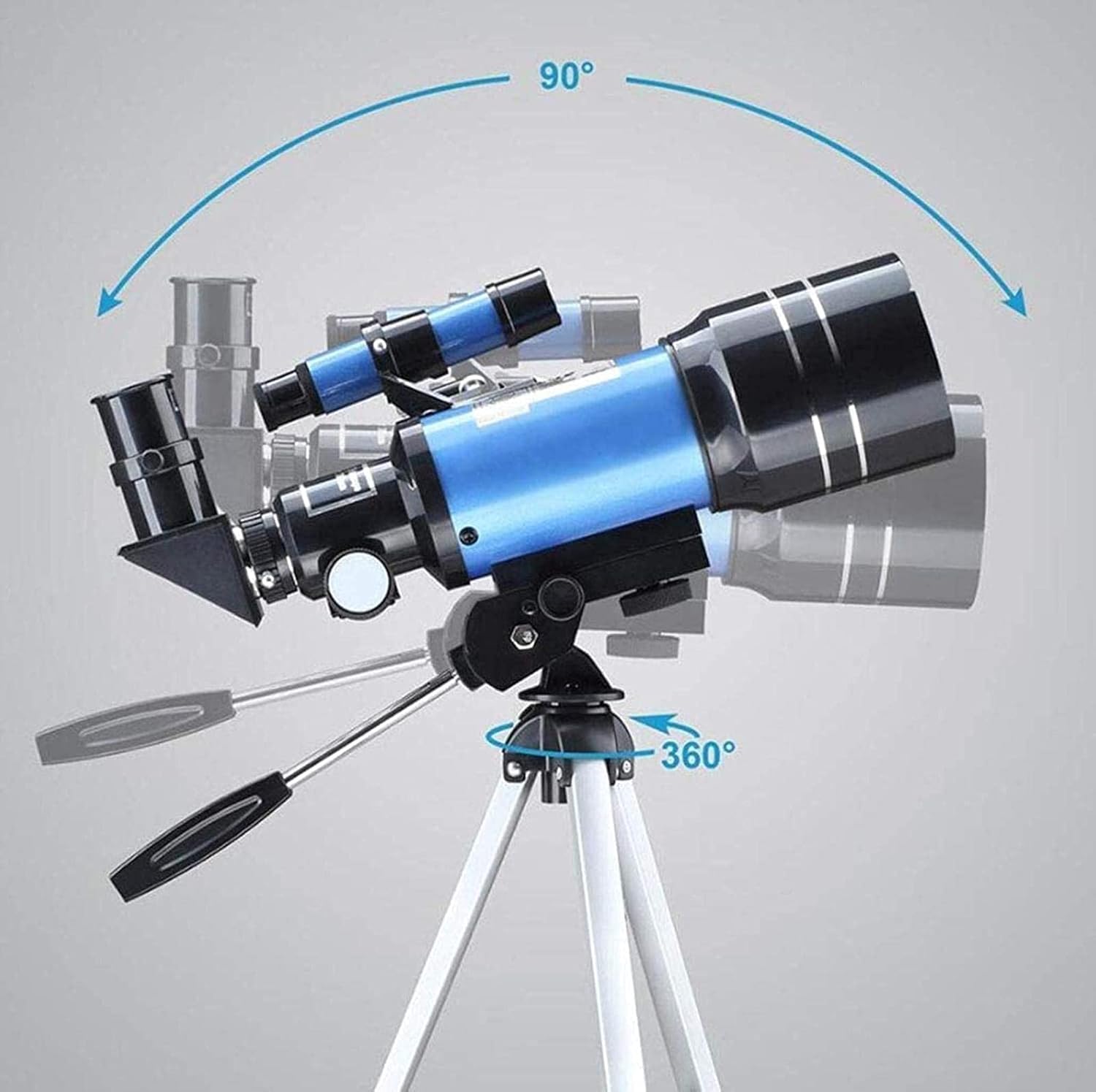
Image: This diagram demonstrates the telescope's ability to rotate 90 degrees vertically and 360 degrees horizontally, offering full range of motion for tracking objects.
4. Using the Smartphone Adapter
The included smartphone adapter allows you to capture images or videos through the telescope. Attach your smartphone to the adapter, then secure the adapter to the eyepiece. Adjust your phone's camera to align with the eyepiece for optimal viewing and photography.
5. Moon Filter
For observing the Moon, especially when it is bright, attach the Moon filter to the eyepiece. This reduces glare and enhances contrast, allowing for more comfortable and detailed viewing of lunar features.
Magnification Details
Your MMAXZ F30070M telescope offers a versatile range of magnifications using the provided eyepieces and Barlow lens:
- 20mm Eyepiece: Provides 15X magnification (300mm focal length / 20mm eyepiece = 15X).
- 6mm Eyepiece: Provides 50X magnification (300mm focal length / 6mm eyepiece = 50X).
- 3X Barlow Lens: Triples the magnification of any eyepiece.
- With 20mm Eyepiece + 3X Barlow: 15X * 3 = 45X magnification.
- With 6mm Eyepiece + 3X Barlow: 50X * 3 = 150X magnification.
- 1.5X Erecting Eyepiece: Increases magnification by 1.5 times and corrects the image orientation for terrestrial viewing.
- With 20mm Eyepiece + 1.5X Erecting Eyepiece: 15X * 1.5 = 22.5X magnification.
- With 6mm Eyepiece + 1.5X Erecting Eyepiece: 50X * 1.5 = 75X magnification.
The 1.5X erecting eyepiece is particularly useful for terrestrial observations as it corrects the inverted image typically produced by astronomical telescopes, making objects appear right-side up.

Image: An illustration demonstrating the magnification capabilities, showing a moon with an overlay indicating 140X and 15X magnification options.

Image: A visual comparison demonstrating the effect of the 1.5X erect-image lens, showing how it corrects an inverted image (common in astronomical telescopes) to an upright image, suitable for terrestrial viewing.
Maintenance
- Cleaning Lenses: Use a soft, lint-free cloth specifically designed for optical lenses. Gently wipe the lens surfaces. For stubborn smudges, use a small amount of optical cleaning fluid on the cloth, not directly on the lens.
- Dust Protection: Always keep dust caps on the objective lens and eyepieces when the telescope is not in use.
- Storage: Store the telescope in a dry, dust-free environment. Avoid extreme temperatures and humidity.
- Handling: Handle the telescope and its accessories with care to prevent damage from drops or impacts.
Troubleshooting
| Problem | Possible Cause | Solution |
|---|---|---|
| Image is blurry or out of focus. | Improper focusing; atmospheric conditions. | Adjust the focusing knob slowly. Wait for stable atmospheric conditions. |
| Cannot find objects. | Finderscope not aligned; incorrect aiming. | Align the finderscope with the main telescope. Use the aiming control to sweep the sky slowly. |
| Image is dark. | High magnification eyepiece used in low light; light pollution. | Use a lower magnification eyepiece (e.g., 20mm). Observe from a darker location. |
| Image is inverted (upside down). | Normal for astronomical telescopes; 1.5X erecting eyepiece not used. | This is normal for astronomical viewing. Use the 1.5X erecting eyepiece for terrestrial viewing to correct the image. |
Specifications
- Brand: MMAXZ
- Model: F30070M
- Objective Lens Diameter: 70 mm
- Focal Length: 300 mm
- Focus Type: Manual Focus
- Finderscope: 5X24 Reflex
- Compatible Devices: Smartphone (with adapter)
- Lens Coating: Coated Optical Glass
- Eyepieces: 20mm (15X), 6mm (50X)
- Auxiliary Lenses: 3X Barlow Lens, 1.5X Erecting Eyepiece
- Maximum Magnification: 150X

Image: A close-up view of the telescope's objective lens, emphasizing its 70mm aperture, which is crucial for light gathering and image brightness.
Warranty and Support
Your MMAXZ F30070M telescope includes a warranty card. Please refer to the card for specific warranty terms and conditions. For technical support, troubleshooting assistance, or inquiries regarding your product, please contact MMAXZ customer service through the contact information provided on your warranty card or the official MMAXZ website.
Retain your proof of purchase for warranty claims.