
JEKCA 20S-M01
JEKCA Cat 20S-M01 Calico Cat Plastic Building Blocks Instruction Manual
Model: 20S-M01
Introduction
This manual provides detailed instructions for assembling your JEKCA Cat 20S-M01 Calico Cat Plastic Building Blocks. Please read all instructions carefully before beginning assembly to ensure a smooth and enjoyable building experience. This product is designed for individuals aged 14 years and above.
The JEKCA building system utilizes a unique interlocking brick-through system, ensuring a sturdy and durable final model.
Safety Information
WARNING: CHOKING HAZARD - Small Parts.
This product contains small parts and is not suitable for children under 3 years of age. Recommended for ages 14 and up. Keep all components out of reach of young children and pets to prevent accidental ingestion.
What's in the Box
Before starting, please verify that all components are present:
- Instruction Manual
- Plastic Building Bricks (various colors and shapes)
- Connecting Pins
- Pin Driver Tool
- Quick Guide
If any parts are missing or damaged, please contact JEKCA customer support.
Setup
- Prepare Your Workspace: Choose a clean, well-lit, and flat surface for assembly. Ensure you have enough space to spread out the building blocks and the instruction manual.
- Unpack Components: Carefully open the packaging and remove all contents. Separate the different types of bricks and pins if desired, to facilitate easier access during assembly.
- Review Instructions: Familiarize yourself with the instruction manual and the Quick Guide. Pay attention to the diagrams and step-by-step procedures.
Assembly Instructions
The JEKCA building system uses a unique interlocking method. Follow the steps below for proper assembly.
Basic Interlocking Principle
Each brick is connected using pins that pass through the bricks, securing them together. The pin driver tool is essential for this process.

Image: Illustration demonstrating the JEKCA interlocking system. Step 1 shows inserting a pin into a block. Step 2 shows turning the pin 90 degrees with the pin driver to lock it in place. This method ensures a sturdy connection between blocks.

Image: A visual guide to the JEKCA assembly process. Diagram 1 shows two pink blocks being joined by black pins. Diagram 2 illustrates the insertion of two pins into the blocks. Diagram 3 depicts the pins being rotated 90 degrees using a red pin driver tool to secure the connection, highlighting the robust interlocking mechanism.
Step-by-Step Assembly
Follow the detailed diagrams and instructions provided in the included instruction manual. Each step will guide you through adding specific bricks and pins to build the Calico Cat model.
- Identify Parts: Before each step, identify the required bricks by color and shape as indicated in the manual.
- Connect Bricks: Place the bricks in the designated positions.
- Insert Pins: Insert the connecting pins through the holes in the bricks.
- Secure Pins: Use the provided pin driver tool to turn the pins 90 degrees. This locks the bricks firmly in place. Ensure each pin is fully turned and secured before proceeding.
- Verify Connections: Gently test the connections to ensure they are sturdy. If a connection feels loose, re-check the pin insertion and rotation.
Proceed through the manual page by page, completing each section of the model. The model is built layer by layer, gradually forming the Calico Cat structure.

Image: A fully assembled JEKCA Calico Cat model, constructed from plastic building blocks. The cat is depicted in a running or pouncing pose, showcasing its distinctive black, orange, and white fur patterns. This image represents the final product of the assembly process.
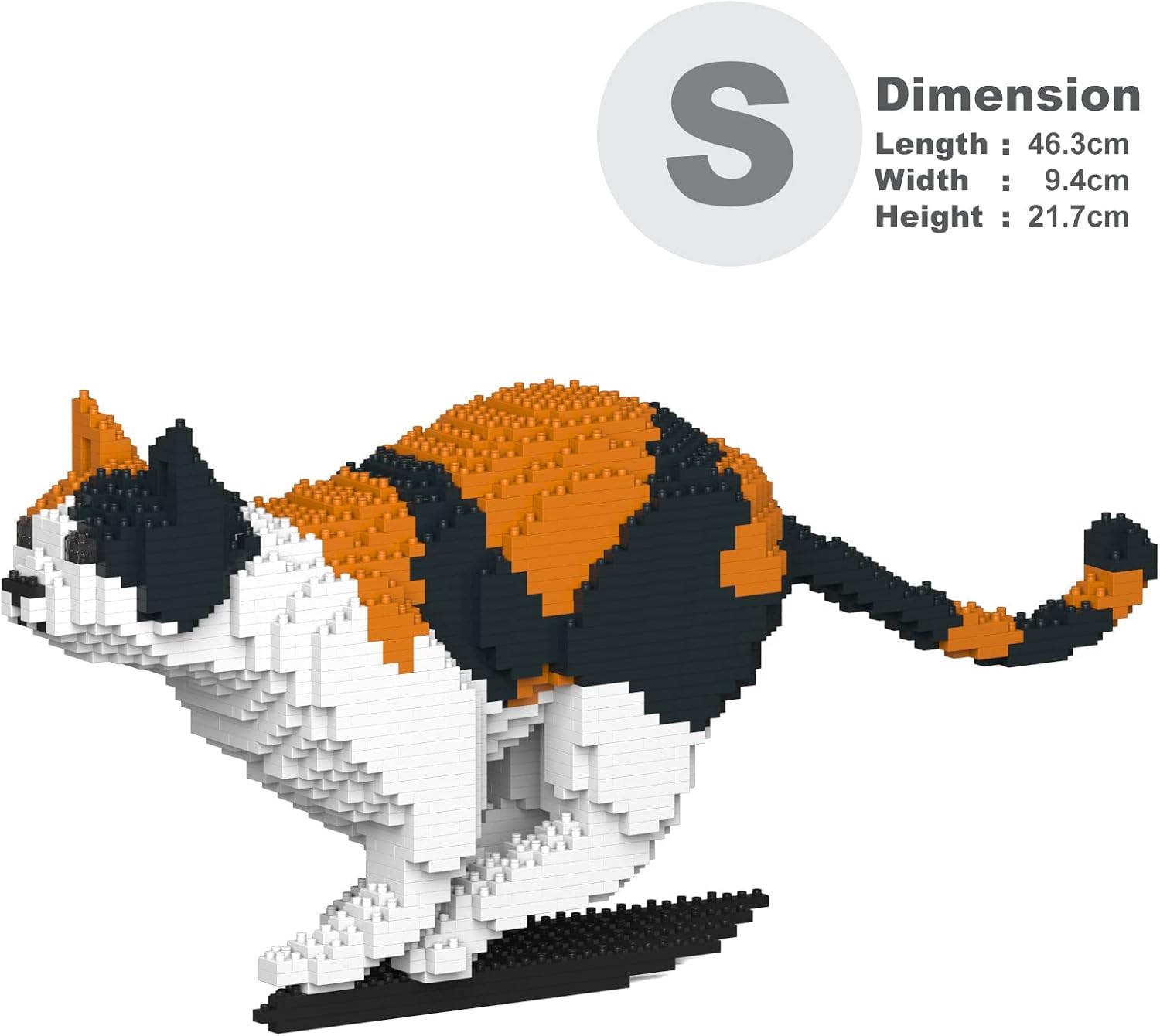
Image: The assembled JEKCA Calico Cat model with an overlay indicating its dimensions. The model has a length of 46.3 cm, a width of 9.4 cm, and a height of 21.7 cm. This provides a clear understanding of the finished product's size.
Maintenance
The JEKCA Calico Cat model requires minimal maintenance due to its sturdy construction.
- Cleaning: To clean the model, gently wipe it with a dry, soft cloth. For stubborn dust, a slightly damp cloth can be used, followed by immediate drying. Avoid using harsh chemicals or abrasive cleaners.
- Storage: Store the model in a stable location to prevent accidental falls. Keep it away from direct sunlight and extreme temperatures to preserve the plastic's integrity and color.
- Disassembly (Optional): If you wish to disassemble the model, carefully use the pin driver tool to rotate the pins back to their original position and remove them. This process can be time-consuming due to the secure interlocking system.
Troubleshooting
- Problem: Bricks are not connecting securely.
- Solution: Ensure the connecting pins are fully inserted and rotated 90 degrees using the pin driver tool. Sometimes, a firm push and twist are required to lock the pins into place. Verify that you are using the correct pin size for the specific connection.
- Problem: Difficulty inserting pins.
- Solution: Check for any debris in the pin holes. Ensure the bricks are perfectly aligned before attempting to insert the pin. Apply steady, even pressure. Do not force pins, as this may damage the bricks or pins.
- Problem: Model appears unstable or wobbly.
- Solution: Review previous steps in the instruction manual. It is likely that one or more pins are not fully secured, or bricks are not correctly aligned. Re-examine the connections in the affected area and ensure all pins are locked.
Specifications
| Model Number | ST19CA20-M01 (20S-M01) |
| Product Dimensions (Assembled) | 18.23 x 3.7 x 8.54 inches (46.3 x 9.4 x 21.7 cm) |
| Item Weight | 2.58 pounds |
| Material | Plastic |
| Recommended Age | 14 years and up |
| Number of Pieces | >1550 pieces |
Warranty and Support
For information regarding product warranty, missing parts, or technical support, please contact JEKCA customer service directly. Refer to the contact information provided in your product packaging or visit the official JEKCA website.
You can also visit the JEKCA Store on Amazon for more information and product details.
Related Documents - 20S-M01
 |
JEKCA Model Dimensions and Specifications Technical specifications for JEKCA building block models, including piece counts, dimensions, and weights for various animal figures. |
 |
Jekca Tier- und Kreaturenskulpturen – Abmessungs- und Gewichtsdaten Detaillierte Spezifikationen für Jekca-Skulpturen, einschließlich Elementanzahl, Abmessungen und Gewicht für verschiedene Tiere und fiktive Kreaturen. |
 |
Jekca Brick Construction Models: Specifications and Details Detailed specifications for Jekca's brick construction models, including model names, piece counts, dimensions, and weight. Features a wide range of animal and art-inspired designs. |
 |
JKB Group Fence Privacy Strips Safety Information Safety information and instructions for JKB Group fence privacy strips, including product identification, risk assessment, safe usage guidelines, maintenance, and disposal. |
 |
Sena 20S EVO Quick Start Guide A quick start guide for the Sena 20S EVO Bluetooth headset, covering installation, device operation, Bluetooth pairing, intercom functions, and voice commands. |
 |
Flipsky UBEC 20S 20A: User Manual & Technical Specifications for RC Models Detailed user manual for the Flipsky UBEC 20S 20A, an external DC voltage regulator designed for RC models. Covers safety precautions, overview, specifications, features, and usage guide for 4-20S LiPo battery packs. |
Ask a question about this manual
Ask about setup, troubleshooting, compatibility, parts, safety, or missing instructions. Manuals+ will review the question and use this page’s manual context to help answer it.