
1. Introduction
Thank you for choosing the Philips Sonicare DiamondClean Connected Rechargeable Toothbrush. This manual provides comprehensive instructions for the safe and effective use, setup, operation, maintenance, and troubleshooting of your new toothbrush. Please read this manual thoroughly before first use and retain it for future reference.
2. Important Safety Information
Please observe the following safety precautions to reduce the risk of injury or damage.
- Do not use this product if you are under 18 years of age.
- Keep the battery out of reach of young children to prevent potential choking hazards.
- Consult your dentist before using this product if you have had oral surgery or gum disease.
- Do not immerse the handle, charger, or travel case in water.
- Do not modify or repair the product yourself. Contact Philips customer support for service.
- Ensure the charging voltage is compatible with your local power supply.
Legal Disclaimer: Statements regarding dietary supplements have not been evaluated by the FDA and are not intended to diagnose, treat, cure, or prevent any disease or health condition. This product is an oral hygiene device.
3. Product Overview
The Philips Sonicare DiamondClean Connected Series includes the following components:
- Two Sonicare Handles (one white, one pink)
- Two Wireless Charging Glasses
- Two Premium Plaque Brush Heads
- Two USB Charging Travel Cases
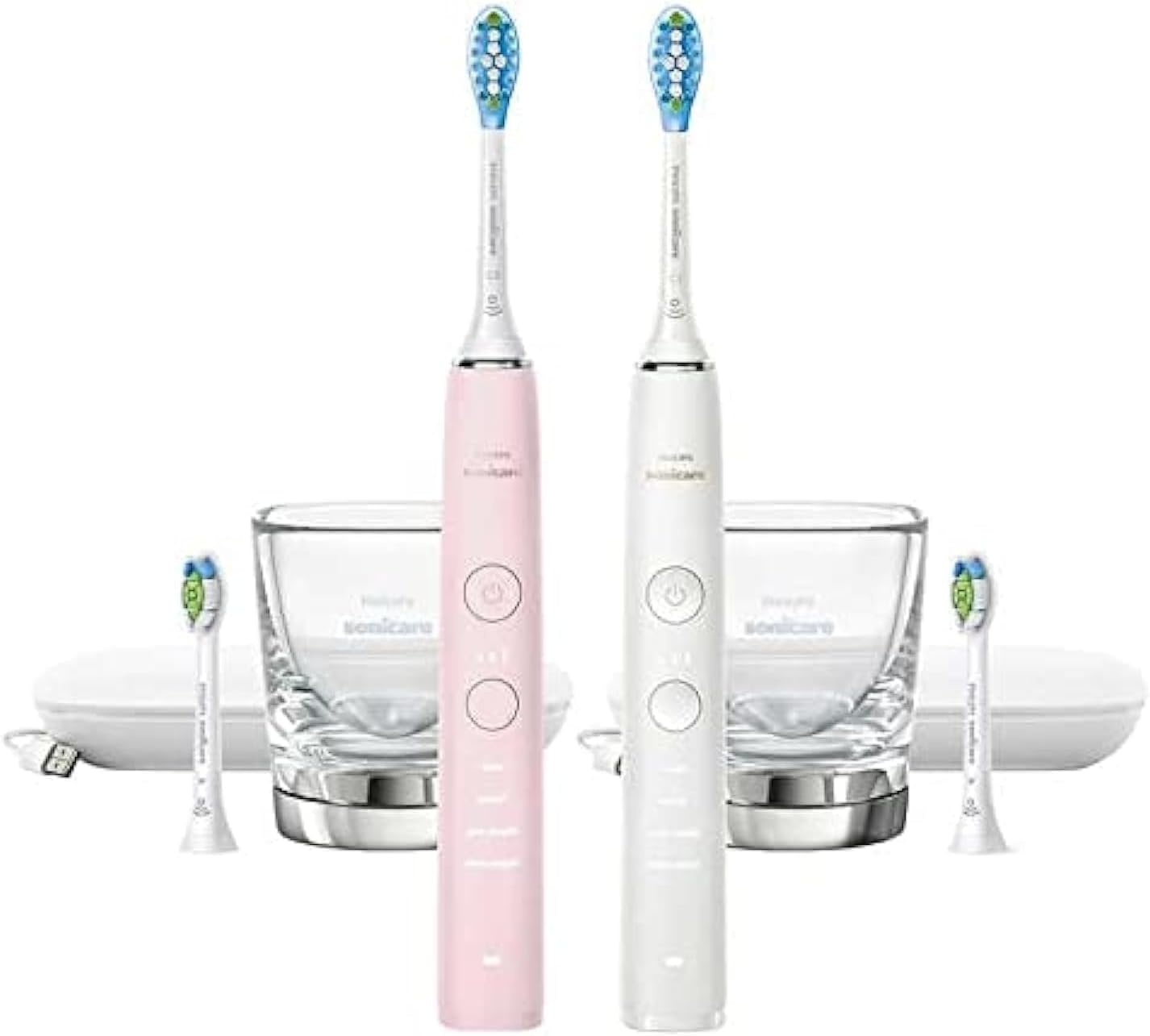
Image 1: Complete Philips Sonicare DiamondClean Connected 2-Pack contents, showing two toothbrush handles, two charging glasses, two travel cases, and four brush heads.
4. Setup
4.1 Initial Charging
Before first use, fully charge your Philips Sonicare toothbrush for at least 24 hours. You have two charging options:
- Using the Charging Glass:
Place the charging glass on the charging base and plug the base into a power outlet. Place the toothbrush handle into the glass. The battery indicator light will flash to show charging is in progress.

Image 2: Philips Sonicare charging glass and open USB charging travel case, demonstrating charging accessories.
- Using the USB Charging Travel Case:
Place the toothbrush handle into the travel case. Connect the USB cable to the travel case and then to a USB power adapter or computer. The battery indicator light will flash to show charging is in progress.
4.2 Attaching the Brush Head
Align the brush head with the handle so the bristles face the same direction as the front of the handle. Push the brush head down firmly onto the metal shaft until it clicks into place. A small gap between the brush head and the handle is normal.
4.3 Connecting to the Philips Sonicare App (Optional)
For a personalized brushing experience and tracking, download the Philips Sonicare app from your device's app store. Follow the in-app instructions to pair your toothbrush via Bluetooth. This allows access to features like real-time feedback, progress reports, and personalized guidance.
5. Operating Instructions
5.1 Brushing Technique
- Wet the bristles and apply a small amount of toothpaste.
- Place the brush head against your teeth at a slight angle towards the gumline.
- Press the power button to start brushing.
- Gently move the brush head slowly across your teeth in small back-and-forth motions, allowing the Sonicare to do the work. Do not scrub.
- The QuadPacer feature will beep and pause briefly every 30 seconds to indicate when to move to the next quadrant of your mouth.
- The Smartimer will automatically turn off the toothbrush after 2 minutes of brushing.
5.2 Brushing Modes
Your DiamondClean Connected toothbrush offers multiple brushing modes. Press the mode button to cycle through them:
- Clean: Standard mode for superior cleaning.
- White+: For removing surface stains and whitening teeth.
- Gum Health: Gently massages gums for improved gum health.
- Deep Clean+: Provides an invigorating deep clean for trouble spots.
The selected mode will be indicated by an illuminated icon on the handle.
5.3 Easy Start Program
The Easy Start program gradually increases the brushing power over the first 14 uses to help you adapt to the Sonicare brushing experience. This feature can be activated or deactivated via the Philips Sonicare app.
6. Maintenance and Cleaning
6.1 After Each Use
- Rinse the brush head thoroughly under running water.
- Wipe the handle with a damp cloth.
- Do not use abrasive cleaners or harsh chemicals.
6.2 Weekly Cleaning
- Remove the brush head and rinse the metal shaft area of the handle under warm water.
- Clean the charging glass and travel case with a damp cloth. For stubborn residue, a mild soap solution can be used. Ensure all components are dry before reassembly or charging.
- Periodically clean the power button area to prevent debris buildup, which can affect functionality. A cotton swab with a small amount of rubbing alcohol can be used carefully.
6.3 Brush Head Replacement
For optimal performance and hygiene, replace your brush head every 3 months, or sooner if the bristles are splayed or worn. Philips Sonicare brush heads are designed with fading blue indicator bristles to remind you when it's time for a replacement.
7. Troubleshooting
| Problem | Possible Cause | Solution |
|---|---|---|
| Toothbrush does not turn on. | Battery is depleted. | Charge the toothbrush for at least 24 hours. |
| Toothbrush stops during use. | Battery is low or Smartimer has completed. | Recharge the toothbrush. If not low battery, it's the Smartimer. |
| Power/Mode button is unresponsive or sticky. | Debris buildup around the button. | Clean the button area thoroughly (refer to Maintenance section). |
| Reduced brushing effectiveness or unusual noise. | Worn brush head or loose brush head. | Replace the brush head. Ensure the brush head is firmly attached. |
| Cannot connect to Sonicare app. | Bluetooth is off, app issue, or toothbrush not in pairing mode. | Ensure Bluetooth is enabled on your device. Restart the app and toothbrush. Follow in-app pairing instructions. |
8. Specifications
- Brand: PHILIPS
- Model: DiamondClean Connected Series
- Power Source: Rechargeable Battery Powered
- Age Range (Description): Adult
- Special Feature: Brushing Timer (Smartimer, QuadPacer)
- Item Firmness Description: Medium (for included brush heads)
- Package Dimensions: 14.96 x 14.25 x 3.86 inches
- Item Weight: 14 ounces
9. Warranty and Support
For detailed warranty information, please refer to the warranty card included with your product or visit the official Philips Sonicare website. Philips provides customer support for product inquiries, troubleshooting, and service requests.
Online Support: www.philips.com/sonicare
Please have your product model number and purchase date available when contacting support.