1. Introduction
This manual provides detailed instructions for the VINABTY RM-F01 Replacement Remote Control. This remote is designed as a direct replacement for the original Humax RM-F01 Freesat remote and is compatible with Humax Foxsat HDR 320GB, 500GB, and 1TB boxes, as well as the Humax IHDR5050 model. It offers a lightweight and ergonomic design for comfortable use.
2. Setup
2.1 Battery Installation
The remote control requires two AAA batteries (not included). Follow these steps to install them:
- Locate the battery compartment on the back of the remote control.
- Press down on the tab and slide the battery cover downwards to open it.
- Insert two AAA batteries, ensuring the positive (+) and negative (-) terminals align correctly with the markings inside the compartment.
- Slide the battery cover back into place until it clicks securely.
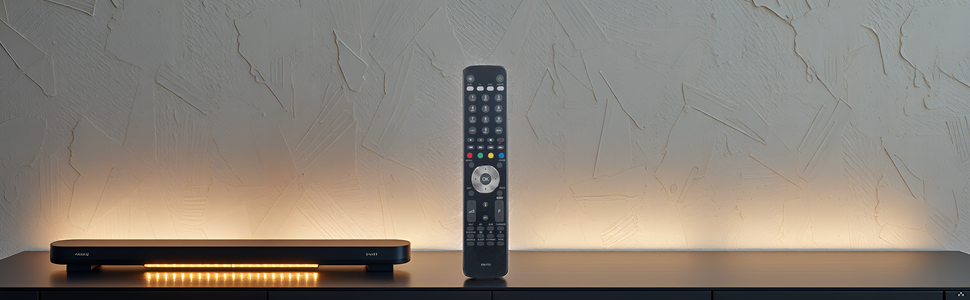
Image: Front view, back view with battery compartment, and detached battery cover of the VINABTY RM-F01 remote control.
2.2 Initial Use
No programming or setup is required for basic control of your Humax Foxsat HDR or IHDR5050 box. Simply point the remote at your device and begin using it.
3. Operating Instructions
3.1 Button Functions Overview
The VINABTY RM-F01 remote control features a standard layout for easy navigation and control of your Humax device. Refer to the image below for a visual guide to the buttons.
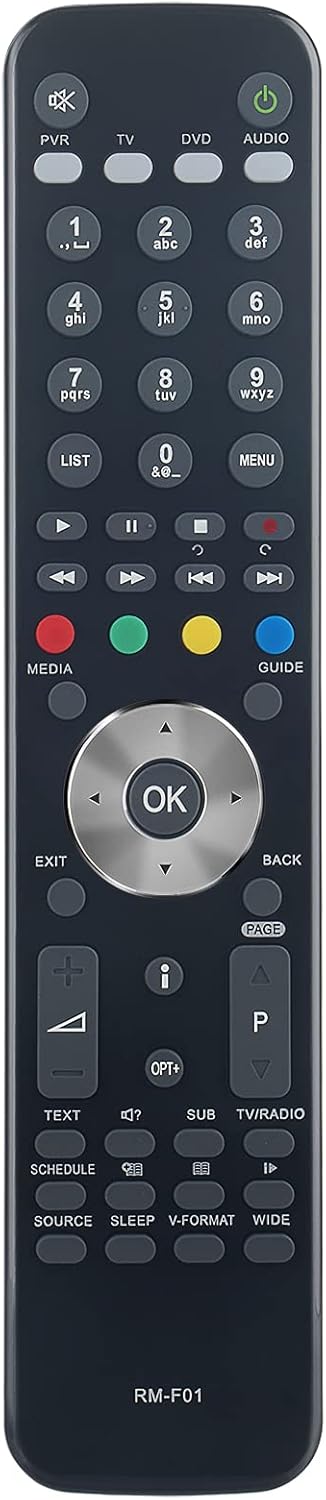
Image: Front view of the VINABTY RM-F01 remote control, displaying all control buttons.
- Power Button (Green): Turns the device on or off.
- PVR, TV, DVD, AUDIO Buttons: Selects the device to control.
- Number Pad (0-9): For channel selection and data entry.
- LIST, MENU, GUIDE Buttons: Accesses various menus and program guides.
- Media Control Buttons (Play, Pause, Stop, Rewind, Fast Forward, Record): Controls playback of recorded content.
- Navigation Pad (Up, Down, Left, Right, OK): For menu navigation and selection.
- EXIT, BACK Buttons: Exits menus or returns to the previous screen.
- Volume Up/Down (+/-): Adjusts the volume.
- Channel Up/Down (P+/P-): Changes channels.
- TEXT, SUB, TV/RADIO Buttons: Accesses teletext, subtitles, or switches between TV and radio modes.
- SOURCE, SLEEP, V-FORMAT, WIDE Buttons: Accesses input sources, sets sleep timer, adjusts video format, or screen aspect ratio.
3.2 Programming TV Control (Optional)
The VINABTY RM-F01 remote control can also be programmed to control basic functions of your television, similar to the original Humax remote. This feature requires a specific code for your TV brand. Follow these steps to program your TV:
- Ensure your television is turned on.
- Press and hold the TV button on the VINABTY remote control until it flashes. This indicates it is in programming mode.
- Enter the 3-digit code for your TV brand. Common codes for some brands include:
- Sony: 412, 203, 369
Note: If your TV brand is not listed, you may need to search online for compatible 3-digit codes for Humax remotes.
- As you enter the third digit of the code, your TV should turn off if the code is correct.
- If the TV turns off, press the OK button on the remote to save the code.
- Test the remote's TV functions (e.g., power, volume, channel). If all desired functions work, the programming is complete.
- If the TV does not turn off, or if functions do not work as expected, repeat the process with a different code for your TV brand.
Tip: To find your TV's code without a list, you can systematically try codes from 000 upwards. When the TV turns off after entering the third digit, that is likely the correct code.
4. Maintenance
4.1 Cleaning
To clean the remote control, use a soft, dry cloth. Do not use liquid cleaners, abrasive pads, or chemical solvents, as these can damage the remote's surface or internal components.
4.2 Battery Care
- Replace batteries when the remote's response becomes sluggish or stops working.
- Remove batteries if the remote will not be used for an extended period to prevent leakage.
- Dispose of used batteries according to local regulations.
5. Troubleshooting
5.1 Remote Not Responding
- Check Batteries: Ensure batteries are inserted correctly with the correct polarity (+/-) and are not depleted. Replace with fresh AAA batteries if necessary.
- Line of Sight: Ensure there is a clear line of sight between the remote control and the device (Humax box or TV). Obstructions can block the infrared signal.
- Distance: Ensure you are within the effective operating range (up to 10 meters).
5.2 TV Control Not Working After Programming
- Re-program TV Control: Repeat the TV programming steps (Section 3.2) carefully, trying different codes for your TV brand if the initial one did not work or only partially worked.
- Verify Code: Double-check that the 3-digit code entered is correct for your specific TV model.
6. Specifications
| Brand | VINABTY |
| Model Number | RM-F01 |
| Color | Black |
| Connectivity Technology | Infrared |
| Special Features | Ergonomic, Lightweight |
| Compatible Devices | Humax Foxsat HDR 320/500GB/1TB, Humax IHDR5050, TV Set-top Box |
| Batteries Required | 2 x AAA (not included) |
| Number of Buttons | 25 |
| Maximum Range | 10 Meters |
7. Warranty Information
Specific warranty details for the VINABTY RM-F01 Replacement Remote Control are not provided in the product information. Please refer to the retailer's return policy or contact the seller directly for warranty inquiries.
8. Support
If you encounter any issues with your VINABTY RM-F01 remote control that are not resolved by the troubleshooting steps in this manual, please contact the seller or manufacturer for assistance. They are committed to providing a satisfactory response within 24 hours for product or service-related concerns.


