
1. Introduction
Thank you for choosing the YumSur Bike Lights Set. This comprehensive set includes a powerful 1000 Lumen USB rechargeable bicycle headlight and a rear taillight with integrated turn signals and a horn, designed to enhance your safety and visibility during night cycling on roads and mountains. This manual provides detailed instructions for installation, operation, and maintenance to ensure optimal performance and longevity of your bike lights.
Package Contents:
- 1x Bicycle Headlight
- 1x Rear Taillight with Turn Signal & Horn
- 1x Wireless Remote Control
- 2x USB Charging Cables
- Mounting Brackets/Straps for Headlight and Taillight
- 1x User Manual (this document)
2. Setup and Installation
2.1 Headlight Installation
- Attach the rubber mounting strap to the headlight base.
- Securely wrap the strap around your bicycle's handlebar.
- Adjust the headlight angle for optimal forward visibility.
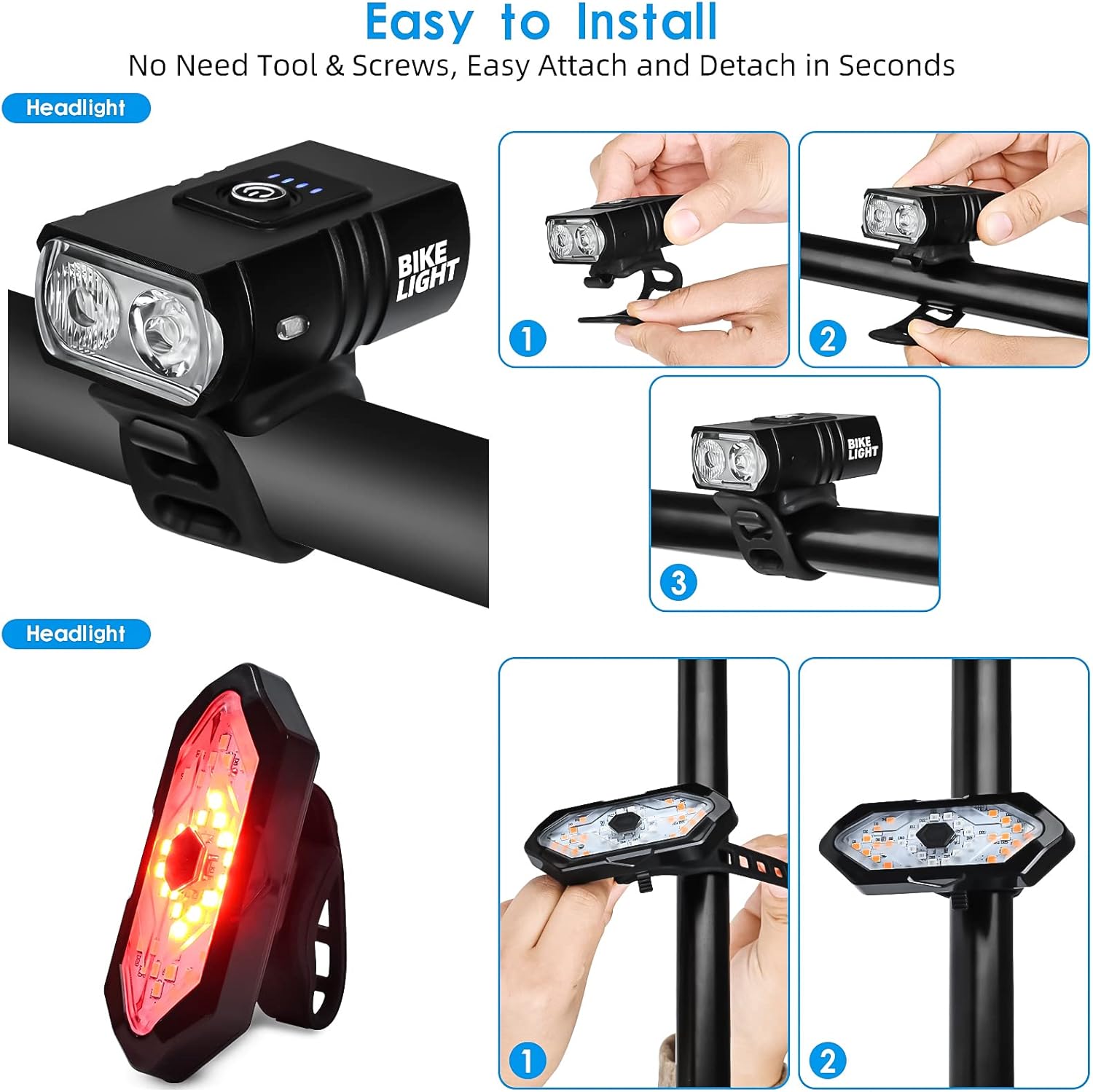
Figure 2.1: Headlight installation on handlebar.
2.2 Rear Taillight Installation
- Attach the rubber mounting strap to the taillight base.
- Securely wrap the strap around your bicycle's seat post.
- Ensure the taillight is facing directly backward for maximum visibility.
Figure 2.2: Taillight installation on seat post.
2.3 Remote Control Installation
The wireless remote control can be mounted on your handlebar for easy access to turn signals and horn functions. Use the provided silicone ring to secure it in a convenient position near your thumb.
Video 2.1: Demonstration of remote control installation and taillight functions.
3. Operating Instructions
3.1 Headlight Modes
The headlight features 6 lighting modes to adapt to various cycling conditions. Press the power button on the top of the headlight to cycle through the modes:
- Strong Light (Wide Light): High brightness, wide beam for maximum visibility.
- Low Light (Wide Light): Reduced brightness, wide beam for energy saving.
- Strong Light (Spotlight): High brightness, focused beam for distant illumination.
- Strong Light (All Bright): Both wide and spotlight beams at high brightness.
- Respiration Flashes (Double Lights On): Gradual fading in and out for attention.
- Strobe (Double Lights On): Rapid flashing for emergency or high-alert situations.

Figure 3.1: Headlight lighting modes.
3.2 Rear Taillight Modes, Turn Signals & Horn
The rear taillight offers 5 lighting modes and integrated turn signals, controlled by the wireless remote. The remote also activates the horn.
- Red Light is Always On: Constant red light for steady rear visibility.
- Left Turn Signal + Horn: Activates left arrow indicator and horn sound.
- Flashing Red: Pulsating red light for increased attention.
- Right Turn Signal + Horn: Activates right arrow indicator and horn sound.
- Flash All: All lights flash simultaneously for maximum warning.
Video 3.1: Demonstration of taillight turn signals and horn.
4. Charging Instructions
Both the headlight and taillight are USB rechargeable. The headlight has a built-in 1000mAh battery, and the taillight has a 900mAh battery. A full charge for the headlight takes approximately 2 hours.
- Locate the hidden USB charging port on the side of each device (covered by a rubber protector).
- Connect the provided USB charging cable to the light and a standard USB power source (e.g., computer, wall adapter, power bank).
- The battery indicator lights will show charging status. The system features an automatic cut-off function when fully charged to prevent overcharging and prolong battery life.

Figure 4.1: USB charging for bike lights.
5. Maintenance
5.1 Waterproofing
The YumSur Bike Lights Set is designed with an IPX5 waterproof aluminum plastic case and rubber protectors on the charge ports. This ensures the lights function normally even in rainy conditions. Always ensure the rubber protector on the charging port is securely closed when not charging to maintain water resistance.
Figure 5.1: IPX5 Waterproof design.
5.2 General Care
- Clean the lights regularly with a soft, damp cloth. Avoid abrasive cleaners.
- Store the lights in a cool, dry place when not in use.
- Avoid prolonged exposure to direct sunlight when not in use to prevent material degradation.
- Charge the batteries at least once every three months if not used regularly to maintain battery health.
6. Troubleshooting
- Light not turning on: Ensure the battery is charged. Press and hold the power button for a few seconds to activate.
- Light not charging: Check the USB cable and power source. Ensure the charging port is clean and the cable is inserted correctly.
- Remote control not working: Ensure the remote's battery is functional. Re-pair the remote with the taillight by following the instructions in the user manual (if applicable, specific pairing steps are usually in the physical manual).
- Turn signals or horn not responding: Verify the remote control is within range and its battery is not depleted.
7. Specifications
| Feature | Specification |
|---|---|
| Brand | YumSur |
| Model Number | FY-1820 |
| Material | Aluminum, Plastic, Rubber |
| Power Source | Battery Powered |
| Headlight Brightness | 1000 Lumen |
| Headlight Battery | 1000mAh (Built-in) |
| Taillight Battery | 900mAh (Built-in) |
| Charging Time (Headlight) | Approx. 2 hours |
| Water Resistance Level | IPX5 (Waterproof) |
| Number of Headlight Modes | 6 |
| Number of Taillight Modes | 5 (plus turn signals and horn) |
| Item Weight | 210 Grams |
| Mounting Type | Handlebar Mount (Headlight), Seat Post Mount (Taillight) |
8. Warranty and Support
For warranty information or technical support, please refer to the contact details provided with your purchase or visit the official YumSur website. Keep your proof of purchase for any warranty claims.


