
beFree Sound BFS-750
User Manual: beFree Sound 2.1 Channel Bluetooth Tower Speakers
Model: BFS-750
Introduction
Thank you for choosing the beFree Sound 2.1 Channel Bluetooth Tower Speakers. This manual provides essential information for the safe and optimal operation of your new speaker system. Please read it thoroughly before use and retain it for future reference.

Image: The beFree Sound 2.1 Channel Bluetooth Tower Speakers, showcasing their sleek black design and tall, slender form factor.
Important Safety Information
- Indoor Use Only: This product is designed for indoor use. Do not expose it to rain, moisture, or extreme temperatures.
- Power Source: Ensure the power supply matches the specifications (110V/60Hz). Use only the provided AC power cord.
- Ventilation: Do not block any ventilation openings. Maintain adequate space around the speakers for proper airflow.
- Heat: Avoid placing the speakers near heat sources such as radiators, heat registers, stoves, or other apparatus (including amplifiers) that produce heat. The rear panel may become hot; DO NOT TOUCH during operation.
- Liquid and Moisture: Do not expose the unit to dripping or splashing liquids. Do not place objects filled with liquids, such as vases, on the apparatus.
- Cleaning: Unplug the unit from the power outlet before cleaning. Use a dry cloth for cleaning.
- Servicing: Do not attempt to service this product yourself. Refer all servicing to qualified service personnel. Opening the casing may expose you to dangerous voltage or other hazards.
What's in the Box
Please check the contents of your package to ensure all items are present:
- Two Speakers (Main and Satellite)
- One Wireless Microphone
- One Remote Control
- One AC Power Cord
- One Aux Cord
- One Optical Cord
- One User Manual (this document)

Image: Included accessories: remote control, optical cable, and an RCA to 3.5mm auxiliary cable.

Image: The wireless microphone, featuring an on/off/mute switch and battery compartment.
Product Features and Controls
Front Panel Controls

Image: Detailed view of the main speaker's front control panel, showing buttons for volume, input, menu, and ports for SD card, USB, and microphone.
- STBY: Standby button.
- INPUT: Selects audio input source (Bluetooth, USB, SD, Optical, FM).
- VOL+/-: Adjusts master volume.
- CH+/-: Changes FM radio channels or navigates tracks.
- MENU: Accesses menu options.
- SD/MMC CARD: Slot for SD or MMC memory cards.
- U DISK (USB): Port for USB flash drives.
- MIC: Microphone input jack.
Rear Panel Connections

Image: The back panel of the main speaker, detailing connections for FM antenna, audio input (RCA), optical input, coaxial input, right speaker output, AC input, and power switch.
- FM ANT: FM antenna input.
- AUDIO INPUT (L/R): RCA stereo audio input for external devices.
- OPTICAL INPUT: Digital optical audio input.
- COAXIAL INPUT: Digital coaxial audio input.
- RIGHT OUTPUT: Connects to the satellite (right) speaker.
- AC INPUT: Power cord connection.
- POWER SWITCH: Main power on/off switch.
Setup
Speaker Placement
Place the two tower speakers on a flat, stable surface. For optimal stereo sound, position them equidistant from your listening position and spaced appropriately apart. Ensure there is sufficient space around the speakers for ventilation.
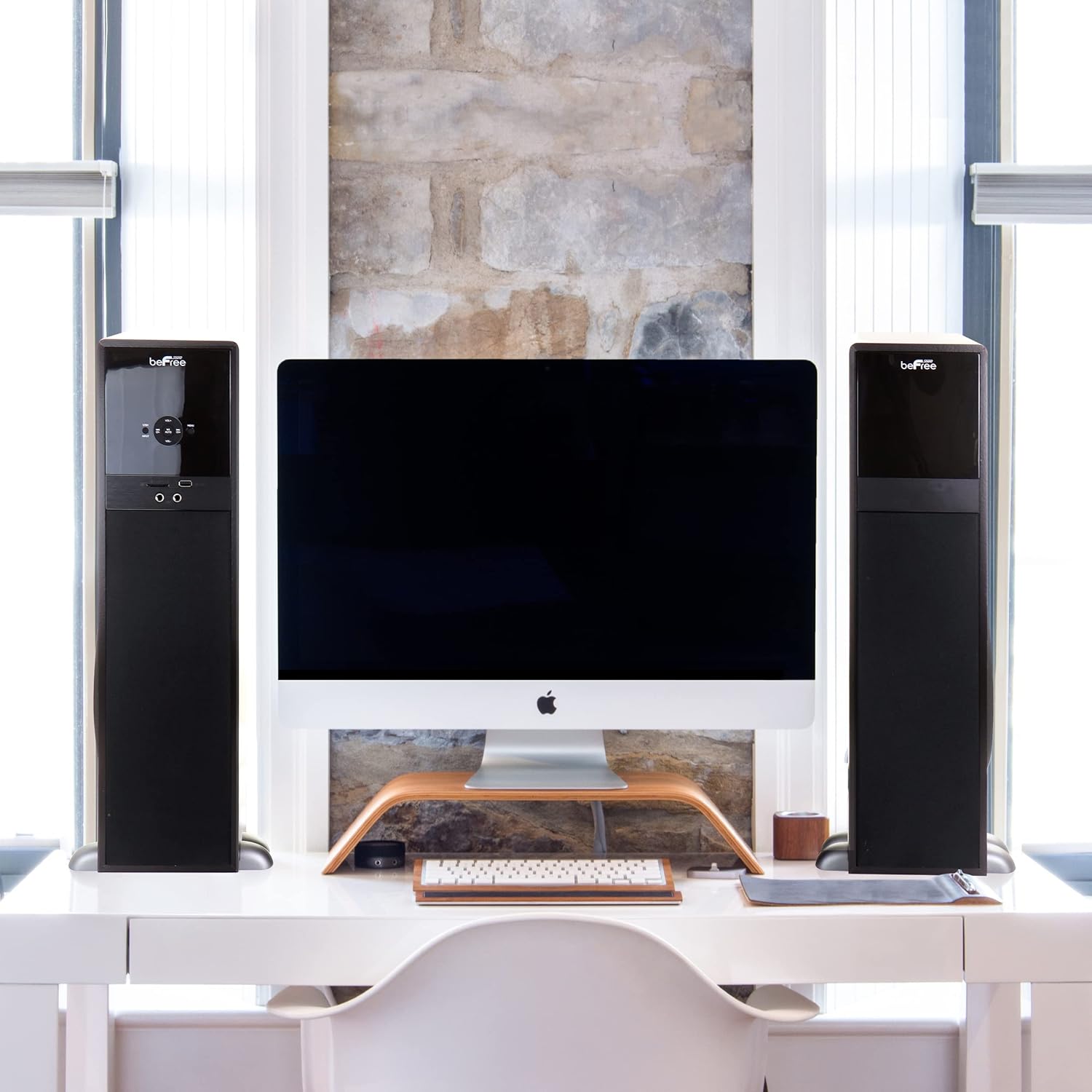
Image: Example setup showing the beFree Sound tower speakers flanking a computer monitor on a desk, illustrating typical indoor placement.
Connecting the Speakers
- Identify the main speaker (with the control panel and rear inputs) and the satellite speaker.
- Connect the cable from the "RIGHT OUTPUT" on the main speaker's rear panel to the input on the satellite speaker.
Power Connection
- Ensure the main power switch on the rear panel is in the "OFF" position.
- Insert the provided AC power cord into the "AC INPUT" on the rear panel of the main speaker.
- Plug the other end of the AC power cord into a standard 110V/60Hz wall outlet.
Audio Input Connections
Connect your audio source device (TV, DVD player, smartphone, etc.) using one of the following methods:
- RCA Audio Input: Use the provided Aux Cord to connect your device's audio output to the "AUDIO INPUT (L/R)" jacks on the speaker's rear panel.
- Optical Input: Use the provided Optical Cord to connect your device's optical audio output to the "OPTICAL INPUT" on the speaker's rear panel.
- Coaxial Input: Connect a coaxial audio cable (not included) from your device to the "COAXIAL INPUT" on the speaker's rear panel.
Operating Instructions
Powering On/Off
- Flip the "POWER SWITCH" on the rear panel to the "ON" position.
- Press the "STBY" button on the front panel or remote control to turn the speakers on or put them into standby mode.
Selecting Input Source
Press the "INPUT" button on the front panel or remote control repeatedly to cycle through available input sources: Bluetooth, USB, SD, Optical, Coaxial, FM, and AUX.
Bluetooth Operation
- Select "Bluetooth" as the input source. The speaker will enter pairing mode, indicated by a flashing Bluetooth indicator.
- On your Bluetooth-enabled device (smartphone, tablet, laptop), enable Bluetooth and search for "beFree Sound" or similar.
- Select the speaker from the list of available devices to pair. Once paired, the indicator will stop flashing.
- You can now play audio from your device through the speakers.
USB/SD Card Playback
- Insert a USB flash drive into the "U DISK" port or an SD/MMC card into the "SD/MMC CARD" slot on the front panel.
- The speaker should automatically switch to USB or SD input and begin playing compatible audio files. If not, select the appropriate input using the "INPUT" button.
- Use the playback controls (Play/Pause, Next/Previous Track) on the front panel or remote control.
FM Radio Operation
- Ensure the FM antenna is connected to the "FM ANT" port on the rear panel.
- Select "FM" as the input source.
- Press the "AUTO" button on the remote or front panel to automatically scan and save available FM stations.
- Use the "CH+/-" buttons to navigate between saved stations.
Microphone Use
- Insert the wireless microphone's receiver (if applicable) or a wired microphone into the "MIC" input jack on the front panel.
- Adjust the microphone volume using the dedicated controls on the remote or through the menu.
Volume Control
Adjust the master volume using the "VOL+/-" buttons on the front panel or the remote control.
Maintenance
- Cleaning: Always unplug the speakers before cleaning. Use a soft, dry cloth to wipe down the surfaces. Do not use liquid cleaners or aerosol sprays.
- Ventilation: Periodically check that the ventilation openings are clear of dust and debris.
- Storage: If storing the speakers for an extended period, unplug them from the power outlet and store them in a cool, dry place.
Troubleshooting
| Problem | Possible Cause | Solution |
|---|---|---|
| No power | Power cord not connected; Power switch off; Outlet not working. | Ensure power cord is securely plugged in. Check rear power switch. Test outlet with another device. |
| No sound | Incorrect input selected; Volume too low; Audio cables loose; Device not playing. | Press INPUT to select correct source. Increase volume. Check all audio cable connections. Ensure source device is playing audio. |
| Bluetooth not connecting | Speaker not in pairing mode; Device Bluetooth off; Speaker too far. | Select Bluetooth input on speaker. Ensure Bluetooth is enabled on your device. Move device closer to speaker (within 10 meters). |
| FM radio static | Poor antenna connection; Weak signal. | Adjust FM antenna position. Try auto-scanning for stations again. |
Specifications
| Model Number | BFS-750 |
| Speaker Type | Tower |
| Surround Sound Channel Configuration | 2.1 |
| Speaker Maximum Output Power | 80 Watts |
| Frequency Response | 40kHz-20Hz |
| Power Source | Corded Electric (110V/60Hz 70020mA) |
| Connectivity Technology | Bluetooth, Optical, USB, SD, FM Radio, AUX, Coaxial |
| Wireless Communication Technology | Bluetooth |
| Bluetooth Range | 10 Meters |
| Compatible Devices | Smartphone, Tablet, MP3 Player, Laptop |
| Control Method | Remote, Button |
| Item Weight | 36 Pounds |
| Product Dimensions | 24 x 13 x 12 inches |
| Color | Black |
Warranty and Support
This beFree Sound product comes with a Limited Warranty. For specific details regarding warranty coverage, duration, and terms, please refer to the warranty card included with your purchase or contact beFree Sound customer support.
For technical support, troubleshooting assistance, or warranty claims, please visit the official beFree Sound website or contact their customer service department using the contact information provided on their packaging or website.
Ask a question about this manual
Ask about setup, troubleshooting, compatibility, parts, safety, or missing instructions. Manuals+ will review the question and use this page’s manual context to help answer it.