
1. Important Safety Instructions
Please read and save these instructions before operating your humidifier. Failure to follow these instructions may result in electric shock, fire, or serious injury.
- Always place the humidifier on a firm, flat, waterproof surface at least 12 inches (30 cm) away from walls and appliances.
- Do not immerse the humidifier base in water or other liquids.
- Unplug the humidifier before filling, cleaning, or moving it.
- Do not operate the humidifier with a damaged cord or plug.
- Keep the humidifier out of reach of children and pets.
- Use only clean, cool tap water. Distilled or demineralized water is recommended to prevent white dust.
- Do not add essential oils directly into the water tank. Use the designated essential oil tray.
2. Product Overview
Familiarize yourself with the components of your MIZUKATA HIKARI Ultrasonic Cool Mist Tower Humidifier.

Image 2.1: The MIZUKATA HIKARI Tower Humidifier shown with its accompanying remote control. The humidifier features a sleek, tall design with a digital display on the front panel.
Components:
- Water Tank: Large capacity tank for water storage.
- Base Unit: Contains the ultrasonic transducer, fan, and control panel.
- Mist Nozzle: Top outlet for cool mist.
- Digital Display: Shows humidity, temperature, mist level, and timer settings.
- Control Panel Buttons: Power, Mode, Humidity Setting, Timer.
- Remote Control: For convenient operation from a distance.
- Essential Oil Tray: Located at the base for aromatherapy.
- Demineralization Cartridge: Optional component to reduce mineral buildup.
3. Setup
3.1 Unpacking and Placement
- Remove all packaging materials and ensure all components are present.
- Place the humidifier on a flat, stable, and waterproof surface. Ensure it is at least 12 inches (30 cm) away from walls, furniture, and electronic devices.
3.2 Filling the Water Tank

Image 3.1: The humidifier's transparent water tank, illustrating its 6.5L (1.72 Gallon) capacity. This large capacity allows for extended operation on a single fill.
- Remove the water tank from the base unit.
- Unscrew the tank cap at the bottom of the water tank.
- Fill the tank with clean, cool tap water. Distilled or demineralized water is recommended to minimize mineral residue. Do not fill past the maximum fill line.
- Securely screw the tank cap back on.
- Place the filled water tank back onto the base unit, ensuring it is seated correctly.
4. Operation
4.1 Power On/Off
- Plug the power cord into a suitable electrical outlet.
- Press the Power Button (symbol: circle with vertical line) on the control panel or remote control to turn the humidifier on or off.
4.2 Mist Level Adjustment
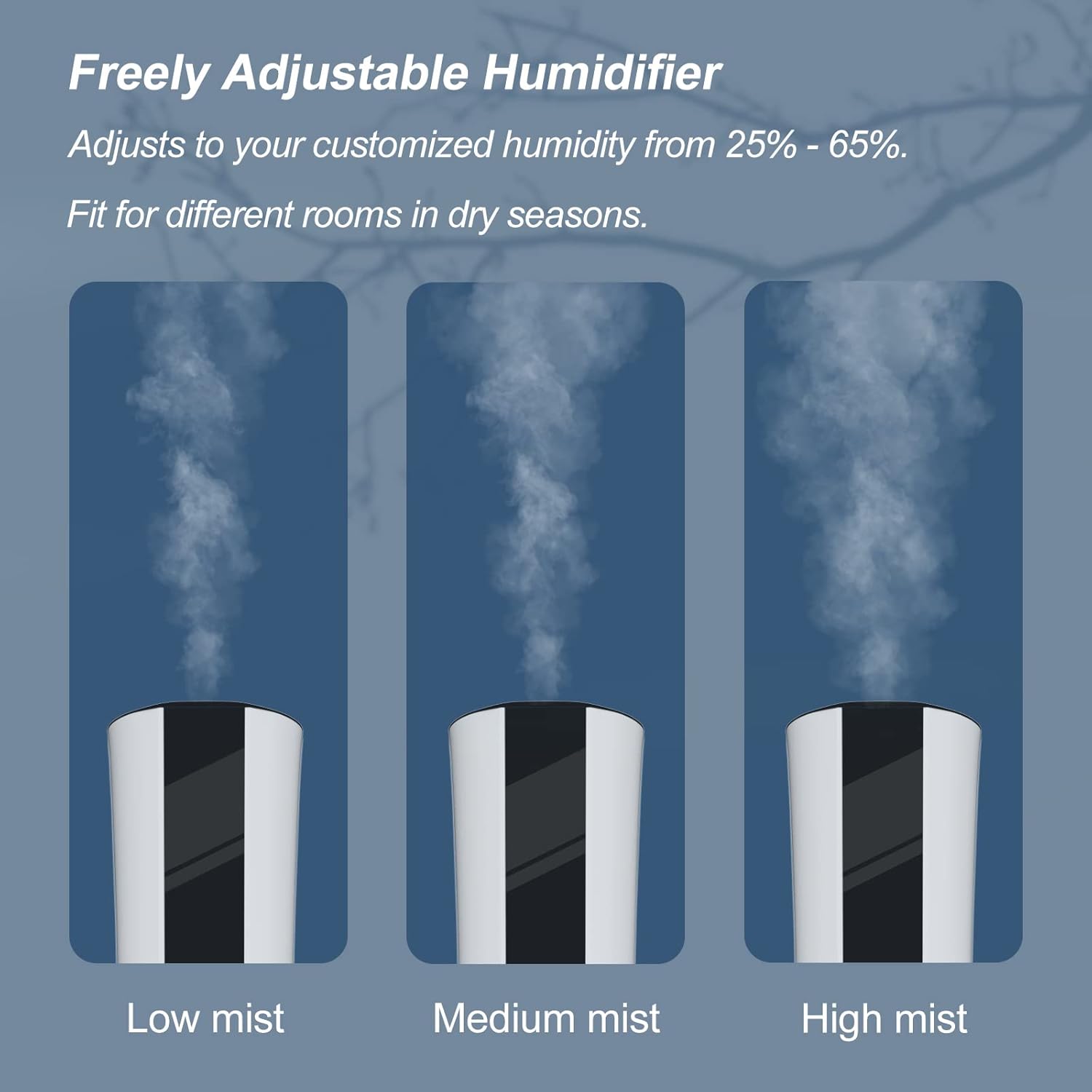
Image 4.1: Visual representation of the three adjustable mist output levels: Low, Medium, and High. Users can select the desired intensity for their environment.
- Press the Mode Button (symbol: water drop with fan) on the control panel or remote control to cycle through Low, Medium, and High mist levels. The selected level will be indicated on the digital display.
4.3 Humidity Setting
- Press the Humidity Setting Button (symbol: humidity icon) on the unit or remote to set your desired humidity level from 25% to 65% RH. The humidifier will automatically turn on and off to maintain this level.
4.4 Timer Function
- Press the Timer Button (symbol: clock) to set the operating time from 1 to 12 hours. The humidifier will automatically shut off after the set time.
4.5 Digital Display and Remote Control

Image 4.2: The digital display of the humidifier showing current humidity and temperature, alongside the remote control. The display provides real-time operational information.
The digital display provides real-time information including current temperature (in Fahrenheit), relative humidity (RH%), mist mode, and timer status. The remote control offers full functionality for convenient adjustment of settings.
4.6 Quiet Operation

Image 4.3: An illustration demonstrating the humidifier's quiet operation, typically below 35dB, suitable for use in bedrooms or quiet environments without disturbance.
The humidifier operates at a noise level below 35dB, ensuring minimal disturbance during sleep, work, or relaxation.
5. Maintenance
Regular cleaning is essential for optimal performance and hygiene.
5.1 Daily Maintenance
- Unplug the humidifier before any maintenance.
- Empty any remaining water from the tank and base.
- Rinse the water tank and base with fresh water.
- Refill the tank with fresh water.
5.2 Weekly Cleaning
- Unplug the humidifier.
- Remove the water tank.
- Pour 1 cup of white vinegar into the water tank and base. Let it soak for 20-30 minutes to loosen mineral buildup.
- Use a soft brush or sponge to clean the inside of the tank and the ultrasonic transducer in the base.
- Rinse all components thoroughly with clean water until the vinegar smell is gone.
- Dry all parts completely before reassembling or storing.
5.3 Essential Oil Tray Cleaning
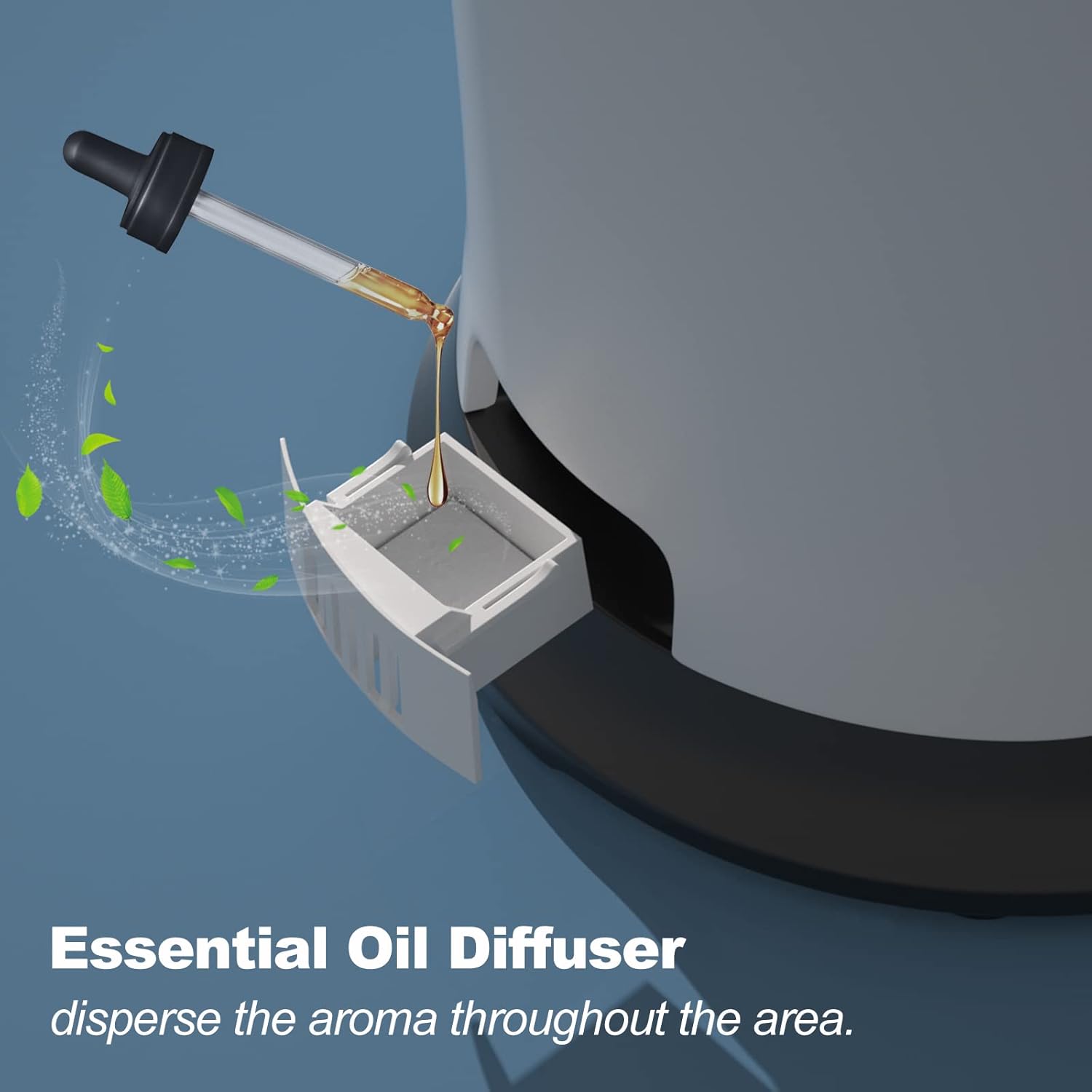
Image 5.1: A close-up view of the essential oil diffuser tray located at the base of the humidifier, designed for adding aromatic oils.
- Pull out the essential oil tray from the base.
- Remove the essential oil pads.
- Clean the tray with a mild detergent and rinse thoroughly.
- Replace the pads or use new ones if needed.
6. Troubleshooting
Refer to this section for common issues and their solutions.
| Problem | Possible Cause | Solution |
|---|---|---|
| No mist or low mist output | Lack of water; Mineral buildup on transducer; Mist nozzle blocked. | Refill water tank; Clean transducer with vinegar solution; Clear mist nozzle. |
| White dust around humidifier | Hard water used. | Use distilled or demineralized water; Clean humidifier regularly. |
| Water leakage | Water tank cap not secured; Tank not seated correctly; Damaged tank. | Ensure tank cap is tight; Re-seat tank properly; Inspect tank for cracks. |
| Unusual noise | Humidifier not on a flat surface; Water level too low. | Place on a flat surface; Refill water tank. |
| Humidifier turns off unexpectedly | Water shortage; Timer activated; Desired humidity reached. | Refill water tank; Check timer settings; Adjust desired humidity. |
7. Specifications
Technical details of the MIZUKATA HIKARI Ultrasonic Cool Mist Tower Humidifier.
| Feature | Detail |
|---|---|
| Brand | MIZUKATA HIKARI |
| Model Name | MIZUKATA HIKARI Ultrasonic |
| Capacity | 6.5 Liters (1.72 Gallons) |
| Operation Mode | Ultrasonic Cool Mist |
| Runtime | Up to 55 hours |
| Product Dimensions | 25.4D x 76.2W x 25.4H Centimetres (76.2 x 25.4 x 25.4 cm) |
| Item Weight | 2.74 kg (6.04 Pounds) |
| Material | Ceramic (likely for internal components or finish) |
| Special Features | Quiet operation, Remote Control, Digital Display, Water shortage alarm, Auto shut-off, Essential Oil Tray |
| Recommended Room Type | Bedroom, Large Room, Whole House/Room, Greenhouse, Office, Yoga Studio |
8. Warranty and Support
For warranty information or technical support, please refer to the contact details provided with your purchase or visit the official MIZUKATA HIKARI website. Keep your proof of purchase for any warranty claims.