
1. Introduction
Welcome to the SINOPUREN Thermal Laminator Machine OL188. This manual provides essential information for the safe and efficient operation of your new laminator. Designed for ease of use, the OL188 features a 2-roller system for smooth lamination, a quick warm-up time, and versatile functionality for various document types.
This laminator is ideal for preserving important documents, photos, certificates, menus, and children's artwork, offering protection against spills, tears, and wear.

Image: Examples of documents that can be laminated for protection.

Image: A user inspecting a laminated document.
2. Safety Instructions
- Read all instructions before use.
- Keep the laminator away from water or other liquids.
- Do not touch the hot parts of the machine during or immediately after operation.
- Ensure proper ventilation around the machine during use.
- Unplug the laminator from the power outlet when not in use or before cleaning.
- Do not attempt to open or repair the machine yourself. Contact qualified service personnel.
- Use only thermal laminating pouches recommended for this machine.
- Keep out of reach of children and supervise children if they are near the appliance.
3. Package Contents
Your SINOPUREN Thermal Laminator Machine OL188 package includes:
- 1 x SINOPUREN Thermal Laminator Machine OL188
- 100 x 3mil Letter Size Laminating Pouches
- 1 x User Manual
- 1 x Built-in Paper Trimmer (integrated into the laminator)
- 1 x Corner Rounder (separate accessory)

Image: Complete package contents of the SINOPUREN Thermal Laminator Machine OL188 bundle.
4. Product Overview
Familiarize yourself with the components of your laminator:
- Feed Slot: Where laminating pouches are inserted.
- Output Slot: Where laminated documents exit.
- Power Indicator Light: Red light indicates the machine is powered on.
- Ready Indicator Light: Green light indicates the machine has reached optimal laminating temperature.
- Power Switch/Mil Selector: Used to turn the machine ON/OFF and select pouch thickness (3mil, 5mil/Photo).
- ABS Release Button: Used to clear paper jams.
- Built-in Paper Trimmer: Integrated on top for precise cutting of documents.
- Corner Rounder: Separate tool for rounding sharp corners of laminated documents.

Image: The laminator highlighting its 9-inch maximum laminating width.

Image: Detail of the ABS release button for clearing jams.
Video: Overview of the SINOPUREN laminator's features and operation, including different models.
5. Setup
- Unpack: Carefully remove the laminator and all accessories from the packaging.
- Placement: Place the laminator on a flat, stable, and heat-resistant surface. Ensure there is enough space around the machine for proper ventilation and for documents to feed through.
- Power Connection: Plug the power cord into a standard electrical outlet.
6. Operating Instructions
6.1. Power On and Warm-up
- Locate the Power Switch/Mil Selector on the side of the machine.
- Slide the switch to the desired pouch thickness setting: 3mil for standard documents or 5mil (Photo) for thicker documents or photos.
- The red Power indicator light will illuminate. The machine will begin to warm up.
- Wait approximately 3 minutes for the green Ready indicator light to illuminate. This indicates the machine has reached the optimal laminating temperature and is ready for use.
Video: Demonstration of the laminator's quick warm-up and readiness indicators.
6.2. Laminating a Document
- Select a laminating pouch appropriate for your document size and thickness.
- Place your document inside the laminating pouch, ensuring it is centered and flat, with even margins on all sides.
- Once the green Ready light is on, insert the sealed edge of the pouch first into the laminator's feed slot.
- The machine will automatically feed the pouch through. Do not pull or push the pouch during lamination.
- Retrieve the laminated document from the output slot. Allow it to cool for a few seconds before handling.
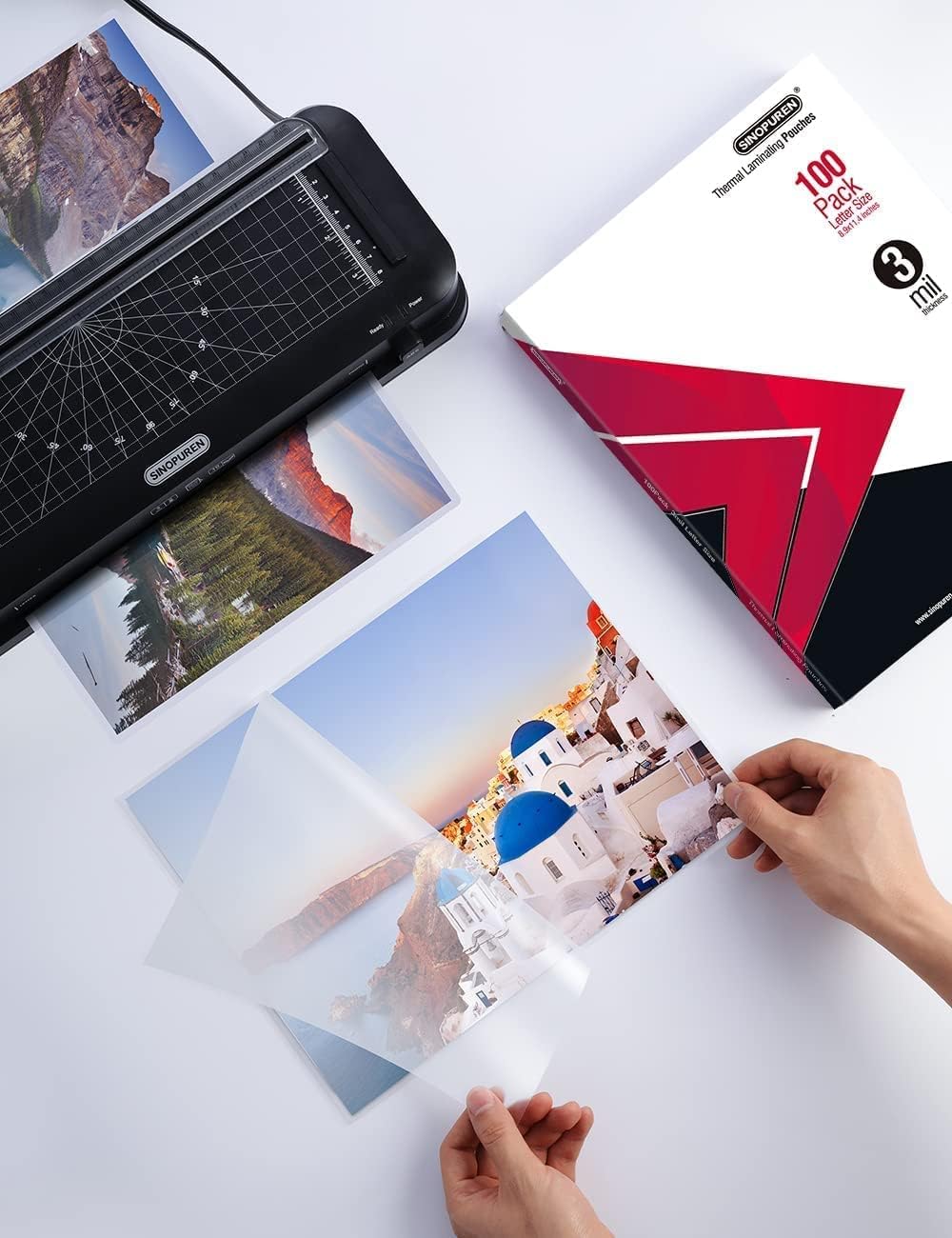
Image: Preparing a document by placing it inside a laminating pouch.

Image: The laminator actively processing a document.
Video: A demonstration of the laminating process with the SINOPUREN machine.
6.3. Using the Built-in Paper Trimmer
- The paper trimmer is located on the top of the laminator.
- Lift the clear guide bar.
- Place the document you wish to trim under the guide bar, aligning it with the desired measurement or angle markings.
- Press down on the cutter carriage and slide it along the guide to make a clean cut.
- Remove the trimmed document and any excess material.
6.4. Using the Corner Rounder
- Take your laminated document.
- Insert one corner of the document into the slot of the corner rounder accessory.
- Press down firmly to cut and round the corner. Repeat for all desired corners.

Image: A laminated document showcasing perfectly rounded corners.
6.5. Clearing a Paper Jam (ABS Function)
- If a laminating pouch becomes jammed or misfed, immediately press and hold the ABS Release Button located on the front of the machine.
- While holding the button, gently pull the jammed pouch out of the feed slot.
- Release the ABS button. Allow the machine to cool down if it was overheated before attempting further lamination.
7. Maintenance
- Cleaning: Ensure the laminator is unplugged and completely cool before cleaning. Wipe the exterior with a soft, dry cloth. Do not use abrasive cleaners or solvents.
- Roller Cleaning: To maintain optimal performance, occasionally run a folded sheet of plain paper through the laminator to clean any adhesive residue from the rollers.
- Storage: Store the laminator in a cool, dry place when not in use. The integrated cable storage on the underside helps keep the power cord tidy.
8. Troubleshooting
| Problem | Possible Cause | Solution |
|---|---|---|
| Machine not turning on | No power supply | Check power cord connection and electrical outlet. |
| Green "Ready" light not on | Not fully warmed up | Allow approximately 3 minutes for warm-up. |
| Poor lamination quality (bubbles, wrinkles) | Incorrect temperature/pouch thickness, old pouches, misfed document | Ensure correct mil setting. Allow full warm-up. Use fresh, high-quality pouches. Insert sealed edge first, centered. |
| Paper jam | Misfed pouch, incorrect insertion | Press and hold the ABS Release Button and gently pull out the jammed pouch. |
9. Specifications
- Brand: SINOPUREN
- Model: OL188
- Laminating Width: Up to 9 inches (A4)
- Pouch Thickness: 3-5 mil
- Warm-up Time: Approximately 3 minutes
- Laminating Speed: 400mm/min
- Maximum Working Temperature: 125℃
- Roller System: 2-Roller
- Features: Built-in Paper Trimmer, Corner Rounder, ABS Jam Release, Automatic Shutdown System.
10. Warranty and Support
For warranty information, product registration, and customer support, please refer to the documentation included in your product packaging or visit the official SINOPUREN website. You may also contact SINOPUREN customer service directly for assistance with any product-related inquiries or issues.