
SIMBROS TA-1257
SIMBROS Nokia 8 V 5G UW TA-1257 User Manual
Model: TA-1257
1. Introduction
This manual provides essential information for setting up, operating, maintaining, and troubleshooting your SIMBROS Nokia 8 V 5G UW TA-1257 smartphone. The Nokia 8 V 5G UW is designed for high performance with its advanced camera system, expansive display, and 5G capabilities.
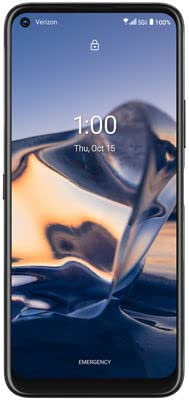
Figure 1: Front view of the SIMBROS Nokia 8 V 5G UW TA-1257 smartphone.
Key features include a PureView quad camera for high-quality photos and videos, an edge-to-edge 6.81-inch display, and ultra-fast 5G speeds. The device is powered by an energy-efficient processor and features a long-lasting battery.
2. What's in the Box
Verify that all items are present in your product package:
- SIMBROS Nokia 8 V 5G UW TA-1257 Smartphone
- Charger (Model: SACAD18TVL)
- USB Cable (Model: L53B-092000100)
- Protective Foil
- Security Seal
- SIM PIN Ejector Tool
- SIM PIN Sticker
- SIM Card
- Quick Start Guide (English)
- Quick Start Guide (Spanish)
- Phone Case
3. Setup
3.1. Inserting the SIM Card
- Locate the SIM card tray on the side of your device.
- Insert the provided SIM PIN ejector tool into the small hole on the SIM card tray. Press firmly until the tray ejects.
- Place your SIM card into the designated slot on the tray. Ensure it is correctly oriented.
- Carefully push the SIM card tray back into the device until it clicks into place.

Figure 2: Side view of the smartphone, showing the SIM card tray location.
3.2. Powering On Your Device
Press and hold the Power button (located on the side of the device) until the Nokia logo appears on the screen. Follow the on-screen prompts to complete the initial setup, including language selection, Wi-Fi connection, and Google account sign-in.
3.3. Security Setup
During initial setup, you will be prompted to set up a screen lock (PIN, pattern, or password) and fingerprint unlock. The device features a side-mounted fingerprint sensor for convenient and secure access.
4. Operating Your Device
4.1. Display
The Nokia 8 V 5G UW features a 6.81-inch FHD+ (1080x2400) HID display with a 20:9 aspect ratio and 386ppi. It is protected by Gorilla Glass 5 and utilizes PureDisplay technology for enhanced visual clarity.

Figure 3: The vibrant 6.81-inch display of the Nokia 8 V 5G UW.
4.2. Camera
The device is equipped with a powerful camera system:
- Rear Camera: 64 MP Quad camera with PureView technology.
- Front Camera: 24 MP for high-resolution selfies and video calls.
Explore various camera modes and settings for optimal photo and video capture, even in low-light conditions.

Figure 4: Rear camera module of the Nokia 8 V 5G UW.
4.3. Battery Management
The Nokia 8 V 5G UW features a 4500 mAh non-removable battery, providing up to 48 hours of usage time and 14 days of standby time. To optimize battery life:
- Adjust screen brightness.
- Disable unnecessary background apps.
- Use power-saving modes when needed.
4.4. Connectivity
The device supports ultra-fast 5G connectivity, along with 4G LTE, Wi-Fi (802.11 a/b/g/n/ac), and Bluetooth for seamless communication and data transfer.
5. Maintenance
5.1. Cleaning Your Device
Use a soft, lint-free cloth to clean the screen and body of your phone. Avoid using harsh chemicals or abrasive materials that could damage the finish.
5.2. Software Updates
Regularly check for and install software updates to ensure your device has the latest features, security patches, and performance improvements. Navigate to Settings > System > System update to check for updates.
5.3. Data Backup
Periodically back up your important data (photos, contacts, documents) to a cloud service or a computer to prevent data loss.
6. Troubleshooting
6.1. Device Not Powering On
Ensure the battery is charged. Connect the device to the charger and wait a few minutes before attempting to power it on again. If the issue persists, contact support.
6.2. Poor Network Connectivity
Check if your SIM card is properly inserted. Verify that you are within network coverage. Try restarting your device. If issues continue, contact your network provider.
6.3. Apps Crashing or Freezing
Clear the cache of the problematic app (Settings > Apps > [App Name] > Storage > Clear cache). If the issue persists, try uninstalling and reinstalling the app. Ensure your device software is up to date.
7. Specifications
| Feature | Specification |
|---|---|
| Model Name | 8v (TA-1257) |
| Brand | SIMBROS |
| Operating System | Android 10.0 |
| CPU Model | Snapdragon 765G 5G Mobile platform |
| CPU Speed | 2.4 GHz |
| RAM | 6 GB |
| Memory Storage Capacity | 64 GB (Expandable up to 1 TB) |
| Screen Size | 6.81 Inches |
| Display Resolution | 1080 x 2400 (FHD+) |
| Display Technology | LCD (PureDisplay, Gorilla Glass 5) |
| Refresh Rate | 60 Hz |
| Rear Camera | 64 MP Quad Camera |
| Front Camera | 24 MP |
| Battery Capacity | 4500 mAh (Non-Removable) |
| Phone Talk Time | 48 Hours |
| Standby Time | 14 Days |
| Wireless Communication | 5G, 4G, Wi-Fi, Cellular |
| Connectivity Technologies | Wi-Fi, GPS |
| Audio Jack | No headphone jack |
| Form Factor | Slate |
| Color | Gray |
| Item Weight | 1.08 pounds |
| Package Dimensions | 7.24 x 5.87 x 1.46 inches |
8. Warranty and Support
8.1. Product Warranty
Your SIMBROS Nokia 8 V 5G UW TA-1257 is covered by an ICSI Product Safety Warranty. Please refer to the warranty documentation included in your package for specific terms and conditions.
8.2. Additional Support
For further assistance, please consult the Quick Start Guide (English and Spanish versions included in the box). For technical support or service inquiries, refer to the contact information provided by SIMBROS or your retailer.