
1. Introduction and Overview
This manual provides essential information for the proper installation, operation, and maintenance of your FLASH HOBBY D3530EVO 1100KV RC Brushless Motor. Designed for remote-controlled aircraft, this motor features a high-torque design and durable construction for reliable performance. Please read this manual thoroughly before use to ensure safe and optimal operation.

Image 1.1: Front view of the FLASH HOBBY D3530EVO 1100KV RC Brushless Motor.
2. Package Contents
Verify that all items listed below are included in your package. If any components are missing or damaged, please contact your retailer.
- 1x D3530EVO-1100kv Brushless Motor
- 4x M3*6MM Flat Wafer Head Screws
- 1x Propeller Nut
- 1x Propeller Adapter
- 3x 3.5MM Banana Female Plugs
- 3x Heat Shrink Tubes

Image 2.1: The D3530EVO motor shown with its included accessories, including screws, propeller nut, adapter, and connectors.
3. Specifications
Key technical specifications for the D3530EVO 1100KV motor:
| Feature | Specification |
|---|---|
| Model | D3530EVO 1100KV |
| Max Wattage | 380W |
| Recommended ESC | 50A |
| Recommended Propeller (4S) | APC 8*6 |
| Motor Design | 14P12N 48H Level Magnet High Torque |
| Bearings | Imported (NSK/NMB) |
| Winding | High Temperature Resistant Copper Wire |
| Bell Material | CNC machined 6061 T6 Aluminum |
| Item Weight | 40 Grams |
| Shaft Diameter | 6 Millimeters |
| Dimensions (W x H) | 1.18"W x 1.53"H (approx. 30mm W x 39mm H) |

Image 3.1: The D3530EVO motor on a digital scale. Please refer to the specifications table for the precise item weight of 40 grams.

Image 3.2: Detailed technical drawing showing the dimensions and mounting points of the D3530EVO motor.
4. Setup and Installation
Proper installation is crucial for the performance and longevity of your motor.
4.1 Motor Mounting
- Identify the motor mounting holes on your aircraft's firewall or motor mount. Refer to Image 3.2 for motor dimensions and mounting hole patterns.
- Secure the motor to the mount using the provided M3*6MM flat wafer head screws. Ensure the screws are tightened firmly but do not overtighten to avoid damaging the motor casing.
- Ensure there is adequate clearance for the motor to spin freely without obstruction.
4.2 Electrical Connections
- Connect the three motor wires to your Electronic Speed Controller (ESC). The motor comes with 3.5MM banana female plugs and heat shrink tubes for secure connections.
- The order of connection for the three wires determines the motor's rotation direction. If the motor spins in the wrong direction, swap any two of the three motor wires.
- Connect the ESC to your receiver's throttle channel and to your battery pack. Ensure all connections are secure and insulated.
- A 50A ESC is recommended for optimal performance with this 1100KV motor.
4.3 Propeller Installation
- Attach the propeller adapter to the motor shaft.
- Mount the propeller onto the adapter, ensuring it is correctly oriented for thrust.
- Secure the propeller with the provided propeller nut. Ensure the propeller is balanced and securely fastened to prevent vibrations and potential damage.
- An APC 8*6 propeller is recommended for 4S battery configurations.
5. Operating Instructions
Before operating your RC aircraft, perform a thorough pre-flight check.
5.1 ESC Calibration
Calibrate your ESC's throttle range according to its manufacturer's instructions. This ensures the ESC correctly interprets the throttle signals from your transmitter.
5.2 Initial Motor Test
- With the propeller removed for safety, connect the battery.
- Slowly advance the throttle to check for smooth motor rotation.
- If the motor does not spin or spins erratically, check all connections and ESC calibration.
- If the motor spins in the wrong direction, disconnect the battery and swap any two of the three motor wires.
5.3 Flight Operation
Always operate your RC aircraft in a safe and open area, away from people and obstacles. Monitor motor temperature during initial flights. Excessive heat can indicate an overloaded motor or incorrect propeller choice.
Video 5.1: A demonstration of the FLASH HOBBY D3530EVO RC Brushless Motor, showcasing its physical appearance and smooth rotation.
Video 5.2: A demonstration of the D3530EVO brushless motor being tested with an ESC and power supply, showing its operational characteristics.
6. Performance Data
The following tables provide performance data for various propeller and voltage configurations. This data can assist in selecting the appropriate setup for your application.
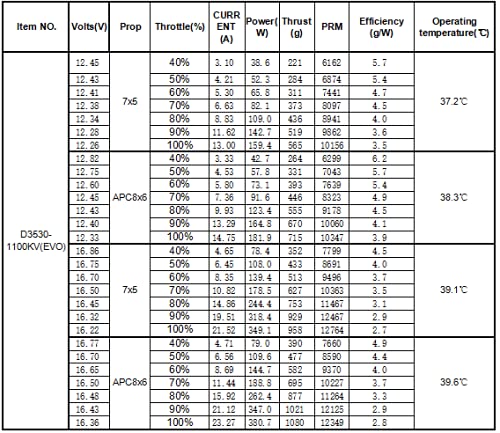
Image 6.1: Performance data for the D3530EVO 1100KV motor, showing current, power, thrust, RPM, efficiency, and operating temperature for 7x5 and APC 8x6 propellers at various throttle percentages.
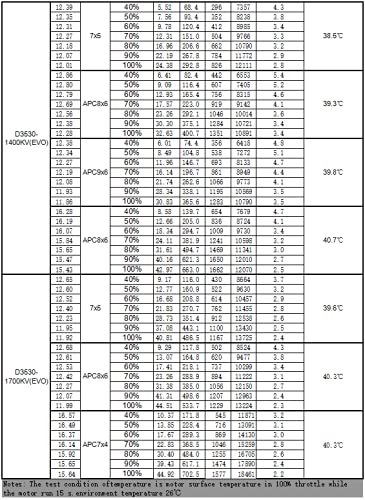
Image 6.2: Additional performance data for D3530EVO 1400KV and 1700KV motors, providing similar metrics for different propeller and throttle settings. Note: This manual focuses on the 1100KV model, but this table provides comparative data.
Note: The test condition for temperature measurement is the motor surface temperature at 100% throttle while the motor runs for 15 minutes in an environment temperature of 26°C.
7. Maintenance
Regular maintenance helps ensure the longevity and reliable operation of your brushless motor.
- Cleaning: Periodically clean the motor to remove dust, dirt, and debris that can accumulate in the stator and rotor. Use compressed air or a soft brush.
- Bearing Inspection: Check the motor bearings for smooth operation. If you notice any roughness or excessive play, the bearings may need replacement. The motor uses imported NSK/NMB bearings for extended life.
- Wire Inspection: Regularly inspect motor wires and connectors for any signs of wear, fraying, or damage. Ensure all connections remain secure.
- Shaft Check: Verify that the motor shaft is straight and free from bends or damage.
8. Troubleshooting
Refer to the following common issues and their potential solutions:
| Problem | Possible Cause | Solution |
|---|---|---|
| Motor does not spin | Loose connections, incorrect ESC calibration, faulty ESC/motor. | Check all wire connections. Recalibrate ESC. Test with a known good ESC or motor if possible. |
| Motor spins in wrong direction | Incorrect motor wire connection order. | Swap any two of the three motor wires connected to the ESC. |
| Motor runs hot | Over-propped, insufficient cooling, excessive current draw. | Use a smaller propeller or one with less pitch. Ensure adequate airflow around the motor. Check current draw with a watt meter. |
| Excessive vibration | Unbalanced propeller, bent motor shaft, loose motor mount. | Balance the propeller. Inspect motor shaft for bends. Tighten motor mounting screws. |
| Loss of power/intermittent operation | Poor battery connection, damaged motor wire, ESC issue. | Check battery voltage and connections. Inspect motor wires for damage. Consult ESC manual for troubleshooting. |
9. Safety Information
Always prioritize safety when working with RC components.
- Propeller Safety: Always remove propellers before performing any maintenance or testing on the motor or ESC. A spinning propeller can cause severe injury.
- Battery Safety: Use appropriate LiPo battery safety precautions. Never short-circuit battery terminals.
- Electrical Safety: Ensure all electrical connections are secure and properly insulated to prevent short circuits.
- Heat: Motors can become hot during operation. Allow the motor to cool before handling after use.
- Environment: Operate RC aircraft in open areas, away from people, animals, and property.
10. Warranty and Support
For warranty information, please refer to the terms and conditions provided at the point of purchase or contact your retailer. For technical support or further inquiries, please visit the official FLASH HOBBY website or contact their customer service.
FLASH HOBBY Official Website: Visit FLASH HOBBY Store on Amazon