
Purivortex AC201B
Purivortex AC201B Air Purifier User Manual
Model: AC201B | Brand: Purivortex
1. Introduction
Thank you for choosing the Purivortex AC201B Air Purifier. This device is designed to improve your indoor air quality by effectively removing various airborne particles and odors. Featuring an H13 True HEPA filter, it captures 99.97% of particles as small as 0.3 microns, including dust, pollen, pet dander, smoke, and odors. This manual provides essential information for safe operation, maintenance, and troubleshooting to ensure optimal performance of your air purifier.
2. Important Safety Instructions
Please read and follow all safety instructions before using this appliance to prevent fire, electric shock, or injury.
- Always unplug the air purifier before moving, cleaning, or performing any maintenance.
- Do not operate the appliance with a damaged cord or plug.
- Keep the power cord away from heated surfaces.
- Do not use the air purifier in wet or damp environments.
- Keep openings free from blockages. Never insert objects into openings.
- This appliance is not intended for use by persons (including children) with reduced physical, sensory, or mental capabilities, or lack of experience and knowledge, unless they have been given supervision or instruction concerning use of the appliance by a person responsible for their safety.
- Ensure the filter is correctly installed before operation.
- This product is Ozone-Free, CARB certified, EPA certified, ETL listed, and FCC listed.
3. Package Contents
Upon unpacking, please ensure all items listed below are present and in good condition:
- Purivortex AC201B Air Purifier Unit
- H13 True HEPA Filter (pre-installed or separately packaged)
- Power Adapter
- User Manual (this document)
4. Product Overview
The Purivortex AC201B features a compact, cylindrical design with a 360° air intake. The control panel is located on the top surface of the unit.

Figure 1: Purivortex AC201B Air Purifier in a living room setting.
Control Panel
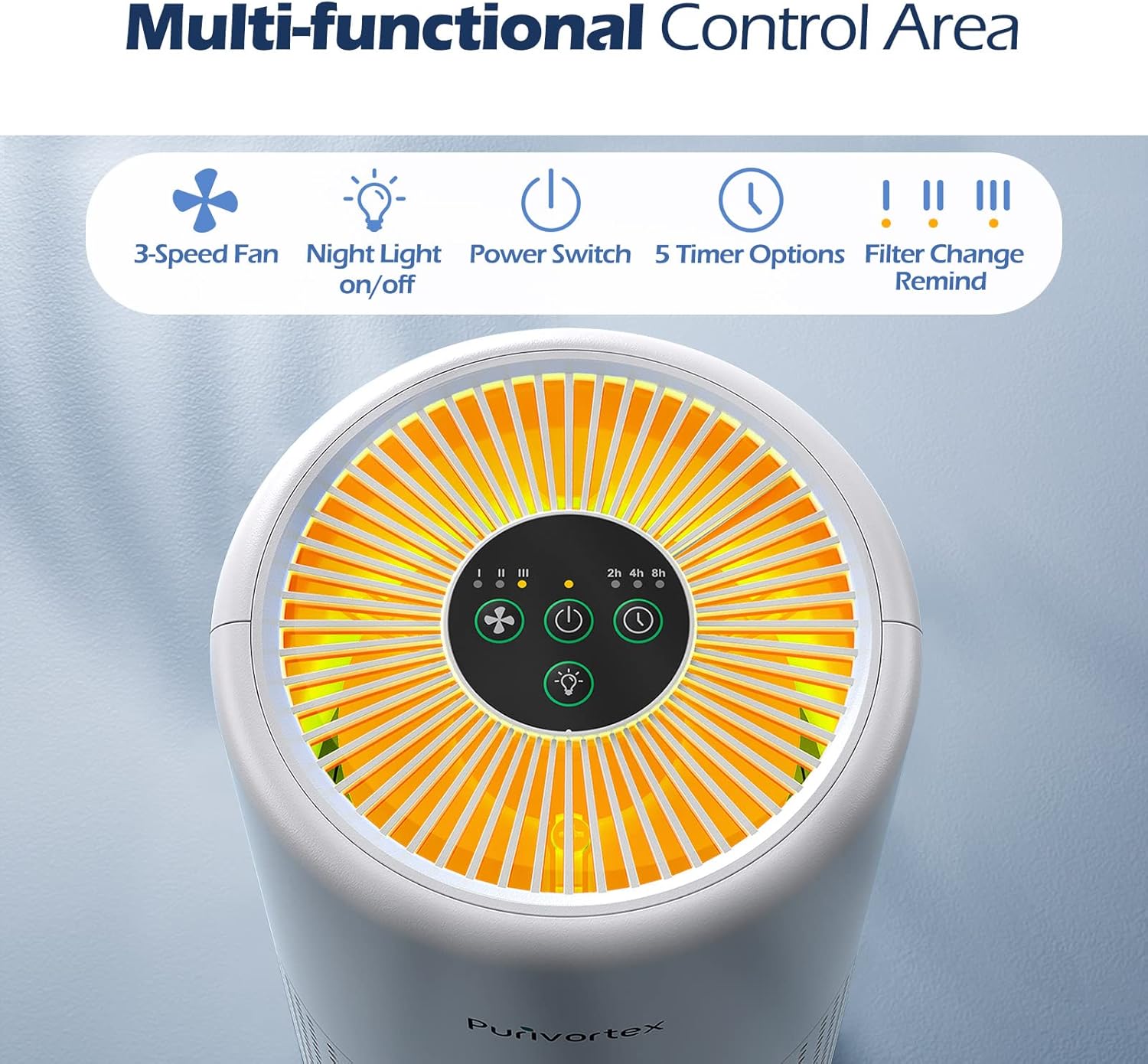
Figure 2: Multi-functional Control Area with touch buttons.
- Power Button: Turns the unit On/Off.
- Fan Speed Button: Cycles through 3 fan speeds (I, II, III).
- Timer Button: Sets operation time for 2, 4, or 8 hours.
- Night Light Button: Turns the warm night light On/Off.
- Filter Change Reminder: An indicator light will illuminate when it's time to replace the filter.
5. Setup
Follow these steps to set up your Purivortex AC201B Air Purifier:
- Unpack the Unit: Carefully remove the air purifier from its packaging.
- Access the Filter Compartment: Turn the unit upside down. Rotate the base cover counter-clockwise to unlock and remove it.
- Remove Filter Packaging: Take out the H13 True HEPA filter and remove any plastic packaging. The filter must be unwrapped before use.
- Install the Filter: Place the unwrapped filter back into the unit. Ensure it sits securely.
- Secure the Base: Reattach the base cover and rotate it clockwise to lock it into place.
- Connect Power: Place the air purifier on a flat, stable surface. Plug the power adapter into the unit and then into a suitable electrical outlet.
Video 1: Demonstration of filter installation and basic operation.
6. Operating Instructions
Your Purivortex AC201B Air Purifier is designed for simple operation.
- Power On/Off: Press the Power Button once to turn the unit on. Press it again to turn it off.
- Adjust Fan Speed: With the unit on, press the Fan Speed Button to cycle through low (I), medium (II), and high (III) settings. The corresponding indicator light will illuminate.
- Set Timer: Press the Timer Button to select a desired operating time: 2 hours, 4 hours, or 8 hours. The unit will automatically shut off after the selected time.
- Night Light Function: Press the Night Light Button to turn the warm night light on or off. This feature is ideal for bedrooms, providing a soft glow without disturbing sleep.
The air purifier operates at a quiet 20dB on its lowest setting, ensuring a peaceful environment. It effectively covers areas up to 215 sq ft.

Figure 3: Quiet operation and night light feature for undisturbed sleep.
Video 2: Overview of Purivortex Air Purifier features and coverage.
7. Maintenance
Regular maintenance ensures the longevity and efficiency of your air purifier.
Filter Replacement
The Purivortex AC201B uses a multi-layer H13 True HEPA filter system:
- Pre-Filter: Captures large particles like dust, lint, fibers, hair, and pet fur.
- H13 True HEPA Filter: Traps fine dust, pollen, and pet dander.
- Activated Carbon Filter: Absorbs smoke, pet odors, fumes, and VOCs.

Figure 4: Multi-layer filtration system of the Purivortex AC201B.
The filter change reminder light will indicate when it's time to replace the filter. Typically, filters should be replaced every 6-8 months, depending on usage and air quality.
- Unplug the air purifier.
- Turn the unit upside down and remove the base cover.
- Remove the old filter.
- Insert a new, unwrapped H13 True HEPA filter.
- Replace and lock the base cover.
- Plug in the unit. To reset the filter reminder, press and hold the Power Button for 5 seconds until the indicator light turns off.
Cleaning
- Wipe the exterior of the unit with a soft, dry cloth.
- Do not use abrasive cleaners or solvents.
- The pre-filter layer can be gently vacuumed to extend its life, but the entire filter should be replaced as recommended. Do not wash the filter.
8. Troubleshooting
If you encounter issues with your air purifier, please refer to the following common problems and solutions:
| Problem | Possible Cause | Solution |
|---|---|---|
| Unit does not turn on | Power cord not properly connected; No power from outlet. | Check power cord connection; Try a different outlet. |
| Poor airflow or purification | Filter is dirty or clogged; Filter packaging not removed. | Replace the filter; Ensure all filter packaging is removed. |
| Unusual noise | Filter not installed correctly; Obstruction in fan. | Reinstall filter securely; Check for and remove any obstructions. |
| Filter Change Indicator remains on after replacement | Filter reminder not reset. | Press and hold the Power Button for 5 seconds to reset. |
9. Specifications
| Feature | Detail |
|---|---|
| Model Number | AC201B |
| Product Dimensions | 5.7 x 5.7 x 9.9 inches |
| Item Weight | 7.34 Pounds (3.33 Kilograms) |
| Power Source | DC |
| Control Method | Touch Button Control |
| Filter Type | H13 True HEPA (Pre-filter, HEPA, Activated Carbon) |
| Floor Area Coverage | Up to 215 Square Feet |
| Noise Level | As low as 20 Decibels |
| Particle Retention Size | 0.3 Microns |
| Special Features | 3-Speed Fan, Night Light, 5 Timer Options, Filter Change Reminder, Ozone Free |
| Certifications | Ozone-Free, CARB, EPA, ETL Listed, FCC Listed |
10. Warranty and Support
Warranty Information
The Purivortex AC201B Air Purifier comes with a 2-Year Warranty. This warranty covers defects in materials and workmanship under normal use. Please retain your proof of purchase for warranty claims.
Customer Support
For any questions, technical assistance, or warranty inquiries, please contact Purivortex customer support. Contact details can typically be found on the official Purivortex website or on the product packaging.
Ask a question about this manual
Ask about setup, troubleshooting, compatibility, parts, safety, or missing instructions. Manuals+ will review the question and use this page’s manual context to help answer it.