
Pyle PPHP2109B
Pyle Portable Bluetooth PA Speaker User Manual
Model: PPHP2109B
Introduction
Thank you for purchasing the Pyle Portable Bluetooth PA Speaker. This manual provides important safety instructions, operational guidelines, and maintenance procedures for your device. Please read it thoroughly before using the product to ensure proper operation and to prevent damage.

Image: The Pyle Portable Bluetooth PA Speaker, showcasing its tall, black design with dual 10-inch woofers and top-mounted tweeters. Included accessories like the wireless microphone, remote control, and power adapter are displayed alongside the speaker.
Safety Instructions
- Ensure the power supply matches the speaker's requirements (110/240V switchable).
- Do not expose the unit to rain or moisture to prevent fire or electric shock.
- Avoid placing the speaker near heat sources or in direct sunlight.
- Do not block ventilation openings.
- Use only attachments/accessories specified by the manufacturer.
- Unplug the unit during lightning storms or when unused for long periods.
- Refer all servicing to qualified service personnel.
- Turn off the power with the ON/OFF switch when not in use to prevent battery damage.
Features
The Pyle Portable Bluetooth PA Speaker is an all-in-one karaoke entertainment system designed for both indoor and outdoor use. Key features include:
- High-Powered Active Speaker Tower with Dual 10'' Woofers + 3'' Tweeters.
- 600 Watt MAX Power Output.
- Multi-Colored DJ Flashing LED Lights.
- Bluetooth 5.0 for Wireless Music Streaming (32'+ Feet range).
- USB Flash & SD Memory Card Readers for Digital Audio File Support.
- FM Radio with Auto Station Scan.
- (2) 1/4'' Microphone Inputs and Aux (3.5mm) Input.
- Treble, Bass, Echo, and Volume Controls.
- Convenient Carry Handles & Rolling Wheels for portability.
- Built-in 12V (4.5A) lead acid rechargeable battery.
- Microphone Priority Function.

Image: An illustration highlighting the various connectivity options of the Pyle PA Speaker, including Bluetooth 5.0, Microphone Input, USB, AUX In, and FM Radio, demonstrating its versatility.
What's in the Box
Upon unpacking, please ensure all items listed below are present:
- Active Speaker Tower
- Wireless Microphone
- Remote Control
- Power Adapter
Setup
Initial Charging
Before first use, fully charge the speaker's built-in 12V (4.5A) lead acid battery using the provided power adapter. Connect the power adapter to the speaker's power input and plug it into a standard electrical outlet. The charging indicator will illuminate.
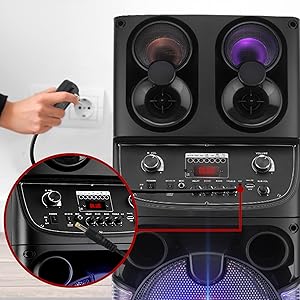
Image: A close-up view of a hand plugging the power adapter into the speaker's power input, illustrating the charging process.
Microphone and Remote Batteries
The wireless microphone requires (2) 'AA' batteries (not included). The remote control requires (2) 'AAA' batteries (not included). Insert batteries according to polarity markings.
Operating Instructions
Power On/Off
Locate the ON/OFF switch on the speaker's control panel. Flip the switch to 'ON' to power on the unit. Flip to 'OFF' to power off. Always power off the unit when not in use to preserve battery life.
Bluetooth Pairing
- Turn on the speaker.
- Activate Bluetooth on your device (smartphone, tablet, etc.).
- Search for the Bluetooth network name 'PYLEUSA' in your device's Bluetooth settings.
- Select 'PYLEUSA' to connect. A confirmation sound will indicate successful pairing.
- You can now stream music wirelessly from your device.
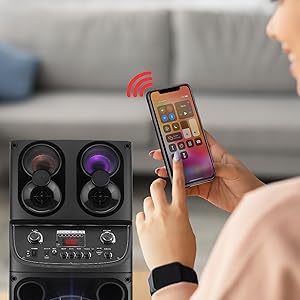
Image: A person's hand holding a smartphone, demonstrating the wireless control and music streaming capabilities via Bluetooth connection to the Pyle speaker.
USB/SD Card Playback
Insert a USB flash drive or SD memory card (up to 32GB) into the respective slot on the control panel. The speaker will automatically detect and begin playing compatible audio files (MP3). Use the control panel or remote to navigate tracks and adjust volume.
AUX Input
Connect external audio devices (e.g., MP3 players, laptops) to the 3.5mm AUX input using an audio cable (not included). The speaker will switch to AUX mode, allowing audio playback from the connected device.
Microphone Usage
Connect the wireless microphone or other 1/4'' wired microphones to the microphone inputs. Adjust the microphone volume, treble, bass, and echo controls on the speaker's panel for desired sound. The Microphone Priority Function allows the microphone audio to take precedence over music playback.

Image: A mother and child enjoying karaoke with the Pyle speaker, demonstrating the microphone priority function and the speaker's use in a home entertainment setting.
FM Radio
Switch to FM mode. Use the auto station scan function to find available radio stations. Adjust volume and navigate stations using the controls on the speaker or remote.
LED Lights
The speaker features multi-colored DJ flashing LED lights. These lights can be turned on or off, or their mode changed, using the dedicated button on the control panel or remote control.

Image: A display of multiple Pyle PA speakers showcasing their vibrant multi-color flashing LED party lights, illustrating the dynamic visual effect they create for events.
Maintenance
- Cleaning: Use a soft, dry cloth to clean the exterior of the speaker. Do not use liquid cleaners or aerosols.
- Storage: When not in use for extended periods, store the speaker in a cool, dry place. Ensure the battery is fully charged before storage and recharge it every few months to maintain battery health.
- Battery Care: To prevent battery damage, always turn off the power with the ON/OFF switch when the speaker is not in use.
Troubleshooting
| Problem | Possible Cause | Solution |
|---|---|---|
| No power | Battery drained; Power adapter not connected; Power switch off. | Charge the battery; Ensure power adapter is securely connected; Turn power switch to ON. |
| No sound | Volume too low; Incorrect input mode; Device not connected properly. | Increase volume; Select correct input mode (Bluetooth, USB, AUX, FM); Reconnect device. |
| Bluetooth not connecting | Speaker not in pairing mode; Device Bluetooth off; Too far from speaker. | Ensure speaker is in Bluetooth mode; Turn on device Bluetooth; Move device closer (within 32'+ feet). |
| Microphone not working | Microphone batteries low/dead; Microphone not paired (wireless); Volume too low. | Replace microphone batteries; Ensure wireless mic is paired; Increase microphone volume. |
Specifications
| Feature | Detail |
|---|---|
| MAX Power Output | 600 Watt |
| Sound System | Dual 10'' Woofers + 3'' Tweeters |
| Frequency Response | 45Hz-20kHz |
| Sensitivity (1k 0db) | 500mv |
| Impedance | 3 ohms |
| Power Supply | 110/240V Switchable (15V/2A Power Adapter) |
| PA Speaker Rechargeable Battery | 12V (4.5A) lead acid battery |
| Remote Battery Requirement | 1.5V (2) x 'AAA' Batteries (not included) |
| Mic Nominal Current Drain | <100mAh |
| Microphone Battery Requirement | (2) x 'AA' Batteries (each, not included) |
| Maximum USB Flash / SD Memory Card Support | 32GB |
| Product Dimensions (L x W x H) | 12.6'' x 12.2'' x 43.7'' inches |
| Item Weight | 35.6 pounds |
| Bluetooth Version | 5.0 |
| Bluetooth Wireless Range | 32'+ Feet |
| Model Number | PPHP2109B |
| UPC | 842893142739 |
Warranty and Support
For warranty information or technical support, please refer to the official Pyle website or contact Pyle customer service. A digital copy of this user manual and a Certificate of Compliance are available for download:
Related documentsPPHP2109B


Ask a question about this manual
Ask about setup, troubleshooting, compatibility, parts, safety, or missing instructions. Manuals+ will review the question and use this page’s manual context to help answer it.