
1. Product Overview
The smaate 3D Screen Protector is designed to safeguard your smartwatch screen from scratches, impacts, and daily wear. Made from PMMA (Polymethyl Methacrylate), a clear plastic acrylic material, it offers shatter-proof protection while maintaining high touch sensitivity and transparency.

Image: Key features of the smaate 3D Screen Protector, including anti-scratch, anti-shatter, high transparency, and high sensitivity.
2. Compatibility
This 3D screen protector is compatible with various smartwatch models. Please verify your watch model number before installation to ensure proper fit.
- SKG V7 and SKG V7 PRO (1.7 inches)
- ID206 (JIKKO, AOKESI, HAFURY, Yamay) (1.69 inches)
- Cubitt CT2PRO
- UMIDIGI UFit Pro (44mm)
- Doogee CS2 Pro (1.69 inches)
- Fitpolo Gydom FVYAO IDO Veryfit ID207 (1.69 inches)
- HAFURY C7 (1.54 inches)
- Pupuskyer P25 (1.69 inches)
- ANDFZ T42
- Fitniv IW1, IW2
Note: Not compatible with ID205L 1.3" of HAFURY.

Image: Visual guide showing various compatible smartwatch models for the screen protector.
3. What's in the Package
Each package contains the following items:
- 3 x 3D Screen Protectors
- 3 x Wet Wipes
- 3 x Dry Wipes
- 3 x Dust Removal Stickers
- 1 x Microfiber Cloth
- 1 x Squeegee
- 1 x Foam Ring Sticker (Non-slip Pad)
- 1 x Instruction Card
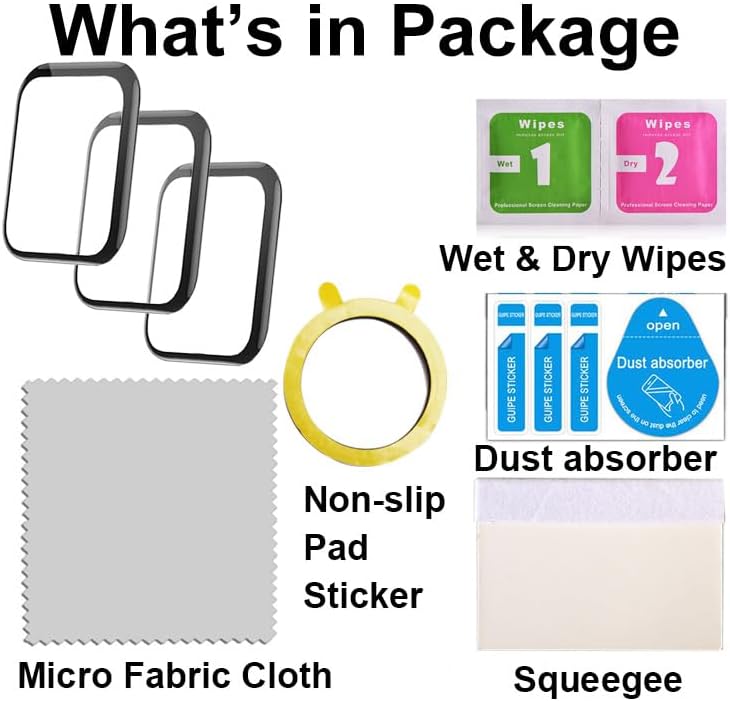
Image: All items included in the screen protector package.
4. Installation Guide
Follow these steps carefully for optimal screen protector application. Watching the instructional videos is highly recommended before you begin.
4.1 Preparation
- Place your smartwatch on a stable, flat surface. Use the provided foam ring sticker (non-slip pad) on the back of the watch to prevent it from moving during installation.
- Clean the smartwatch screen thoroughly using the wet wipe (labeled '1') to remove any dirt or oils.
- Immediately follow with the dry wipe (labeled '2') to dry the screen completely.
- Use the microfiber cloth to gently polish the screen, ensuring no streaks or smudges remain.
- Utilize the dust absorber sticker to pick up any remaining dust particles from the screen. This step is crucial to prevent bubbles.

Image: Demonstrates how to use the non-slip pad sticker to stabilize the smartwatch.
4.2 Applying the Screen Protector
- Carefully peel off the inner protective film from the 3D screen protector. Avoid touching the adhesive side.
- Align the screen protector precisely with your smartwatch screen. Ensure it is centered and all edges are correctly positioned.
- Once aligned, gently press the protector onto the screen. Use your finger to squeeze out any initial bubbles from the center outwards.
- Use the provided squeegee to firmly push out any remaining air bubbles, working from the center towards the edges. Apply even pressure. If bubbles persist, gently lift a corner of the protector and re-squeegee.

Image: Visual instructions for applying the screen protector.
4.3 Installation Videos
How to Apply 3D Screen Protector
Video: A detailed guide on the application process of the 3D screen protector to a smartwatch.
How to Install 3D Protector by Squeegee
Video: Demonstrates the correct technique for using the squeegee to remove air bubbles during screen protector installation.
Applying 3D Screen Protector to ID206, IW1, IW2, P25, T42
Video: Shows the application process of the 3D screen protector on specific smartwatch models: ID206, IW1, IW2, P25, and T42.
5. Operating Features
The smaate 3D Screen Protector is designed to maintain the full functionality of your smartwatch screen:
- High Sensitivity: The protector ensures that you can touch and control the screen quickly and easily without any noticeable delay or reduction in responsiveness.
- High Transparency: Enjoy clear visibility of your smartwatch display, as the protector offers 99% high transparency.
6. Maintenance
To ensure the longevity and clarity of your screen protector:
- Clean the screen protector regularly with a soft, lint-free cloth (like the included microfiber cloth) to remove fingerprints and smudges.
- Avoid using harsh chemicals or abrasive materials, as these can damage the protector's surface.
- If the protector becomes heavily soiled, use a slightly damp cloth with water, then dry immediately with a clean microfiber cloth.
7. Troubleshooting
Persistent Bubbles After Installation
If bubbles reappear under the protector, especially around the edges, after initial installation:
- Gently squeeze the bubbles out towards the nearest edge using your finger or the squeegee.
- Place the smartwatch face down on a flat surface.
- Place a heavy object, such as a book (approximately 2KGS), on top of the watch for at least 12 hours (preferably overnight). This sustained pressure helps the adhesive bond more firmly and eliminates remaining air pockets.

Image: Illustrates placing a heavy object on the smartwatch to remove bubbles.
If Bubbles Appear Again, How to Do?
Video: Provides instructions on how to address and remove bubbles that reappear after screen protector installation.
8. Specifications
| Feature | Detail |
|---|---|
| Material | PMMA (Polymethyl Methacrylate) Acrylic |
| Item Hardness | 4H |
| Product Dimensions | 1.6 x 1.3 x 0.5 inches (1.6"L x 1.3"W) |
| Item Weight | 1.13 ounces |
| Screen Size Compatibility | 1.69 Inches (for most compatible models) |
| Special Features | Scratch Resistant, Shatter-proof, High Sensitivity, High Transparency |
| Finish Type | Glossy |
| Color | Transparent with black frame (as per product images) |
9. Warranty and Support
For any questions, concerns, or support regarding your smaate 3D Screen Protector, please refer to the contact information provided with your purchase or visit the official smaate store on Amazon.
The product is designed for durability and performance. If you encounter any issues, please reach out to customer service for assistance.